
이 페이지는 앱이나 개발자의 공식 페이지가 아니며, 정보 제공 및 논평을 목적으로 작성된 독립 편집 간행물입니다. 명시적으로 달리 언급되지 않는 한, 해당 앱이나 개발자는 MWM, Apple, Google Play, 앱 퍼블리셔 또는 앱 개발자와 제휴, 보증, 후원, 승인 또는 공식적으로 연결되어 있지 않으며, 이 페이지의 어떤 내용도 해당 앱이 MWM의 서비스를 사용하여 개발되었음을 의미하지 않습니다. 모든 상표, 로고, 스크린샷 및 기타 콘텐츠는 해당 소유자의 자산입니다.


다운로드
10M+사용자 평점
총 평가 수
47.1K개발사
카테고리
Utilities지원 언어
1최신 버전
11.8.1크기
121.6 MB출시일
2016년 11월 7일iOS 환경에서 폰트 설치, 비교, 관리를 혁신하는 도구의 심층 평가
iFont: 모바일 폰트 관리 및 디자인 전문가를 위한 핵심 기능 분석
사용자 지정 폰트 설치 및 관리
이 앱은 사용자가 .ttf, .ttc, .otf 형식의 자체 폰트를 가져와 다른 앱에서 활용할 수 있게 해줍니다. 이는 전문적인 프로젝트에서 브랜드 일관성을 유지하는 데 필수적입니다. 여러 폰트를 한 번에 설치하고 폰트 가족 단위로 관리할 수 있어 효율성을 높입니다.
온라인 폰트 라이브러리 직접 다운로드 및 설치
이 도구는 Google Fonts, Dafont 등 다양한 온라인 폰트 라이브러리에서 폰트를 직접 찾아 다운로드하고 설치하는 기능을 제공합니다. 이를 통해 사용자는 방대한 폰트 컬렉션에 쉽게 접근하고 새로운 폰트를 신속하게 적용할 수 있습니다.
폰트 비교 도구
이 앱은 여러 서체를 나란히 비교하여 특정 디자인 목적에 가장 적합한 폰트를 선택할 수 있도록 돕습니다. 이는 시각적 품질과 프로젝트 적합성을 높이는 데 결정적인 역할을 합니다.
폰트 테스트용 메모장
각 폰트 아래에 제공되는 메모장 기능을 통해 사용자는 폰트를 실제로 테스트하고 메시지를 입력해 볼 수 있으며, 이를 이미지로 내보내 다른 앱에서 공유할 수 있습니다. 이는 폰트 선택 및 시안 공유 과정을 간소화합니다.
폰트 워터폴 뷰
이 기능은 폰트가 매우 작거나 큰 포인트 크기에서 어떻게 보이는지 쉽게 확인할 수 있게 해줍니다. 사용자는 이를 통해 다양한 크기에서 폰트의 가독성과 미학을 평가할 수 있습니다.
상세한 폰트 기술 정보 제공
이 앱은 디자이너 정보, 상표권, 어센트 및 디센트 간격 등 각 폰트에 대한 상세한 기술 정보를 제공합니다. 이는 전문적인 폰트 선택과 심층적인 타이포그래피 분석에 유용합니다.
최대 500% 폰트 확대
이 도구는 폰트를 최대 500%까지 확대하여 각 문자의 미세한 디테일을 정밀하게 검토할 수 있도록 해줍니다. 이는 고품질 디자인 작업과 폰트 오류 확인에 필수적입니다.
폰트 내보내기 및 프로필 공유
사용자는 설치된 폰트의 사본을 내보내거나, 폰트 프로필을 다른 사람과 공유하여 그들도 폰트를 쉽게 설치할 수 있도록 합니다. 이는 협업 작업 흐름을 개선하고 팀 내 폰트 일관성을 유지하는 데 기여합니다.
자주 묻는 질문
에 대해 알아야 할 모든 것 iFont: find, install any font
Can iFont install new fonts for use in other apps?
Yes, iFont allows users to install new fonts on their iOS devices. These fonts are compatible with content creation apps such as Pages, Keynote, and Numbers, enabling custom typeface use within those applications.
Does iFont change the system font on an iPhone or iPad?
No, iFont cannot change the system font on your device. Its functionality focuses on installing fonts for specific apps and does not extend to modifying the device's overall system typography or keyboard fonts.
What font file formats does iFont support for installation?
iFont supports custom font files in .ttf, .ttc, and .otf formats. It also accommodates these formats when they are compressed within a .zip archive, allowing for easy import and installation.
Can I download new fonts directly within the iFont app?
Yes, iFont lets users download and install a range of fonts directly from popular libraries like Google Fonts and Dafont within the app. It also supports integrating fonts from custom online sources.
Does iFont offer a feature to compare different fonts?
Yes, iFont includes a 'Compare' feature. This tool allows users to analyze and contrast multiple typefaces to determine which one best suits their design or content creation needs.
Can I preview how a font looks with custom text using iFont?
Yes, iFont provides a 'Notepad' feature under each font's details. Users can type and test messages with the selected font, then export the result as an image for sharing in other applications.
Does iFont display technical information about fonts?
iFont provides comprehensive technical details for each font. This includes information about the designer, trademark data, and spacing specifics like ascents and descents, aiding in informed font selection.
Can iFont import font files downloaded from the internet?
Yes, iFont supports importing font files directly from the web. Users can download a font in a web browser, open it in iFont, and follow simple instructions to install it on their device.
Does iFont display individual font glyphs and offer customization?
Yes, iFont allows users to view all individual glyphs within a font. It also offers customization options, including changing glyph and background colors, and is compatible with Dark Mode settings.
Is the iFont app optimized for use on an iPad?
Yes, iFont is fully optimized for iPad. It features a split-view experience for enhanced multitasking and supports a range of keyboard shortcuts, ensuring a productive workflow on the device.
What font file types are not supported by iFont?
iFont does not currently support .suit or .dfont files. Users must ensure their font files are in compatible formats like .ttf, .ttc, or .otf for successful installation within the application.
다음 스크린샷과 설명은 앱의 공식 스토어 목록에서 직접 가져온 것이며 앱 개발자의 자산입니다.
앱 스토어
스크린샷
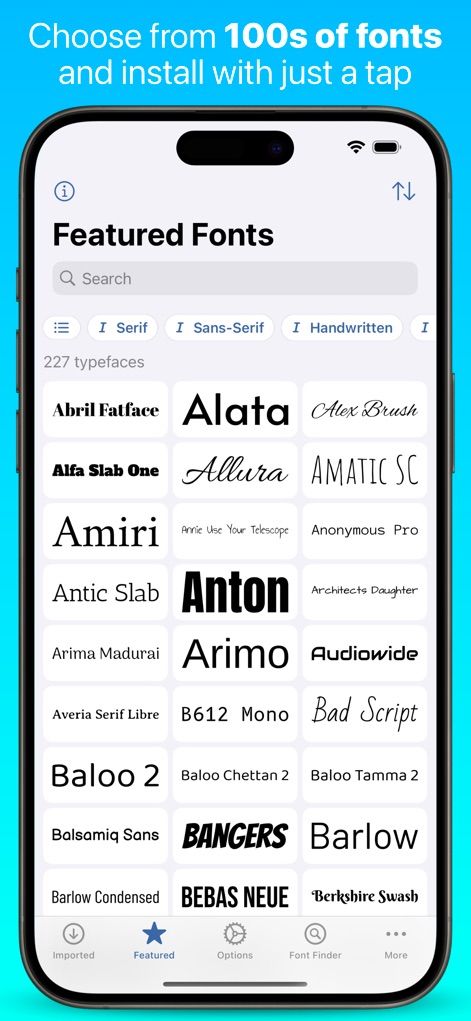
이 앱은 수백 가지의 폰트를 제공하며, 사용자는 'Serif' 및 'Sans-Serif'와 같은 태그를 사용하여 다양한 폰트 스타일을 쉽게 탐색할 수 있습니다.
방대한 폰트 컬렉션
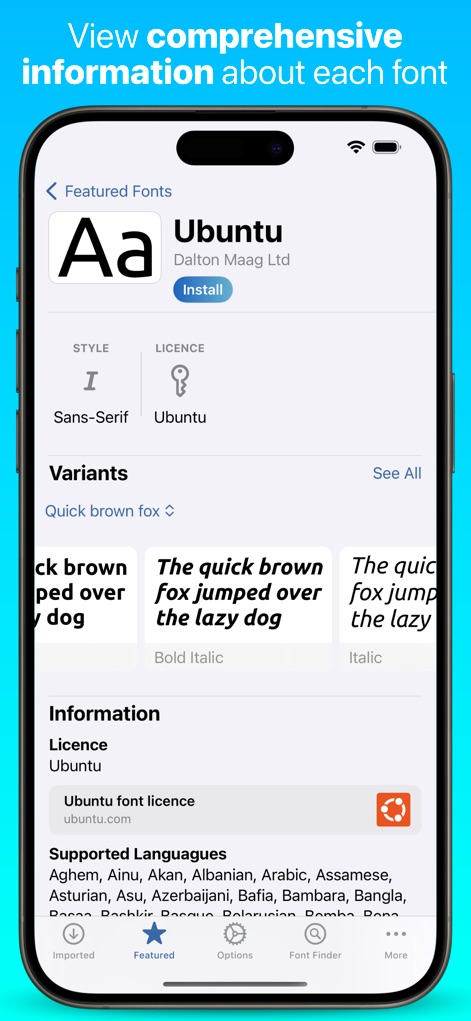
개별 폰트의 심층적인 정보를 확인할 수 있으며, '스타일' 및 '지원 언어'와 같은 핵심 세부 정보를 명확하게 제시합니다.
상세 폰트 정보

사용자는 웹에서 다운로드한 압축 파일을 가져와 'OpenType' 형식의 폰트 파일과 '라이선스 파일'을 포함한 내용을 효율적으로 관리하고 설치할 수 있습니다.
외부 폰트 간편 설치
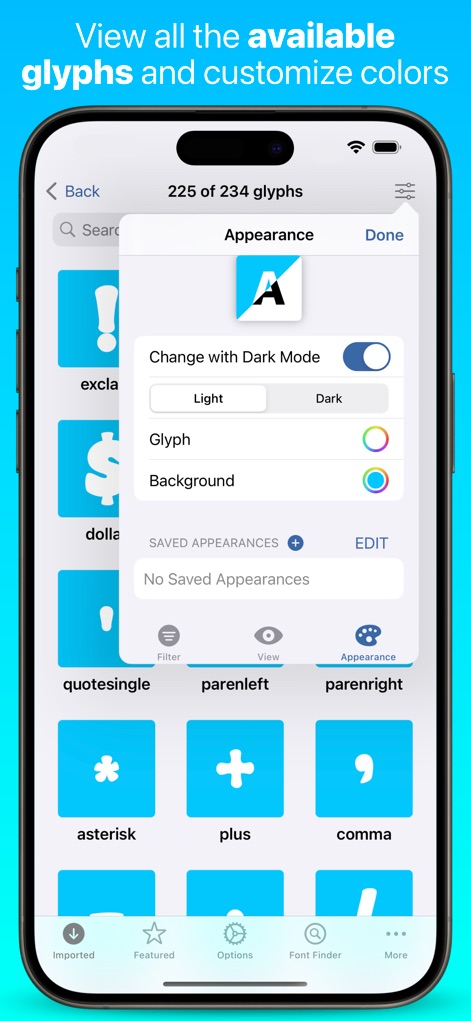
앱은 폰트의 모든 '글리프'를 시각적으로 보여주며, '다크 모드' 설정과 글리프 및 배경 색상 조절을 통해 시각적 환경을 개인화할 수 있습니다.
글리프 맞춤 설정

이 도구는 설치된 폰트를 쉽게 관리할 수 있는 다양한 기능을 제공하며, '미리보기'를 통해 폰트의 전반적인 모양을 확인하고 'Compare'와 같은 심층 분석 기능을 활용할 수 있습니다.
설치 폰트 효율적 관리
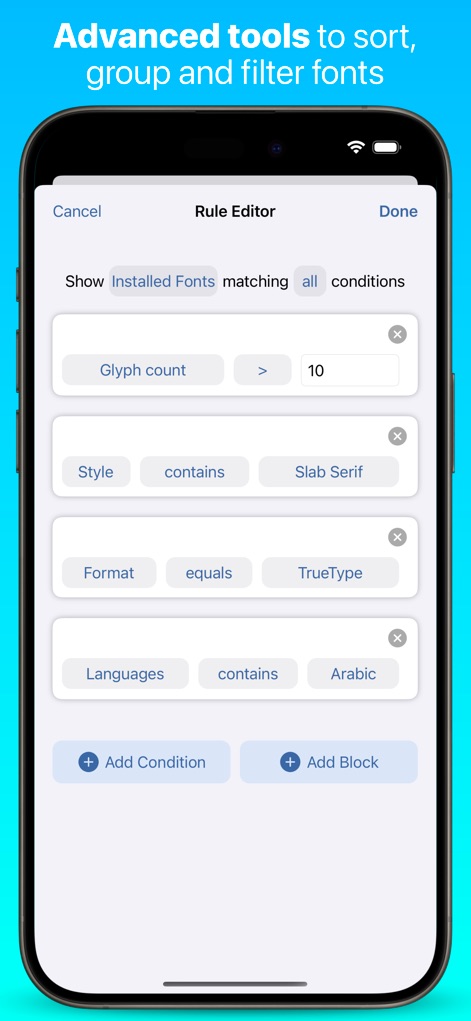
사용자는 '글리프 수'나 '스타일', '언어'와 같은 여러 조건을 조합하여 방대한 폰트 라이브러리에서 원하는 폰트를 정밀하게 필터링할 수 있습니다.
고급 폰트 필터링
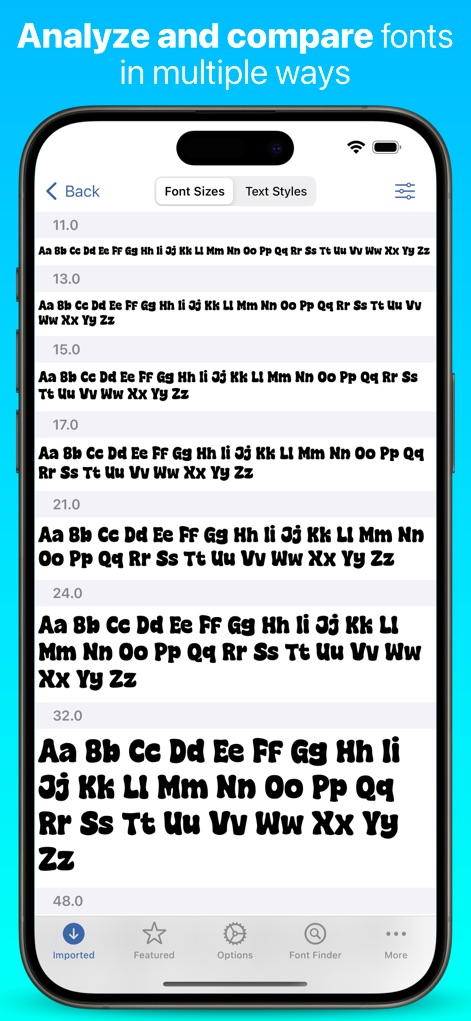
이 기능은 '폰트 크기'별로 텍스트를 비교하여 폰트의 가독성과 시각적 효과를 평가할 수 있게 하며, 'Text Styles' 탭을 통해 다양한 스타일을 탐색할 수 있습니다.
다중 폰트 비교 분석
설명
Download
비슷한 앱
유사한 기능과 사용자 경험을 가진 앱

Bakey: fonts market
Sandoll Inc.

Fonts - Install Font
OneCutOne Technology Co. Ltd.
Fonts –
璞 王

AnyFont
Pepperbit Online GmbH

Fonts for DIY Space
Country Road App Software LLC
Fonts - Fonts Aesthetic
梓峰 戴
خطوط - خطوط عربية · خط عربي
雨双 柯

手机字体大全-主题字体美化大师&下载安装管家
晖 孟

Fontcase - Manage Your Type
manolo Sanudo
이 페이지는 앱이나 개발자의 공식 페이지가 아니며, 정보 제공 및 논평을 목적으로 작성된 독립 편집 간행물입니다. 명시적으로 달리 언급되지 않는 한, 해당 앱이나 개발자는 MWM, Apple, Google Play, 앱 퍼블리셔 또는 앱 개발자와 제휴, 보증, 후원, 승인 또는 공식적으로 연결되어 있지 않으며, 이 페이지의 어떤 내용도 해당 앱이 MWM의 서비스를 사용하여 개발되었음을 의미하지 않습니다. 모든 상표, 로고, 스크린샷 및 기타 콘텐츠는 해당 소유자의 자산입니다.