
이 페이지는 앱이나 개발자의 공식 페이지가 아니며, 정보 제공 및 논평을 목적으로 작성된 독립 편집 간행물입니다. 명시적으로 달리 언급되지 않는 한, 해당 앱이나 개발자는 MWM, Apple, Google Play, 앱 퍼블리셔 또는 앱 개발자와 제휴, 보증, 후원, 승인 또는 공식적으로 연결되어 있지 않으며, 이 페이지의 어떤 내용도 해당 앱이 MWM의 서비스를 사용하여 개발되었음을 의미하지 않습니다. 모든 상표, 로고, 스크린샷 및 기타 콘텐츠는 해당 소유자의 자산입니다.


ImgPlay: GIF Maker & Meme
이 앱은 당신에게 디지털 연금술사의 힘을 부여합니다. 어떤 미디어든 손쉽게 GIF로 빚어내는 능력, 그것이 바로 ImgPlay가 선사하는 유일무이한 경험입니다. 평범한 비디오 클립을 인터넷 문화의 심장부로 돌진하는 밈으로, 라이브 포토를 영혼이 담긴 루프로 변환합니다. 변환은 단순한 기능이 아닙니다. 이는 지배력입니다. 당신은 모든 픽셀의 주인이 됩니다. 이 앱은 사용자에게 평범한 미디어를 강력한 시각적 서사로 탈바꿈시킬 절대적인 권한을 줍니다.
다운로드
7.5M+사용자 평점
총 평가 수
193.0K개발사
카테고리
Photo & Video지원 언어
15최신 버전
6.5.3크기
244.6 MB출시일
2015년 6월 23일주요 기능 및 타겟 오디언스 영향력 평가
ImgPlay: GIF Maker & Meme 앱 분석
고품질 내보내기 및 소셜 최적화
이 앱은 고품질 GIF 출력을 보장하며, 파일 크기 최적화, 다양한 내보내기 형식 지원, 그리고 인스타그램, 틱톡 등 주요 소셜 미디어 플랫폼으로 원탭 공유 기능을 제공합니다.
텍스트, 스티커 및 밈 제작
이 앱은 다양한 폰트, 애니메이션 텍스트 효과, 고급 밈 메이커, 맞춤형 스티커, 45가지 필터 및 시각적 조정을 통해 콘텐츠를 개인화할 수 있는 강력한 도구를 갖추고 있습니다.
다양한 미디어 GIF 변환
이 앱은 비디오, 라이브 포토, 버스트 샷, 스틸 이미지 및 화면 녹화를 고품질 GIF로 쉽게 변환할 수 있도록 합니다.
스마트 편집 및 AI 기능
이 도구는 AI 배경 제거, 소셜 미디어 플랫폼에 최적화된 캔버스 비율 설정, 재생 속도 및 루프 제어를 포함한 고급 편집 기능을 제공하여 고품질 GIF를 제작할 수 있게 해줍니다.
4가지 카메라 모드
이 도구는 핸즈프리, 일반, 스톱모션, 부메랑의 4가지 카메라 모드를 제공하여 사용자가 다양한 스타일의 원본 콘텐츠를 직접 촬영할 수 있게 해줍니다.
프레임 단위 정밀 편집
사용자가 개별 프레임을 보고 편집하며, 프레임 순서를 변경하거나 불필요한 프레임을 제거하는 등 애니메이션에 대한 완벽한 제어 기능을 활용할 수 있게 해줍니다.
자주 묻는 질문
에 대해 알아야 할 모든 것 ImgPlay: GIF Maker & Meme
What is ImgPlay?
ImgPlay is a GIF Maker app that converts videos, Live Photos, burst shots, still images, and screen recordings into high-quality GIFs. It provides tools for creating animations and memes.
Can ImgPlay convert videos to GIFs?
Yes, ImgPlay can convert videos to GIFs with precise trimming. It also transforms Live Photos, burst shots, and screen recordings into seamless animations.
Does ImgPlay offer AI features for editing GIFs?
Yes, ImgPlay includes cutting-edge AI technology for GIF editing. It features AI background removal to instantly remove backgrounds from your creations.
Can I create memes using the ImgPlay app?
Yes, ImgPlay includes an Advanced Meme Maker with multiple text areas and an auto-text canvas. You can also use custom stickers and import fonts.
What export formats does ImgPlay support for GIFs?
ImgPlay supports exporting creations as GIF, MP4, APNG, or WebP formats. It also offers customized resolutions and file size optimization.
Is ImgPlay free to use or does it have a subscription?
ImgPlay offers ImgPlay Premium to unlock all GIF editing features and remove watermarks. Subscription options include weekly, monthly, or yearly plans.
Can I share my GIFs directly to social media from ImgPlay?
Yes, ImgPlay provides one-tap sharing to major platforms like Instagram, TikTok, Reels, X, and Facebook. It also allows quick sharing via iMessage.
Does ImgPlay allow frame-level editing for animations?
Yes, ImgPlay provides frame-level editing. Users can view, edit, reorder, and remove individual frames, or combine different media types within a single project.
What camera modes does ImgPlay offer for content creation?
ImgPlay offers four camera modes for capturing new content. These modes are hands-free, normal, stop-motion, and boomerang, providing versatile creation options.
Can I customize backgrounds in ImgPlay?
Yes, ImgPlay provides tools for background customization. You can add colored or patterned backgrounds and apply various borders to frame your GIF perfectly.
다음 스크린샷과 설명은 앱의 공식 스토어 목록에서 직접 가져온 것이며 앱 개발자의 자산입니다.
앱 스토어
스크린샷
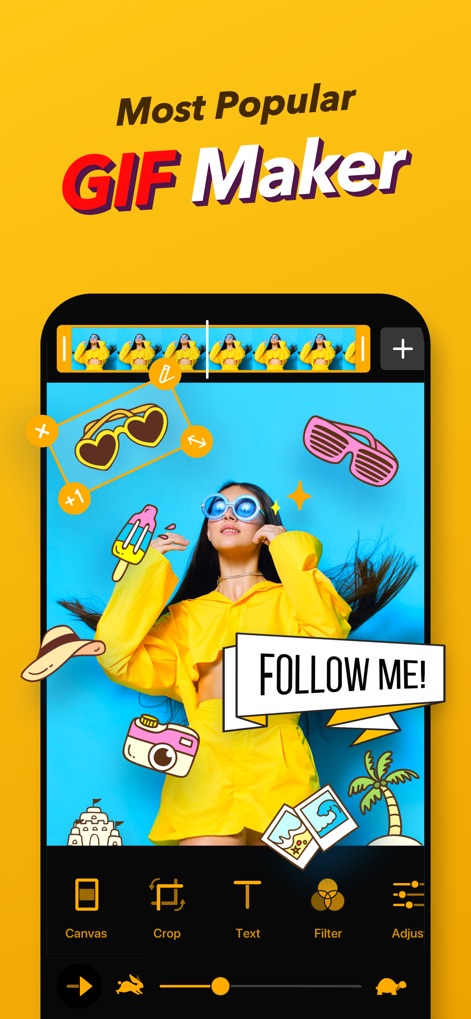
이 앱은 다양한 스티커와 텍스트 도구를 활용하여 사용자가 창의적인 GIF를 만들 수 있도록 지원하며, 직관적인 타임라인과 편집 도구(예: Canvas, Text)를 제공합니다.
GIF 제작의 시작
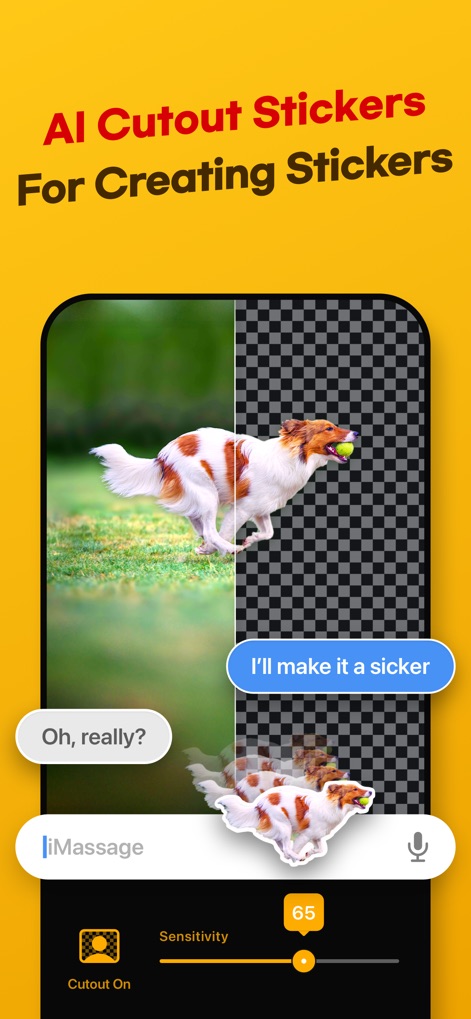
이 도구는 AI 기반 배경 제거 기능을 통해 이미지의 특정 객체를 스티커로 변환하는 과정을 보여줍니다. 사용자는 정밀한 AI 컷아웃과 감도(Sensitivity) 조절 기능을 사용하여 원하는 스티커를 만들 수 있습니다.
AI 스티커 제작

이 앱은 사용자가 인기 있는 이미지에 텍스트를 추가하여 재미있는 밈을 쉽게 만들 수 있도록 설계되었습니다. 다양한 밈 템플릿과 여러 텍스트 영역을 활용하여 창의적인 콘텐츠를 제작할 수 있습니다.
나만의 밈 만들기

사용자는 이 기능을 통해 프레임별로 이미지를 캡처하여 생동감 넘치는 스톱모션 애니메이션을 제작할 수 있습니다. 촬영 중 실시간 프레임 수(24) 표시와 재촬영(Retake) 옵션을 제공합니다.
정교한 스톱모션

이 도구는 사용자가 GIF를 소셜 미디어 플랫폼(예: Instagram, WhatsApp)에 최적화된 형식으로 쉽게 공유할 수 있도록 지원합니다. 파일 크기 조절 슬라이더와 반복 횟수(Loop) 설정을 통해 맞춤형 저장을 제공합니다.
소셜 미디어 최적화

사용자는 이 인터페이스를 통해 다양한 인기 GIF를 탐색하고 검색할 수 있습니다. 직관적인 검색창과 카테고리 태그(예: OMG, Love)를 사용하여 원하는 GIF를 빠르게 찾을 수 있습니다.
인기 GIF 탐색

이 앱은 여러 이미지를 조합하여 새로운 GIF를 만들고, 사용자가 텍스트 풍선과 같은 시각적 요소를 추가하여 콘텐츠를 더욱 풍부하게 만들 수 있도록 합니다. 분할 화면 레이아웃과 다양한 스티커 옵션을 활용한 창작이 가능합니다.
창의적인 GIF 편집
설명
Download
비슷한 앱
유사한 기능과 사용자 경험을 가진 앱

quickLive-Video2Live Wallpaper
Changshu Chuang Shi Media Technology Co., Ltd.

Live - LivePhoto maker
Beyond Trading

Patternator Video Wallpapers
Bazaart Ltd.
GIF Maker & Editor Pro
Chengdu Siwen Culture Media Co., Ltd.
Gif Maker-meme & video to gifs
姿凤 陈

Mematic - The Meme Maker
Trilliarden Entertainment GmbH

Video to Live ◦
Anish Modan

Boomerang - Video Maker
Video Bakery Ltd.

Easy Video Speed Editor
Osawa Shunsuke
이 페이지는 앱이나 개발자의 공식 페이지가 아니며, 정보 제공 및 논평을 목적으로 작성된 독립 편집 간행물입니다. 명시적으로 달리 언급되지 않는 한, 해당 앱이나 개발자는 MWM, Apple, Google Play, 앱 퍼블리셔 또는 앱 개발자와 제휴, 보증, 후원, 승인 또는 공식적으로 연결되어 있지 않으며, 이 페이지의 어떤 내용도 해당 앱이 MWM의 서비스를 사용하여 개발되었음을 의미하지 않습니다. 모든 상표, 로고, 스크린샷 및 기타 콘텐츠는 해당 소유자의 자산입니다.