
이 페이지는 앱이나 개발자의 공식 페이지가 아니며, 정보 제공 및 논평을 목적으로 작성된 독립 편집 간행물입니다. 명시적으로 달리 언급되지 않는 한, 해당 앱이나 개발자는 MWM, Apple, Google Play, 앱 퍼블리셔 또는 앱 개발자와 제휴, 보증, 후원, 승인 또는 공식적으로 연결되어 있지 않으며, 이 페이지의 어떤 내용도 해당 앱이 MWM의 서비스를 사용하여 개발되었음을 의미하지 않습니다. 모든 상표, 로고, 스크린샷 및 기타 콘텐츠는 해당 소유자의 자산입니다.

다운로드
25M+사용자 평점
총 평가 수
1.1M개발사
카테고리
Photo & Video지원 언어
23최신 버전
7.0.689크기
178.9 MB출시일
2012년 11월 21일'InstaSize: AI Photo Editor' 앱 분석
AI 기반 편집 기능으로 소셜 미디어 콘텐츠 제작을 혁신하는 도구
AI 이미지 확장 (Magic Fill™)
이 앱은 AI 기반 기술로 사진의 빈 공간을 지능적으로 확장하고 채워, 어떤 비율에도 완벽하게 맞는 이미지를 생성하며 고품질을 유지합니다.
AI 배경 제거
이 도구는 강력한 AI 기술을 활용하여 피사체를 정확하게 분리하고 배경을 손쉽게 제거하여, 깔끔하고 전문적인 이미지 연출을 가능하게 합니다.
불필요한 객체 제거
사용자가 사진에서 불필요한 객체나 방해 요소를 정밀하게 지워, 더욱 집중적이고 세련된 시각적 콘텐츠를 만들 수 있도록 돕습니다.
효율적인 일괄 편집
이 앱은 여러 장의 이미지를 동시에 처리하여 크기 조정, 프리셋 적용 등 반복적인 편집 작업을 효율적으로 수행하고 일관된 결과물을 얻게 합니다.
소셜 미디어 최적화 크기 조정
이 도구는 인스타그램, 틱톡 등 다양한 소셜 플랫폼에 최적화된 비율로 사진과 비디오의 크기를 정확하게 조정하고 자를 수 있게 합니다.
130+ 프리미엄 필터 및 프리셋
이 앱은 130가지 이상의 고급 필터와 프리셋을 제공하여, 사용자가 사진과 비디오에 전문적이고 감성적인 분위기를 손쉽게 적용할 수 있도록 합니다.
간편한 비디오 편집 기능
사용자는 이 앱의 직관적인 비디오 편집기로 동영상을 손쉽게 자르고, 필터를 적용하며, 다양한 소셜 플랫폼에 맞춰 내보낼 수 있습니다.
개성 있는 사진 콜라주 제작
이 앱은 다양한 템플릿과 레이아웃을 활용하여 여러 장의 사진을 매력적인 콜라주로 만들고, 프레임과 배경으로 독특한 개성을 더할 수 있게 합니다.
자주 묻는 질문
에 대해 알아야 할 모든 것 InstaSize: AI Photo Editor
What is InstaSize: AI Photo Editor?
InstaSize is a comprehensive photo and video editor with over 100 million creators. It provides premium filters, presets, cropping, and color editing tools, alongside AI features like Magic Fill and Object Removal.
Does InstaSize include photo editing features?
Yes, InstaSize offers a free photo editor. It includes tools for enhancing images with filters, presets, contrast, exposure, saturation, grain, and clarity adjustments.
Can InstaSize resize photos for Instagram and other social media?
Yes, InstaSize can quickly resize photos for Instagram. It provides specific options to fit images perfectly for social platforms such as Instagram, TikTok, Twitter, and Pinterest.
How does Magic Fill™ work in InstaSize?
Magic Fill™ in InstaSize utilizes cutting-edge AI to expand and uncrop images. It intelligently generates pixels to blend seamlessly, eliminating white borders and fitting images into any aspect ratio.
Can InstaSize remove objects from photos?
Yes, InstaSize includes an Object Removal feature. Users can effortlessly remove unwanted elements from their photos with precision, ensuring a clean and professional appearance.
Does InstaSize have a background removal tool?
Yes, InstaSize features a powerful background removal tool. It instantly isolates the subject of a photo, providing a clean and professional look, ideal for product images or profile photos.
Is there a video editor feature in InstaSize?
Yes, InstaSize provides a free video editor. Users can quickly create, edit, apply premium filters and effects, and crop videos for various formats, including Instagram Stories, TikTok, and Snapchat.
How many filters are available in InstaSize?
InstaSize offers over 130 filters for both photos and videos. These filters range from natural looks to retro aesthetic presets, providing a wide variety of choices to enhance any image.
Does InstaSize offer batch editing for photos?
Yes, InstaSize includes a robust batch editing tool. It allows users to process and edit multiple images simultaneously, applying resizing, presets, and adjustments while maintaining consistent quality.
What premium features does InstaSize offer?
InstaSize Premium includes Magic Fill, Object Removal, and Background Remover. It also provides access to over 130 premium filters for enhanced creative control and professional editing.
How does an InstaSize Premium subscription renew?
An InstaSize Premium subscription automatically renews. Auto-renewal can be turned off at least 24 hours before the end of the current period via iTunes Account Settings.
Can users create photo collages with InstaSize?
Yes, InstaSize includes a free photo collage maker. Users can combine multiple photos, choose from hundreds of templates, and customize with different frames and backgrounds.
다음 스크린샷과 설명은 앱의 공식 스토어 목록에서 직접 가져온 것이며 앱 개발자의 자산입니다.
앱 스토어
스크린샷
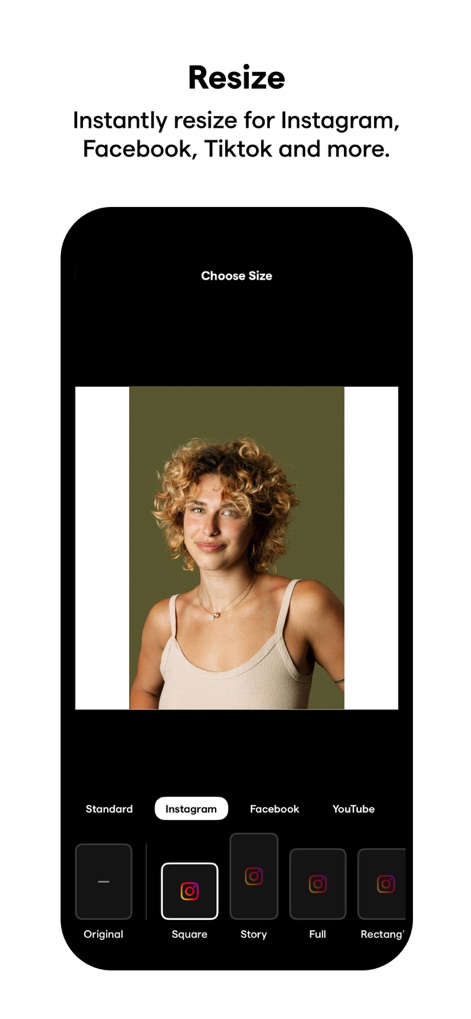
사진 비율 조절
이 앱은 소셜 미디어 플랫폼에 맞춰 사진 크기를 조절할 수 있게 해주며, 특히 인스타그램의 스퀘어 및 스토리 형식에 최적화된 옵션을 제공합니다.
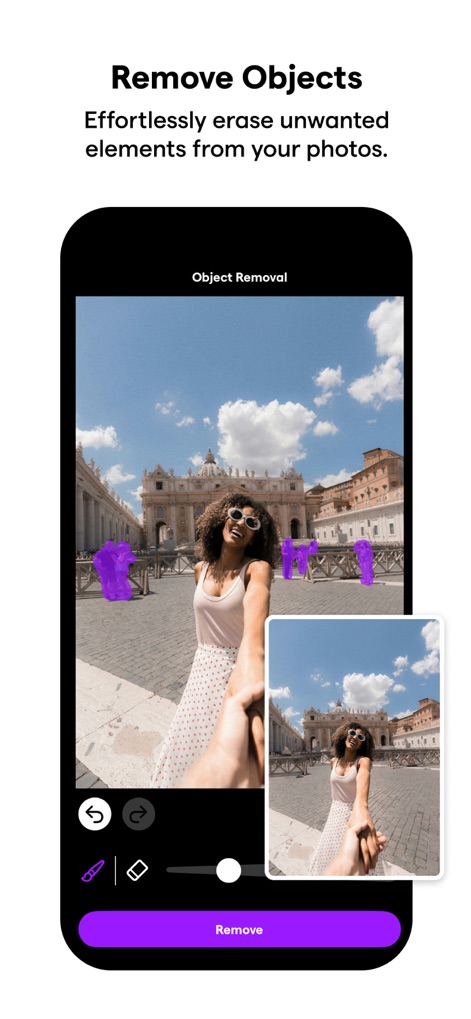
개체 제거 도구
사용자는 '개체 제거' 기능을 활용하여 사진 속 원치 않는 대상을 정밀하게 식별하고, 보라색 하이라이트로 표시된 영역을 손쉽게 지울 수 있습니다.
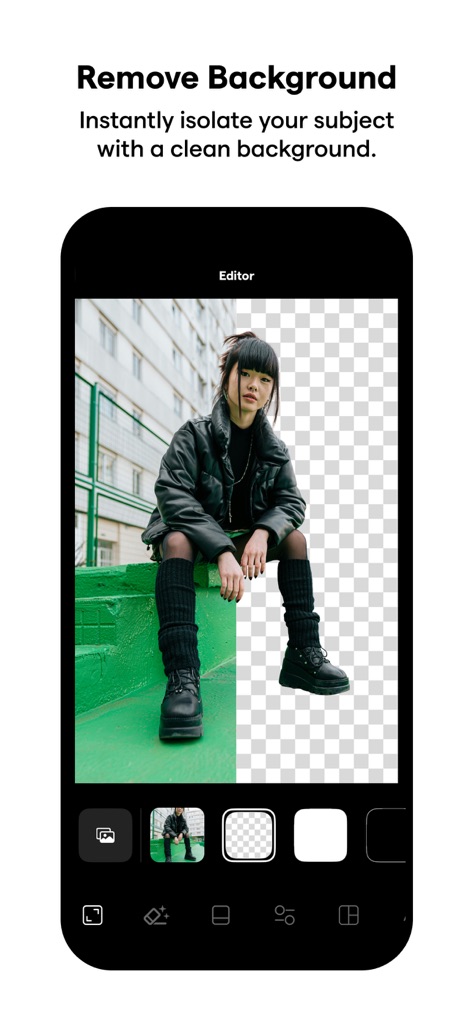
배경 자동 제거
이 편집기는 원본 이미지를 배경이 제거된 투명한 버전과 나란히 보여주며, '에디터' 인터페이스 내에서 피사체를 깔끔하게 분리하는 기능을 시각적으로 강조합니다.
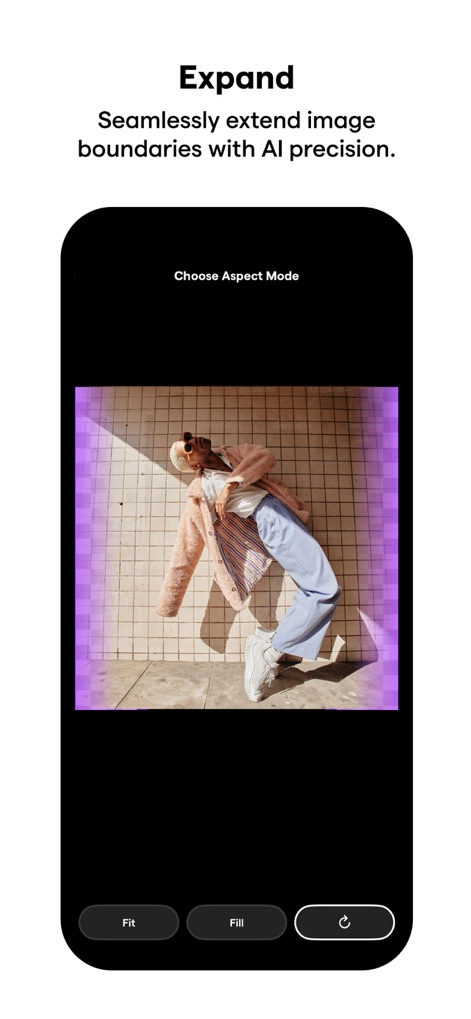
AI 확장 기능
'AI 확장' 기능은 이미지 경계를 자연스럽게 확장하여, 보라색으로 강조된 새로운 영역을 생성하고 '가로세로 비율 모드 선택' 옵션을 통해 사용자에게 유연성을 제공합니다.
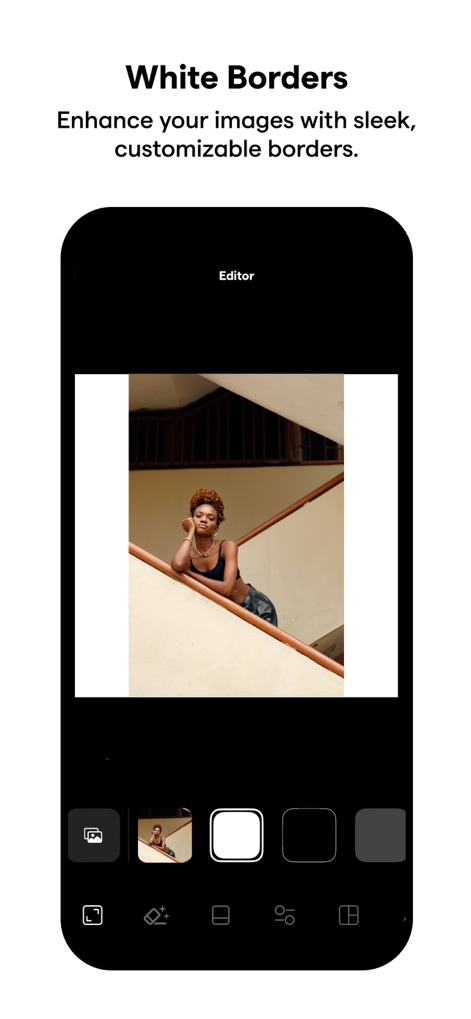
세련된 테두리 추가
사용자는 깔끔하고 넓은 흰색 테두리를 추가하여 이미지를 돋보이게 할 수 있으며, 하단의 다양한 선택 옵션을 통해 원하는 스타일의 테두리를 손쉽게 적용할 수 있습니다.
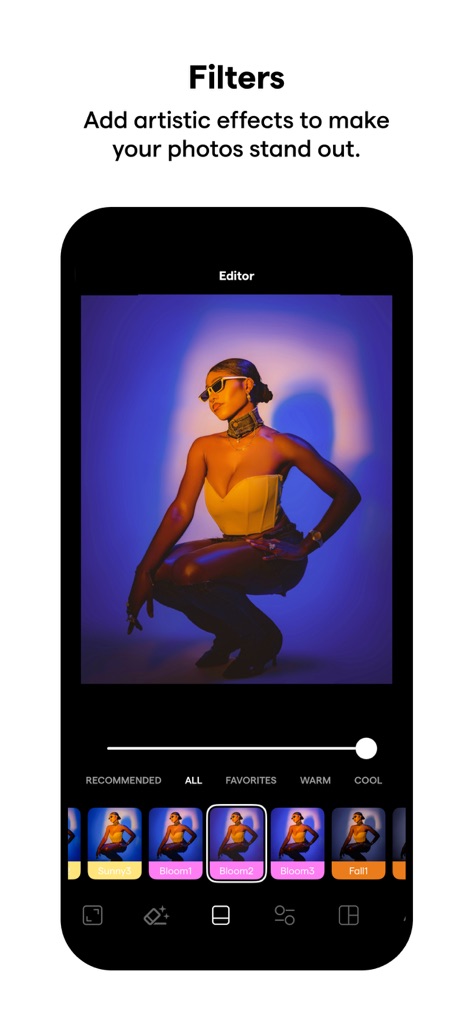
다채로운 필터 효과
이 앱은 사진에 다채로운 색감의 필터 효과를 적용할 수 있게 하며, 'Bloom' 및 'Fall' 등 다양한 프리셋 썸네일을 통해 원하는 분위기를 쉽게 선택할 수 있습니다.
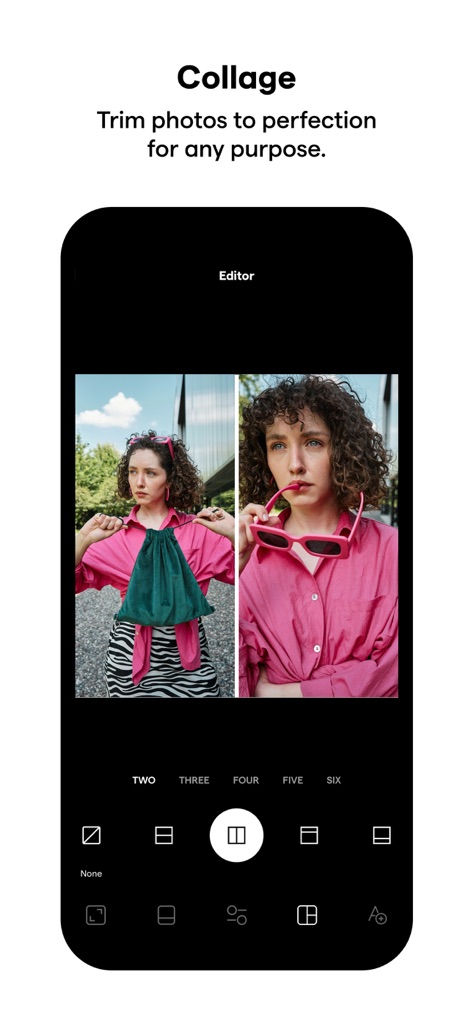
맞춤형 콜라주 제작
사용자는 두 장의 사진을 나란히 배치한 콜라주를 생성할 수 있으며, 하단에 제공되는 '두 장', '세 장', '네 장' 등 다양한 레이아웃 옵션으로 맞춤형 콜라주를 제작할 수 있습니다.
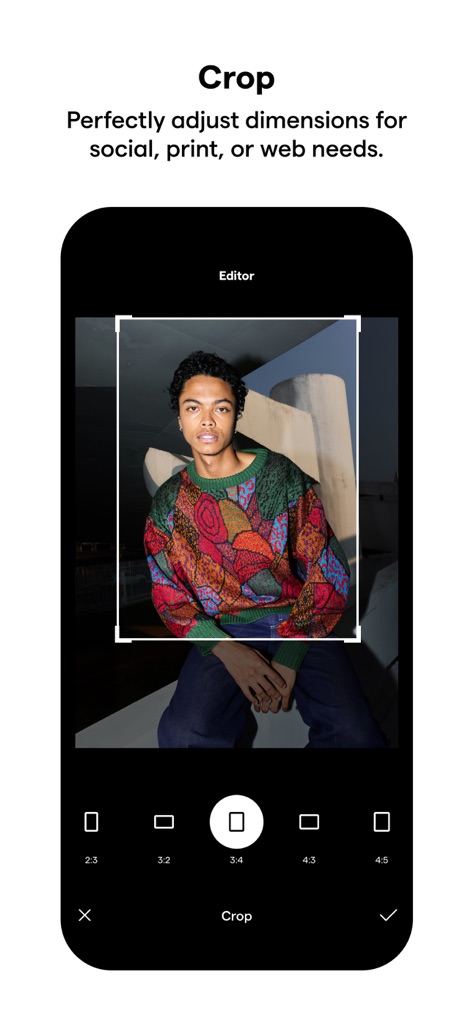
정교한 자르기 도구
이 도구는 이미지에 정교한 자르기 오버레이를 제공하여 특정 영역을 선택할 수 있게 하며, 2:3, 3:2, 3:4 등 다양한 가로세로 비율 옵션으로 완벽한 구도를 잡을 수 있습니다.
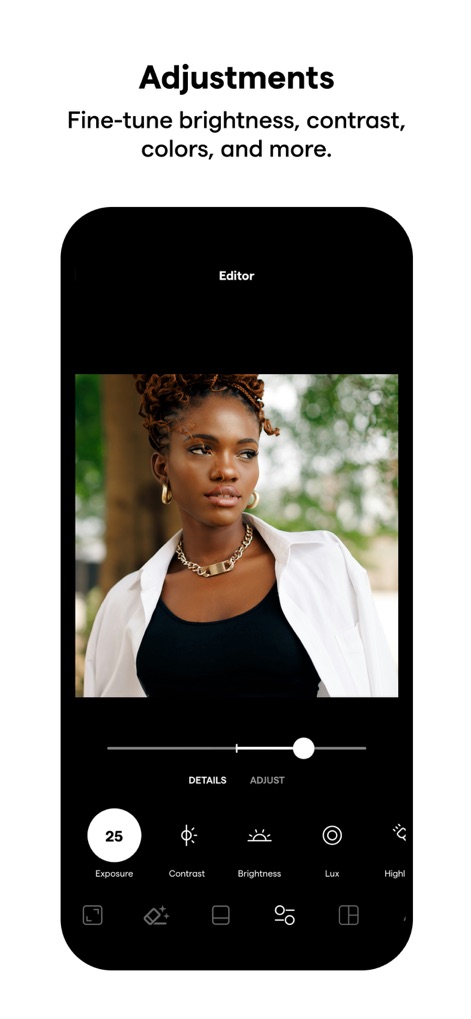
세부 조정 기능
사용자는 '노출' 슬라이더를 25와 같은 특정 값으로 조정하여 이미지의 밝기를 세밀하게 제어할 수 있으며, '대비' 및 '밝기' 등 다양한 편집 옵션으로 사진을 완벽하게 미세 조정할 수 있습니다.
설명
Download
비슷한 앱
유사한 기능과 사용자 경험을 가진 앱

ElevenLabs: AI Voice Generator
Eleven Labs Inc.

Viggle AI: Meme Maker
WarpEngine Canada Inc.

可灵AI - AI图片&视频创作工具
Beijing Kwai Technology Co., Ltd.

Leonardo.Ai - Image Generator
Leonardo Interactive Pty Ltd

Reface: Face Swap AI Photo App
NEOCORTEXT, INC.

Shedevrum
DIRECT CURSUS COMPUTER SYSTEMS TRADING LLC

Remove Objects
TAPUNIVERSE LLC

Zaps Collages
Turnip Media Private Limited

Carat - Create Anything
Paradot Corp.
이 페이지는 앱이나 개발자의 공식 페이지가 아니며, 정보 제공 및 논평을 목적으로 작성된 독립 편집 간행물입니다. 명시적으로 달리 언급되지 않는 한, 해당 앱이나 개발자는 MWM, Apple, Google Play, 앱 퍼블리셔 또는 앱 개발자와 제휴, 보증, 후원, 승인 또는 공식적으로 연결되어 있지 않으며, 이 페이지의 어떤 내용도 해당 앱이 MWM의 서비스를 사용하여 개발되었음을 의미하지 않습니다. 모든 상표, 로고, 스크린샷 및 기타 콘텐츠는 해당 소유자의 자산입니다.