
이 페이지는 앱이나 개발자의 공식 페이지가 아니며, 정보 제공 및 논평을 목적으로 작성된 독립 편집 간행물입니다. 명시적으로 달리 언급되지 않는 한, 해당 앱이나 개발자는 MWM, Apple, Google Play, 앱 퍼블리셔 또는 앱 개발자와 제휴, 보증, 후원, 승인 또는 공식적으로 연결되어 있지 않으며, 이 페이지의 어떤 내용도 해당 앱이 MWM의 서비스를 사용하여 개발되었음을 의미하지 않습니다. 모든 상표, 로고, 스크린샷 및 기타 콘텐츠는 해당 소유자의 자산입니다.


Intuit QuickBooks for Business
이 앱은 사업주가 재정 관리에 소비하는 시간을 잔인하게 줄입니다. 당신의 아이폰을 결제 단말기로 변환시키고, 영수증을 파쇄하며, AI가 회계 처리를 맡도록 합니다. 이 앱은 당신을 평범한 재정 관리자에서 현금 흐름의 지배자로 만듭니다. 당신의 모든 돈을 어디에서든 지배합니다.
다운로드
10M+사용자 평점
총 평가 수
334.5K개발사
카테고리
Business지원 언어
4최신 버전
26.04.0크기
558.6 MB출시일
2013년 2월 14일소규모 사업주와 프리랜서를 위한 핵심 재무 관리 솔루션
Intuit QuickBooks for Business 주요 기능 분석
AI 기반 거래 자동화
Intuit AI가 거래를 자동으로 분류하고 조정하며, 불일치를 감지하고 다음 단계를 추천하여 수작업을 크게 줄이고 회계의 정확성을 높입니다.
결제 수금 간소화
아이폰 탭투페이(Tap to Pay) 기능으로 비접촉식 결제를 손쉽게 처리하고, 고객이 간편하게 결제할 수 있는 청구서를 보내 실시간으로 결제 상황을 추적하여 현금 흐름을 개선합니다.
자동 주행거리 추적
GPS를 통해 주행거리를 자동으로 추적하여 정확한 세금 공제를 받을 수 있도록 돕고, 수동 기록의 번거로움을 없애 효율성을 극대화합니다.
실시간 경비 관리
회계 AI가 거래와 경비를 매칭하고, 영수증이 필요한 신용카드 거래의 경우 영수증 업로드를 위한 문자 알림을 보내어 모든 지출을 정확하게 기록합니다.
청구서 및 견적서 생성
고객 및 공급업체 정보를 추가하고, 프로젝트 세부 정보를 캡처하며, 수기 노트 사진을 통해 앱 내에서 직접 청구서와 견적서를 생성하고 전송하여 시간과 노력을 절약합니다.
영수증 간편 촬영 및 매칭
영수증 사진을 찍어 저장하고 자동으로 해당 거래와 매칭하여, 서류 더미를 없애고 정확한 기록을 손쉽게 유지할 수 있도록 지원합니다.
모바일-웹 데이터 동기화
모바일 앱이 QuickBooks Online 계정과 실시간으로 동기화되어 금융 데이터가 항상 최신 상태로 유지되므로, 언제 어디서든 신속하고 정보에 입각한 의사 결정을 내릴 수 있습니다.
잠재 고객 발굴 및 관리
고객 허브(Customer Hub)와 Intuit AI가 협력하여 이메일에서 적격한 잠재 고객을 찾아내고, 기록된 음성 메모를 바탕으로 자동 생성된 견적서를 검토, 편집 및 전송할 수 있게 합니다.
자주 묻는 질문
에 대해 알아야 할 모든 것 Intuit QuickBooks for Business
What is Intuit QuickBooks for Business?
Intuit QuickBooks for Business is an app designed to help businesses manage accounting, payments, and customers on the go. It integrates Intuit AI in Essentials and Plus plans.
Can I accept contactless payments using the Intuit QuickBooks app?
Yes, the Intuit QuickBooks app supports Tap to Pay on iPhone for in-person contactless payments. It also allows sending invoices that customers can pay with a tap.
How does Intuit QuickBooks for Business help with invoicing?
The Intuit QuickBooks app enables users to create and send invoices and estimates. It supports adding customer details and generating documents from photos of handwritten notes.
Does the Intuit QuickBooks app track business mileage automatically?
Yes, Intuit QuickBooks for Business automatically tracks mileage via GPS for accurate tax deductions. Users can categorize trips by swiping within the app to stay organized.
Can I capture and manage leads with Intuit QuickBooks for Business?
Yes, the Intuit QuickBooks app features a Customer Hub [Beta] that works with Intuit AI to surface qualified leads from emails. It also incorporates voice notes into auto-generated estimates.
How does Intuit QuickBooks automate accounting tasks?
Intuit QuickBooks AI automates categorizing and reconciling transactions. It also combines data, spots inconsistencies for review, and proactively recommends next steps for users.
Is the Intuit QuickBooks mobile app compatible with QuickBooks Desktop?
No, the Intuit QuickBooks mobile app is not compatible with QuickBooks Desktop for Windows or Mac. It syncs with your QuickBooks Online account instead.
How do I manage my Intuit QuickBooks app subscription?
Users manage their Intuit QuickBooks app subscription through their Apple account settings after purchase. Auto-renewal can be turned off there at least 24 hours before the current period ends.
Does Intuit QuickBooks for Business help manage expenses?
Yes, the Intuit QuickBooks app's Accounting AI matches transactions and expenses. It can also prompt users to upload receipts for credit card transactions requiring them, ensuring accurate expense tracking.
Can I digitize receipts using the Intuit QuickBooks app?
Yes, the Intuit QuickBooks app allows users to take photos of receipts. These digital receipts are then stored and automatically matched to relevant transactions, simplifying expense management.
다음 스크린샷과 설명은 앱의 공식 스토어 목록에서 직접 가져온 것이며 앱 개발자의 자산입니다.
앱 스토어
스크린샷
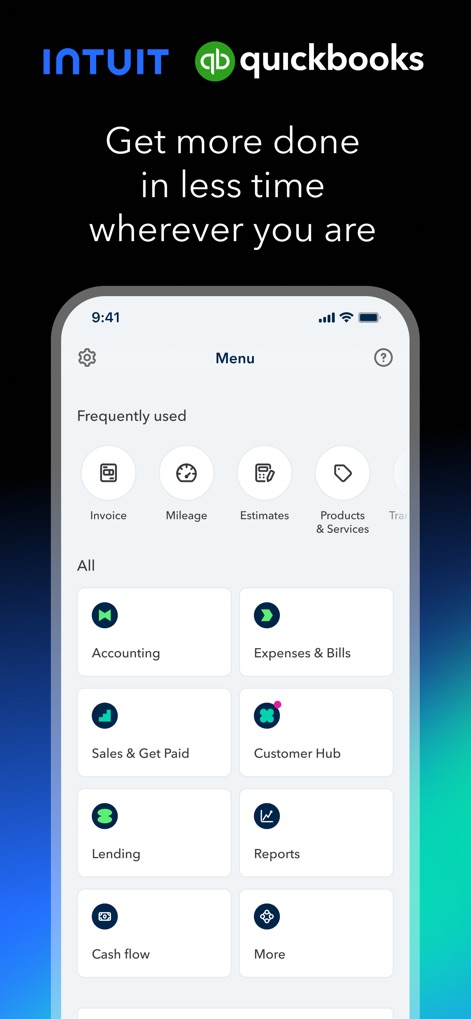
이 앱의 깔끔한 메인 메뉴는 '송장', '주행 거리'와 같은 자주 사용하는 기능을 빠르고 직관적으로 접근할 수 있게 하며, '회계' 및 '고객 허브'와 같은 주요 범주를 명확하게 보여줍니다.
간편한 메인 메뉴

사용자는 고객 이름 'Niki Davis'와 이메일 주소를 쉽게 추가할 수 있으며, 'Half-day photo shoot' 및 'Retouching'과 같은 세부 항목을 포함하여 전문적인 송장을 만들고 발송할 수 있습니다.
송장 생성 및 발송
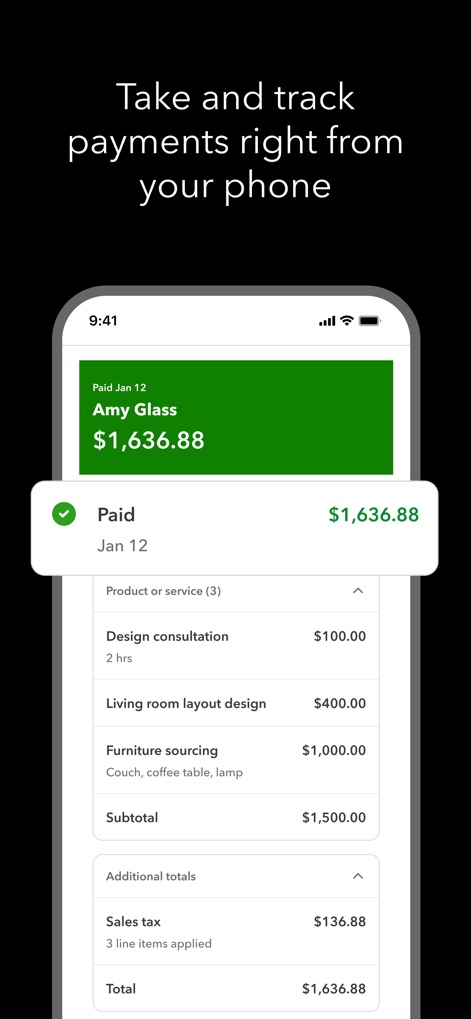
이 앱은 'Amy Glass'로부터 받은 $1,636.88의 결제 내역을 명확하게 표시하며, 'Design consultation' 및 'Living room layout design'과 같은 상세한 서비스 내역을 통해 결제 상태를 효율적으로 추적할 수 있습니다.
결제 추적 및 관리
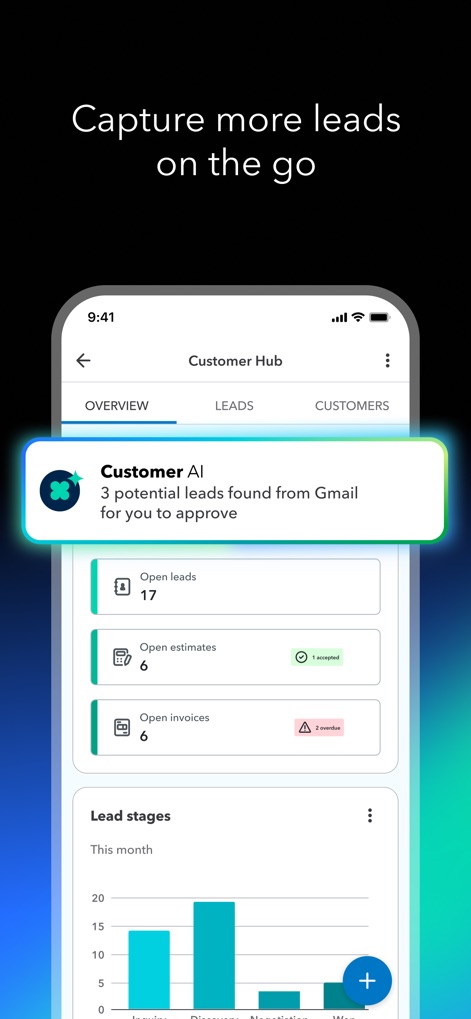
'Customer AI' 알림이 Gmail에서 3개의 잠재 리드를 발견했다고 알려주며, 'Open leads'와 'Open estimates' 수치를 통해 리드 진행 상황을 한눈에 파악할 수 있습니다.
고객 리드 포착

이 도구는 'Accounting AI'를 통해 게시할 준비가 된 2개의 거래를 보여주며, 'Overdue invoices' 섹션에서 미결 송장 알림을 생성하여 사용자에게 시간을 절약해 줍니다.
AI 기반 자동화

'Accounting AI'가 거래를 자동 분류하는 동안, 사용자는 'Bank Deposit'과 'Park Cafe'와 같은 항목에 대해 자동으로 매칭된 거래 내역을 확인할 수 있어 효율적인 지출 관리가 가능합니다.
실시간 지출 관리

이 앱은 'Capturing' 애니메이션을 통해 영수증을 즉시 촬영하고 디지털화하는 과정을 보여주며, 'Hardware store' 영수증의 총액 '$142.48'과 같은 핵심 정보를 자동으로 추출합니다.
간편한 영수증 스캔

사용자는 GPS를 통해 자동으로 기록된 'Fri, Feb 23'의 이동 경로와 'Potential deduction $13.30' 예상 공제액을 확인할 수 있으며, 'Meeting with client'와 같은 사업 목적을 쉽게 분류할 수 있습니다.
자동 주행거리 기록
설명
Download
비슷한 앱
유사한 기능과 사용자 경험을 가진 앱

Invoice Maker - PDF Creator
Decodation LLC
Invoice Maker + Estimate App
Daniel Bitton

Invoice Maker - Invoice Fly
Labhouse Mobile SL
Invoice Maker ▸ Estimate App
GetPaid Inc.

Invoice Simple: Invoice Maker
Zenvoice Inc.
Zoho Invoice Maker App
Zoho Corporation

Accounting App - Zoho Books
Zoho Corporation

Invoice2go: Easy Invoice Maker
Invoice2go.com

Invoice Maker & Estimate App
Bookipi Pty Ltd
이 페이지는 앱이나 개발자의 공식 페이지가 아니며, 정보 제공 및 논평을 목적으로 작성된 독립 편집 간행물입니다. 명시적으로 달리 언급되지 않는 한, 해당 앱이나 개발자는 MWM, Apple, Google Play, 앱 퍼블리셔 또는 앱 개발자와 제휴, 보증, 후원, 승인 또는 공식적으로 연결되어 있지 않으며, 이 페이지의 어떤 내용도 해당 앱이 MWM의 서비스를 사용하여 개발되었음을 의미하지 않습니다. 모든 상표, 로고, 스크린샷 및 기타 콘텐츠는 해당 소유자의 자산입니다.