蓝狐盒子-极简本地漫画图片阅读器

蓝狐盒子-极简本地漫画图片阅读器

다운로드: App Store
로고: 蓝狐盒子-极简本地漫画图片阅读器

블루폭스박스: 만화와 코믹을 위한 미니멀리스트 로컬 리더

디지털 라이브러리를 완벽하게 제어하세요. CBZ, CBR, PDF, EPUB을 지원하며 원활한 WiFi 전송과 최적화된 읽기 모드로 최고의 오프라인 경험을 제공합니다.

개발사

IDOAI-HK-LIMITED

카테고리

Utilities

다운로드

1M+

사용자 평점

2.9/5

총 평가 수

5K+

지원 언어

3

당신의 라이브러리, 다듬다

이 인터페이스를 사용하는 1M+ 명의 사용자.

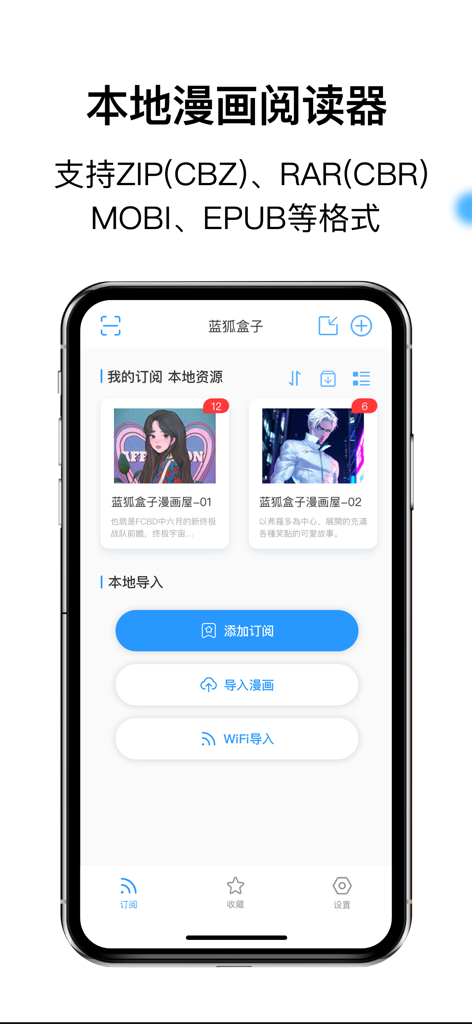
블루폭스박스 앱 인터페이스, 아이폰에서 로컬 만화 라이브러리와 파일 가져오기 옵션을 보여줌
블루폭스박스 앱 인터페이스, 아이폰에서 로컬 만화 라이브러리와 파일 가져오기 옵션을 보여줌

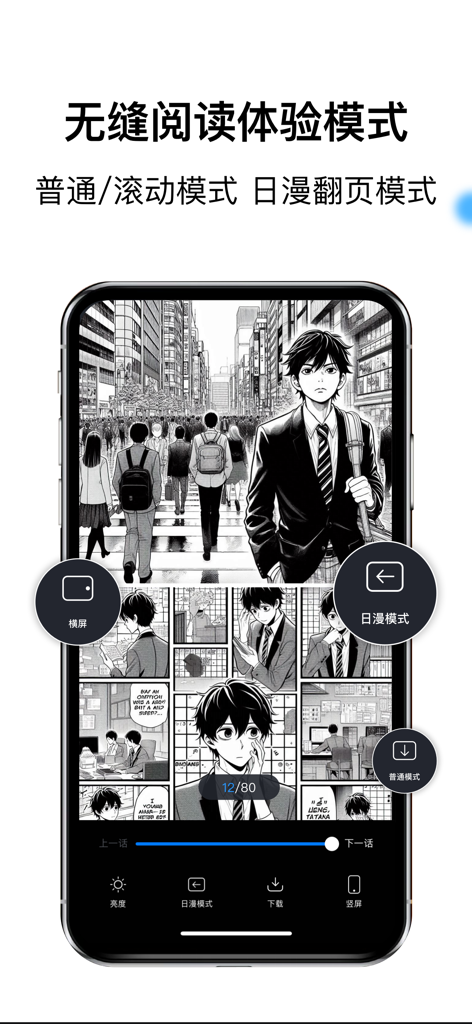
스마트폰에서 블루폭스박스 앱 내 만화 페이지를 표시하고 다양한 읽기 및 페이지 넘김 모드를 보여줌.
스마트폰에서 블루폭스박스 앱 내 만화 페이지를 표시하고 다양한 읽기 및 페이지 넘김 모드를 보여줌.

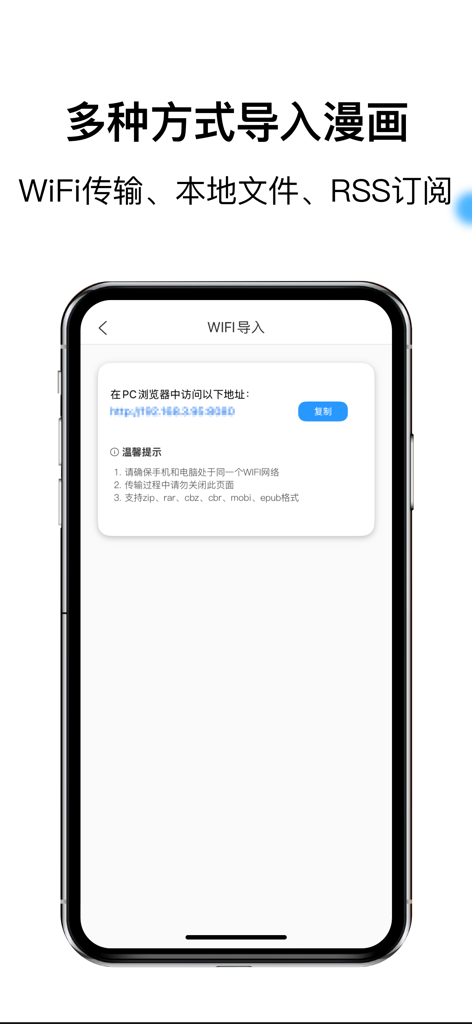
블루폭스박스 앱 인터페이스, PC 브라우저에서 만화 파일을 가져오기 위한 WiFi 전송 화면을 보여줌
블루폭스박스 앱 인터페이스, PC 브라우저에서 만화 파일을 가져오기 위한 WiFi 전송 화면을 보여줌

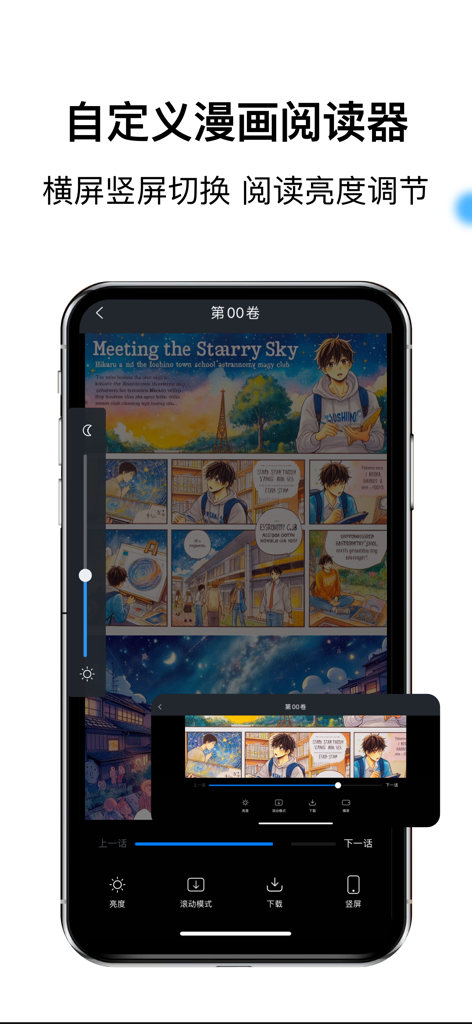
블루폭스박스 앱 인터페이스, 밝기 및 방향 조절 컨트롤이 있는 만화 리더를 보여줌
블루폭스박스 앱 인터페이스, 밝기 및 방향 조절 컨트롤이 있는 만화 리더를 보여줌

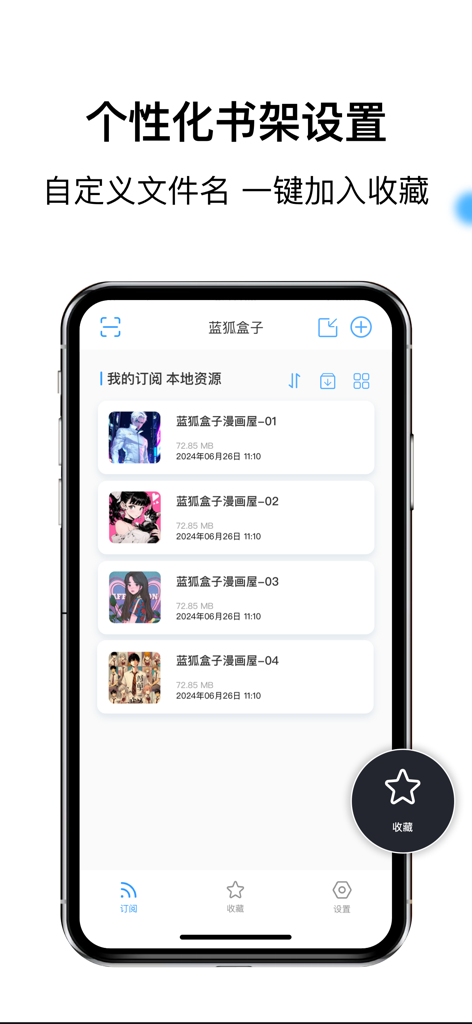
블루폭스박스 로컬 만화 리더 앱의 개인화된 책장 인터페이스, 디지털 만화 목록을 보여줌

블루폭스박스 로컬 만화 리더 앱의 개인화된 책장 인터페이스, 디지털 만화 목록을 보여줌

디지털 컬렉션을 위한 궁극의 허브

이 앱을 돋보이게 하는 도구, 1M+ 명의 사용자가 선택.

📦

보편적인 형식 지원

더 이상 변환 문제에 시달릴 필요가 없습니다. CBR, CBZ, RAR, PDF, EPUB 파일을 기기에서 바로 열어보세요.

무선 즉시 전송

케이블과 iTunes는 잊으세요. WiFi를 통해 컴퓨터에서 아이폰으로 만화 라이브러리 전체를 즉시 전송하세요.

📖

진정한 만화 경험

우에서 좌로 페이지 넘김과 웹툰을 위한 부드러운 세로 스크롤을 포함한 사용자 지정 모드로 자신만의 방식으로 읽으세요.

리뷰 분석

사용자 리뷰 인사이트.

감정 점수

34%
부정적

요약

The app receives overwhelmingly negative feedback from users, primarily due to an excessive number of intrusive advertisements that frequently pop up, auto-play with sound, are difficult to close, and often redirect to other apps or even lead to accidental subscriptions. Users also report significant performance and stability issues, including constant lagging, slow loading times, and frequent crashes, with some unable to open the app at all. While some users appreciate the core comic reading functionality and free access to content, these positives are largely overshadowed by the poor ad experience and general instability. Concerns also include questionable monetization practices, such as unexpected charges and download limits, though one user did acknowledge a past bug fix.

주요 테마

Intrusive Advertisements(29)
App Performance & Stability(23)
Unclosable Ads(12)
Monetization Concerns(4)
Comic Reading Functionality(2)
Developer Responsiveness(1)
Free Access to Content(1)

앱 소개

에 대해 알아야 할 모든 것 蓝狐盒子-极简本地漫画图片阅读器.

설명

【Features】 - Extensive Format Support: Effortlessly read comics in various popular formats, including ZIP (CBZ), RAR (CBR), MOBI, EPUB, and PDF. - Flexible Import Options: Easily bring your comics into the app through multiple methods: WiFi transfer/upload, direct import of local comic files, or custom RSS feed subscriptions. - Seamless Offline Image Viewing: Enjoy smooth and rapid browsing of your offline image-based comic resources in formats like PNG and JPG. - Versatile Page-Turning Modes: Choose from multiple reading modes to suit your preference, including Up-to-Down scrolling and Left-to-Right page-turning, specifically adapted for Japanese manga. - Customizable Reading Settings: Instantly switch between landscape and portrait orientations, and smart-adjust the reading brightness for optimal comfort in any environment. - Intuitive Comic Shelf Management: Organize your library with view/list mode sorting, customize file names, and add favorites to your collection with a single tap. 【Automatic Subscription Service Description】 1. Subscription service: automatic renewal of membership (1 month). 2. Subscription price: subject to the displayed price. 3. Payment: Subscriptions can be managed by the user, and the user will be credited to the iTunes account after the purchase is confirmed and the payment is made. 4. Renewal: Apple iTunes account will be deducted within 24 hours before the expiration, and the subscription cycle will be extended by one subscription cycle after the deduction is successful. 5. Cancel renewal: If you need to cancel the subscription, please open the "Settings" --> enter the "iTunes Store and App Store" --> click "Apple ID", select "View Apple ID", enter the "Account Settings" page, click "Subscription", and select "Blue Fox Box to Advertise Monthly" to cancel the subscription. If you do not close your subscription at least 24 hours before the end of the subscription period, it will automatically renew your subscription. Membership Service Agreement http://wordpress.m1book.com/vip User Agreement http://wordpress.m1book.com/comics Auto-Renewal Agreement http://wordpress.m1book.com/renewal Privacy Policy http://wordpress.m1book.com/kbmh-ysxy The official website of the app is http://www.idoaihk.com/

최신 버전

3.3.5

크기

119.8 MB

출시일

2022년 7월 6일

당신의 라이브러리, 완벽하게.

아이폰을 궁극의 미니멀리스트 만화 허브로 만든 100만 명 이상의 독자들과 함께하세요. 모든 형식 지원, 원활한 WiFi 전송, 그리고 방해 요소 제로.

다운로드: App Store
FAQ

자주 묻는 질문

에 대해 알아야 할 모든 것 蓝狐盒子-极简本地漫画图片阅读器

蓝狐盒子支持哪些漫画格式?

蓝狐盒子支持广泛的漫画格式,包括 ZIP (CBZ)、RAR (CBR)、MOBI、EPUB 和 PDF。它还支持 PNG 和 JPG 文件的离线图像查看。

用户如何将漫画导入蓝狐盒子应用程序?

用户可以通过多种方法将漫画导入蓝狐盒子:WiFi 传输/上传、直接导入本地漫画文件,或通过自定义 RSS 订阅。

蓝狐盒子为漫画提供哪些阅读模式?

蓝狐盒子提供多种翻页模式。包括上到下滚动(正常模式)和从左到右翻页,这两种模式都专门为阅读日式漫画进行了优化。

用户可以在蓝狐盒子中自定义他们的阅读体验吗?

是的,蓝狐盒子允许用户自定义他们的阅读体验。用户可以即时切换横屏和竖屏方向,并调整阅读亮度以获得最佳舒适度。

蓝狐盒子如何帮助整理漫画库?

蓝狐盒子提供直观的漫画架管理。用户可以通过视图/列表模式排序来整理他们的库,自定义文件名,并一键将收藏添加到他们的集合中。

蓝狐盒子是一项订阅服务吗?

是的,蓝狐盒子作为一项自动订阅服务运行。会员按月续订,用户通过其 iTunes 账户管理订阅。

如何取消蓝狐盒子的月度订阅?

要取消订阅,请在设备设置中导航到您的 Apple ID,然后选择“iTunes Store 和 App Store”,选择“查看 Apple ID”,进入“帐户设置”,点击“订阅”,然后选择“蓝狐盒子广告月度订阅”进行取消。

蓝狐盒子是否支持离线阅读漫画?

是的,蓝狐盒子提供无缝且快速的离线图像漫画资源浏览。导入后,漫画和图像可以在没有互联网连接的情况下查看。

在哪里可以找到蓝狐盒子的隐私政策?

蓝狐盒子的隐私政策可在 http://wordpress.m1book.com/kbmh-ysxy 找到。此链接提供了有关应用程序如何处理用户数据的详细信息。

App information, icons, screenshots, and descriptions displayed on this page are sourced from the Apple App Store and are the property of their respective developers. Download estimates and rankings are based on MWM's proprietary models and may not reflect actual figures. This page is provided for informational and analytical purposes only.

Believe this page infringes your intellectual property? File a dispute