이 페이지는 앱이나 개발자의 공식 페이지가 아니며, 정보 제공 및 논평을 목적으로 작성된 독립 편집 간행물입니다. 명시적으로 달리 언급되지 않는 한, 해당 앱이나 개발자는 MWM, Apple, Google Play, 앱 퍼블리셔 또는 앱 개발자와 제휴, 보증, 후원, 승인 또는 공식적으로 연결되어 있지 않으며, 이 페이지의 어떤 내용도 해당 앱이 MWM의 서비스를 사용하여 개발되었음을 의미하지 않습니다. 모든 상표, 로고, 스크린샷 및 기타 콘텐츠는 해당 소유자의 자산입니다.
Lazy Lighting
몇 분 안에 모든 표면을 디지털 캔버스로 변환하세요. 아티스트, DJ 및 크리에이터를 위한 전문가 수준의 왜곡, 마스킹 및 실시간 비주얼 — 노트북 없이 가능합니다.
부피 큰 노트북과 비싼 소프트웨어는 잊으세요. Lazy Lighting은 iPhone 및 iPad에 전문가급 프로젝션 매핑 기능을 제공하여 몇 분 안에 모든 표면을 변환할 수 있습니다.
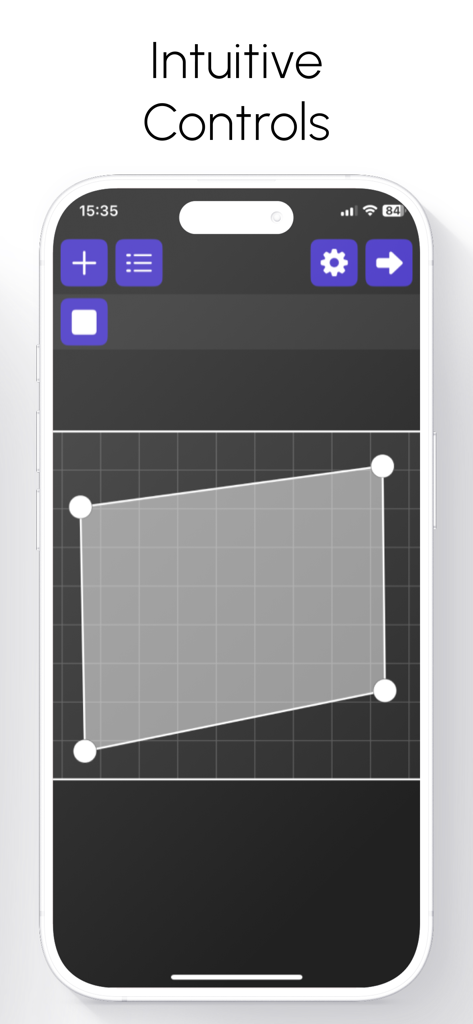
직관적인 터치 매핑
더 이상 복잡한 워크플로우는 없습니다. 손가락을 사용하여 불규칙한 표면이나 객체에 시각 효과를 완벽하게 왜곡, 마스킹 및 맞춤 설정하세요. 정밀한 제어가 가능합니다.
실시간 공연 제어
듀얼 채널을 믹싱하고, 실시간 효과를 레이어링하고, 전문가처럼 크로스페이드하세요. 기술적인 어려움 없이 강력한 비주얼을 원하는 DJ 및 VJ에게 적합합니다.
FAQ
자주 묻는 질문
에 대해 알아야 할 모든 것 Lazy Lighting
Lazy Lighting이란 무엇인가요?
Lazy Lighting은 프로젝션 매핑을 새롭게 해석하여 간단하고 쉽게 사용할 수 있도록 만든 iPhone 및 iPad 앱입니다. 이 앱을 사용하면 컴퓨터 없이도 기기와 프로젝터를 사용하여 모든 표면에 시각 효과를 매핑할 수 있습니다.
Lazy Lighting은 프로젝터에 어떻게 연결되나요?
Lazy Lighting은 HDMI, USB-C, Lightning 케이블 또는 AirPlay를 통한 무선 연결을 통해 프로젝터에 연결됩니다. 이를 통해 다양한 프로젝터 설정에 유연한 옵션을 제공합니다.
내 동영상을 Lazy Lighting과 함께 사용할 수 있나요?
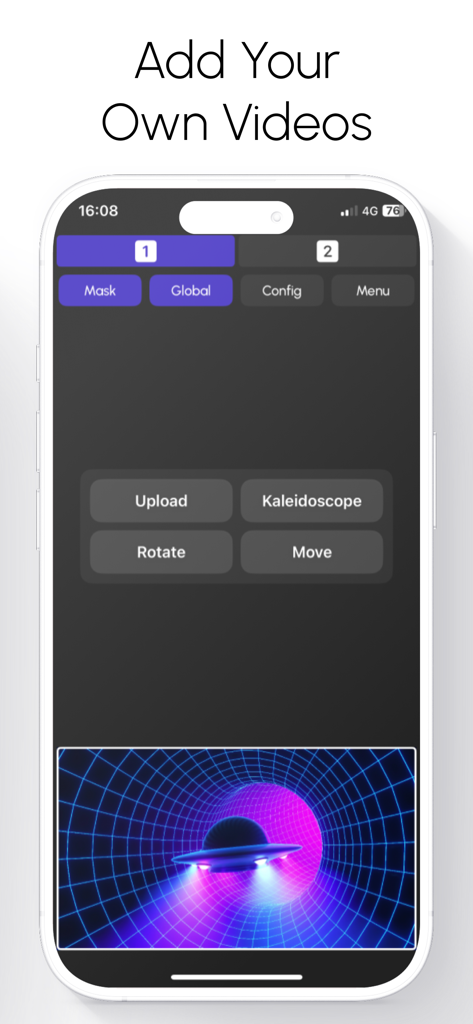
네, Lazy Lighting을 사용하면 기기 라이브러리에서 직접 자신의 동영상을 가져와 매핑할 수 있습니다. 이 기능을 통해 개인 콘텐츠를 프로젝션 매핑 프로젝트에 통합할 수 있습니다.
Lazy Lighting은 어떤 표면에 투사할 수 있나요?
Lazy Lighting은 벽, 무대, 조각품, 불규칙한 표면, 물체 또는 여러 패널을 포함한 다양한 표면에 투사할 수 있습니다. 어떤 환경에서도 정밀한 매핑이 가능합니다.
Lazy Lighting은 내장 시각 효과를 제공하나요?
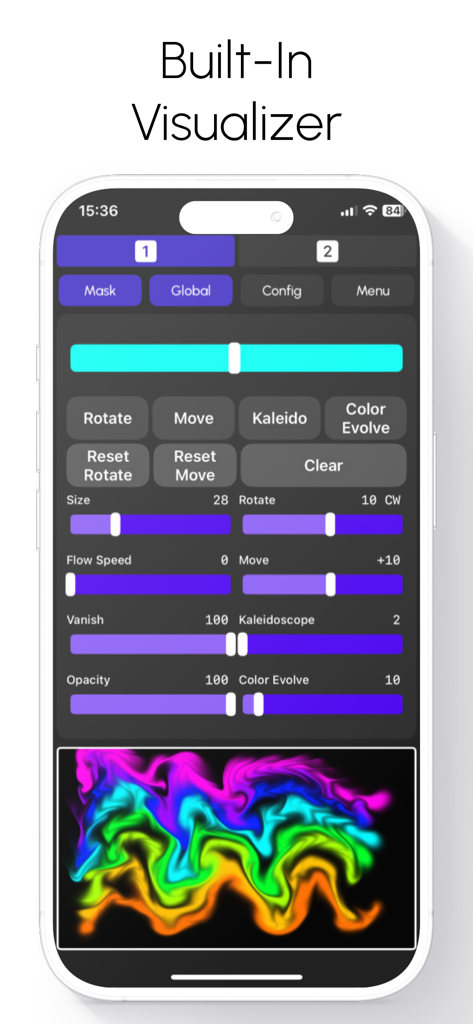
네, Lazy Lighting에는 실시간 시각 효과 라이브러리가 포함되어 있습니다. 이 효과에는 칼레이도스코프, 터널, 색상 변환 및 왜곡이 포함되어 투사를 동적으로 향상시킵니다.
Lazy Lighting을 라이브 공연에 사용할 수 있나요?
네, Lazy Lighting은 라이브 공연을 위해 설계되었습니다. 실시간 제어, 시각 효과 혼합을 위한 듀얼 채널, Apple의 그래픽 하드웨어에 최적화된 부드러운 재생 기능을 제공하여 역동적인 쇼에 이상적입니다.
Lazy Lighting의 매핑 도구의 주요 기능은 무엇인가요?
Lazy Lighting의 매핑 도구를 사용하면 시각 효과를 자르고, 마스크하고, 왜곡할 수 있습니다. 이를 통해 직접적인 터치 상호 작용을 통해 어떤 표면이나 물체에도 완벽하게 맞도록 정밀하게 조정할 수 있습니다.
Lazy Lighting은 프로젝션 매핑을 위해 노트북이 필요한가요?
아니요, Lazy Lighting은 프로젝션 매핑을 위해 노트북이 필요하지 않습니다. 사용자는 iPhone 또는 iPad에서 직접 모든 매핑 작업을 수행할 수 있으므로 복잡한 데스크톱 워크플로우를 대체할 수 있습니다.
다음 스크린샷과 설명은 앱의 공식 스토어 목록에서 직접 가져온 것이며 앱 개발자의 자산입니다.
앱 스토어
스크린샷
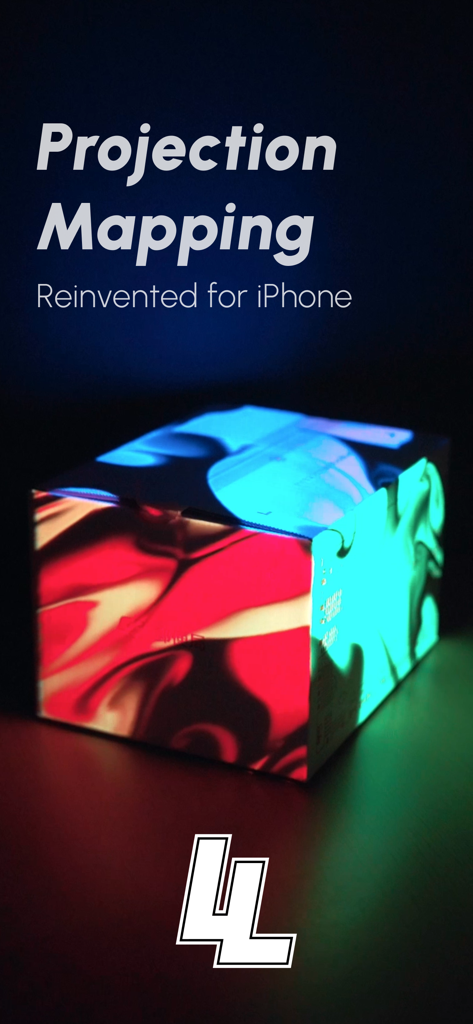
Lazy Lighting 앱을 사용하여 다채로운 프로젝션 조명 패턴이 상자에 비치는 모습
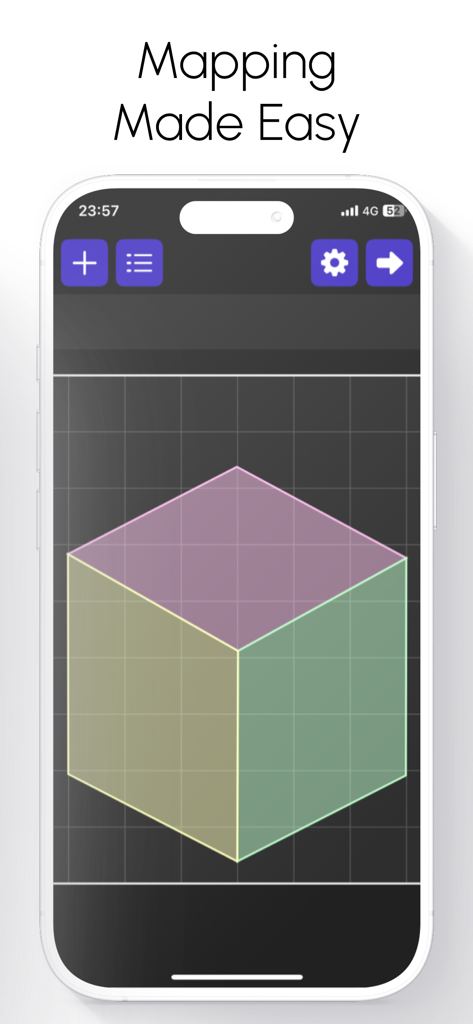
쉬운 프로젝션 매핑을 위한 3D 큐브 그리드를 보여주는 iPhone의 Lazy Lighting 앱 인터페이스
프로젝션 매핑을 위한 사용자 정의 동영상 추가 및 편집을 보여주는 Lazy Lighting 앱 인터페이스의 스마트폰 화면
흐름 속도, 칼레이도스코프 효과 및 다채로운 네온 웨이브 미리보기를 위한 조절 가능한 슬라이더가 있는 내장 시각화 도구를 보여주는 Lazy Lighting 앱 인터페이스
iPhone에서 직관적인 프로젝션 매핑 컨트롤을 보여주는 Lazy Lighting 앱의 인터페이스
설명
Projection Mapping. Reinvented for iPhone and iPad.
Lazy Lighting makes projection mapping simple, affordable, and accessible to everyone.
No computer. No expensive software. Just your iPhone or iPad and any projector. From small portable models to professional systems.
Connect directly with HDMI, USB-C, or Lightning, or go completely wireless using AirPlay. Map walls, stages, sculptures, or any surface in minutes with an intuitive, touch-based interface. Whether you’re an artist, musician, or just experimenting at home, Lighting gives you the creative freedom of full projection mapping anywhere.
Map Anything, Anywhere
Lazy Lighting brings powerful projection mapping tools into a portable, easy-to-use app.
You can project onto irregular surfaces, objects, or multiple panels without needing a laptop or complex setup.
Simply aim your projector, open the app, and start shaping your visuals. Drag corners to fit perfectly, cut out areas with masking tools, and layer effects in real time. The entire mapping process is designed around direct touch interaction. Fast, precise, and incredibly intuitive.
Key Features
Projection Mapping Tools – Cut, mask, and warp visuals to perfectly match any surface or object.
Draw Mode – Create visuals by hand in real time using a fluid drawing engine.
Video Import – Load and map your own videos directly from your device’s library.
Custom Shapes – Import vector outlines or logos to map specific designs or stage elements.
Dual Channels – Mix, layer, and crossfade between two independent visuals for dynamic live control.
Built-In Effects – Access a library of real-time visual effects including kaleidoscopes, tunnels, color morphs, and distortions.
External Display Output – Project full-resolution visuals while keeping your control interface private.
Wireless and Wired Compatibility – Works with AirPlay, HDMI, USB-C, and Lightning connections.
Everything runs in real time, fully optimized for Apple’s graphics hardware, ensuring smooth playback even during complex visual setups.
For Every Creator and Every Setup
Artists and Creators – Bring walls, canvases, and sculptures to life with moving light.
Bands and Performers – Add projection to your stage show without extra hardware or setup.
Installations and Galleries – Design immersive spaces that react and evolve with light.
Event Organizers – Transform venues, festivals, or exhibits with dynamic mapped visuals.
Home Projection – Create ambient visuals for relaxation, parties, or decoration.
Holiday Displays – Design your own Halloween, Christmas, or themed light shows effortlessly.
Whether you’re using a $100 portable projector or a high-end stage setup, Lazy Lighting adapts perfectly to your hardware and environment.
Simple Design, Professional Results
Lazy Lighting is built around real-time performance and creative flow. The interface is clean, fast, and responsive, allowing you to stay focused on your visuals instead of menus and settings.
Every parameter updates instantly, giving you complete control over colors, shapes, and movement. Because all rendering happens live, no two performances are ever the same. Every show feels organic, fluid, and unique.
The Future of Projection Mapping
Lazy Lighting brings the art of projection mapping into the modern era. Powerful enough for professionals, yet simple enough for anyone to use.
It replaces complicated desktop workflows with a touch-first design built specifically for iPhone and iPad.
You can create, perform, and project anywhere: no laptop, no cables, no extra equipment.
From living room experiments to professional stage productions, Lazy Lighting delivers stunning real-time visuals that anyone can create.
Lazy Lighting – Projection Mapping, Live Visuals, and Real-Time Video Effects.
The easiest way to project, map, and perform with any projector, anywhere.
Terms of Use: https://sites.google.com/view/lazylighting-terms
Privacy Policy: https://sites.google.com/view/lazylighting-privacy
이 페이지는 앱이나 개발자의 공식 페이지가 아니며, 정보 제공 및 논평을 목적으로 작성된 독립 편집 간행물입니다. 명시적으로 달리 언급되지 않는 한, 해당 앱이나 개발자는 MWM, Apple, Google Play, 앱 퍼블리셔 또는 앱 개발자와 제휴, 보증, 후원, 승인 또는 공식적으로 연결되어 있지 않으며, 이 페이지의 어떤 내용도 해당 앱이 MWM의 서비스를 사용하여 개발되었음을 의미하지 않습니다. 모든 상표, 로고, 스크린샷 및 기타 콘텐츠는 해당 소유자의 자산입니다.