
이 페이지는 앱이나 개발자의 공식 페이지가 아니며, 정보 제공 및 논평을 목적으로 작성된 독립 편집 간행물입니다. 명시적으로 달리 언급되지 않는 한, 해당 앱이나 개발자는 MWM, Apple, Google Play, 앱 퍼블리셔 또는 앱 개발자와 제휴, 보증, 후원, 승인 또는 공식적으로 연결되어 있지 않으며, 이 페이지의 어떤 내용도 해당 앱이 MWM의 서비스를 사용하여 개발되었음을 의미하지 않습니다. 모든 상표, 로고, 스크린샷 및 기타 콘텐츠는 해당 소유자의 자산입니다.


다운로드
25M+사용자 평점
총 평가 수
814.2K개발사
카테고리
Photo & Video지원 언어
9최신 버전
8.4.1크기
198.6 MB출시일
2018년 11월 16일Lensa AI: Photo Editor 주요 기능 분석
소셜 미디어 시대, Lensa AI가 제공하는 차별화된 사진 및 비디오 편집 경험
AI 아바타 생성
개성 넘치는 독특한 AI 아바타를 생성하여 사용자의 개성을 예술적인 스타일로 표현합니다.
전문가 수준의 필터 및 색조 적용
다양한 아름다운 필터와 색조를 사용하여 모든 사진과 비디오를 예술 작품으로 변환합니다.
불필요한 객체 및 방해 요소 제거
사진에서 원치 않는 객체나 방해 요소를 제거하여 사용자가 강조하고 싶은 부분에 시선이 집중되도록 합니다.
자연스러운 인물 및 셀카 보정
'과도하게 보정된' 느낌 없이 셀카 및 인물 사진에서 최상의 모습을 연출할 수 있도록 자연스러운 보정 기능을 제공합니다.
자주 묻는 질문
에 대해 알아야 할 모든 것 Lensa AI: Photo Editor
What is Lensa AI?
Lensa AI is a photo and video editor that enhances media with AI-powered tools. It improves selfies, removes distractions, applies filters, and creates avatars for social media and personal use.
Can Lensa AI remove objects from photos?
Yes, Lensa AI removes unwanted objects and distractions from photos. The app allows users to erase selected items, ensuring the focus remains on the main subject.
Does Lensa AI offer video editing features?
Yes, Lensa AI offers video editing capabilities, including retouching and color-grading. Users can adjust aspects like face retouch, teeth whitening, and eye bags in their videos.
How does Lensa AI enhance selfies and portraits?
Lensa AI enhances selfies and portraits by smoothing imperfections, brightening lighting, and applying natural-looking edits. It includes tools like Magic AI, Makeup, and Magic Retouch for optimal results.
Can I use presets in Lensa AI?
Yes, Lensa AI allows users to choose and apply various presets to their photos. This feature helps in quickly matching different styles and streamlining the editing process.
Does Lensa AI have a privacy policy?
Yes, Lensa AI has a privacy policy. Users can access the complete details of the privacy policy via the dedicated link provided in the app's description.
What kind of artistic styles can I create with Lensa AI?
Lensa AI helps users create unique avatars that express personality in fun, artistic styles. It transforms photos using beautiful filters and color tones to achieve various artistic looks.
Is Lensa AI easy to use for photo editing?
Yes, Lensa AI provides a simple, quick, and fun editing experience. It requires no specific skills, making it accessible for effortlessly enhancing photos and videos.
Can Lensa AI fine-tune image adjustments?
Yes, Lensa AI offers precision tools for fine-tuning image adjustments. Users can control settings like exposure, contrast, and highlights under the 'Adjusts' menu for detailed editing.
다음 스크린샷과 설명은 앱의 공식 스토어 목록에서 직접 가져온 것이며 앱 개발자의 자산입니다.
앱 스토어
스크린샷
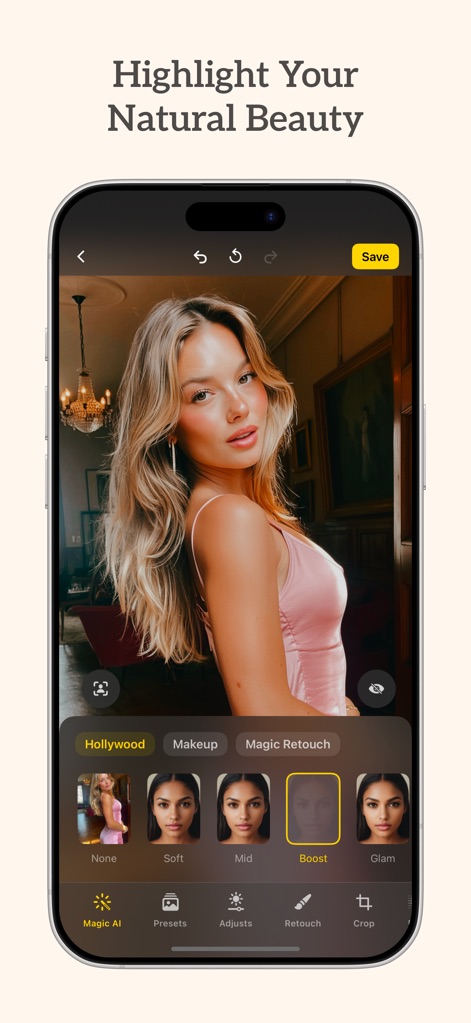
AI 마법 같은 보정
이 앱은 AI 기반 인물 보정 기능을 선보이며, 'Magic AI' 메뉴를 통해 사용자가 'Boost' 효과와 같은 다양한 옵션으로 인물 사진을 쉽고 빠르게 개선할 수 있음을 보여줍니다.
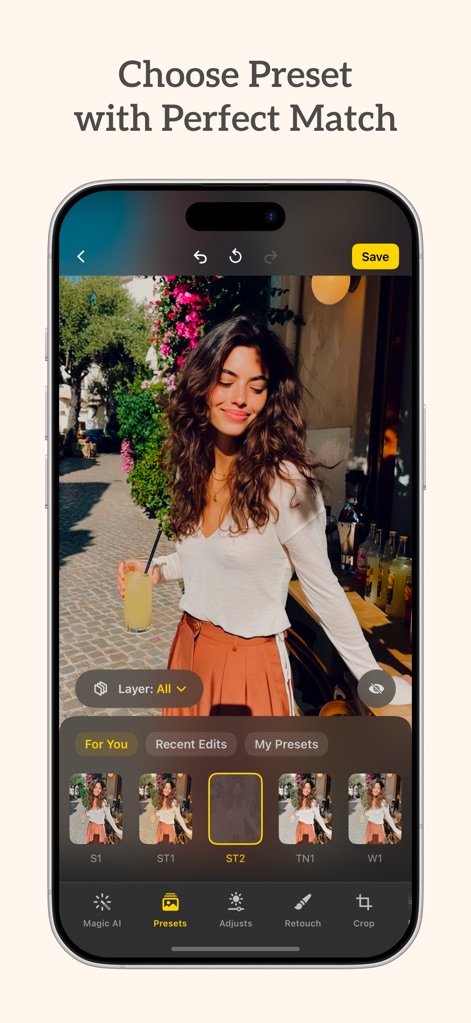
완벽한 프리셋 선택
이 앱은 'For You' 탭과 같은 다양한 카테고리를 통해 사용자가 'ST2' 프리셋과 같이 개성 있는 필터를 적용하여 사진의 분위기를 즉시 바꿀 수 있음을 보여줍니다.
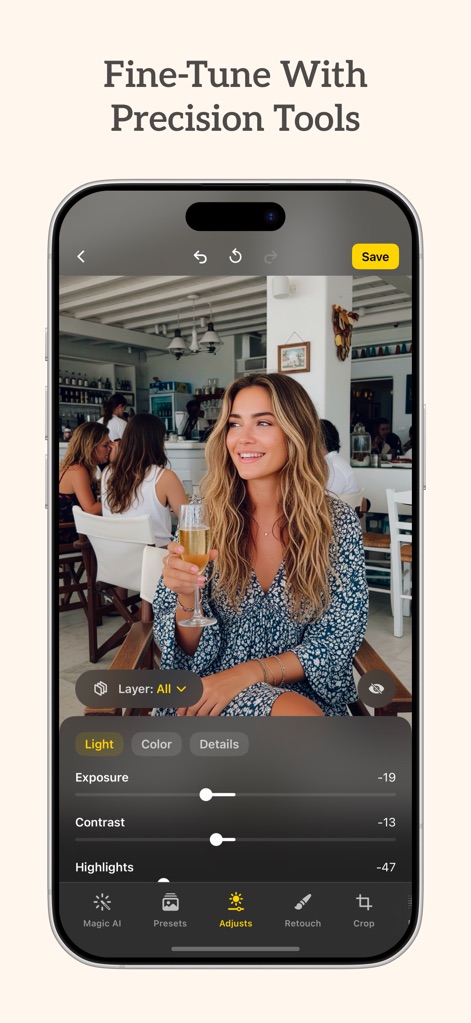
섬세한 조정 도구
이 앱은 정밀한 편집 도구를 제공하여 사용자가 'Light' 메뉴에서 'Exposure' 및 'Highlights'와 같은 세밀한 슬라이더를 조작하여 사진의 밝기를 완벽하게 조정할 수 있음을 보여줍니다.
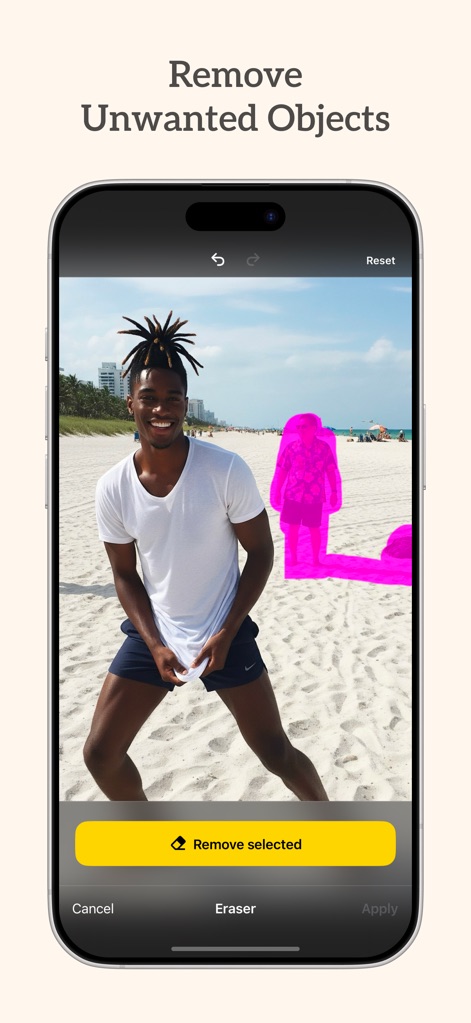
불필요한 요소 제거
이 앱은 이미지에서 불필요한 요소를 제거하는 기능을 시각적으로 보여주며, 'Remove selected' 버튼을 통해 사용자가 분홍색으로 표시된 객체를 손쉽게 지울 수 있습니다.
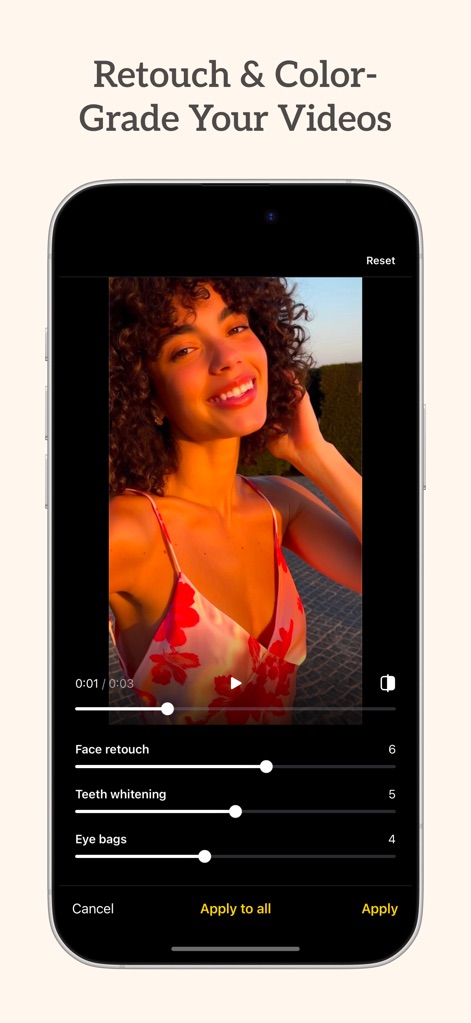
영상도 완벽하게
이 앱은 'Face retouch' 슬라이더와 'Teeth whitening' 슬라이더를 포함한 다양한 도구를 통해 사용자가 동영상을 매력적으로 보정하고 색상을 조정할 수 있음을 보여줍니다.
설명
Download
비슷한 앱
유사한 기능과 사용자 경험을 가진 앱

ElevenLabs: AI Voice Generator
Eleven Labs Inc.

Viggle AI: Meme Maker
WarpEngine Canada Inc.

可灵AI - AI图片&视频创作工具
Beijing Kwai Technology Co., Ltd.

Leonardo.Ai - Image Generator
Leonardo Interactive Pty Ltd

Reface: Face Swap AI Photo App
NEOCORTEXT, INC.

Shedevrum
DIRECT CURSUS COMPUTER SYSTEMS TRADING LLC

Remove Objects
TAPUNIVERSE LLC

Zaps Collages
Turnip Media Private Limited

Carat - Create Anything
Paradot Corp.
이 페이지는 앱이나 개발자의 공식 페이지가 아니며, 정보 제공 및 논평을 목적으로 작성된 독립 편집 간행물입니다. 명시적으로 달리 언급되지 않는 한, 해당 앱이나 개발자는 MWM, Apple, Google Play, 앱 퍼블리셔 또는 앱 개발자와 제휴, 보증, 후원, 승인 또는 공식적으로 연결되어 있지 않으며, 이 페이지의 어떤 내용도 해당 앱이 MWM의 서비스를 사용하여 개발되었음을 의미하지 않습니다. 모든 상표, 로고, 스크린샷 및 기타 콘텐츠는 해당 소유자의 자산입니다.