
이 페이지는 앱이나 개발자의 공식 페이지가 아니며, 정보 제공 및 논평을 목적으로 작성된 독립 편집 간행물입니다. 명시적으로 달리 언급되지 않는 한, 해당 앱이나 개발자는 MWM, Apple, Google Play, 앱 퍼블리셔 또는 앱 개발자와 제휴, 보증, 후원, 승인 또는 공식적으로 연결되어 있지 않으며, 이 페이지의 어떤 내용도 해당 앱이 MWM의 서비스를 사용하여 개발되었음을 의미하지 않습니다. 모든 상표, 로고, 스크린샷 및 기타 콘텐츠는 해당 소유자의 자산입니다.


Lightbox draw - tracing paper
이 앱은 당신의 손에 디지털 라이트박스를 쥐어줍니다. 정확하고 깨끗하게 베껴 그릴 수 있는 능력을 부여하는 셈입니다. 복잡한 그림도 선명한 선으로 분해해내며, 흔들림 없는 화면은 사용자의 집중력을 보장합니다.
다운로드
50k+사용자 평점
총 평가 수
419개발사
카테고리
Graphics & Design지원 언어
52최신 버전
1.0.30크기
93.2 MB출시일
2025년 7월 23일모바일 기기를 활용한 정밀한 드로잉 및 추적 솔루션 평가
Lightbox Draw - Tracing Paper 핵심 기능 분석
모바일 라이트박스 기능
이 앱은 사용자의 스마트폰이나 태블릿을 강력한 라이트박스 및 추적 도구로 전환하여, 언제 어디서든 종이 위에 이미지를 쉽고 정확하게 비춰 그릴 수 있도록 합니다. 이는 예술가, 학생, 디자이너, 취미 생활자 모두에게 필수적인 기반 기능을 제공합니다.
이미지 추적
사용자가 자신의 사진을 앱으로 가져오거나, 앱이 제공하는 미리 정의된 이미지 라이브러리에서 이미지를 선택하여 간편하게 추적할 수 있게 합니다. 이는 드로잉 학습부터 복잡한 작품 제작까지 폭넓은 활용 가능성을 제공합니다.
화면 잠금
추적 작업 중에 이미지의 우발적인 움직임이나 화면 터치로 인한 방해를 방지하기 위해 화면을 고정하는 기능을 제공합니다. 이 기능은 사용자가 집중하여 정밀한 선을 그릴 수 있도록 돕습니다.
윤곽선 변환
이 앱은 사진을 명확한 선화로 즉시 변환하여 사용자가 복잡한 이미지를 더 쉽고 정밀하게 추적하도록 돕습니다. 이는 특히 초보자가 형태를 파악하고 그리기를 배우는 데 큰 이점을 제공합니다.
자주 묻는 질문
에 대해 알아야 할 모든 것 Lightbox draw - tracing paper
What is Lightbox Draw - Tracing Paper?
Lightbox Draw - Tracing Paper transforms your phone or tablet into a powerful lightbox and tracing tool. It allows users to effortlessly trace any image onto paper for drawing and creative projects.
Can users trace their own photos using Lightbox Draw?
Yes, Lightbox Draw enables users to import their own photos for tracing. The app also provides a library of predefined images for selection, offering flexibility for various creative needs.
How does Lightbox Draw prevent accidental image movement during tracing?
Lightbox Draw features a "Lock Display" function. This feature keeps the tracing image steady on the screen, preventing accidental movement or interference during the tracing process.
Does Lightbox Draw convert photos into line art for easier tracing?
Yes, Lightbox Draw offers an "Outline Conversion" feature. This instantly transforms photos into clear line art, facilitating easier and more precise tracing for users.
Can users add a grid overlay in Lightbox Draw for precision?
Yes, Lightbox Draw allows users to activate a customizable "Overlay Grid." This feature aids in positioning images accurately and drawing with pinpoint precision on the device screen.
Who is Lightbox Draw - Tracing Paper designed for?
Lightbox Draw - Tracing Paper is designed for sketch artists, illustrators, students, designers, and hobbyists. It is ideal for improving art skills, calligraphy practice, stencil creation, and various DIY projects.
What are the basic steps to use Lightbox Draw - Tracing Paper?
To use Lightbox Draw, select an image, adjust its position, and lock the display. Then, place paper over your device screen and trace the image that shines through, drawing with confidence.
다음 스크린샷과 설명은 앱의 공식 스토어 목록에서 직접 가져온 것이며 앱 개발자의 자산입니다.
앱 스토어
스크린샷

이 앱은 휴대폰 화면을 통해 이미지가 종이에 투명하게 비치는 효과를 제공하며, 사용자는 펜을 사용하여 이미지를 쉽고 정확하게 따라 그릴 수 있습니다.
종이 위 트레이싱
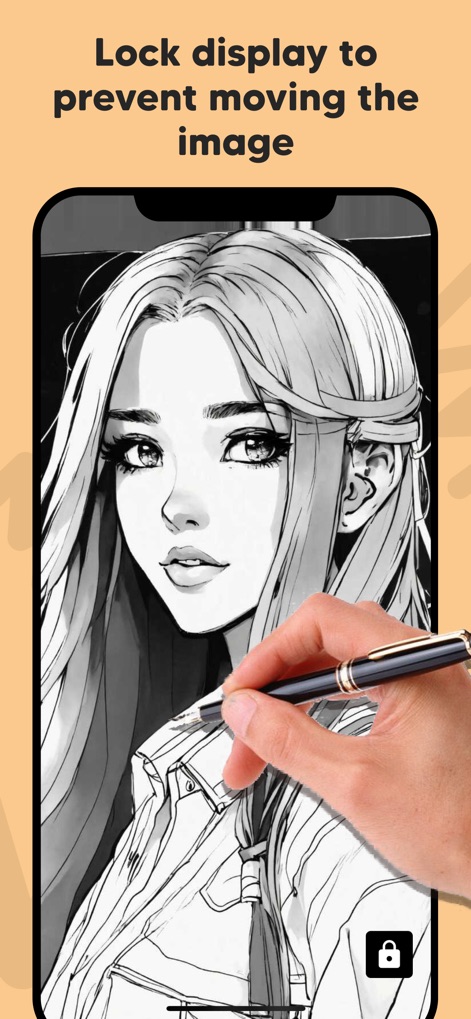
이 앱은 화면 하단에 위치한 잠금 아이콘을 통해 이미지가 움직이지 않도록 고정하여, 사용자가 스타일러스로 섬세하게 작업할 때 안정적인 드로잉 환경을 보장합니다.
화면 잠금으로 안정감
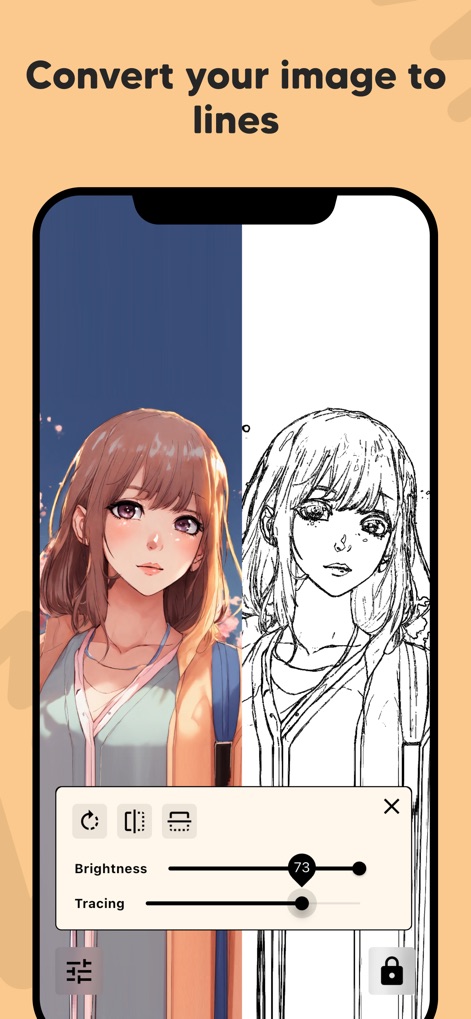
이 도구는 원본 이미지를 선명한 선화로 즉시 변환하는 기능을 제공하며, 사용자는 밝기 및 트레이싱 슬라이더를 조절하여 최적의 선명도를 설정할 수 있습니다.
선화 변환 기능
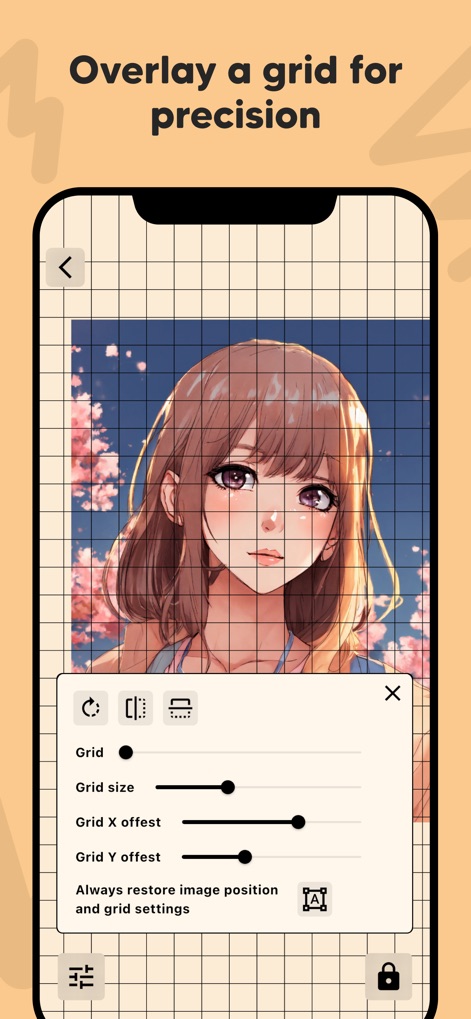
이 앱은 이미지 위에 맞춤형 격자를 오버레이하여 정확한 비율 조정을 돕고, 사용자는 격자 크기 및 오프셋 설정을 통해 세밀한 위치 조절이 가능합니다.
정밀한 격자 오버레이
설명
Download
비슷한 앱
유사한 기능과 사용자 경험을 가진 앱
이 페이지는 앱이나 개발자의 공식 페이지가 아니며, 정보 제공 및 논평을 목적으로 작성된 독립 편집 간행물입니다. 명시적으로 달리 언급되지 않는 한, 해당 앱이나 개발자는 MWM, Apple, Google Play, 앱 퍼블리셔 또는 앱 개발자와 제휴, 보증, 후원, 승인 또는 공식적으로 연결되어 있지 않으며, 이 페이지의 어떤 내용도 해당 앱이 MWM의 서비스를 사용하여 개발되었음을 의미하지 않습니다. 모든 상표, 로고, 스크린샷 및 기타 콘텐츠는 해당 소유자의 자산입니다.