TracingMat

TracingMat

다운로드: App Store
로고: TracingMat

TracingMat: iPad를 전문 라이트 테이블로 바꾸세요

모든 아티스트, 크래프터, 저널러가 디자인을 쉽게 종이에 따라 그릴 수 있는 최고의 도구입니다. 화면을 잠그고, 밝기를 조절하고, 이미지를 뒤집어 언제나 완벽한 정밀도를 얻으세요.

개발사

Yoko Nishimura

카테고리

Utilities

다운로드

95K+

사용자 평점

4.1/5

총 평가 수

0

지원 언어

2

모든 디테일을 마스터하세요

이 인터페이스를 사용하는 95K+ 명의 사용자.

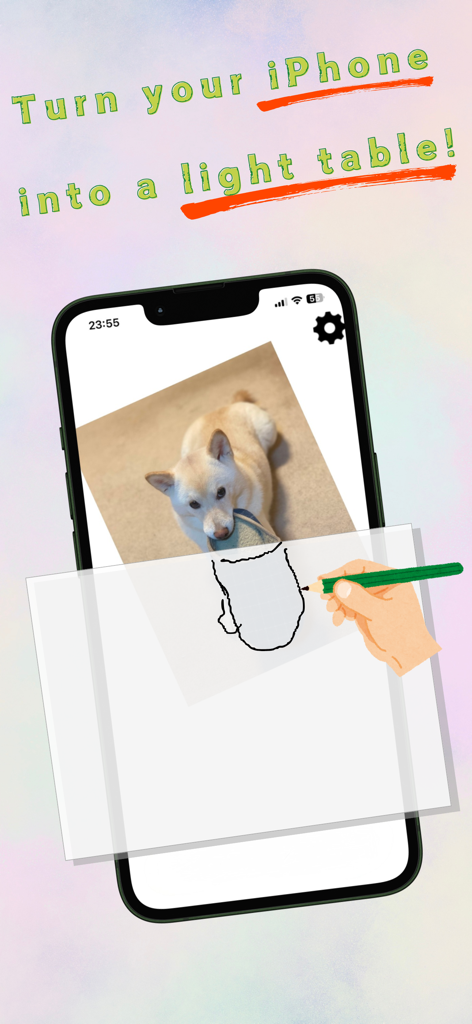
TracingMat 앱을 사용하여 종이에 종이 위에 강아지 이미지를 추적하는 손
TracingMat 앱을 사용하여 종이에 종이 위에 강아지 이미지를 추적하는 손

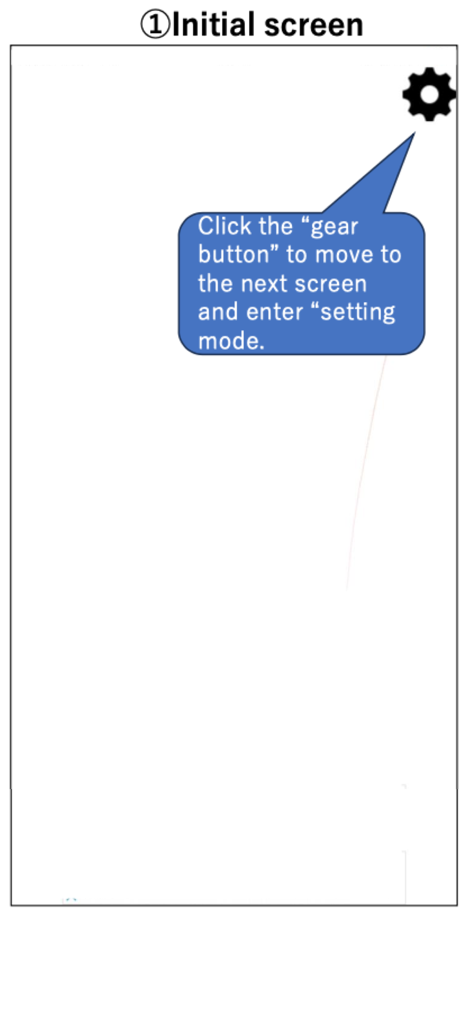
설정 기어 아이콘을 가리키는 튜토리얼 거품이 표시되는 TracingMat 앱의 초기 화면
설정 기어 아이콘을 가리키는 튜토리얼 거품이 표시되는 TracingMat 앱의 초기 화면

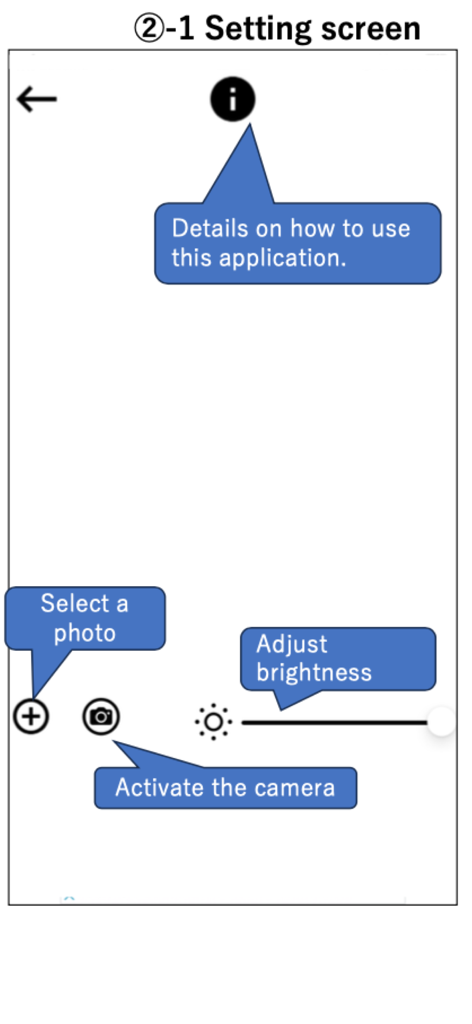
사진 선택, 카메라 활성화, 밝기 조절 아이콘을 보여주는 TracingMat 앱 설정 화면
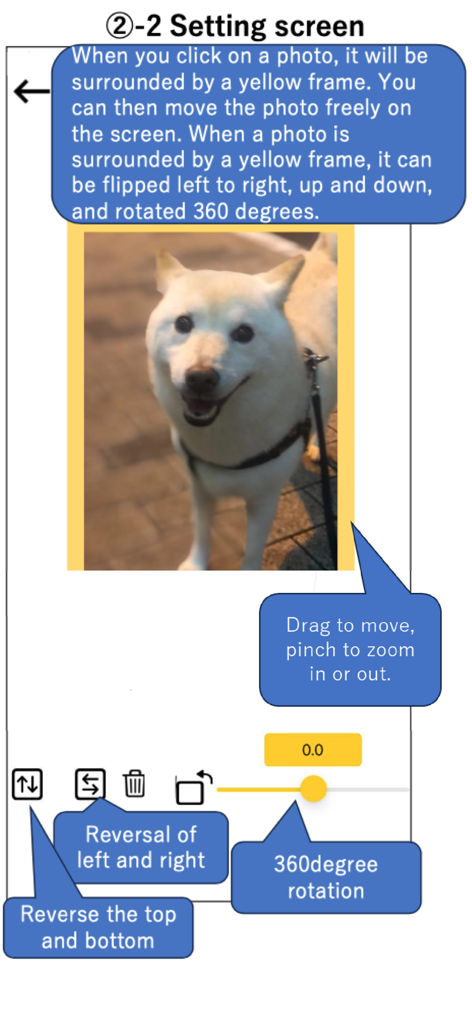
사진 선택, 카메라 활성화, 밝기 조절 아이콘을 보여주는 TracingMat 앱 설정 화면

추적을 위해 사진을 뒤집고 회전하고 확대/축소하는 도구를 보여주는 TracingMat 앱 설정 화면
추적을 위해 사진을 뒤집고 회전하고 확대/축소하는 도구를 보여주는 TracingMat 앱 설정 화면

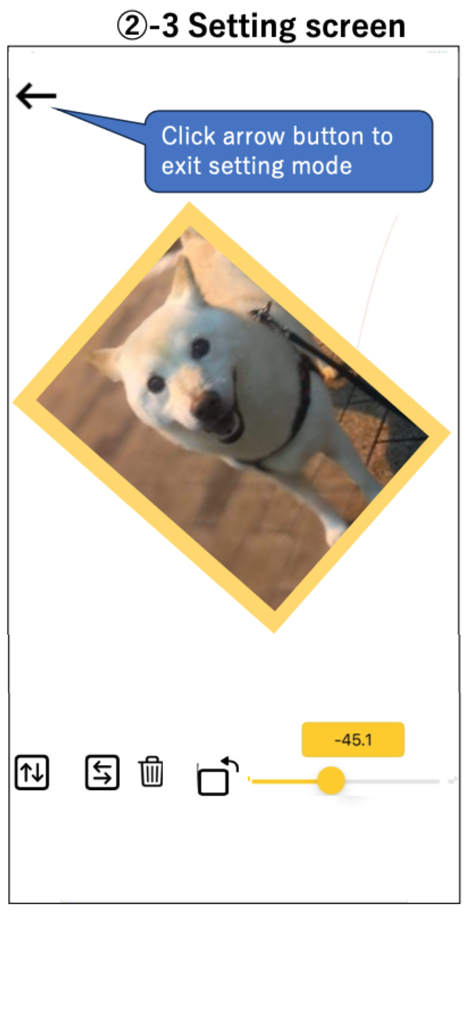
추적을 위해 강아지 이미지를 회전시키는 TracingMat 앱 설정 화면
추적을 위해 강아지 이미지를 회전시키는 TracingMat 앱 설정 화면

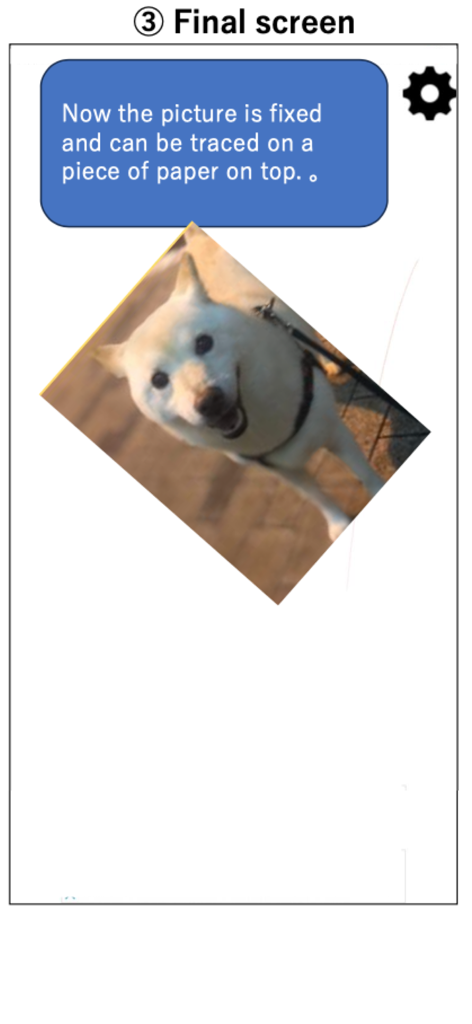
종이에 추적할 준비가 된 고정된 강아지 이미지가 표시되는 TracingMat 앱 인터페이스

종이에 추적할 준비가 된 고정된 강아지 이미지가 표시되는 TracingMat 앱 인터페이스

디지털 캔버스를 전문 라이트 박스로

이 앱을 돋보이게 하는 도구, 95K+ 명의 사용자가 선택.

🔒

터치 방지 잠금

한 번의 탭으로 이미지를 제자리에 고정하세요. 실수로 확대/축소하거나 이동하는 것을 방지하여 좌절감 없이 선 작업에 완전히 집중할 수 있습니다.

💡

최대 가시성

표준 제한을 넘어 화면 밝기를 높여 두꺼운 수채화 용지, 카드스톡 또는 자수 천을 쉽게 통과시켜 보세요.

🔄

미러 및 크기 조절 도구

디자인을 즉시 뒤집어 대칭을 확인하거나 회전하고 크기를 조절하여 실제 스케치북이나 DIY 프로젝트에 완벽하게 맞추세요.

앱 소개

에 대해 알아야 할 모든 것 TracingMat.

설명

"Tracing Mat" is an app for using your iPad or iPhone as a light table. After displaying the image you want to copy on the app, place the copy destination paper on it and trace the image that can be seen through under the paper. It is also possible to prepare the manuscript on paper, stack the copy destination paper on it, place it on the screen, and illuminate it from below with this application. [How to use] Tap the “gear” button on the upper right to enter the setting mode. In the setting mode, add the image to be displayed with the “+” button or "Camera" button at the bottom left. When you tap the displayed image, it will be in a state with a yellow frame. In this state, you can move the image by dragging and zoom in and out by pinching. you can also flip and rotate the image. The screen brightness can be adjusted with the slider bar at the bottom right. When you tap the “left arrow” button on the upper left to exit the setting mode, the displayed image will be fixed, so place a piece of paper from the top of the screen and trace it. [Caution] - I think it is easier to see the image under the paper if the room is darkened a little. - Attach a protective film, etc., to prevent the display from being scratched during copying. - Please use this application at your own risk. We do not take any responsibility for the disadvantage caused by using this application.

최신 버전

1.15.1

크기

4.6 MB

출시일

2020년 2월 6일

아이디어를 현실로 만들 준비가 되셨나요?

95,000명 이상의 창작자들이 iPad를 최고의 휴대용 라이트 테이블로 변환했습니다. 지금 TracingMat를 다운로드하고 전문적인 정밀도로 따라 그리기 시작하세요.

다운로드: App Store

App information, icons, screenshots, and descriptions displayed on this page are sourced from the Apple App Store and are the property of their respective developers. Download estimates and rankings are based on MWM's proprietary models and may not reflect actual figures. This page is provided for informational and analytical purposes only.

Believe this page infringes your intellectual property? File a dispute