iPad의 LiquidText 앱이 문서 분석 및 시각적 링크로 연결된 손글씨 메모를 워크스페이스에 표시하고 있음
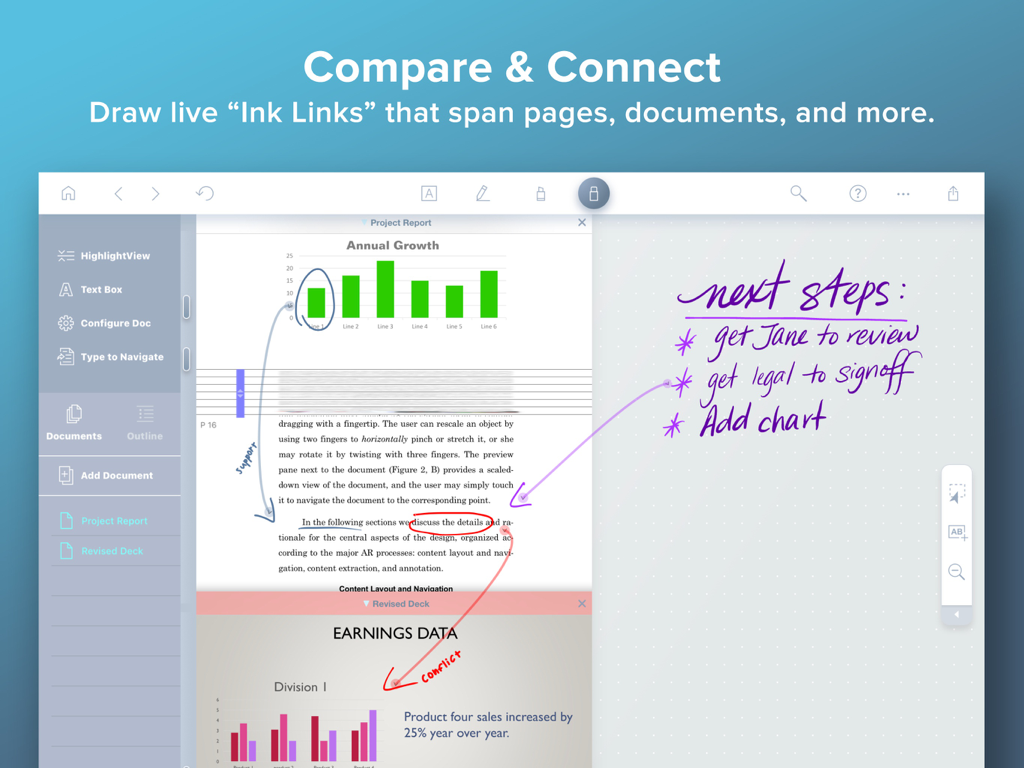
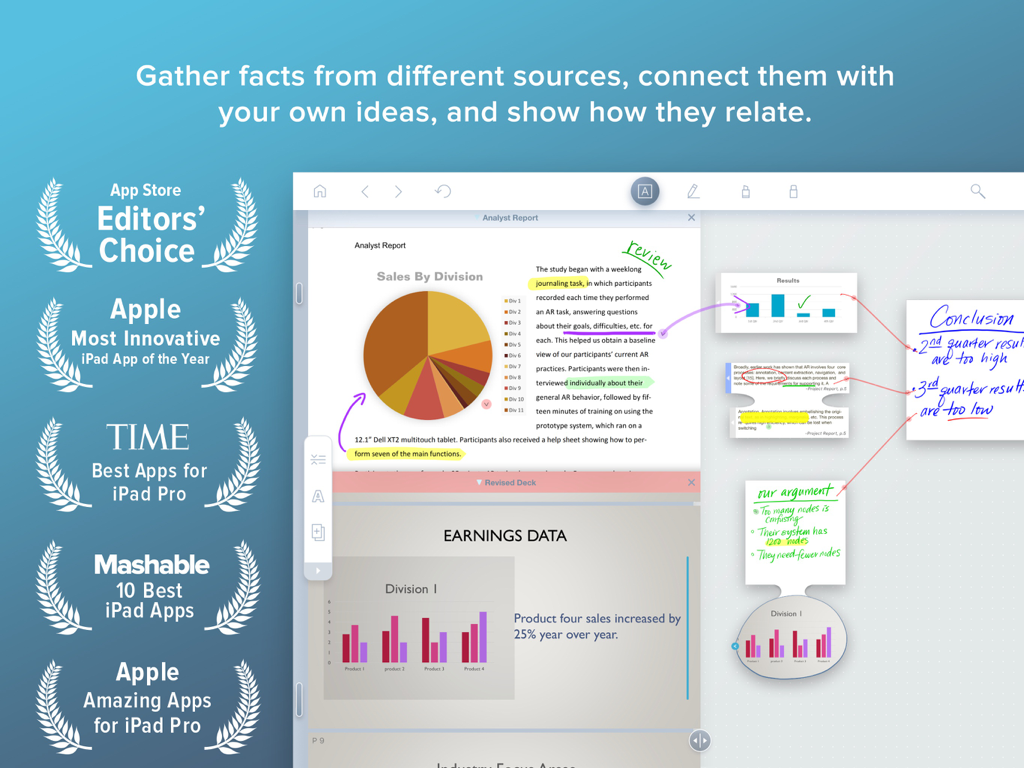
LiquidText 앱 인터페이스가 PDF의 차트를 손으로 쓴 프로젝트 메모에 연결하는 라이브 잉크 링크를 표시하고 있음.
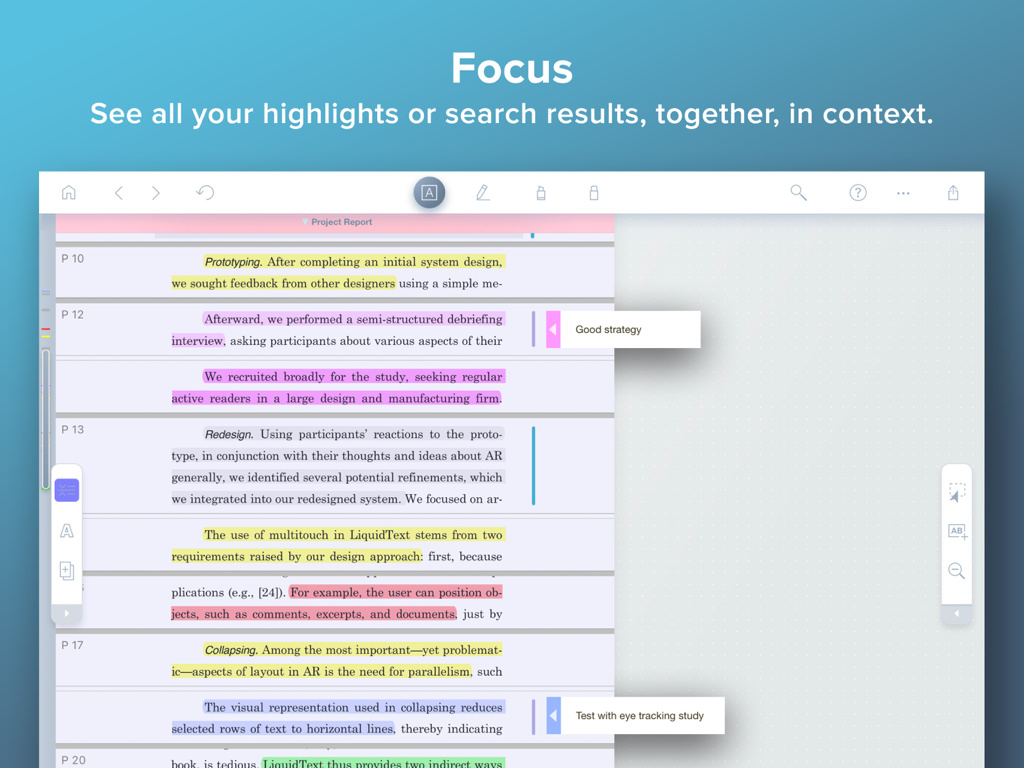
LiquidText 집중 모드가 함께 압축된 여러 하이라이트된 문서 섹션 및 여백 노트를 표시하고 있음.
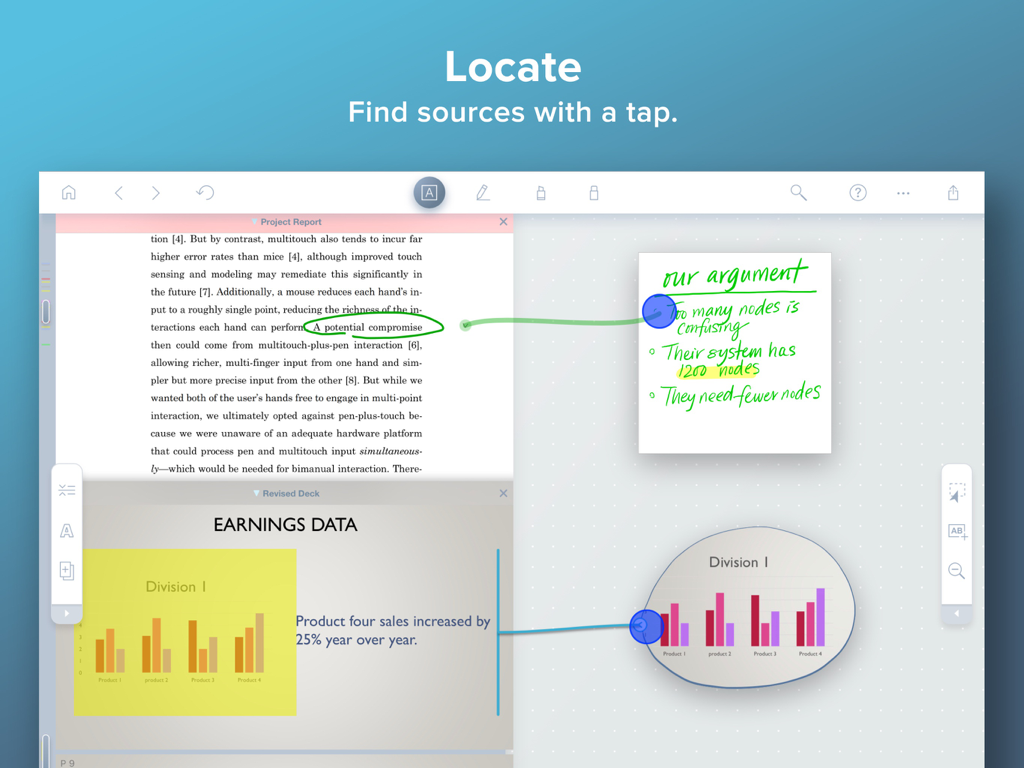
LiquidText iPad 앱 인터페이스가 잉크 링크를 메모와 문서 소스에 연결하는 것을 보여줌
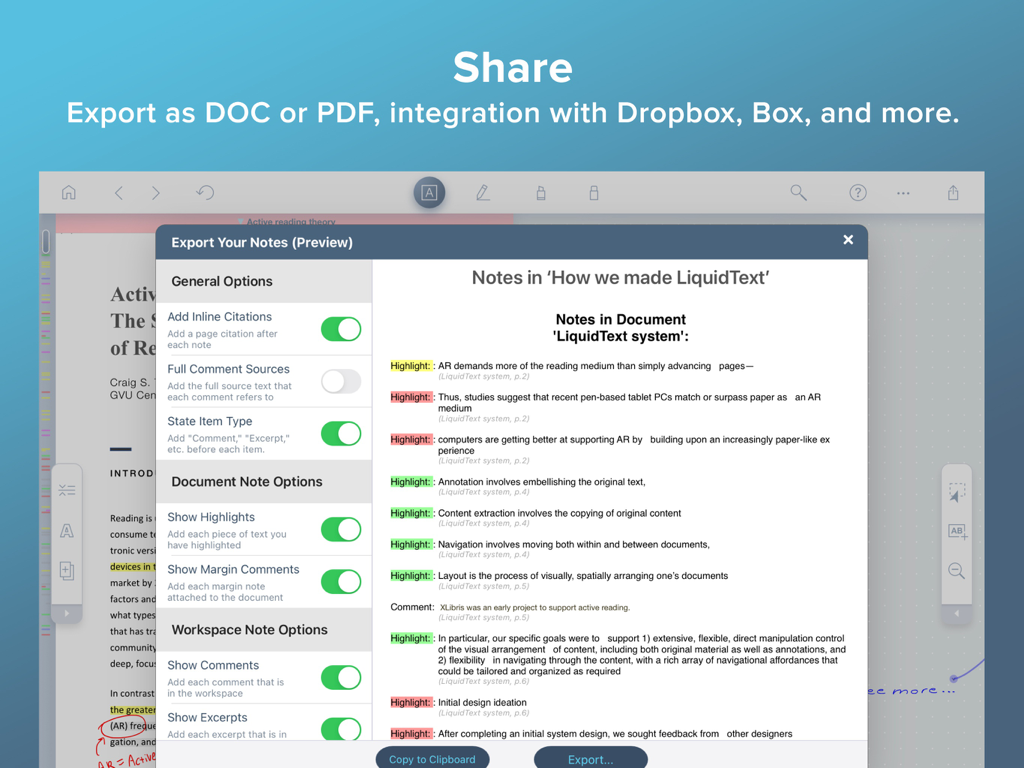
LiquidText 앱 인터페이스가 iPad에서 노트 내보내기 옵션 및 문서 미리보기를 보여줌
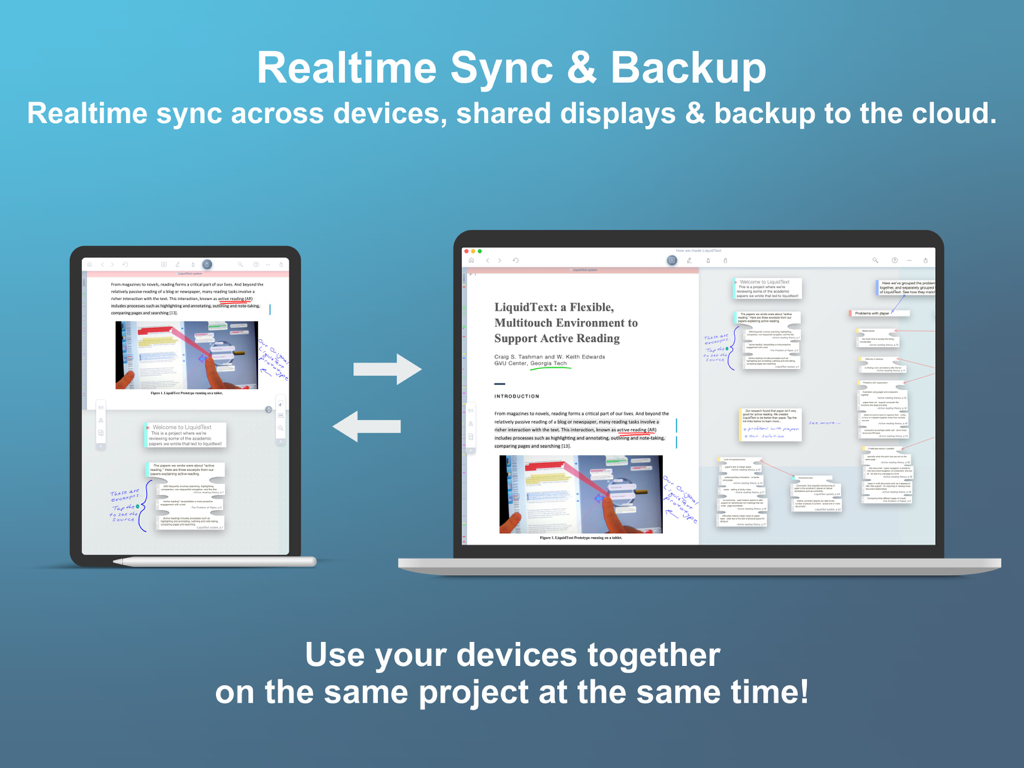
LiquidText 앱이 iPad와 Mac 노트북 간의 실시간 동기화 및 클라우드 백업을 시연하고 있음
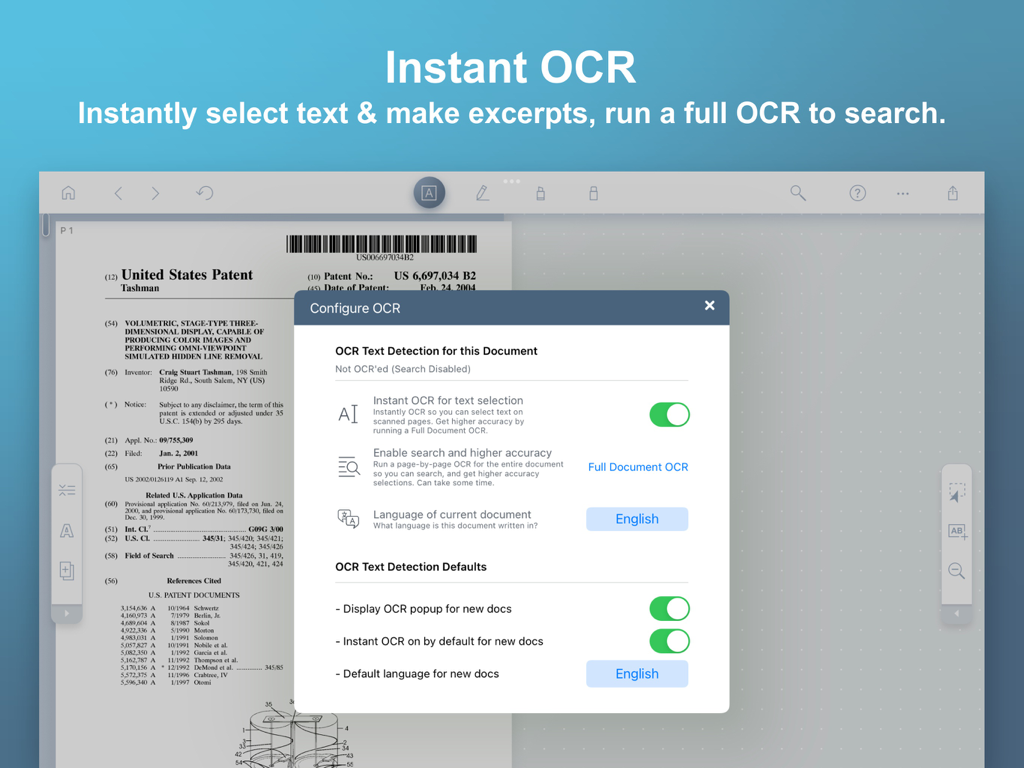
LiquidText 앱 인터페이스가 특허 문서에 대한 즉각적인 OCR 및 텍스트 감지 설정을 보여주고 있음
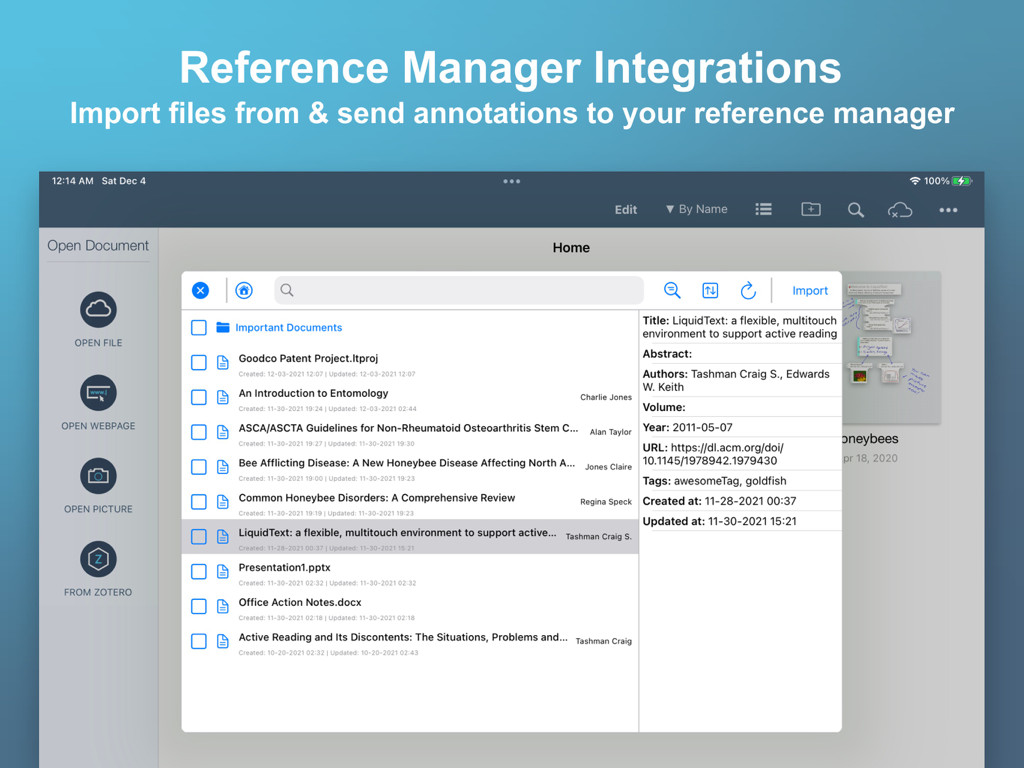
LiquidText 앱 인터페이스가 연구 문서에 대한 참조 관리자 통합을 보여주고 있음
분석 능력을 발휘하세요
이 앱을 돋보이게 하는 도구, 3M+ 명의 사용자가 선택.
🧩
동적 정보 추출
원본 출처와의 연결을 잃지 않고 발견한 내용을 정리하기 위해 핵심 발췌문과 이미지를 유연한 워크스페이스로 직접 가져옵니다.
↕️
지능형 문서 압축
수백 페이지를 축소하여 멀리 떨어진 섹션을 나란히 비교하기 위해 핀치하여 집중적인 검토 중 스크롤 피로를 제거합니다.
🔗
라이브 다중 문서 연결
다른 파일 및 메모에 걸쳐 시각적 '잉크 링크'를 만들어 복잡한 관계를 매핑하고 입증 가능한 주장을 구축합니다.
리뷰 분석
사용자 리뷰 인사이트.
감정 점수
31%
부정적
요약
The app is highly valued by users for its robust features in research and academic work, particularly its ability to facilitate annotation, visual organization, and mind mapping of complex documents. Users praise its effectiveness in handling large volumes of medical literature and academic texts, with some finding it a "game-changer" for productivity and integration with tools like Zotero. However, feedback is strongly negative regarding the app's "egregious" pricing model, which often involves multiple paywalls and expensive subscriptions for basic functionalities, alienating students and long-term users. Frequent bugs, crashes, freezing, and data loss are significant frustrations, compounded by unresponsive customer support and a desire for crucial missing features such as dark mode, multi-image upload, and reliable cross-device synchronization.
주요 테마
Pricing & Subscription Model(23)
Missing Features & UI/UX(17)
Bugs & Stability(16)
Research & Academic Use(10)
Annotation & Organization(9)
Customer Support(7)
Sync & Cross-Platform(7)
앱 소개
에 대해 알아야 할 모든 것 LiquidText.
설명
*** Named “Most Innovative iPad App of the Year” by Apple App Store ***
LiquidText offers a fast, natural way to review, gather, and organize information across all your documents and webpages—then apply the results to writing reports, meeting prep, or simply studying. Pull out key facts and connect them together, squeeze a document to compare sections, draw a line to connect ideas in different documents, comment on multiple pages at once, build upon your thoughts, and much more.
► WHAT PEOPLE ARE SAYING:
* "If you want to experience the power of going beyond paper, you can download LiquidText" – Cult of Mac
* One of Macworld’s Top 24 Apps for iPad Pro
* One of Time Magazine's Ten Best apps for iPad Pro *
* "There's a better way to organize your research, and the app is it." – iMore, Serenity Caldwell
* “All you need for deep research projects.” – Macworld, Jackie Dove
* "The world changed with...LiquidText" – Law360, Paul Kiesel
* "LiquidText may just be *the* app for reviewing and annotating PDFs using Apple's tablet and stylus." – CIO Magazine, James Martin
* “One of the most powerful, original iPad apps I've tried in years” – Federico Viticci, MacStories.net
► LIQUIDTEXT’S COMPLETE FEATURE SET INCLUDES:
(Features with * require a paid upgrade.)
Import
• Create a workspace and import all the documents and web pages you need
• Compatible with PDF, Word, and PowerPoint document types
• Import from Dropbox, iCloud Drive, Box, email, and more
• Import content from webpage or send to LiquidText directly from Safari
• Instant OCR to select text in scanned documents; do a full document-OCR to search as well!*
• Import documents & metadata directly from reference managers (supports Zotero and Mendeley)*
Interact
• Pull excerpts from all the documents in your project into the Workspace area
• Add your own notes (typed or written) to the Workspace area
• Freely draw on your notes, or on the workspace itself*
• Organize excerpts and notes into groups
• Connect anything - draw live “ink links” that span pages, documents, notes, and more*
• Create mind-maps by drawing “ink links” connecting your excerpts/notes to one another *
• Get context - tap notes and excerpts to find original source
Compare
• Pinch a document to compare different distant pages side by side
• Collapse text to see annotated parts side-by-side
• Collapse text to view search results(s) side-by-side
• Import unlimited number of documents into a project, view up to 3 at once*
Annotate
• Freely draw* or highlight on your document, notes, or the workspace itself
• Add margin notes/comments to text, images, notes, and excerpts
• Comment on two or more selections simultaneously
• Replace document with a newer version (and annotations are brought to new doc)*
Search
• Search for keywords across all your LiquidText documents
• Find keywords in title or text of your documents*
• Bulk highlight, tag, or link to your search results*
Realtime Collaboration
• Invite colleagues into your shared projects and work together in near realtime*
• Leave comments and notifications for your collaborators*
• Privacy controls: set whether each workspace & document in your project is shared or private*
Easy Export
• Export your project as a PDF (includes your Workspace and documents)
• Export your project as a Word file (converts your notes/excerpts into a linear document)
• Send a full LiquidText file for those with the app.
• Send files by email or to Dropbox, iCloud Drive, Zotero, and more*
Sync & Backup*
• Real-time, cross-platform sync
• Continuous cloud backup
• Multi-device display:
• Use your desktop or tablet as additional display for your other device
• Use your tablet for freehand inking while viewing and keyboarding on your desktop
See our terms of use at https://www.liquidtext.net/terms-of-use
Learn more at LiquidText.net | Better Than Paper
최신 버전
7.1.10
크기
303.9 MB
출시일
2015년 9월 3일
심층 리서치의 미래를 경험하세요
종이를 넘어서 이주한 3백만 명 이상의 전문가, 변호사 및 연구원과 함께하세요. 지금 LiquidText를 다운로드하고 복잡한 문서를 실행 가능한 통찰력으로 바꾸세요.
FAQ
자주 묻는 질문
에 대해 알아야 할 모든 것 LiquidText
LiquidText는 무엇을 위해 설계되었나요?
LiquidText는 사용자가 문서와 웹페이지의 정보를 검토, 수집 및 정리할 수 있도록 지원하는 iPad 앱입니다. 사실을 추출하고, 아이디어를 연결하고, 주석을 달고, 연구 또는 학습 자료를 준비하는 데 도움을 줍니다.
LiquidText는 어떤 문서 형식을 가져오기(import)로 지원하나요?
LiquidText는 PDF, Word, PowerPoint 문서 형식을 가져오는 것을 지원합니다. 또한 웹페이지 및 Safari에서 직접 콘텐츠를 가져올 수 있어 사용자의 문서 접근성을 향상시킵니다.
LiquidText에 OCR 기능이 포함되어 있나요?
네, LiquidText는 스캔된 문서에서 텍스트를 선택하기 위한 즉각적인 OCR 기능과 전체 문서를 검색할 수 있게 하는 전체 문서 OCR 기능을 제공합니다. 전체 문서 OCR은 유료 업그레이드가 필요합니다.
LiquidText에서 다른 사람과 프로젝트를 공동으로 작업할 수 있나요?
네, LiquidText는 실시간 공동 작업 기능을 제공합니다. 사용자는 동료를 공유 프로젝트에 초대하고, 동시에 함께 작업하며, 댓글 기능을 활용할 수 있습니다. 이 실시간 공동 작업 기능은 유료 업그레이드가 필요합니다.
LiquidText에서 지원하는 내보내기(export) 형식은 무엇인가요?
LiquidText는 작업 공간(Workspace) 및 원본 문서를 포함하여 프로젝트를 PDF 파일로 내보내는 것을 지원합니다. 또한 노트와 발췌문을 선형적인 Word 문서로 변환합니다. 사용자는 전체 LiquidText 파일을 보낼 수 있습니다.
LiquidText는 다중 장치 동기화를 제공하나요?
네, LiquidText는 실시간, 크로스 플랫폼 동기화 및 지속적인 클라우드 백업을 제공합니다. 다중 장치 표시를 지원하여 사용자가 여러 장치를 함께 사용할 수 있습니다. 이 기능은 유료 업그레이드가 필요합니다.
LiquidText는 학술 참고 문헌 관리자와 통합되나요?
네, LiquidText는 Zotero 및 Mendeley와 같은 참고 문헌 관리자와 통합됩니다. 사용자는 이러한 관리자로부터 문서를 직접 가져올 수 있으며, 주석을 다시 보낼 수도 있습니다. 이 기능은 유료 업그레이드가 필요합니다.
LiquidText에서 손글씨 그리기가 가능한가요?
네, LiquidText는 노트, 작업 공간 및 문서에 직접 손글씨 그리기를 허용합니다. 일반적으로 아이디어를 연결하는 '라이브 잉크 링크(ink links)' 그리기와 같은 기능은 유료 업그레이드가 필요합니다.
LiquidText 내에서 문서를 비교하거나 섹션을 비교하려면 어떻게 해야 하나요?
LiquidText를 사용하면 문서를 꼬집어(pinch) 다른 페이지를 나란히 비교할 수 있습니다. 또한 텍스트를 축소하여 주석이 달린 부분이나 검색 결과를 함께 볼 수 있습니다. 유료 업그레이드를 통해 최대 세 개의 문서를 동시에 볼 수 있습니다.
LiquidText는 공동 작업 프로젝트에 대한 개인 정보 보호 설정을 제공하나요?
네, LiquidText는 공유 프로젝트에 대한 개인 정보 보호 제어를 제공합니다. 사용자는 프로젝트 내의 개별 작업 공간과 문서가 공유될지 아니면 비공개로 유지될지 결정할 수 있습니다. 이 제어는 유료 기능의 일부입니다.
LiquidText의 모든 기능이 무료인가요, 아니면 유료 업그레이드도 있나요?
LiquidText는 핵심 기능을 제공하지만, 많은 고급 기능은 유료 업그레이드가 필요합니다. 여기에는 OCR, 실시간 공동 작업, 동기화 및 백업, 참고 문헌 관리자 통합 등이 포함되며, 기능 목록에서 별표(*)로 표시됩니다.
App information, icons, screenshots, and descriptions displayed on this page are sourced from the Apple App Store and are the property of their respective developers. Download estimates and rankings are based on MWM's proprietary models and may not reflect actual figures. This page is provided for informational and analytical purposes only.
Believe this page infringes your intellectual property? File a dispute