
이 페이지는 앱이나 개발자의 공식 페이지가 아니며, 정보 제공 및 논평을 목적으로 작성된 독립 편집 간행물입니다. 명시적으로 달리 언급되지 않는 한, 해당 앱이나 개발자는 MWM, Apple, Google Play, 앱 퍼블리셔 또는 앱 개발자와 제휴, 보증, 후원, 승인 또는 공식적으로 연결되어 있지 않으며, 이 페이지의 어떤 내용도 해당 앱이 MWM의 서비스를 사용하여 개발되었음을 의미하지 않습니다. 모든 상표, 로고, 스크린샷 및 기타 콘텐츠는 해당 소유자의 자산입니다.


Microsoft Outlook
이 앱은 디지털 세상의 혼돈 속에서 사용자가 지휘권을 획득하게 함이 관찰됩니다. 모든 계정을 중앙 집중화하고, AI의 날카로운 통찰로 메시지를 해부하여, 의사결정 과정을 가속화하는 명백한 도구입니다.
다운로드
250M+사용자 평점
총 평가 수
30.8M개발사
카테고리
Productivity지원 언어
47최신 버전
5.2612.0크기
414.7 MB출시일
2015년 1월 29일Microsoft Outlook 모바일 앱 주요 기능 분석
AI 기반 Copilot과 통합된 생산성 도구로 효율성을 극대화하는 Outlook 앱의 핵심 역량
Copilot 기반 이메일 스레드 요약
이 앱은 Copilot을 통해 긴 이메일 스레드의 주요 내용을 즉시 요약하여 사용자가 핵심 정보를 빠르게 파악하고 시간을 절약할 수 있게 해줍니다.
Copilot 기반 이메일 초안 작성 지원
이 도구는 사용자가 몇 단어만 입력해도 Copilot이 이메일 초안이나 개요를 작성하는 데 도움을 주어, 글쓰기 시작에 드는 노력을 줄여줍니다.
Copilot 기반 이메일 문맥 코칭
이 앱은 Copilot을 활용하여 이메일 발송 전 어조, 감정, 명확성을 개선할 수 있는 팁과 제안을 제공함으로써 사용자가 보다 효과적으로 소통할 수 있도록 돕습니다.
통합된 이메일 및 캘린더 관리
이 앱은 모든 이메일 계정과 캘린더를 한곳에 모아 사용자가 편리하게 관리하고, 생산적이고 체계적인 업무 환경을 유지할 수 있도록 지원합니다.
스마트 받은 편지함
이 도구는 스마트 받은 편지함을 통해 사용자가 즉시 조치해야 할 메시지와 그렇지 않은 메시지를 자동으로 분류하여, 중요한 정보에 집중할 수 있도록 돕습니다.
Office 문서 직접 편집 및 재첨부
이 앱은 사용자가 Word, Excel, PowerPoint 첨부 파일을 해당 앱에서 직접 열어 편집하고 이메일에 다시 첨부할 수 있게 하여, 효율적인 문서 작업을 가능하게 합니다.
간편한 회의 시간 공유 및 조율
이 도구는 사용자가 탭 한 번으로 자신의 회의 가능 시간을 공유하고 다른 사람들과의 회의 시간을 쉽게 조율할 수 있도록 지원하여, 일정 관리를 간소화합니다.
통합 검색 기능
이 앱은 파일, 연락처, 예정된 여행 정보를 포함하여 사용자가 찾는 모든 것을 통합적으로 검색할 수 있는 기능을 제공하여, 정보 접근성을 높여줍니다.
클라우드 파일 첨부 및 미리보기
이 도구는 사용자가 파일을 휴대폰에 다운로드하지 않고도 이메일, OneDrive, Dropbox 등에서 파일을 보고 첨부할 수 있게 하여, 편리한 파일 관리를 지원합니다.
제스처 기반 빠른 메일 관리
이 앱은 사용자가 스와이프를 통해 메시지를 빠르게 예약하거나 삭제하고 보관할 수 있게 해주어, 받은 편지함을 효율적으로 관리할 수 있도록 돕습니다.
자주 묻는 질문
에 대해 알아야 할 모든 것 Microsoft Outlook
What is Microsoft Outlook for iOS?
Microsoft Outlook for iOS is an app that centralizes email accounts and calendars in one convenient spot. It helps users stay productive, organized, and connected.
Does Microsoft Outlook for iOS have a smart inbox?
Yes, Microsoft Outlook for iOS features a smart inbox. It helps users sort between messages requiring immediate action and other emails.
Can users manage emails with swipe gestures in Microsoft Outlook for iOS?
Yes, Microsoft Outlook for iOS allows users to quickly schedule, delete, and archive messages using intuitive swipe gestures directly from the inbox.
How do I share meeting availability in Microsoft Outlook for iOS?
Microsoft Outlook for iOS allows users to share their meeting availability with just a tap, simplifying the process of finding suitable times to meet with others.
What can I search for in Microsoft Outlook for iOS?
In Microsoft Outlook for iOS, users can find everything they are looking for, including files, contacts, and forthcoming trips, using the built-in search function.
Can Microsoft Outlook for iOS access files from cloud storage?
Yes, Microsoft Outlook for iOS allows viewing and attaching files directly from email, OneDrive, Dropbox, and more, without downloading them to the phone.
Can I edit Word, Excel, or PowerPoint attachments in Microsoft Outlook for iOS?
Yes, Microsoft Outlook for iOS allows users to open and edit Word, Excel, or PowerPoint attachments directly in their corresponding apps, then attach them back to an email.
How does Microsoft Outlook for iOS summarize email threads?
Microsoft Outlook for iOS can instantly recap extra-long email threads using the "Summarise with Copilot" feature, condensing the content for quick understanding.
Can Microsoft Outlook for iOS generate email drafts?
Yes, Microsoft Outlook for iOS's Copilot feature jump-starts writing. Users type a few words, and Copilot generates an outline or draft.
Does Microsoft Outlook for iOS offer writing assistance for emails?
Yes, Microsoft Outlook for iOS provides "Coaching with Copilot." This feature offers tips and suggestions to improve email tone, sentiment, and clarity before sending.
What are the requirements to use Copilot features in Microsoft Outlook for iOS?
To use Copilot features in Microsoft Outlook for iOS, users require a Microsoft 365 Personal/Family subscription or a business account enabled with Copilot.
Which email accounts does Microsoft Outlook for iOS support?
Microsoft Outlook for iOS supports accounts from Microsoft Exchange, Office 365, Outlook.com (Hotmail, MSN), Gmail, Yahoo Email, and iCloud.
How do I purchase a Microsoft 365 subscription within Microsoft Outlook for iOS?
To purchase a Microsoft 365 subscription in Microsoft Outlook for iOS, open the app, go to Settings, and tap "Upgrade" next to your Outlook.com or Hotmail.com account.
How much does a Microsoft 365 subscription cost through Microsoft Outlook for iOS?
Microsoft 365 subscriptions purchased via Microsoft Outlook for iOS start at $6.99 per month in the US. Pricing varies by region.
What benefits come with a Microsoft 365 subscription purchased via Microsoft Outlook for iOS?
A Microsoft 365 subscription offers 1TB storage per user, full Word, Excel, and PowerPoint access on iOS, plus installation rights for these and other apps on PCs/Macs.
How do Microsoft Outlook for iOS subscriptions renew?
Microsoft 365 subscriptions purchased through Microsoft Outlook for iOS automatically renew via your iTunes account within 24 hours before the current period ends, unless auto-renewal is disabled.
Can I cancel a Microsoft Outlook for iOS subscription mid-period?
No, a Microsoft 365 subscription purchased through Microsoft Outlook for iOS cannot be canceled during its active subscription period.
Where can I find the privacy policy for Microsoft Outlook for iOS?
The privacy policy for Microsoft Outlook for iOS is accessible via the link: https://go.microsoft.com/fwlink/?LinkId=521839.
Does Microsoft Outlook for iOS include intelligent writing tools like spell check?
Yes, Microsoft Outlook for iOS includes intelligent writing tools such as spell check, which corrects errors like misspelled words during email composition.
다음 스크린샷과 설명은 앱의 공식 스토어 목록에서 직접 가져온 것이며 앱 개발자의 자산입니다.
앱 스토어
스크린샷
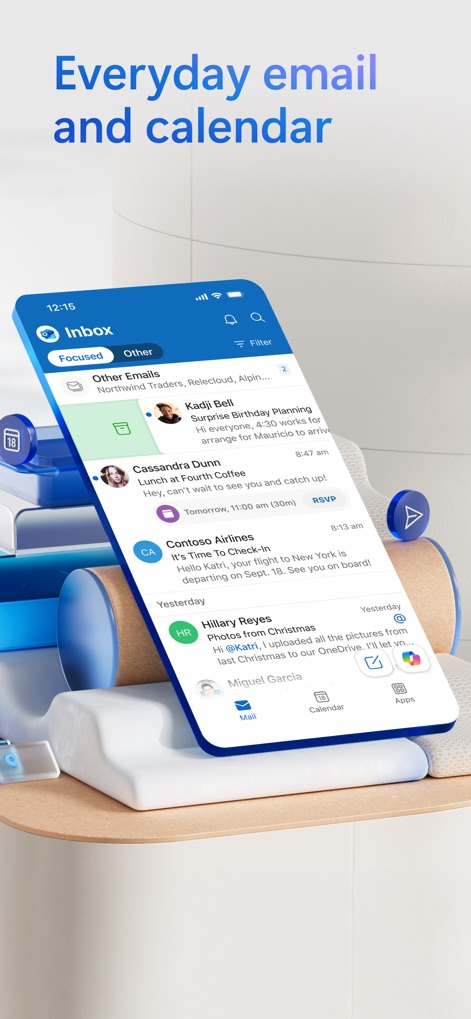
스마트 받은편지함
이 앱은 "Focused" 및 "Other" 탭으로 중요한 메일을 분류하고, 하단의 "Mail" 및 "Calendar" 탭을 통해 이메일과 일정을 통합 관리할 수 있도록 돕습니다.
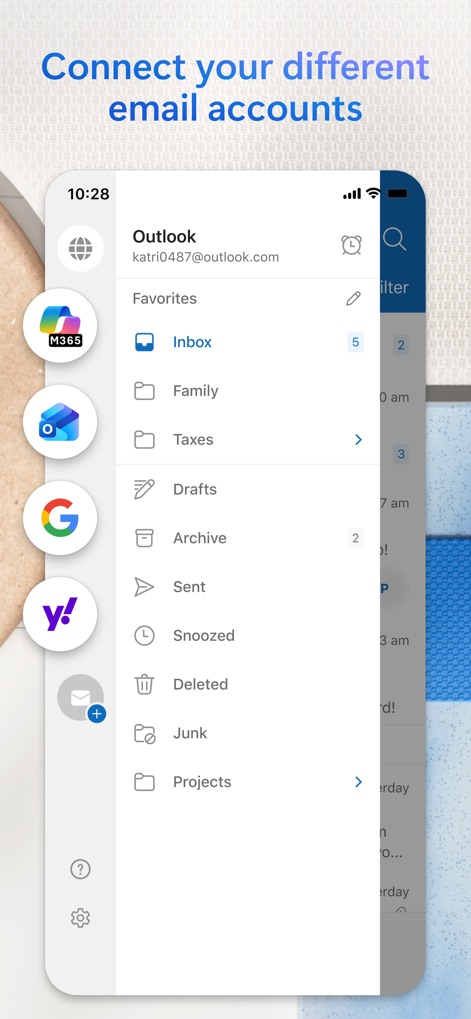
계정 통합 관리
이 앱은 Microsoft 365, Outlook, Google, Yahoo 등 다양한 이메일 계정을 한곳에 연결하여 관리하며, "Inbox", "Family", "Taxes"와 같은 맞춤형 폴더로 효율적인 분류를 제공합니다.
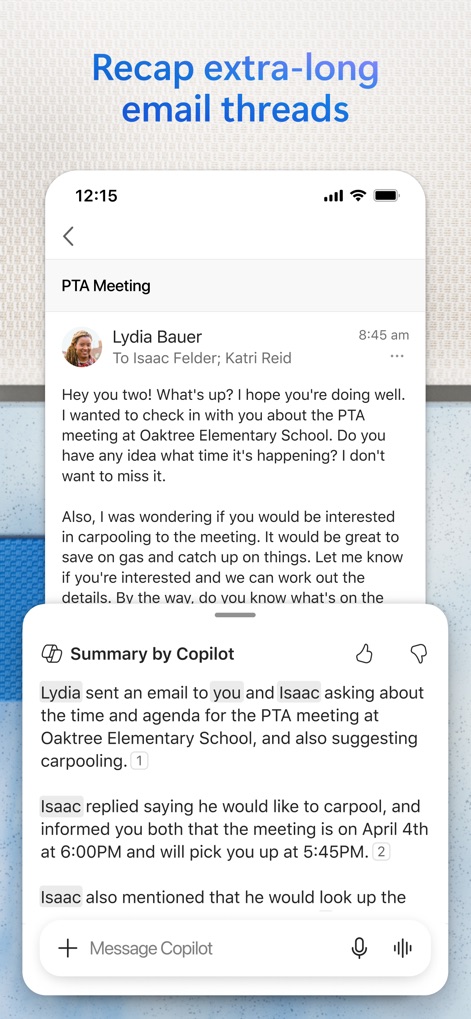
Copilot 요약본
사용자는 "Summary by Copilot" 기능을 활용하여 긴 이메일 스레드를 빠르게 요약할 수 있으며, 요약된 회의 및 카풀 정보를 통해 핵심 내용을 신속하게 파악합니다.
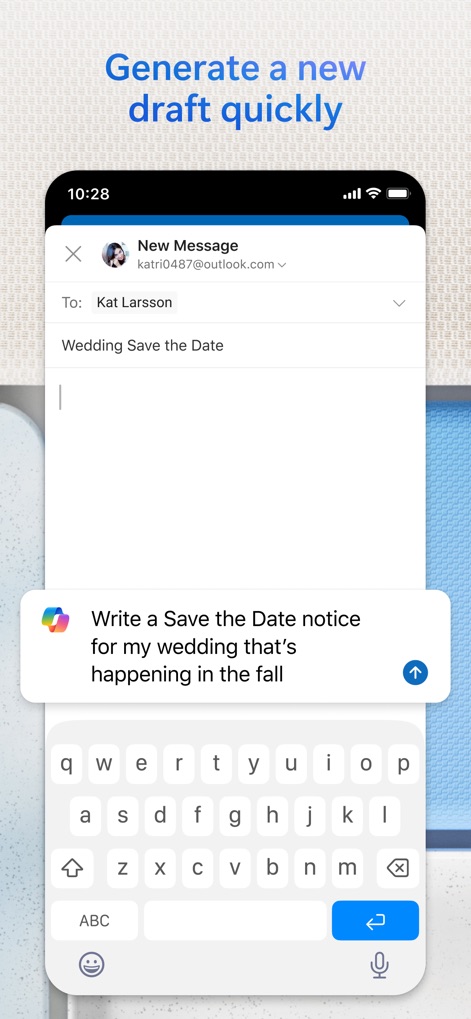
Copilot 초안 작성
이 앱은 "Copilot" 프롬프트 입력창을 통해 이메일 초안 작성을 도와주며, "Save the Date" 알림 생성 제안과 같은 맞춤형 콘텐츠를 생성합니다.
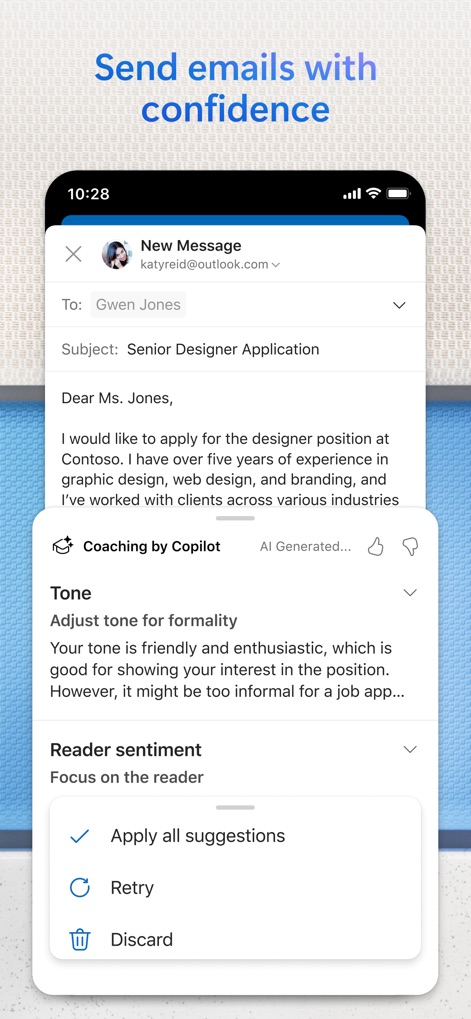
Copilot 작성 코칭
"Coaching by Copilot" 기능을 통해 이메일 작성 시 전문적인 피드백을 받을 수 있으며, 어조 및 독자 감정에 대한 구체적인 조언으로 메시지의 효과를 극대화합니다.
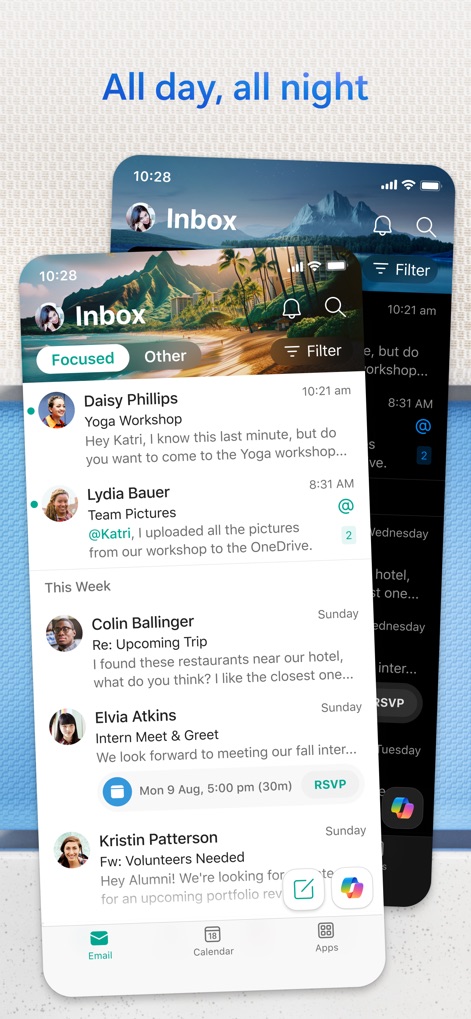
유연한 사용자 인터페이스
이 앱은 라이트 및 다크 모드를 모두 지원하여 사용자의 환경 설정에 맞춰 시각적 편안함을 제공하며, "Focused" 및 "Other" 받은 편지함을 통해 중요한 메일에 집중할 수 있도록 돕습니다.
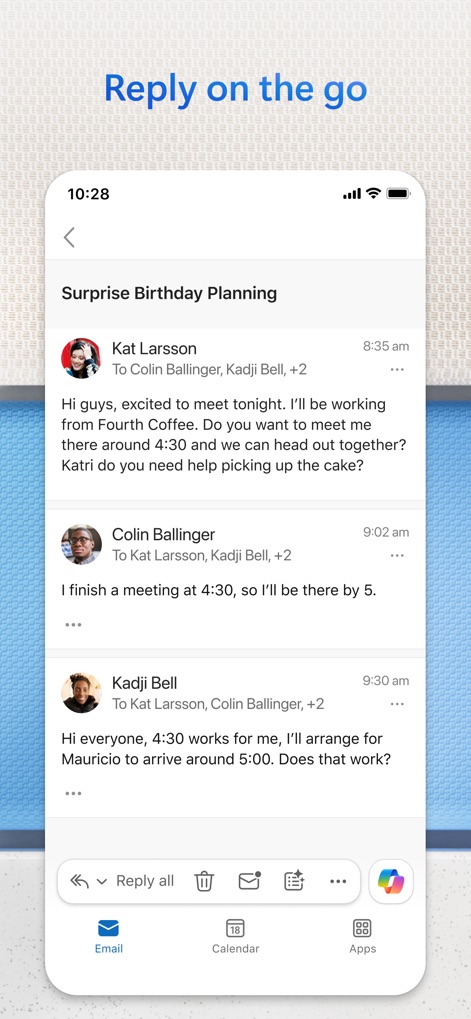
모바일 이메일 답장
사용자는 모바일 환경에서 이메일 대화 스레드를 쉽게 따라갈 수 있으며, 하단의 빠른 답장 및 관리 버튼을 사용하여 효율적으로 메시지에 응답하고 정리합니다.
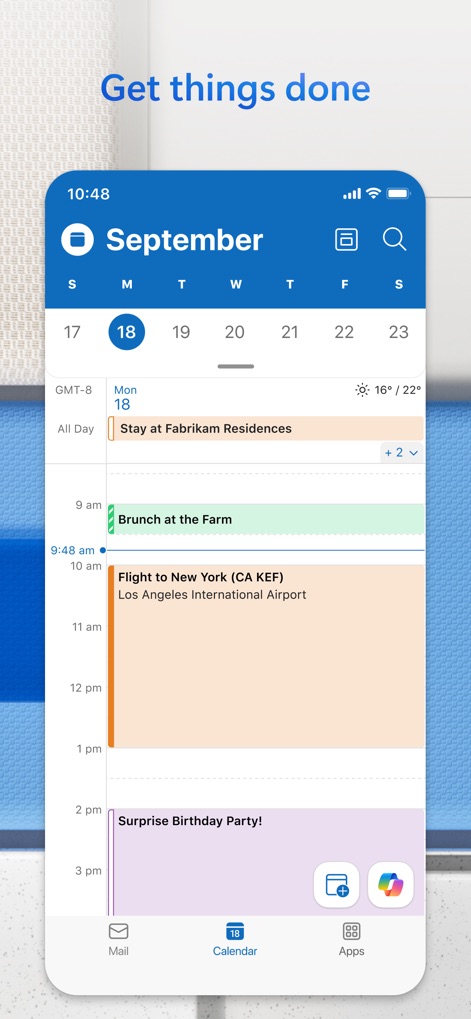
통합 일정 관리
이 앱의 캘린더 기능은 일별 및 월별 보기를 제공하여 사용자가 일정을 효율적으로 파악하도록 돕고, "Flight to New York"과 같은 여행 계획이나 "Surprise Birthday Party!"와 같은 개인 행사 등 다양한 유형의 일정 항목을 관리할 수 있습니다.
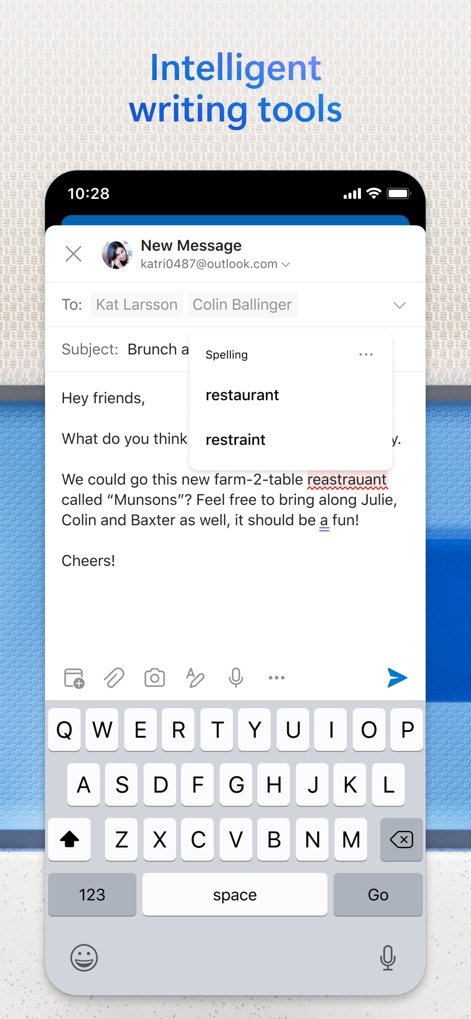
지능형 작성 지원
이 앱은 지능형 맞춤법 검사 기능을 제공하여 작성 오류를 실시간으로 감지하며, "restaurant"와 같은 정확한 단어 추천 및 수정 기능을 통해 사용자가 전문적인 이메일을 작성하도록 돕습니다.
설명
Download
비슷한 앱
유사한 기능과 사용자 경험을 가진 앱

Mail: Email, Cloud, Calendar
V Kontakte OOO

Yandex Mail: Email & Cloud
DIRECT CURSUS COMPUTER SYSTEMS TRADING LLC

Gmail - Email by Google
Google LLC

Yahoo Mail
Yahoo Inc.

Proton Mail - Encrypted Email
Proton AG

Email - Edison Mail
Edison Software Inc.

Zoho Mail - Email and Calendar
Zoho Corporation

GMX - Mail & Cloud
1&1 Mail & Media GmbH

AOL Mail, News, Weather
AOL Media LLC
이 페이지는 앱이나 개발자의 공식 페이지가 아니며, 정보 제공 및 논평을 목적으로 작성된 독립 편집 간행물입니다. 명시적으로 달리 언급되지 않는 한, 해당 앱이나 개발자는 MWM, Apple, Google Play, 앱 퍼블리셔 또는 앱 개발자와 제휴, 보증, 후원, 승인 또는 공식적으로 연결되어 있지 않으며, 이 페이지의 어떤 내용도 해당 앱이 MWM의 서비스를 사용하여 개발되었음을 의미하지 않습니다. 모든 상표, 로고, 스크린샷 및 기타 콘텐츠는 해당 소유자의 자산입니다.