Muliplication table
Muliplication table
다운로드: App Store

이 페이지는 앱이나 개발자의 공식 페이지가 아니며, 정보 제공 및 논평을 목적으로 작성된 독립 편집 간행물입니다. 명시적으로 달리 언급되지 않는 한, 해당 앱이나 개발자는 MWM, Apple, Google Play, 앱 퍼블리셔 또는 앱 개발자와 제휴, 보증, 후원, 승인 또는 공식적으로 연결되어 있지 않으며, 이 페이지의 어떤 내용도 해당 앱이 MWM의 서비스를 사용하여 개발되었음을 의미하지 않습니다. 모든 상표, 로고, 스크린샷 및 기타 콘텐츠는 해당 소유자의 자산입니다.

로고: Muliplication table
다운로드: App Store

Muliplication table

1학년부터 그 이상의 곱셈을 마스터하도록 자녀를 도와주세요. 모든 숫자에 대한 맞춤표를 생성하고, 인수를 즉시 찾고, 쉬운 오프라인 학습을 위한 학습 시트를 인쇄하세요.

주요 수치

다운로드

800

사용자 평점

1.0/5

총 평가 수

0

개발사

Ahmad Sattar

카테고리

Education

지원 언어

1

최신 버전

1.0.2

크기

17.9 MB

출시일

2021년 11월 29일
기능

곱셈을 쉽게 마스터하세요

학생과 학부모가 수학 능력을 향상시키고, 숙제를 풀고, 곱셈표를 쉽게 외울 수 있도록 돕는 필수적인 방해 없는 도구입니다.

무제한 표 생성

12x12를 넘어서세요. 모든 숫자에 대한 표를 크고 명확한 글꼴로 생성하여 모든 연령대가 암기하고 참조하기 쉽게 만듭니다.

스마트 인수 찾기

분수의 스트레스를 줄여줍니다. 모든 숫자의 인수를 즉시 찾아 학생들이 나누기와 수학 문제 단순화에 능숙하도록 돕습니다.

다음 스크린샷과 설명은 앱의 공식 스토어 목록에서 직접 가져온 것이며 앱 개발자의 자산입니다.

앱 스토어

스크린샷
Muliplication table - 옅은 파란색 배경에 숫자가 있는 녹색 및 흰색 그리드 아이콘이 표시된 구구단 모바일 앱의 시작 화면.
옅은 파란색 배경에 숫자가 있는 녹색 및 흰색 그리드 아이콘이 표시된 구구단 모바일 앱의 시작 화면.

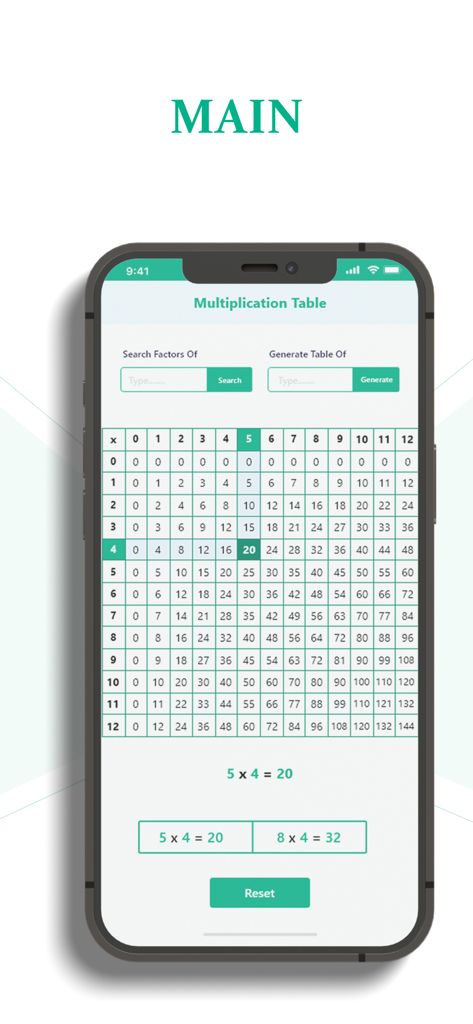
Muliplication table - 모바일 앱 화면에 12x12 곱셈표가 표시되고 행과 열이 강조 표시되어 5 곱하기 4는 20임을 보여줍니다.
모바일 앱 화면에 12x12 곱셈표가 표시되고 행과 열이 강조 표시되어 5 곱하기 4는 20임을 보여줍니다.

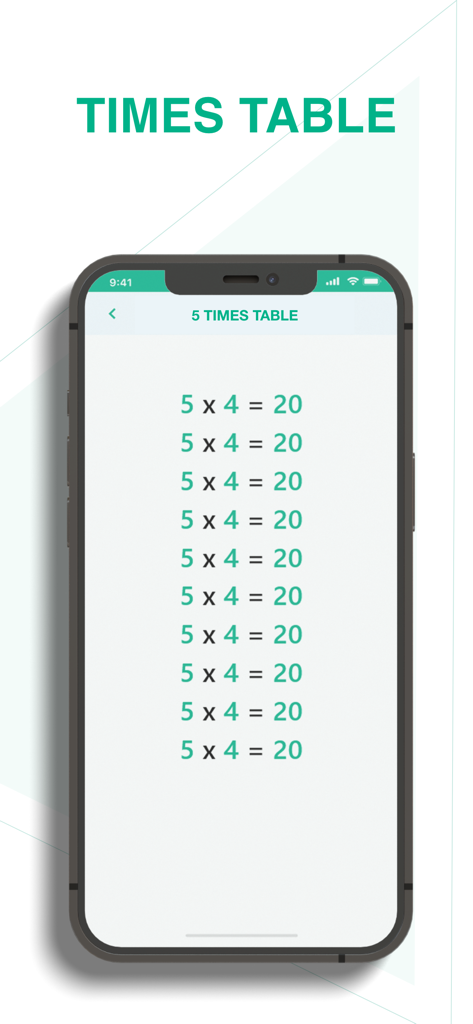
Muliplication table - 모바일 앱 화면에 크고 명확한 텍스트로 5단 곱셈표가 표시됩니다.

모바일 앱 화면에 크고 명확한 텍스트로 5단 곱셈표가 표시됩니다.

설명

Download this app for generating tables. The multiplication table is used by people of all ages belonging to all areas of life. Times table is a chart or list of multiples of a number. It normally consists of the first 10 multiples but it can be stretched as long as you want. Why do you need times tables? Since it is basic math, every person needs to memorize them for daily use. Students start learning these tables for the first ten numbers from grade 1 and onwards. These tables are what make multiplication easy. We use them in daily life without even realizing it. Below are a few examples. • When a person buys two or more packets of snacks, the shopkeeper multiplies the number of snacks with price instead of adding the price of individual packs. • Finding the number of tiles required to cover a floor during construction. Prominent features: The multiplication table is designed by our best developers and it is programmed in Flutter. It has many features worth discussing. Offline: The best thing about this app is that you only need an internet connection once, at the time of downloading. From there onwards, it can work offline. Chart of first 12: The app opens to a screen page containing a chart of the first 12 times table. It is arranged in a way that when the user clicks on a number on the chart, the app gives the corresponding multiples of that number. For instance, if you click number 12, the third (3rd) column and fourth (4th) row will be highlighted. The column contains 3’s times table, highlighted up to 12. Similarly, the row contains 4’s times table highlighted up to number 12. Factors of numbers: Type in any value and get its factors through this application. Factors are the numerical digits that contain the entered number in their times table. For example, if you enter the number 18, the application will give you its four possible factors i.e 2 x 9 = 18, 3 x 6 = 18, 6 x 3 = 18, and 9 x 2 = 18. Generate tables: The chart only contains 12 tables. But if the user wants a times table for a higher value like 45, 190, 762 e.t.c, all they need to do is just enter that number. The table appears separately in big font size to make it easy to read and memorize. Print: You can print any table you want. How to use this app? This app is simple enough to use. You can generate a table by • Typing the number. • Clicking generate. Do the same for finding the factors of any number.

Download

다운로드: App Store

이 페이지는 앱이나 개발자의 공식 페이지가 아니며, 정보 제공 및 논평을 목적으로 작성된 독립 편집 간행물입니다. 명시적으로 달리 언급되지 않는 한, 해당 앱이나 개발자는 MWM, Apple, Google Play, 앱 퍼블리셔 또는 앱 개발자와 제휴, 보증, 후원, 승인 또는 공식적으로 연결되어 있지 않으며, 이 페이지의 어떤 내용도 해당 앱이 MWM의 서비스를 사용하여 개발되었음을 의미하지 않습니다. 모든 상표, 로고, 스크린샷 및 기타 콘텐츠는 해당 소유자의 자산입니다.