
이 페이지는 앱이나 개발자의 공식 페이지가 아니며, 정보 제공 및 논평을 목적으로 작성된 독립 편집 간행물입니다. 명시적으로 달리 언급되지 않는 한, 해당 앱이나 개발자는 MWM, Apple, Google Play, 앱 퍼블리셔 또는 앱 개발자와 제휴, 보증, 후원, 승인 또는 공식적으로 연결되어 있지 않으며, 이 페이지의 어떤 내용도 해당 앱이 MWM의 서비스를 사용하여 개발되었음을 의미하지 않습니다. 모든 상표, 로고, 스크린샷 및 기타 콘텐츠는 해당 소유자의 자산입니다.


다운로드
5M+사용자 평점
총 평가 수
18.3K개발사
카테고리
Productivity지원 언어
31최신 버전
2.3.6크기
27.0 MB출시일
2011년 7월 6일아이폰 사용자에게 맞춤화된 개인 데이터 관리 도구 평가
My Contacts Backup' 앱 주요 기능 분석
오프라인 연락처 백업
이 앱은 서버 동기화 없이 개인 정보를 보호하며 오프라인에서 안전하게 연락처를 백업할 수 있는 기능을 제공합니다.
간편한 VCF 이메일 백업
이 도구는 단 한 번의 터치로 모든 연락처를 .vcf 파일로 백업하여 사용자 이메일로 손쉽게 전송할 수 있게 해줍니다.
VCF 파일을 통한 손쉬운 복원
사용자는 iOS 메일 앱에서 .vcf 파일을 열기만 하면 언제든지 연락처를 번거로움 없이 복원할 수 있습니다. 별도의 앱을 필요로 하지 않습니다.
iOS 기기 간 연락처 전송
이 앱은 이메일 클라이언트만 사용하여 iOS 기기 간에 연락처를 간편하게 전송할 수 있는 방법을 제공합니다.
정기 백업 알림 설정
사용자는 주간 또는 월간 단위로 정기적인 연락처 백업 알림을 설정하여 데이터 손실을 방지할 수 있습니다.
다양한 백업 형식 지원 (VCF/CSV)
이 도구는 연락처를 표준 .vcf(vCard) 또는 .csv(Excel) 파일 형식으로 백업 및 내보내어 유연성을 제공합니다.
자주 묻는 질문
에 대해 알아야 할 모든 것 My Contacts Backup
How to backup contacts with My Contacts Backup?
My Contacts Backup allows you to back up all your contacts with a single touch. The app sends them to your email as a .vcf attachment. You then receive the backup file in your mailbox.
How to restore contacts using My Contacts Backup?
To restore contacts, open the .vcf file in your mailbox using the iOS Mail app. Tap the attachment to import all contacts directly from the file. No other app is required for restoration.
Does My Contacts Backup require an account or internet connection for backup?
No, My Contacts Backup does not require signing in, creating accounts, or internet synchronization with any server for backup. It performs offline backups directly from your phone.
What file formats does My Contacts Backup support for export?
My Contacts Backup supports exporting contacts as a VCF (vCard) file for backup. It also allows users to export contacts as a CSV (Excel) file.
Is there a limit to the number of contacts I can back up using My Contacts Backup?
Yes, the VCF backup in the free version of My Contacts Backup is limited to a maximum of 500 contacts. The PRO version offers unlimited contact backup.
Can My Contacts Backup remind me to backup my contacts regularly?
Yes, My Contacts Backup includes a feature to set reminders. Users can configure the app to prompt them for regular backups on a weekly or monthly basis.
Can I delete all contacts in my Address Book using My Contacts Backup?
Yes, My Contacts Backup provides a specific feature to delete all contacts in your Address Book. This function is available within the application.
다음 스크린샷과 설명은 앱의 공식 스토어 목록에서 직접 가져온 것이며 앱 개발자의 자산입니다.
앱 스토어
스크린샷
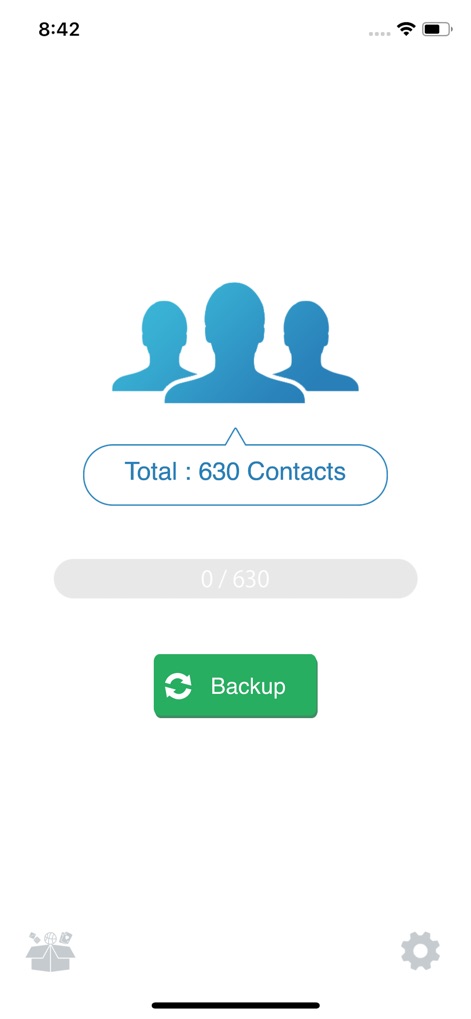
이 앱은 총 연락처 수를 명확히 보여주고 ('Total: 630 Contacts' 레이블) 녹색 'Backup' 버튼을 통해 즉시 백업 프로세스를 시작할 수 있습니다.
간편한 백업 시작

사용자는 첨부된 '.vcf' 파일 아이콘을 탭하고 빨간색 화살표가 가리키는 'Add All 382 Contacts' 옵션을 선택하여 백업된 연락처를 쉽게 복원할 수 있습니다.
원활한 복원
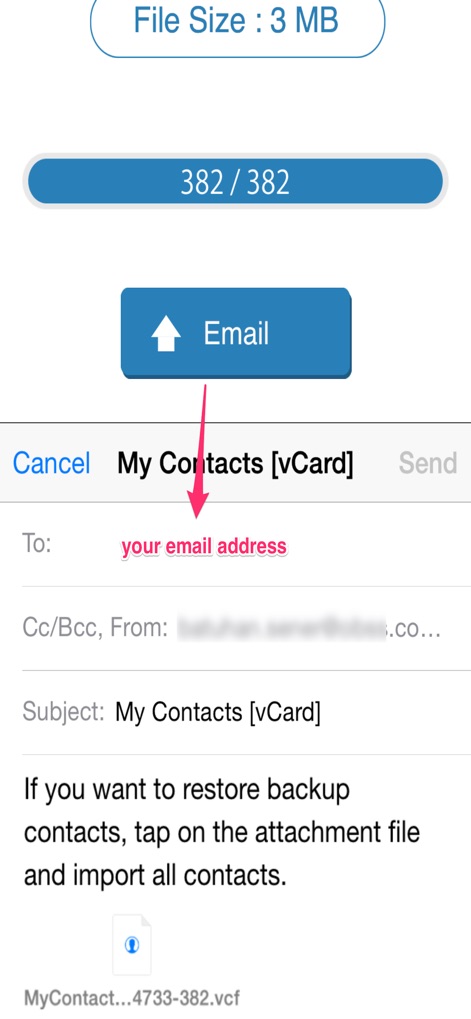
백업된 파일의 크기('File Size: 3 MB')를 확인한 후, 'Email' 버튼을 통해 사용자 본인의 이메일 주소로 .vcf 파일을 간편하게 보낼 수 있습니다.
이메일로 전송
설명
Download
비슷한 앱
유사한 기능과 사용자 경험을 가진 앱
Delete Contacts+
Shanghai Jia Feng Software Co. Ltd.
Contacts Sync: Google & More
Playa Apps

Contact.s Back Up
Symon Johnson
Sync Contact for Google & more
Reena Williams
Contacts Backup + Transfer
One Wave AB

Contacts Backup Pro & Restore
AppRover

Export Contacts to Excel, CSV
LE NGUYEN QUANG PHUOC

Simple Backup Contacts
Giacomo Guglielmi
Contacts Backup and Transfer⁺
serkat ret
이 페이지는 앱이나 개발자의 공식 페이지가 아니며, 정보 제공 및 논평을 목적으로 작성된 독립 편집 간행물입니다. 명시적으로 달리 언급되지 않는 한, 해당 앱이나 개발자는 MWM, Apple, Google Play, 앱 퍼블리셔 또는 앱 개발자와 제휴, 보증, 후원, 승인 또는 공식적으로 연결되어 있지 않으며, 이 페이지의 어떤 내용도 해당 앱이 MWM의 서비스를 사용하여 개발되었음을 의미하지 않습니다. 모든 상표, 로고, 스크린샷 및 기타 콘텐츠는 해당 소유자의 자산입니다.