
이 페이지는 앱이나 개발자의 공식 페이지가 아니며, 정보 제공 및 논평을 목적으로 작성된 독립 편집 간행물입니다. 명시적으로 달리 언급되지 않는 한, 해당 앱이나 개발자는 MWM, Apple, Google Play, 앱 퍼블리셔 또는 앱 개발자와 제휴, 보증, 후원, 승인 또는 공식적으로 연결되어 있지 않으며, 이 페이지의 어떤 내용도 해당 앱이 MWM의 서비스를 사용하여 개발되었음을 의미하지 않습니다. 모든 상표, 로고, 스크린샷 및 기타 콘텐츠는 해당 소유자의 자산입니다.


다운로드
500k+사용자 평점
총 평가 수
7.7K개발사
카테고리
Utilities지원 언어
10최신 버전
4.3크기
128.9 MB출시일
2024년 5월 14일레트로 게임 애호가를 위한 종합 에뮬레이션 솔루션
MyBoyGame-All in one Emulator 앱 분석
다양한 레트로 게임 포맷 지원
이 앱은 GBA, GB, GBC, SFC, MD, NES를 포함한 여러 클래식 게임 포맷을 지원하여 사용자가 광범위한 향수 어린 게임을 손쉽게 즐길 수 있게 해줍니다.
강력한 게임 저장 기능
이 도구는 여러 개의 저장 슬롯을 지원하는 강력한 저장 기능을 갖추고 있어 사용자가 언제든지 걱정 없이 게임 진행 상황을 저장할 수 있습니다.
자주 묻는 질문
에 대해 알아야 할 모든 것 MyBoyGame-All in one Emulator
What is MyBoyGame-All in one Emulator?
MyBoyGame-All in one Emulator is an iOS app designed for gaming enthusiasts. It allows users to relive classic gaming moments by emulating multiple retro game formats, providing an ultimate gaming experience.
What classic game formats does MyBoyGame-All in one Emulator support?
MyBoyGame-All in one Emulator supports multiple classic game formats. These include GBA, GB, GBC, SFC, MD, and NES. This allows users to enjoy a wide range of nostalgic games.
Does MyBoyGame-All in one Emulator include a save functionality?
Yes, MyBoyGame-All in one Emulator includes powerful save functionality. It supports multiple save slots, enabling users to save their game progress anytime without worries. Screenshot #8 also shows "快速保存" (Quick Save).
Can users fast-forward through games in MyBoyGame-All in one Emulator?
Yes, MyBoyGame-All in one Emulator features a unique fast-forward function. This allows users to skip lengthy dialogues or tedious sections, directly engaging in the exciting parts of a game.
How can I subscribe to exclusive features in MyBoyGame-All in one Emulator?
Users can unlock exclusive member features via iTunes auto-renewal subscriptions within MyBoyGame-All in one Emulator. Fees are charged to your iTunes account upon purchase confirmation.
What are the available subscription plans for MyBoyGame-All in one Emulator?
MyBoyGame-All in one Emulator offers several subscription plans. These include a "Monthly Subscription," a "Yearly Subscription," and a "Lifetime Membership" for exclusive member features.
How do I cancel my MyBoyGame-All in one Emulator subscription?
To cancel your MyBoyGame-All in one Emulator subscription, go to your iOS device's Settings, then Apple ID, and tap "Subscriptions." Select the auto-renewing VIP subscription and cancel it at least 24 hours before the billing cycle ends.
Is MyBoyGame-All in one Emulator officially affiliated with game manufacturers?
No, MyBoyGame-All in one Emulator is not affiliated with any game manufacturers. The names of gaming consoles mentioned are solely used to describe the supported game environments.
Where can I find the Privacy Policy for MyBoyGame-All in one Emulator?
The Privacy Policy for MyBoyGame-All in one Emulator is available at https://sites.google.com/view/huajiu-terms/. This link is provided within the app's description.
Does MyBoyGame-All in one Emulator support different screen orientations?
Yes, MyBoyGame-All in one Emulator supports different screen orientations. Screenshot #9 shows options for "Landscape (Small Screen)" and "Landscape (Large Screen)" under display settings.
다음 스크린샷과 설명은 앱의 공식 스토어 목록에서 직접 가져온 것이며 앱 개발자의 자산입니다.
앱 스토어
스크린샷
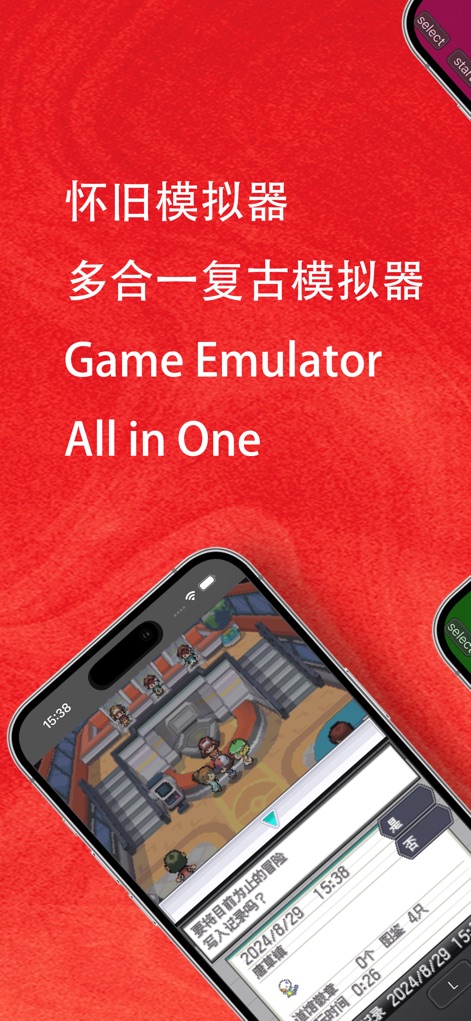
이 에뮬레이터는 고전적인 GBA 스타일의 RPG 게임 화면과 직관적인 가상 컨트롤 패드를 제공하여 몰입감 있는 게임 경험을 선사합니다.
다기능 레트로 에뮬레이터

이 앱은 NES 스타일의 전투 화면과 GBA 스타일의 대화 장면을 동시에 보여주며, 여러 플랫폼의 고전 게임을 지원하는 넓은 호환성을 강조합니다.
다양한 게임 지원
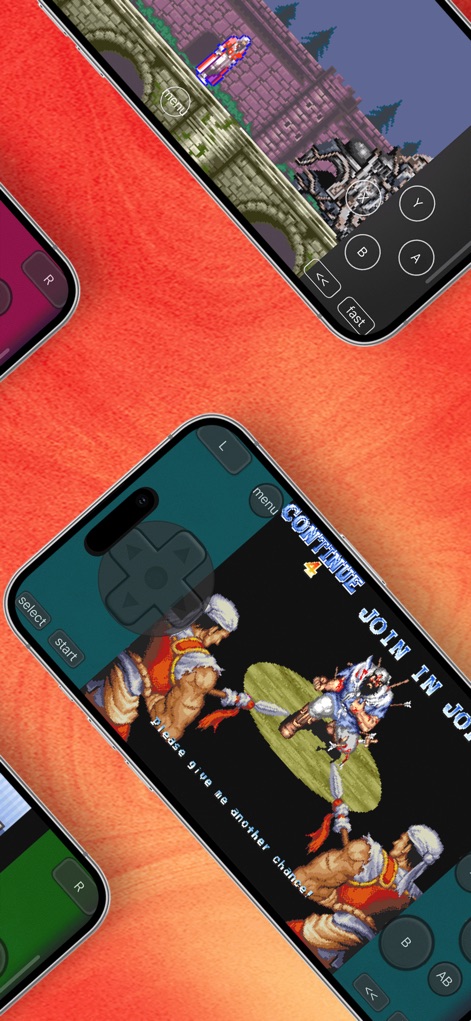
사용자는 횡스크롤 액션 게임 플레이 화면과 치열한 인게임 전투 장면을 통해 스릴 넘치는 고전 게임의 재미를 느낄 수 있습니다.
박진감 넘치는 액션

선명한 그래픽으로 구현된 액션 게임이 전체 화면에 나타나며, 사용자는 하단에 배치된 사용자 친화적인 가상 버튼을 통해 직관적으로 조작할 수 있습니다.
몰입형 게임 경험
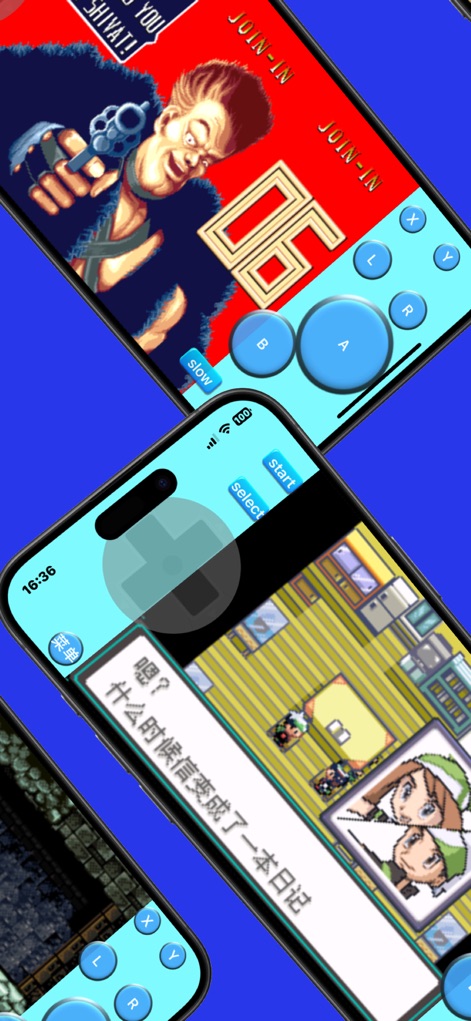
이 앱은 개성 넘치는 캐릭터가 등장하는 액션 게임 시작 화면과 세밀하게 묘사된 RPG 실내 배경을 통해 고전 게임의 매력을 생생하게 재현합니다.
고전 명작의 향수

사용자는 광활한 야외 맵을 탐험하고 아기자기하게 꾸며진 마을 풍경을 감상하며, 고전 RPG의 모험심을 자극하는 경험을 할 수 있습니다.
탐험의 즐거움

이 에뮬레이터는 빠른 로드/저장을 포함한 다양한 저장 옵션을 제공하며, 가상 키 설정 메뉴를 통해 사용자가 게임 환경을 최적화할 수 있도록 지원합니다.
편리한 저장 기능

사용자는 화면 방향 변경 옵션을 통해 가로 모드의 작은 화면 또는 큰 화면과 같은 다양한 표시 모드를 선택하여 개인의 선호에 맞게 게임 화면을 조정할 수 있습니다.
사용자 맞춤 설정

이 앱은 미니멀한 인터페이스 디자인을 자랑하며, 직관적으로 배치된 가상 컨트롤 버튼을 통해 사용자에게 쾌적하고 쉬운 게임 조작 환경을 제공합니다.
깔끔한 인터페이스
설명
Download
비슷한 앱
유사한 기능과 사용자 경험을 가진 앱
Retra - app console emulator
MODERN DEV LP

Manic EMU - Game Emulator
傲霜 李
Game Emulator: GamePod Emu
Aytek Sokmen

Gamuroid: All Game Emulator
UNIVERSAL TECHLAB COMPANY LIMITED

Lucky Emulator – GBA & DS
LUCKY MUSHROOM LIMITED

Game Emulator - RePlay
彩连 刘

Delta - Game Emulator
Yvette Testut

Emu — Game Consoles App
METRONOM YAZILIM LIMITED SIRKETI

Gamebyte
TE-DE GROUP doo
이 페이지는 앱이나 개발자의 공식 페이지가 아니며, 정보 제공 및 논평을 목적으로 작성된 독립 편집 간행물입니다. 명시적으로 달리 언급되지 않는 한, 해당 앱이나 개발자는 MWM, Apple, Google Play, 앱 퍼블리셔 또는 앱 개발자와 제휴, 보증, 후원, 승인 또는 공식적으로 연결되어 있지 않으며, 이 페이지의 어떤 내용도 해당 앱이 MWM의 서비스를 사용하여 개발되었음을 의미하지 않습니다. 모든 상표, 로고, 스크린샷 및 기타 콘텐츠는 해당 소유자의 자산입니다.