
이 페이지는 앱이나 개발자의 공식 페이지가 아니며, 정보 제공 및 논평을 목적으로 작성된 독립 편집 간행물입니다. 명시적으로 달리 언급되지 않는 한, 해당 앱이나 개발자는 MWM, Apple, Google Play, 앱 퍼블리셔 또는 앱 개발자와 제휴, 보증, 후원, 승인 또는 공식적으로 연결되어 있지 않으며, 이 페이지의 어떤 내용도 해당 앱이 MWM의 서비스를 사용하여 개발되었음을 의미하지 않습니다. 모든 상표, 로고, 스크린샷 및 기타 콘텐츠는 해당 소유자의 자산입니다.


다운로드
2.5M+사용자 평점
총 평가 수
478.8K개발사
카테고리
Productivity지원 언어
1최신 버전
5.3.9크기
310.4 MB출시일
2014년 7월 6일현대차 소유자를 위한 향상된 연결성 및 차량 제어
MyHyundai with Bluelink 앱 분석
원격 차량 시동
이 앱은 사용자가 원격으로 차량 시동을 걸 수 있도록 하여, 차량 탑승 전에 실내 온도를 조절하는 편의를 제공합니다.
원격 문 잠금/잠금 해제
이 앱은 사용자가 원격으로 차량의 문을 잠그거나 잠금 해제할 수 있는 기능을 제공하여 보안을 강화하고 편의성을 높여줍니다.
EV/PHEV 충전 관리
이 도구는 EV 및 PHEV 차량 소유자가 충전 상태를 확인하고 충전 스케줄 및 설정을 관리할 수 있게 하여 효율적인 배터리 관리를 돕습니다.
차량 상태 확인
사용자는 앱을 통해 차량의 주요 상태 정보(예: 연료량, 타이어 공기압)를 확인할 수 있어 차량 관리의 효율성을 높입니다.
원격 경적 및 라이트 작동
이 기능은 사용자가 원격으로 차량의 경적을 울리거나 라이트를 켤 수 있도록 하여 넓은 주차장에서 차량을 찾거나 비상 상황 시 유용하게 활용됩니다.
차량 찾기
이 앱은 사용자가 주차된 차량의 위치를 쉽게 찾을 수 있도록 돕습니다.
서비스 예약
사용자는 앱 내에서 편리하게 차량 정비 서비스를 예약할 수 있어 시간과 노력을 절약합니다.
관심 지점(POI) 검색 및 전송
이 도구는 사용자가 관심 지점을 검색하고 이를 차량 내비게이션 시스템으로 전송할 수 있게 하여 경로 계획을 간소화합니다.
사용자 튜토리얼 및 정보 접근
이 앱은 차량 기능에 대한 사용자 튜토리얼 및 유지보수 정보를 제공하여 사용자가 차량을 더 잘 이해하고 관리할 수 있도록 지원합니다.
Apple Watch 연동
이 앱은 Apple Watch를 통한 원격 제어 기능을 지원하여, 더욱 편리하고 신속하게 차량 기능을 조작할 수 있게 합니다.
자주 묻는 질문
에 대해 알아야 할 모든 것 MyHyundai with Bluelink
How do I access Bluelink features in the MyHyundai app?
You access Bluelink features in the MyHyundai app using your MyHyundai.com ID, password, and PIN. An active Bluelink subscription is mandatory. You can conveniently log in with Touch ID or Face ID.
What Bluelink features are available with the MyHyundai app?
The MyHyundai app offers Bluelink features like remote vehicle start, lock/unlock, horn/lights activation, finding your car, and checking vehicle status. It also supports charging management for EV/PHEV and POI search/send with the Guidance package.
Can I remotely start my Hyundai vehicle using the MyHyundai app?
Yes, the MyHyundai app allows you to remotely start your vehicle. This feature requires an active Bluelink Remote Package subscription and a Bluelink-enabled vehicle. Screenshot #2 shows a 'Climate Start' button for this function.
Does the MyHyundai app support electric or hybrid vehicles?
Yes, the MyHyundai app supports hybrid, EV, fuel cell, and gas vehicles. For EV and PHEV vehicles, you can view charging status and manage charging schedules and settings remotely.
How do I schedule a service appointment for my Hyundai using the MyHyundai app?
Yes, you can schedule a car care service appointment directly through the MyHyundai app. Navigate to the 'Car Care' section, where you find options for 'Service Scheduling' and selecting a preferred dealer.
What vehicle information can I view in the MyHyundai app?
The MyHyundai app displays detailed vehicle status including battery charge, remaining range, door lock states, hood/trunk/window status, location, fuel range, and odometer readings. This information is accessible from the main dashboard.
Can I set alerts for my Hyundai vehicle using the MyHyundai app?
Yes, the MyHyundai app allows you to manage Bluelink Alert Settings. You can configure Speed Alerts, Valet Alerts, Curfew Alerts, and Geo-Fence Alerts to safeguard your vehicle and passengers based on custom parameters.
Does the MyHyundai app offer remote control features for Apple Watch?
Yes, the MyHyundai app supports Apple Watch. You can use voice commands or the smartwatch app menu to remotely start your vehicle, unlock/lock doors, activate the horn and lights, and find your car.
How do I find charging stations for my EV with the MyHyundai app?
The MyHyundai app allows you to quickly find nearby charging stations for your EV. You can search by zip code and send Points of Interest (POI) to your vehicle's navigation system directly from the app.
Is a Bluelink subscription required to use the MyHyundai app?
Yes, an active Bluelink subscription is required to use Bluelink features within the MyHyundai app. You can renew or upgrade your subscription packages (Remote or Guidance) via MyHyundai.com.
Can I manage multiple drivers with the MyHyundai app?
Yes, the MyHyundai app allows you to add additional drivers. As the primary Bluelink subscriber, you can invite secondary drivers to create their own unique Bluelink preferences and manage vehicle settings.
Where can I find technical assistance for the MyHyundai app?
For technical assistance concerning the MyHyundai app, you can directly contact the support team via email at AppsTeam@hmausa.com. This ensures direct communication with app specialists.
다음 스크린샷과 설명은 앱의 공식 스토어 목록에서 직접 가져온 것이며 앱 개발자의 자산입니다.
앱 스토어
스크린샷

이 앱을 통해 사용자는 차량과의 연결성을 강화하고, 운전자의 손이 스티어링 휠을 잡은 모습과 함께 편리한 연결 경험을 시각적으로 보여줍니다.
쉬운 현대차 연결
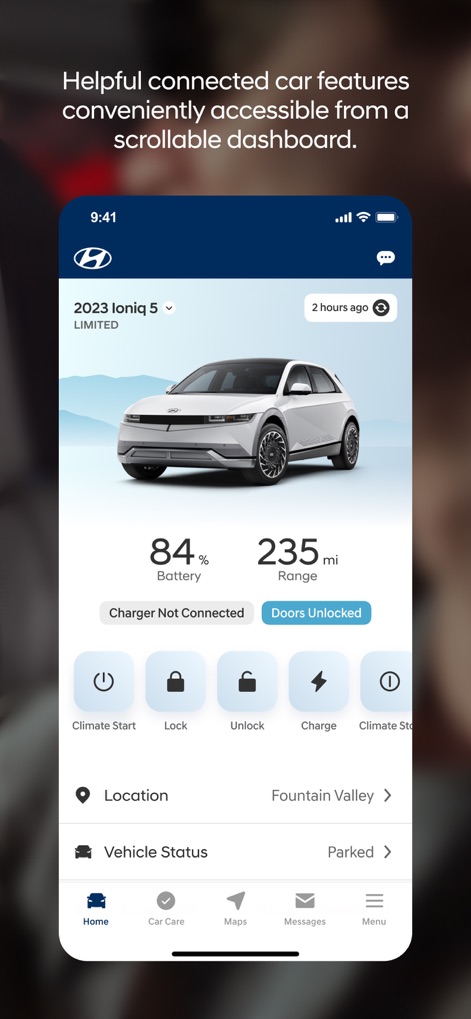
이 도구는 사용자가 차량의 배터리 잔량(84%) 및 주행 가능 거리(235mi)를 한눈에 확인하고, 잠금/해제 및 충전과 같은 주요 기능을 간편하게 제어할 수 있도록 합니다.
차량 제어 대시보드

사용자는 차량의 각 부분(예: 트렁크, 선루프)의 개폐 상태를 시각적으로 확인하고, 연료 범위(100mi)와 주행 거리계(4189mi)를 통해 차량 정보를 상세하게 파악할 수 있습니다.
상세 차량 상태

이 앱은 하이브리드, 전기차, 연료 전지 및 가스 차량을 모두 지원하여 사용자가 모험을 떠나는 라이프스타일 이미지와 함께 자신의 차량 종류에 맞는 기능을 활용할 수 있도록 합니다.
모든 차량 유형 지원

사용자는 과속 경고(85mph) 및 지오-펜스 경고(30.0 Miles)와 같은 Bluelink 알림 설정을 직접 관리하여 가족과 탑승자의 안전을 강화하고 차량을 보호할 수 있습니다.
스마트 안전 경고

이 도구는 사용자가 근처 충전소(예: Stevens Creek Walmart #84, Big Al's Chevron)를 지도에서 빠르게 찾고, 각 충전소까지의 거리(1.8 miles, 2.0 miles)를 확인하여 주행 거리에 대한 불안감을 해소하도록 돕습니다.
충전소 찾기

사용자는 주 운전자(Sarah Hyland) 정보를 확인하고 추가 운전자(Brandon Hylano)를 등록하여 각자 고유한 Bluelink 환경 설정을 관리할 수 있습니다.
드라이버 프로필 관리

이 앱은 사용자가 차량 진단 보고서(Diagnostic Report)를 확인하고 서비스 예약(Service Scheduling)을 통해 차량 건강을 유지하며, 필요한 유지 보수 정보를 손쉽게 접근할 수 있도록 지원합니다.
포괄적 차량 관리

사용자는 지도에서 선호하는 현대 딜러(Hyundai of San Jose)를 쉽게 검색하고, 영업 시간 및 서비스 일정(Schedule Service)과 같은 정보를 확인하여 편리하게 정비 예약을 할 수 있습니다.
딜러 서비스 예약
설명
Download
비슷한 앱
유사한 기능과 사용자 경험을 가진 앱

Toyota
Toyota Motor Sales, U.S.A., Inc.

myChevrolet
General Motors
My BMW
BMW NORTH AMERICA, LLC

Mercedes-Benz (USA/CA)
Mercedes-Benz USA LLC

LoJack
Spireon, Inc.
Tessie — For your Tesla
Tessie Technology LLC

Tesla
Tesla, Inc.

Ford™
Ford Motor Company
MyMazda
Mazda Motor Corporation
이 페이지는 앱이나 개발자의 공식 페이지가 아니며, 정보 제공 및 논평을 목적으로 작성된 독립 편집 간행물입니다. 명시적으로 달리 언급되지 않는 한, 해당 앱이나 개발자는 MWM, Apple, Google Play, 앱 퍼블리셔 또는 앱 개발자와 제휴, 보증, 후원, 승인 또는 공식적으로 연결되어 있지 않으며, 이 페이지의 어떤 내용도 해당 앱이 MWM의 서비스를 사용하여 개발되었음을 의미하지 않습니다. 모든 상표, 로고, 스크린샷 및 기타 콘텐츠는 해당 소유자의 자산입니다.