
이 페이지는 앱이나 개발자의 공식 페이지가 아니며, 정보 제공 및 논평을 목적으로 작성된 독립 편집 간행물입니다. 명시적으로 달리 언급되지 않는 한, 해당 앱이나 개발자는 MWM, Apple, Google Play, 앱 퍼블리셔 또는 앱 개발자와 제휴, 보증, 후원, 승인 또는 공식적으로 연결되어 있지 않으며, 이 페이지의 어떤 내용도 해당 앱이 MWM의 서비스를 사용하여 개발되었음을 의미하지 않습니다. 모든 상표, 로고, 스크린샷 및 기타 콘텐츠는 해당 소유자의 자산입니다.


MySSS
당신의 SSS 기록에 대한 완전한 통제는 더 이상 꿈이 아닙니다. 이 앱은 당신의 사회 보장 데이터를 당신의 주머니에 넣어줍니다.
다운로드
1M+사용자 평점
총 평가 수
1.3K개발사
카테고리
Finance지원 언어
1최신 버전
1.3.22크기
59.7 MB출시일
2024년 9월 15일필리핀 사회보장제도(SSS) 회원들을 위한 디지털 솔루션 평가
MySSS 앱 핵심 기능 분석
SSS 기록 조회
이 앱은 사용자가 자신의 SSS 기여금 내역, 대출 잔액 및 기타 중요한 기록을 편리하게 조회할 수 있도록 제공합니다.
온라인 기여금 납부
사용자는 MySSS 앱을 통해 SSS 기여금을 직접 온라인으로 납부하여 시간과 노력을 절약할 수 있습니다.
대출 및 혜택 신청 현황 추적
이 도구는 사용자가 신청한 대출 및 혜택의 처리 현황을 실시간으로 확인하고 관리할 수 있게 해줍니다.
지불 참조 번호(PRN) 생성
앱은 SSS 기여금 납부에 필요한 지불 참조 번호(PRN)를 생성하는 기능을 제공하여 거래 과정을 간소화합니다.
개인 정보 관리
사용자는 자신의 등록된 개인 정보(예: 연락처, 주소)를 앱 내에서 직접 업데이트하고 관리할 수 있습니다.
SSS 프로그램 및 서비스 정보
이 앱은 SSS의 다양한 프로그램, 혜택 및 서비스에 대한 최신 정보를 제공하여 사용자의 이해를 돕습니다.
자주 묻는 질문
에 대해 알아야 할 모든 것 MySSS
What is the MySSS mobile app?
The MySSS mobile app is the official application of the Philippine Social Security System. It provides a convenient way to access SSS records, manage accounts, conduct transactions, and obtain information about SSS programs and services directly from a mobile device.
Who developed the MySSS mobile application?
The MySSS mobile application is the official app of the Philippine Social Security System. It is designed to provide members with direct access to their SSS accounts and services.
How do I log in to the MySSS mobile app?
To log in to the MySSS app, users enter their User ID and Password on the member login screen. The app also supports logging in using biometrics for enhanced convenience and security.
Can I create a new MySSS account through the mobile app?
Yes, users can create a new MySSS account directly through the mobile app. The login screen provides a "Create a MySSS account" option to guide new users through the registration process.
What SSS information is accessible through the MySSS app?
The MySSS app allows access to personal SSS records, including SS Number, total contributions, last posted contribution, and activity history. Users can also view member details and UMID/SSS ID details.
How do I check my SSS contributions using the MySSS app?
Users can check their SSS contributions by navigating to the dashboard, which displays the "Total Contribution" and "Last Posted Contribution". Tapping on this section provides a detailed view of total number and amount of contributions by month and year.
Does the MySSS app provide access to SSS services like loans and benefits?
Yes, the MySSS app offers access to various SSS services. The dashboard features dedicated icons for "Benefits", "Loan", and "Services", allowing members to explore and manage these offerings directly within the application.
Does the MySSS app support biometric login?
Yes, the MySSS app supports biometric login. On the member login screen, users have the option to "Log in using biometrics" in addition to traditional User ID and Password entry, enhancing security and convenience.
Where can I find support or contact information for the MySSS app?
Support and contact information for MySSS are available in the app's side menu under "Help" and "Feedback". Additionally, the store description provides contact details like www.sss.gov.ph, 1455, or usssaptayo@sss.gov.ph.
다음 스크린샷과 설명은 앱의 공식 스토어 목록에서 직접 가져온 것이며 앱 개발자의 자산입니다.
앱 스토어
스크린샷
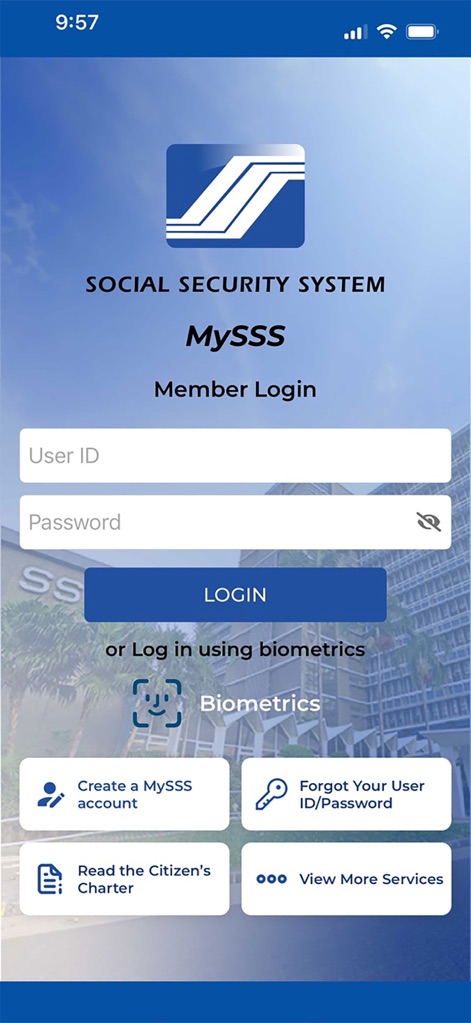
사용자는 안전한 로그인 페이지에서 사용자 ID와 비밀번호를 입력하거나, 생체 인증을 통해 빠르고 편리하게 앱에 접근할 수 있습니다.
로그인으로 시작
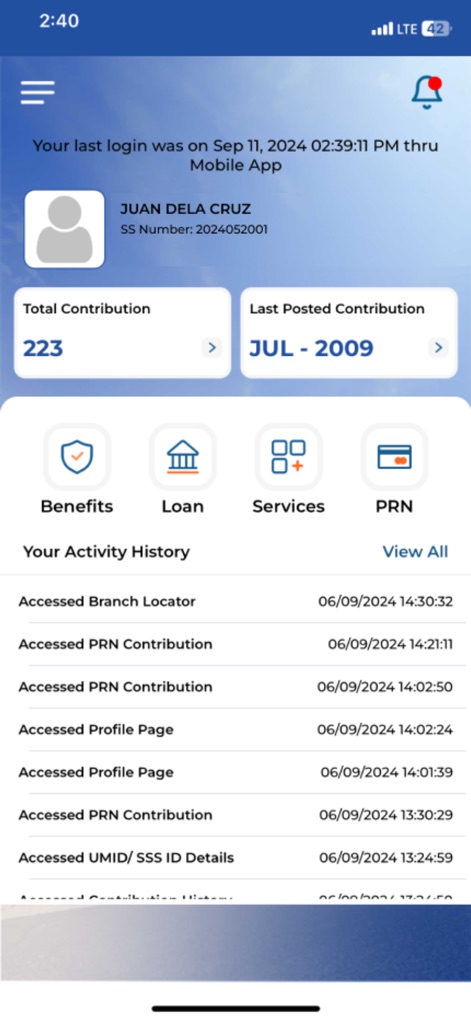
이 앱은 사용자에게 총 납부 횟수와 최종 납부 월 같은 주요 SSS 정보를 대시보드에서 즉시 확인할 수 있도록 제공합니다.
한눈에 보는 요약

사용자는 연도별 총 납부 금액과 월별 납부 상세 내역을 포함하여 자신의 SSS 기여 기록을 상세히 검토할 수 있습니다.
상세 기여 내역
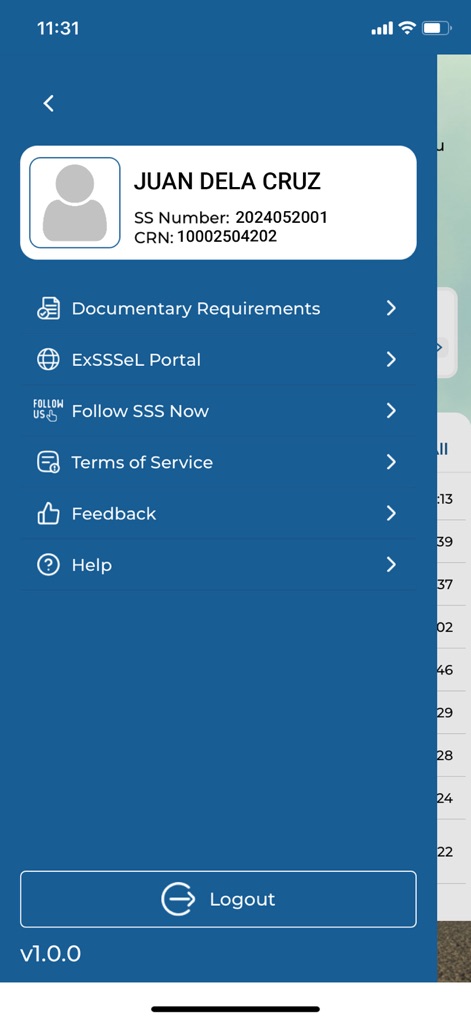
로그인한 사용자는 문서 요구사항, ExSSSMeL 포털, 그리고 로그아웃 버튼과 같은 다양한 서비스 및 정보에 사이드 메뉴를 통해 쉽게 접근할 수 있습니다.
편리한 접근 메뉴

사용자는 앱에서 자신의 생년월일과 전화번호 같은 개인 연락처 정보를 포함한 상세 회원 정보를 안전하게 확인할 수 있습니다.
회원 정보 확인

이 도구는 사용자가 자신의 UMID/SSS ID 카드 생성 사이트와 카드 유형 및 거래 상태를 포함한 중요한 정보를 확인할 수 있도록 합니다.
ID 세부 정보

앱은 사용자가 My.SSS 등록 방법 안내, Citizen's Charter, 그리고 브랜치 찾기와 같은 유용한 지원 및 서비스 메뉴에 접근할 수 있도록 돕습니다.
지원 및 등록

이 앱은 필리핀 사회보장제도(SSS)의 공식 로고와 함께 "Bagong Pilipinas" 로고를 표시하여 사용자가 신뢰할 수 있는 플랫폼임을 명확히 보여줍니다.
공식 시작 화면
설명
Download
비슷한 앱
유사한 기능과 사용자 경험을 가진 앱

GOSI
general organization for social insurance
Toeslagen
Belastingdienst

신용회복위원회
Credit counseling & Recovery service

e-Sosial
Ministry of Labour and Social Protection of the Population of the Azerbaijan Republic
ma MSA & moi
MUTUALITE SOCIALE AGRICOLE

myErgani
Ministry of Labour and Social Affairs Hellenic Republic
NSSF Member
National Social Security Fund, Cambodia

مؤسسة الضمان الإجتماعي
Jordan eGovernment

老来健康
Beijing Laolai Network Technology Development Co., Ltd.
이 페이지는 앱이나 개발자의 공식 페이지가 아니며, 정보 제공 및 논평을 목적으로 작성된 독립 편집 간행물입니다. 명시적으로 달리 언급되지 않는 한, 해당 앱이나 개발자는 MWM, Apple, Google Play, 앱 퍼블리셔 또는 앱 개발자와 제휴, 보증, 후원, 승인 또는 공식적으로 연결되어 있지 않으며, 이 페이지의 어떤 내용도 해당 앱이 MWM의 서비스를 사용하여 개발되었음을 의미하지 않습니다. 모든 상표, 로고, 스크린샷 및 기타 콘텐츠는 해당 소유자의 자산입니다.