이 페이지는 앱이나 개발자의 공식 페이지가 아니며, 정보 제공 및 논평을 목적으로 작성된 독립 편집 간행물입니다. 명시적으로 달리 언급되지 않는 한, 해당 앱이나 개발자는 MWM, Apple, Google Play, 앱 퍼블리셔 또는 앱 개발자와 제휴, 보증, 후원, 승인 또는 공식적으로 연결되어 있지 않으며, 이 페이지의 어떤 내용도 해당 앱이 MWM의 서비스를 사용하여 개발되었음을 의미하지 않습니다. 모든 상표, 로고, 스크린샷 및 기타 콘텐츠는 해당 소유자의 자산입니다.
NeoServer: SSH Client|Terminal
DevOps, NAS 소유자, AI 연구원을 위한 최고의 SSH 클라이언트 및 터미널. Docker 컨테이너를 관리하고, 실시간 GPU/CPU 메트릭을 모니터링하며, iCloud를 통해 안전하게 동기화하세요. 데이터 추적은 전혀 없습니다.
모바일에서 데스크톱급 제어를 요구하는 DevOps, NAS 애호가, AI 연구원을 위해 설계된 강력하고 개인 정보 보호 우선 SSH 클라이언트입니다.
시각적 Docker 관리
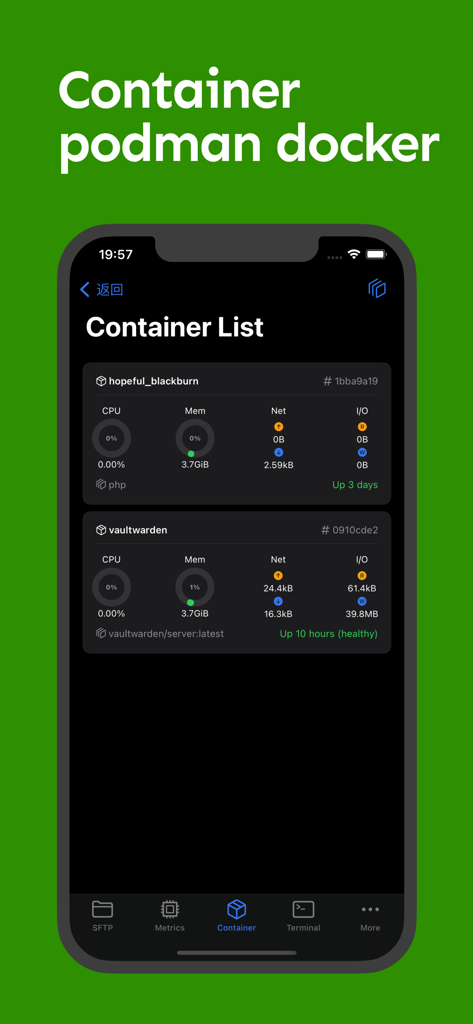
코드를 한 줄도 입력하지 않고 Docker 및 Podman 인스턴스를 다시 시작, 일시 중지 또는 삭제하면서 탭 한 번으로 로그를 모니터링하고 컨테이너를 관리하세요.
실시간 상태 모니터링
하드웨어의 시각적 '신의 시점'을 확보하세요. AI 학습 및 서버 부하 모니터링에 필수적인 CPU, RAM, 특수 GPU 사용량을 실시간으로 추적하세요.
다음 스크린샷과 설명은 앱의 공식 스토어 목록에서 직접 가져온 것이며 앱 개발자의 자산입니다.
앱 스토어
스크린샷
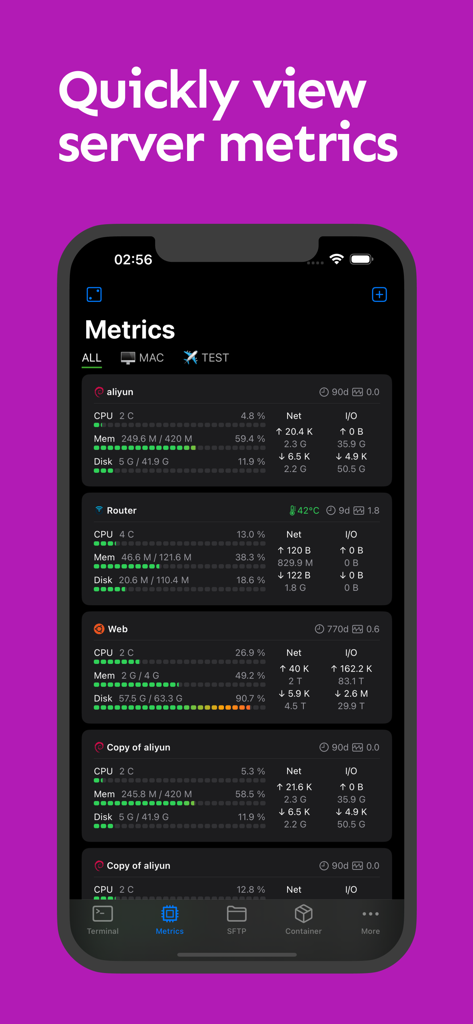
NeoServer 앱 스크린샷으로 iPhone에서 실시간 서버 메트릭(CPU, 메모리, 디스크 사용량 등)을 보여주는 대시보드
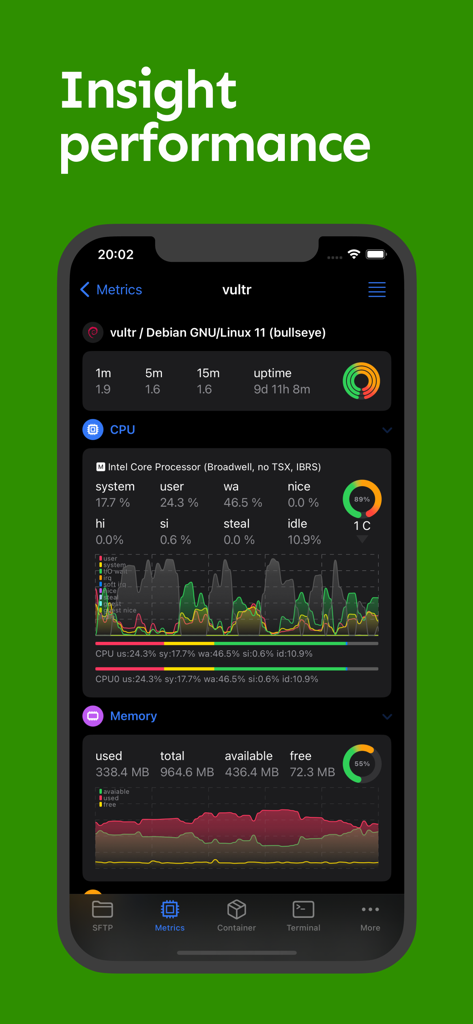
NeoServer 앱 대시보드로 서버 CPU 및 메모리 사용량 메트릭 표시
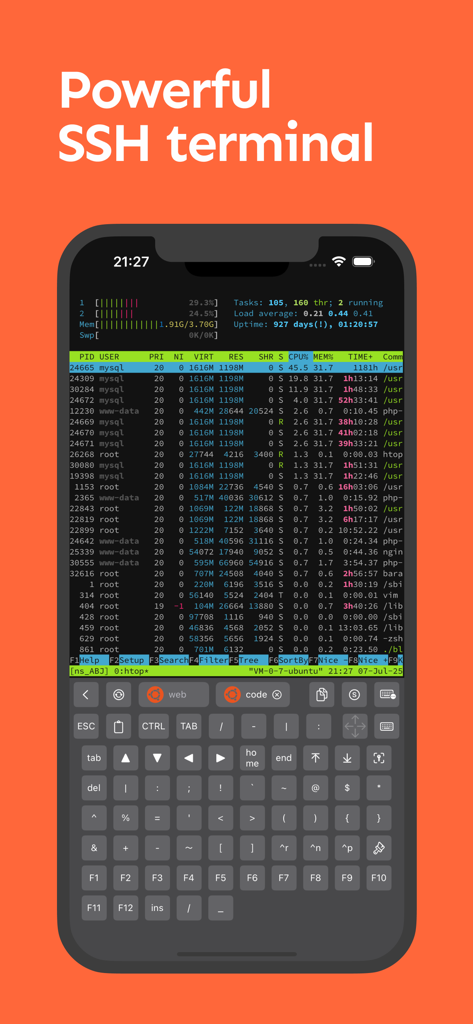
NeoServer 모바일 SSH 터미널로 서버 프로세스 모니터링 및 특수 개발자 키보드 표시
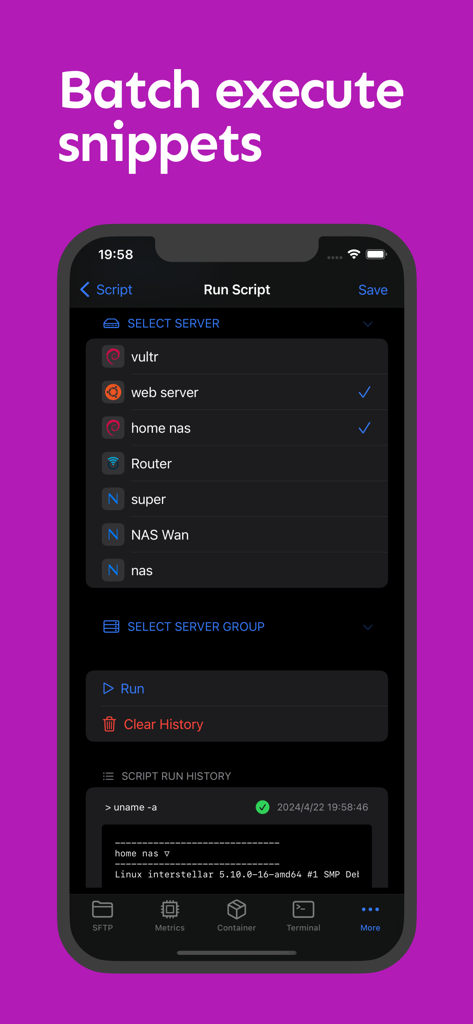
NeoServer 인터페이스로 선택된 여러 서버에서 배치 스크립트 실행 표시
NeoServer 모바일 앱으로 CPU, 메모리, 네트워크 사용량 실시간 모니터링과 함께 Docker 및 Podman 컨테이너 목록 표시
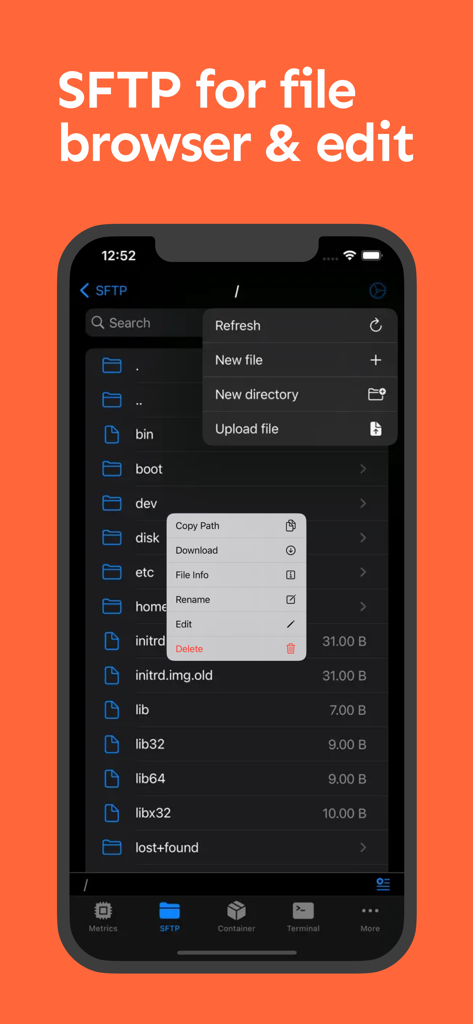
NeoServer 모바일 앱 인터페이스로 iPhone 화면에서 SFTP 파일 브라우저 및 파일 관리 옵션 표시
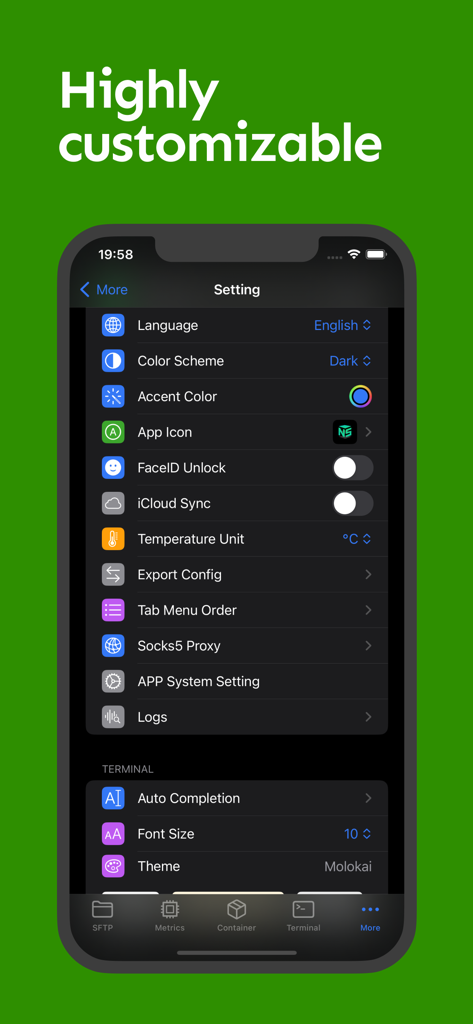
NeoServer 설정 화면으로 터미널 테마, iCloud 동기화, FaceID 보안에 대한 사용자 지정 옵션 표시
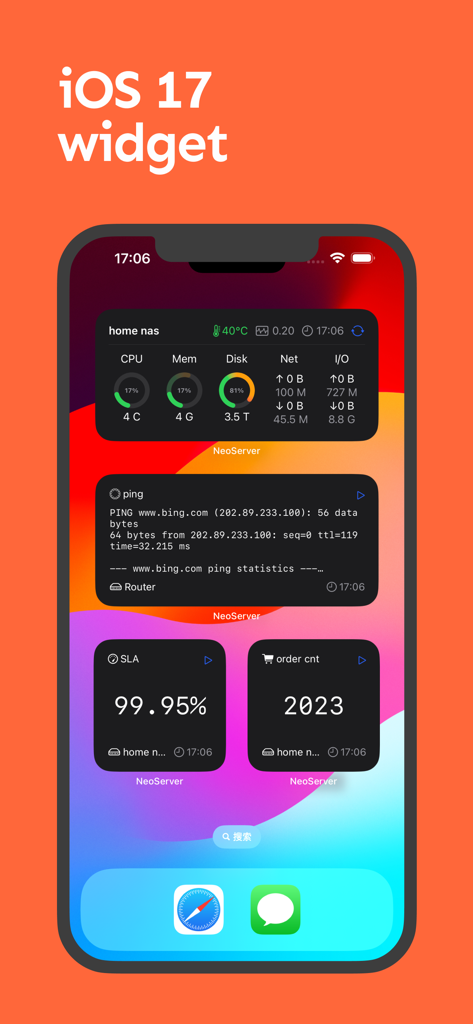
iPhone 홈 화면에 NeoServer용 iOS 17 위젯 표시(서버 성능 메트릭, 핑 통계, SLA 가동 시간 모니터링)
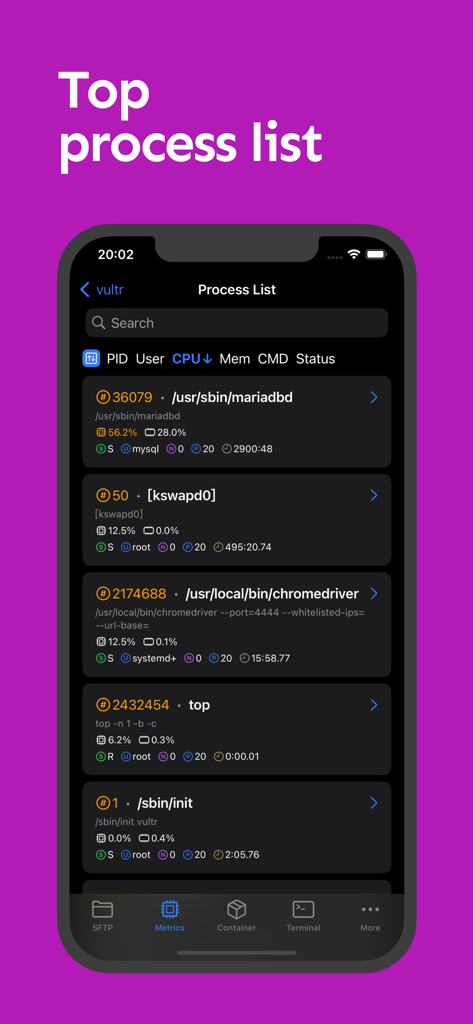
NeoServer 앱 스크린샷으로 PID, CPU, 메모리 사용량 등 활성 서버 프로세스의 상세 목록 표시
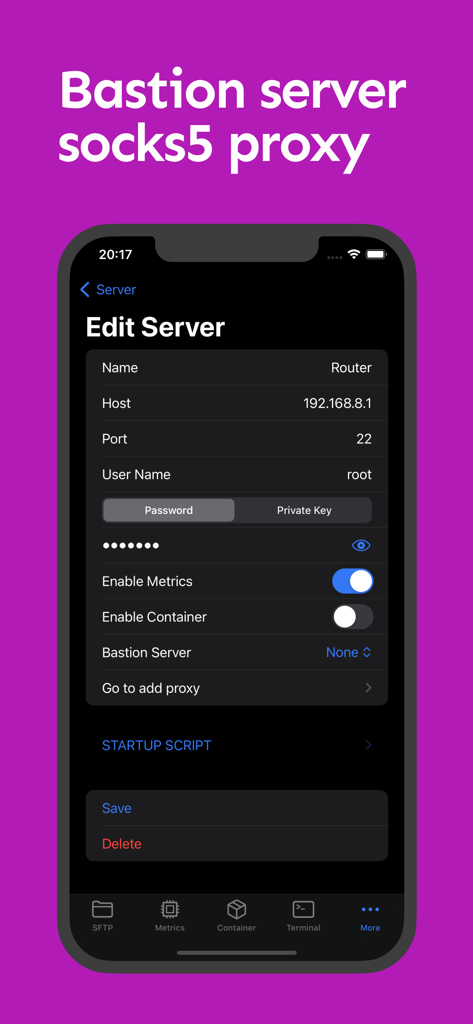
NeoServer 모바일 앱 인터페이스로 Bastion 및 SOCKS5 프록시 옵션이 포함된 SSH 서버 세부 정보 구성
설명
NeoServer offers a comprehensive management solution via SSH without additional software installation for your servers, NAS (Network Attached Storage), and Linux-based routers across iPhone, iPad, and Mac platforms. It supports terminal remote connections, multi-server script execution, container management, SFTP file management, and common performance data display.
◉ Free Features:
◦ Supports SFTP browsing of server files, allowing editing (with syntax highlighting for common languages), renaming, deletion, viewing file size and permissions, uploading and downloading files, etc.
◦ Supports running scripts and viewing historical records. It also allows batch execution on server groups or multiple servers.
◦ Displays server parameters and monitoring status, including CPU, memory, disk, and network metrics, with widgets for visualization.
◦ Uptime, system load over 1/5/15 minutes.
◦ CPU temperature, CPU model, CPU usage rate.
◦ GPU Usage & Task on the GPU
◦ Disk, IOPS, I/O Wait, read/write speed, total read/write size.
◦ Network, upload/download speed, total upload/download size. Click for network card details, IP binding, and network card UP/DOWN status.
◦ Supports SSH remote connection with copy, paste, special keyboard functionality in Terminal. It supports initializing shell scripts upon connection, tmux for session recovery, command line auto-completion, and double-click to trigger TAB.
◦ Displays the process list with PID, User, CPU Usage, Memory Usage, Command, and Status, with the ability to sort by header and send specified kill signals.
◦ Supports Docker/Podman container management, viewing container logs and inspection information, restarting, pausing, deleting containers, and managing container images.
◦ iOS 17 Widgets.
◦ Supports SSH server configuration, including password and key. Supports jump hosts/bastion servers, and SOCKS5 connections to corporate intranets. support Wake-on-LAN (WOL)
◦ Supports iCloud synchronization (using private iCloud space), FaceID to unlock the app.
◦ Apple multiplatform support: iOS/macOS, iPadOS.
◉ Premium Version
◦ Terminal Theme & Terminal Script Execution
◦ Container Operations: Create, Restart, Stop
◦ SFTP File Editing
◦ Socks Proxy & Jump Server
◦ Batch Server Script Execution
◉ NeoServer is popular among NAS (Synology, TrueNAS, QNAP, FreeNAS) players, self-hosting enthusiasts, website master, AI model researcher, and developers.
◉ Feedback and issues contact: h2eros.z@gmail.com.
◉ NeoServer is best iOS alternatives for putty,termux,juicessh
◉ Data Privacy:
All data is stored on your device. NeoServer does not transmit data over the network to any servers outside of your configured servers, nor does it engage in any third-party statistics or advertising connections.
Privacy Policy: https://www.playshare.cc/en/doc/neoserver-privacy.html
Terms of Use: https://www.apple.com/legal/internet-services/itunes/dev/stdeula/
이 페이지는 앱이나 개발자의 공식 페이지가 아니며, 정보 제공 및 논평을 목적으로 작성된 독립 편집 간행물입니다. 명시적으로 달리 언급되지 않는 한, 해당 앱이나 개발자는 MWM, Apple, Google Play, 앱 퍼블리셔 또는 앱 개발자와 제휴, 보증, 후원, 승인 또는 공식적으로 연결되어 있지 않으며, 이 페이지의 어떤 내용도 해당 앱이 MWM의 서비스를 사용하여 개발되었음을 의미하지 않습니다. 모든 상표, 로고, 스크린샷 및 기타 콘텐츠는 해당 소유자의 자산입니다.