
이 페이지는 앱이나 개발자의 공식 페이지가 아니며, 정보 제공 및 논평을 목적으로 작성된 독립 편집 간행물입니다. 명시적으로 달리 언급되지 않는 한, 해당 앱이나 개발자는 MWM, Apple, Google Play, 앱 퍼블리셔 또는 앱 개발자와 제휴, 보증, 후원, 승인 또는 공식적으로 연결되어 있지 않으며, 이 페이지의 어떤 내용도 해당 앱이 MWM의 서비스를 사용하여 개발되었음을 의미하지 않습니다. 모든 상표, 로고, 스크린샷 및 기타 콘텐츠는 해당 소유자의 자산입니다.


다운로드
5M+사용자 평점
총 평가 수
44.6K개발사
카테고리
Utilities지원 언어
35최신 버전
6.9.1크기
99.5 MB출시일
2017년 9월 24일테크 전문가를 위한 다기능 디지털 스캐닝 및 데이터 상호작용 도구
NFC.cool Tools Tag Reader 앱 주요 기능 분석
강력한 자동화 및 시스템 통합
사용자는 웹훅을 통한 데이터 전송, iOS 단축어 연동, 위젯을 이용한 빠른 실행, 그리고 스캔 시 자동 액션 트리거와 같은 기능을 통해 복잡한 워크플로우를 자동화하고 다른 시스템과 효율적으로 통합할 수 있습니다.
고급 NFC 도구
이 앱은 암호화된 데이터 저장, 태그 포맷팅, 비밀번호 설정, 배치 작업 및 사용자 정의 명령과 같은 고급 기능을 통해 NFC 태그 관리를 세밀하게 제어할 수 있게 합니다.
3D 객체 및 공간 스캐너
이 앱은 3D 모델링 및 공간 계획을 위해 물리적 객체를 3D 모델로 변환하고, LiDAR 센서를 활용하여 상세한 실내 평면도를 생성하며 치수를 측정할 수 있습니다.
NFC 태그 읽기 및 쓰기
사용자에게 다양한 유형의 NFC 태그 데이터를 읽고, 맞춤형 메시지 및 동작을 태그에 기록하여 자동화 및 정보 공유를 간소화할 수 있는 기능을 제공합니다.
다기능 QR 및 바코드 스캐너/생성기
사용자는 다양한 유형의 QR 코드와 바코드를 스캔하고, 색상과 로고를 커스터마이징하여 25가지 이상의 메시지 유형으로 QR 코드를 생성할 수 있어 마케팅, 재고 관리 및 정보 공유에 유용합니다.
문서 스캐너 및 OCR
이 도구는 자동 가장자리 감지 및 온디바이스 OCR 기능을 통해 문서를 디지털화하고, 검색 가능한 PDF로 저장하여 효율적인 문서 관리와 빠른 정보 검색을 가능하게 합니다.
자주 묻는 질문
에 대해 알아야 할 모든 것 NFC.cool Tools Tag Reader
What devices does NFC.cool Tools Tag Reader support for NFC functions?
NFC.cool Tools Tag Reader supports NFC functionality on iPhone 7 and newer models. iPhones can read NFC tags, but the app does not support all RFID frequencies.
Can NFC.cool Tools Tag Reader write data to NFC tags?
Yes, NFC.cool Tools Tag Reader can write data to NFC tags. Users can write various types of information, including web links, Wi-Fi details, contact information, and custom messages.
What types of NFC tag management features does NFC.cool Tools Tag Reader offer?
NFC.cool Tools Tag Reader offers comprehensive NFC tag management, including reading, writing, formatting, locking, password protection, and modifying tags. It also provides NFC memory analysis in Expert Mode.
Does NFC.cool Tools Tag Reader support QR code scanning and creation?
Yes, NFC.cool Tools Tag Reader supports both scanning and creating QR codes. Users can decode various QR types and design custom QR codes with logos, emojis, and backgrounds using the QR Code Studio.
Can NFC.cool Tools Tag Reader scan documents and convert them to PDF?
Yes, NFC.cool Tools Tag Reader features a document scanner. It captures and enhances documents using on-device OCR, allowing users to save or share them as searchable PDF files.
Is LiDAR required to use the 3D scanning features in NFC.cool Tools Tag Reader?
Yes, LiDAR is required to utilize the 3D & Room Scanner features in NFC.cool Tools Tag Reader. This hardware enables the app to scan objects and rooms for 3D model generation.
How can NFC.cool Tools Tag Reader send scanned data to a server?
NFC.cool Tools Tag Reader sends scanned NFC and QR data to a user's server via Webhook functionality. This feature offers security and flexibility for various applications like inventory and home automation.
What customization options are available for QR codes in NFC.cool Tools Tag Reader?
NFC.cool Tools Tag Reader allows users to customize QR codes vibrantly in its QR Code Studio. Customization options include adding logos, emojis, and backgrounds for distinctiveness.
Can NFC.cool Tools Tag Reader export 3D models for printing?
Yes, NFC.cool Tools Tag Reader can export 3D models. The app supports exporting models for 3D printing and other applications, particularly those generated from scanning objects or rooms.
Does NFC.cool Tools Tag Reader offer widgets for quick access?
Yes, NFC.cool Tools Tag Reader offers widgets. These widgets provide quick access to scanning tools and allow users to share QR codes directly from their home screen.
다음 스크린샷과 설명은 앱의 공식 스토어 목록에서 직접 가져온 것이며 앱 개발자의 자산입니다.
앱 스토어
스크린샷
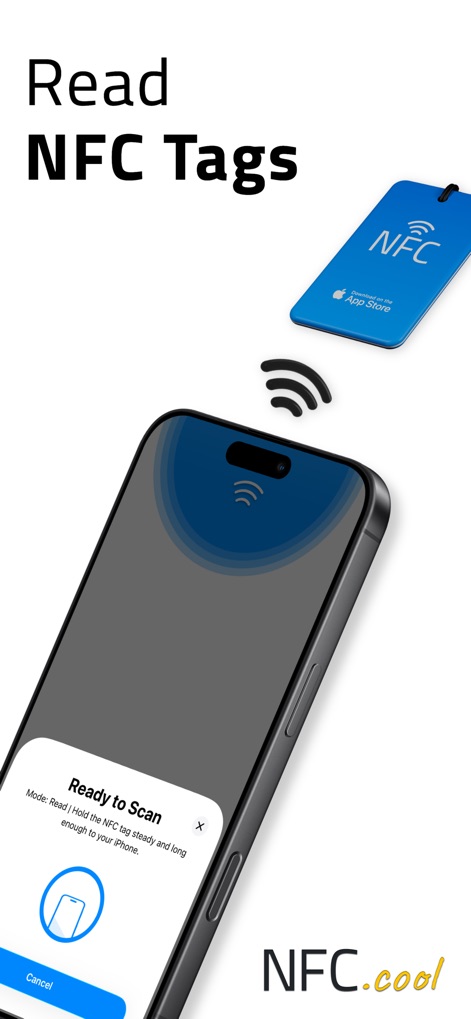
이 앱은 NFC 태그를 인식하여 데이터를 읽어들입니다. 'Ready to Scan' 메시지와 시각적인 NFC 신호 감지 애니메이션을 확인할 수 있습니다.
NFC 태그 읽기
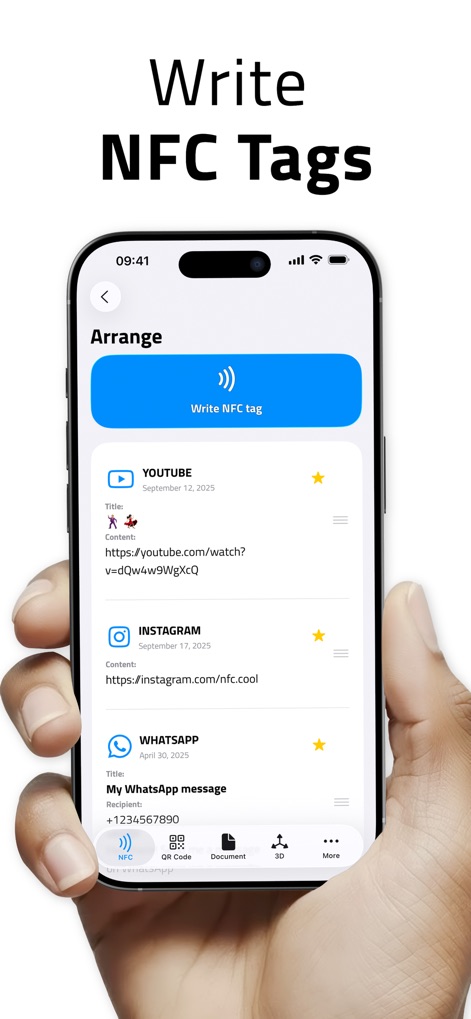
사용자는 다양한 정보를 NFC 태그에 기록할 수 있습니다. YouTube 링크와 Instagram 프로필을 태그에 쉽게 추가하고 정렬하는 기능을 보여줍니다.
NFC 태그 쓰기
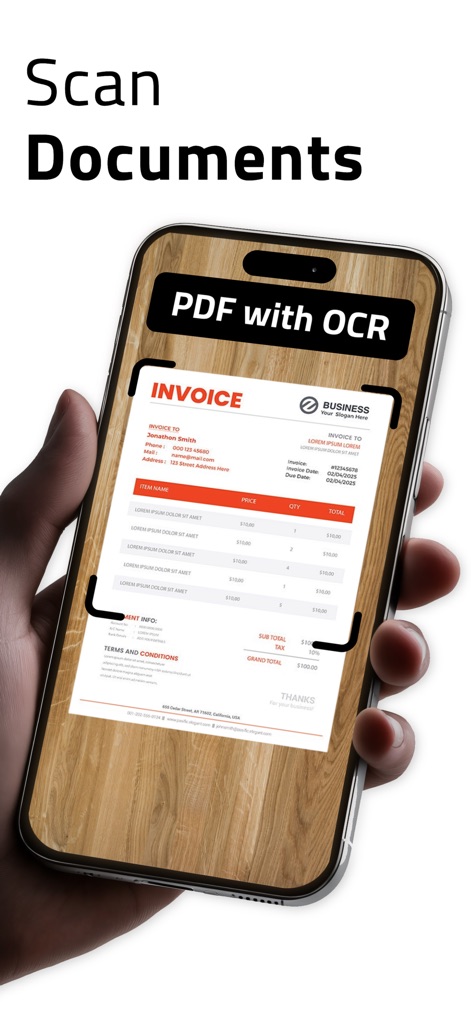
이 도구는 문서를 스캔하고 OCR을 통해 텍스트를 추출합니다. 화면에서 청구서 이미지와 'PDF with OCR'이라는 문구를 확인할 수 있습니다.
문서 스캔 기능
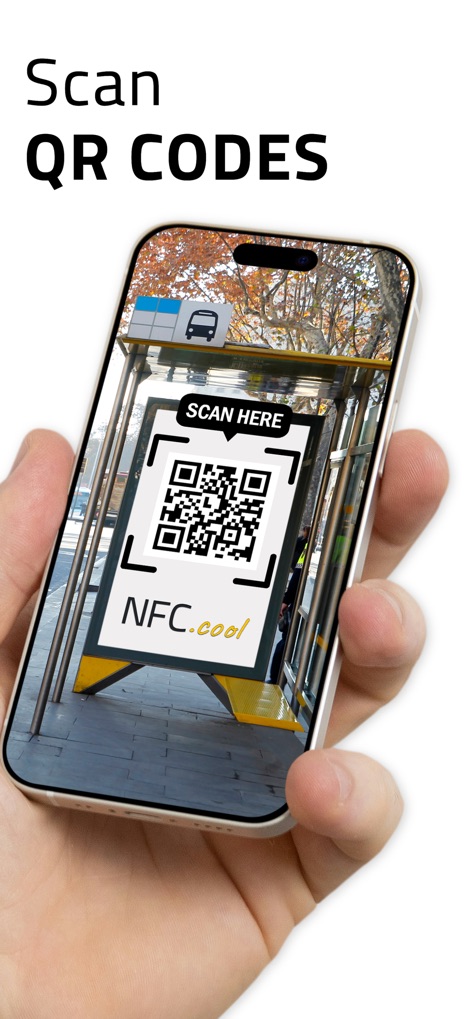
사용자는 주변의 QR 코드를 빠르게 스캔할 수 있습니다. 길거리 간판의 QR 코드와 'SCAN HERE' 안내 문구가 이 기능을 시각적으로 보여줍니다.
QR 코드 스캔

이 앱은 3D 객체를 스캔하여 모델로 변환하는 기능을 제공합니다. 앱 내에서 오리 모형의 3D 뷰와 'Show in AR' 및 'Export 3D model' 옵션을 볼 수 있습니다.
3D 객체 스캔

이 앱의 주요 기능들을 한눈에 볼 수 있습니다. QR 코드 스튜디오와 Wi-Fi 공유 기능이 아이콘과 함께 명확하게 제시되어 있습니다.
핵심 기능 개요

NFC 태그 잠금 및 비밀번호 보호 기능과 3D 프린팅을 위한 STL 내보내기 지원이 특징입니다.
고급 NFC 및 3D

웹훅을 통해 서버로 데이터를 전송하고, iOS 단축어를 커스터마이징하여 워크플로우를 자동화할 수 있습니다.
자동화 및 확장성

사용자는 스캔 데이터를 웹훅을 통해 서버로 전송할 수 있습니다. 'NFC Expert' 메뉴와 웹훅 활성화 설정 화면이 이 기능을 구체적으로 보여줍니다.
서버 데이터 연동
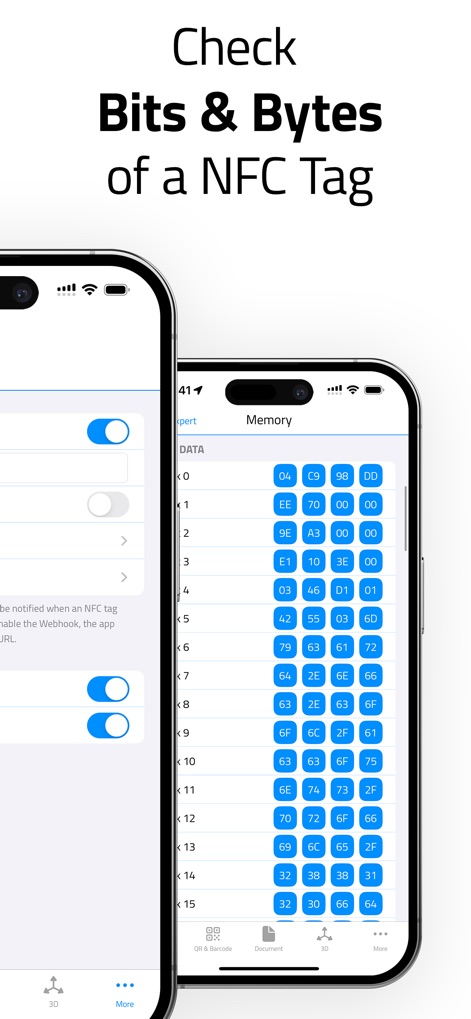
이 도구는 NFC 태그의 메모리 구조를 상세하게 분석할 수 있습니다. 웹훅 설정 화면과 태그의 비트 및 바이트 데이터가 표시된 화면을 통해 고급 기능을 보여줍니다.
NFC 태그 상세 분석
설명
Download
비슷한 앱
유사한 기능과 사용자 경험을 가진 앱
手机扫描王-扫描计数、智能测距、文字OCR识别、文档增强
小英 吕

扫描测量全能王-手机扫描文字识别、计数、测距、翻译软件
Wenzhou XunChi Digital Technology Co., Ltd.
QR Reader for iPhone
TapMedia Ltd

Simple Scanner-Measuredistance
Guangzhou Xiangfeng Network Technology Co.,Ltd.
手机扫描王-实景测量物体距离&一键统计建材数据
毅 谢

万能扫描王-测距计数
亚丽 高

万能扫描王- PDF扫描、拍照计数、智能测距、OCR文字识别
霞 韩

Phone counting Measurement
Guangzhou Xishang Network Technology Co., Ltd.

SmartScanner-AI Measure&Count
GUANGZHOU TOPJOY TECHNOLOGY CO., LIMITED
이 페이지는 앱이나 개발자의 공식 페이지가 아니며, 정보 제공 및 논평을 목적으로 작성된 독립 편집 간행물입니다. 명시적으로 달리 언급되지 않는 한, 해당 앱이나 개발자는 MWM, Apple, Google Play, 앱 퍼블리셔 또는 앱 개발자와 제휴, 보증, 후원, 승인 또는 공식적으로 연결되어 있지 않으며, 이 페이지의 어떤 내용도 해당 앱이 MWM의 서비스를 사용하여 개발되었음을 의미하지 않습니다. 모든 상표, 로고, 스크린샷 및 기타 콘텐츠는 해당 소유자의 자산입니다.