
이 페이지는 앱이나 개발자의 공식 페이지가 아니며, 정보 제공 및 논평을 목적으로 작성된 독립 편집 간행물입니다. 명시적으로 달리 언급되지 않는 한, 해당 앱이나 개발자는 MWM, Apple, Google Play, 앱 퍼블리셔 또는 앱 개발자와 제휴, 보증, 후원, 승인 또는 공식적으로 연결되어 있지 않으며, 이 페이지의 어떤 내용도 해당 앱이 MWM의 서비스를 사용하여 개발되었음을 의미하지 않습니다. 모든 상표, 로고, 스크린샷 및 기타 콘텐츠는 해당 소유자의 자산입니다.


다운로드
1M+사용자 평점
총 평가 수
130.3K개발사
카테고리
Health & Fitness지원 언어
7최신 버전
4.6크기
97.2 MB출시일
2017년 3월 17일뉴욕시 공공 지원 수혜자를 위한 필수 모바일 플랫폼
NYC ACCESS HRA 앱 분석
필수 서류 업로드
이 앱은 사용자가 신청서, 재인증, 정기 보고서 또는 특별 지원 요청을 위해 기관에 제출해야 하는 서류 목록을 보여줍니다. 사용자는 각 서류의 사진을 찍거나 카메라 롤에서 이미지를 선택하여 직접 업로드할 수 있습니다.
다국어 지원
이 앱은 영어, 스페인어, 아랍어, 프랑스어, 한국어, 러시아어 및 중국어 간체로 제공되어 광범위한 사용자 접근성을 보장합니다.
혜택 케이스 상세 정보 및 EBT 잔액 확인
이 앱은 사용자가 SNAP 또는 현금 지원 케이스의 현재 상태, 각 혜택의 EBT 잔액, 예정된 재인증 날짜를 확인할 수 있게 해줍니다. 또한 Fair Fares NYC 할인 상태 및 갱신 기간 또는 Access-A-Ride 상태를 추적할 수 있습니다.
실시간 알림 수신
이 앱은 사용자의 스마트폰으로 케이스 재인증 기한, 온라인 신청 제출 확인, 예정된 약속, 필수 서류 및 전자 통지와 같은 실시간 알림을 받을 수 있게 해줍니다.
결제 내역 추적
이 앱은 사용자가 집주인, 공과금 회사 또는 EBT 카드에 대한 지급과 같이 케이스와 관련된 예정된 및 과거 결제 내역을 확인할 수 있도록 지원합니다.
약속 관리 및 알림 설정
이 도구는 사용자가 예정된, 놓쳤던, 또는 완료된 약속을 볼 수 있게 해줍니다. 또한 앱은 사용자의 휴대폰이나 태블릿에 약속 미리 알림을 추가하는 기능을 제공합니다.
접수된 서류 내역 확인
이 앱은 기관이 사용자의 케이스에 대해 접수한 서류 목록을 확인할 수 있는 기능을 제공합니다. 앱은 제출되어 기관에 의해 접수된 각 서류를 접수일로부터 60일 동안 목록에 유지합니다.
프로필 정보 관리
이 도구는 사용자가 이전에 기관에 제공했던 연락처 정보와 알림 환경 설정을 확인할 수 있도록 지원합니다. 이 앱은 특정 혜택 유형에 따라 프로필 업데이트 빈도에 제한을 둡니다.
자주 묻는 질문
에 대해 알아야 할 모든 것 NYC ACCESS HRA
What is NYC ACCESS HRA mobile?
NYC ACCESS HRA mobile is an app that allows users to manage their benefits on-the-go. It provides access to case details, EBT balances, appointments, payments, and required documents for various assistance programs.
Can I view my EBT balance with the NYC ACCESS HRA app?
Yes, the NYC ACCESS HRA app allows users to view the EBT balance for each of their benefits, including SNAP or Cash Assistance cases, in the Cases section.
How do I check my upcoming appointments in the NYC ACCESS HRA app?
Users can view upcoming, missed, or completed appointments in the Appointments section of the NYC ACCESS HRA app. It also provides an option to add reminders to a phone or tablet.
How long do uploaded documents stay visible in NYC ACCESS HRA?
Submitted documents remain visible on the 'My Uploads' screen for 100 days. Accepted documents stay on the 'Documents' list for 60 days from their acceptance date.
Can I update my profile information in the NYC ACCESS HRA app?
Yes, the Profile section allows users to view and update contact information and notification preferences. Users with CA or SNAP cases can update every 24 hours; Fair Fares NYC clients can update as needed.
What types of payments can I view in the NYC ACCESS HRA app?
The Payments section displays upcoming and past payments related to a case. This includes payments made to landlords, utility companies, or directly to an EBT card.
Does NYC ACCESS HRA send notifications?
Yes, NYC ACCESS HRA provides real-time notifications. These alerts cover case updates like recertification due dates, online application confirmations, upcoming appointments, and required documentation.
What languages does the NYC ACCESS HRA mobile app support?
The NYC ACCESS HRA mobile app is available in multiple languages. These include English, Spanish, Arabic, French, Korean, Russian, and Simplified Chinese for broad accessibility.
How do I submit required documents using the NYC ACCESS HRA app?
The Required Documents section lists needed documents. Users can take a photo of each document or select an image from their camera roll directly from this list to submit them.
Can I see my Fair Fares NYC discount status in the app?
Yes, the NYC ACCESS HRA app allows users to track their Fair Fares NYC discount status and renewal period directly within the Cases section of the application.
다음 스크린샷과 설명은 앱의 공식 스토어 목록에서 직접 가져온 것이며 앱 개발자의 자산입니다.
앱 스토어
스크린샷
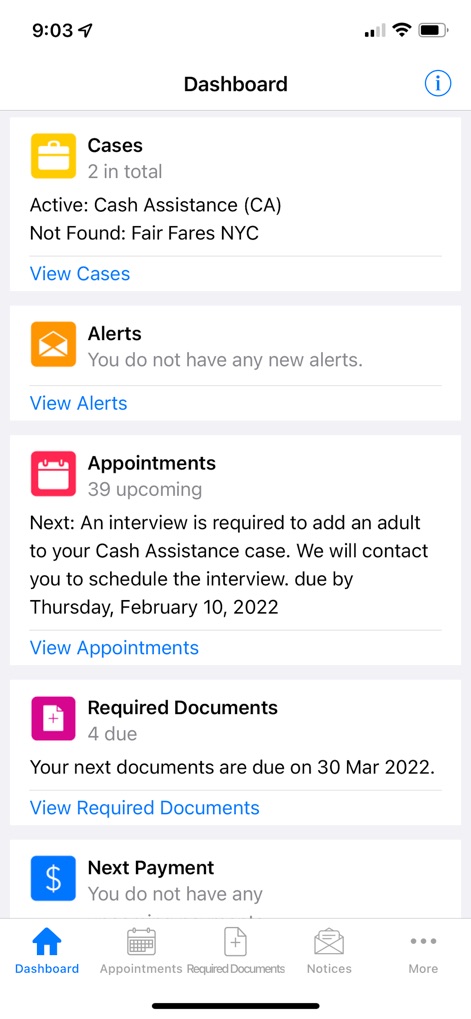
이 화면에서 사용자는 현재 활성화된 '사례 정보'와 '예정된 약속'과 같은 주요 정보를 한눈에 확인할 수 있습니다.
주요 정보 요약
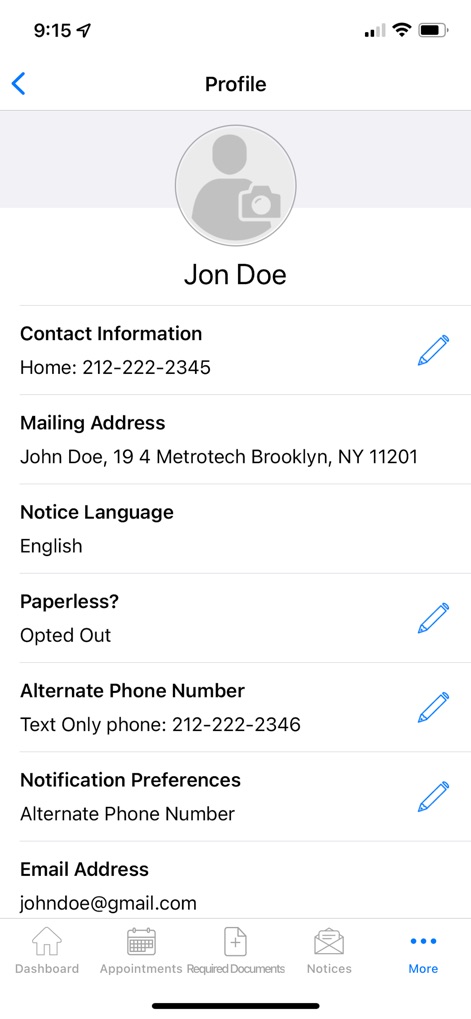
이 화면은 사용자의 '연락처 정보'와 '알림 설정'을 포함한 개인 프로필을 보여주며, 필요에 따라 정보를 편집할 수 있습니다.
개인 정보 관리
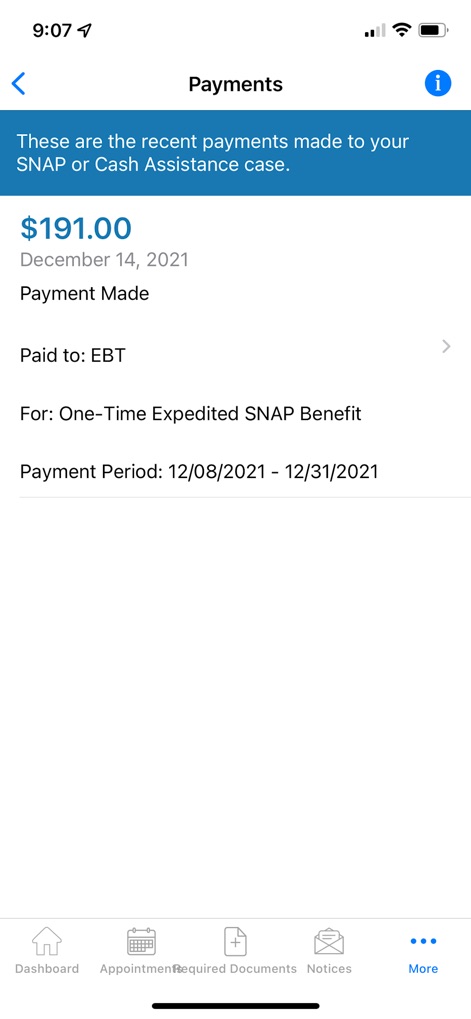
이 화면은 사용자의 최근 '결제 금액'과 해당 '혜택 종류'를 상세히 보여주어 재정 관리를 돕습니다.
결제 내역 확인
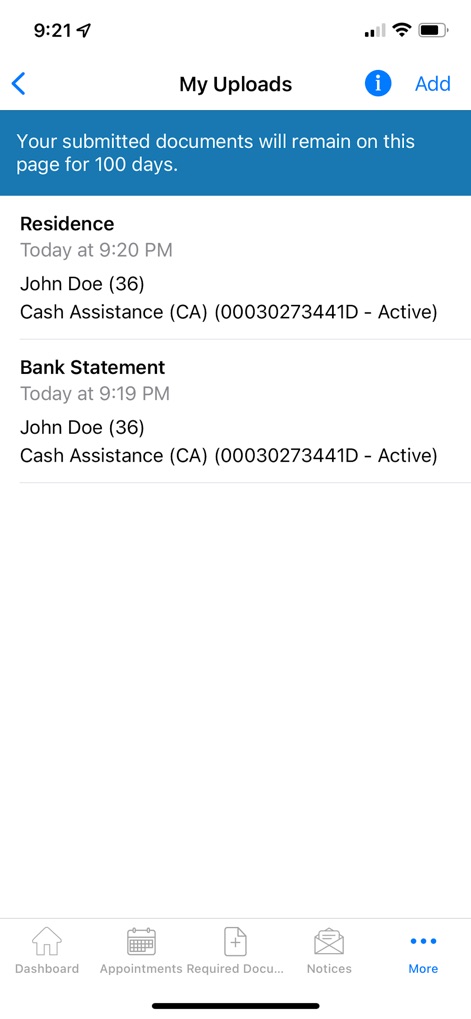
이 화면에서 사용자는 '거주지 증명'과 '은행 명세서'와 같이 제출한 서류 목록과 업로드 시점을 확인할 수 있습니다.
제출 서류 현황
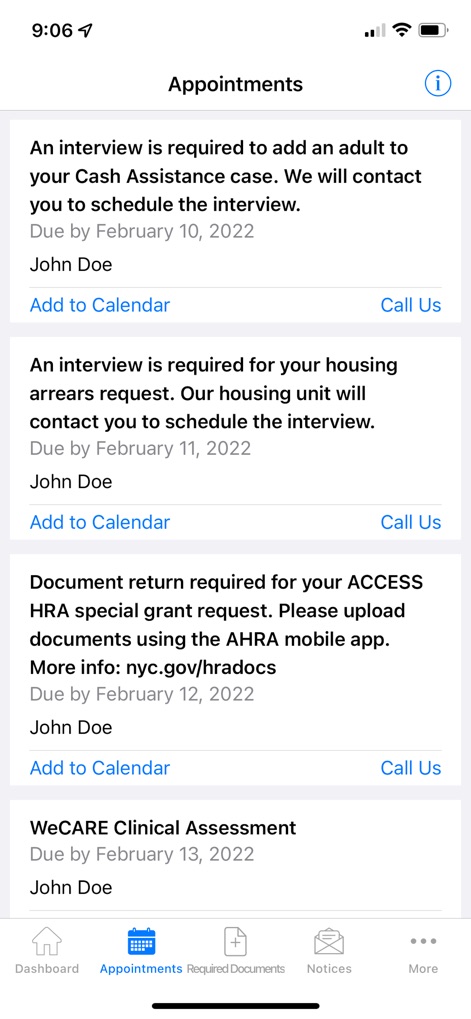
이 화면은 사용자의 '예정된 인터뷰'와 '서류 제출 기한'과 같은 다양한 약속을 나열하며, 달력 추가 및 전화 연락 옵션을 제공합니다.
예정된 약속 관리
설명
Download
비슷한 앱
유사한 기능과 사용자 경험을 가진 앱

Propel: EBT, SNAP, WIC, & more
Propel Inc

Netspend
NETSPEND CORPORATION
Your Texas Benefits
Texas Health and Human Services Commission
Direct Express® Mobile
Comerica Bank

Xpectations!® Plus
Green Dot Corporation

Netspend Wallet
NETSPEND CORPORATION
U.S. Bank ReliaCard
U.S. Bancorp
Serve
HI Technology Corp

Vプリカ+
LIFECARD CO.,LTD.
이 페이지는 앱이나 개발자의 공식 페이지가 아니며, 정보 제공 및 논평을 목적으로 작성된 독립 편집 간행물입니다. 명시적으로 달리 언급되지 않는 한, 해당 앱이나 개발자는 MWM, Apple, Google Play, 앱 퍼블리셔 또는 앱 개발자와 제휴, 보증, 후원, 승인 또는 공식적으로 연결되어 있지 않으며, 이 페이지의 어떤 내용도 해당 앱이 MWM의 서비스를 사용하여 개발되었음을 의미하지 않습니다. 모든 상표, 로고, 스크린샷 및 기타 콘텐츠는 해당 소유자의 자산입니다.