On Shelf
On Shelf
다운로드: App Store

이 페이지는 앱이나 개발자의 공식 페이지가 아니며, 정보 제공 및 논평을 목적으로 작성된 독립 편집 간행물입니다. 명시적으로 달리 언급되지 않는 한, 해당 앱이나 개발자는 MWM, Apple, Google Play, 앱 퍼블리셔 또는 앱 개발자와 제휴, 보증, 후원, 승인 또는 공식적으로 연결되어 있지 않으며, 이 페이지의 어떤 내용도 해당 앱이 MWM의 서비스를 사용하여 개발되었음을 의미하지 않습니다. 모든 상표, 로고, 스크린샷 및 기타 콘텐츠는 해당 소유자의 자산입니다.


로고: On Shelf
다운로드: App Store

On Shelf

팔리지 않는 상품에 돈 낭비는 이제 그만. '인기' 상품을 한눈에 파악하고, 바코드를 쉽게 스캔하며, 시각적인 재고 관리 센터를 통해 iPad에서 전체 재고를 관리하세요.

주요 수치

다운로드

79K+

사용자 평점

4.4/5

총 평가 수

100

개발사

Dawn Malsbury

카테고리

Business

지원 언어

1

최신 버전

8.4.0

크기

10.7 MB

출시일

2012년 4월 9일
기능

재고를 수익 창출 기계로 바꾸세요

On Shelf는 불량 재고에 돈을 낭비하는 것을 멈추고 실제로 판매되는 상품에 집중해야 하는 실무 소유주를 위해 설계된 직관적인 iPad 솔루션입니다.

'인기' 트렌드를 즉시 파악하세요

색상으로 구분된 통찰력으로 판매 실적을 시각화하세요. 인기 상품을 한눈에 파악하고 재고 수준을 최적화하여 모든 수익을 극대화하세요.

손쉽게 스캔하고 판매하세요

수동 입력을 버리세요. iPad 카메라를 사용하여 바코드를 스캔하여 매장에서 바로 신속하게 재고 업데이트, 판매 송장 및 재고 확인을 하세요.

다음 스크린샷과 설명은 앱의 공식 스토어 목록에서 직접 가져온 것이며 앱 개발자의 자산입니다.

앱 스토어

스크린샷
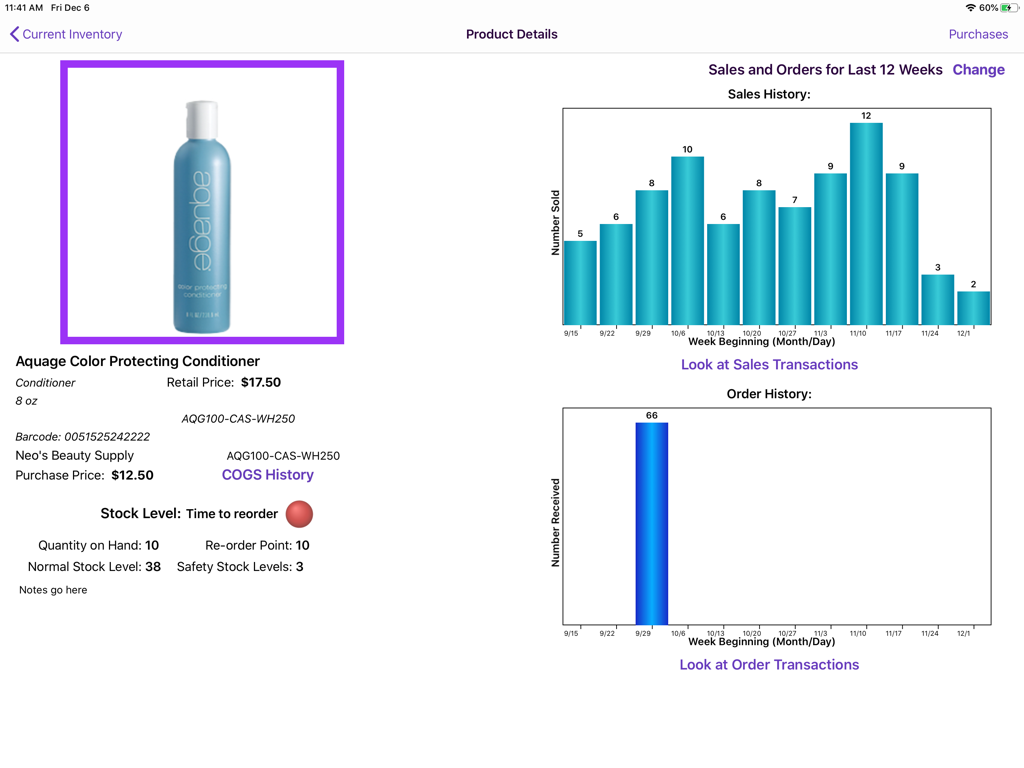
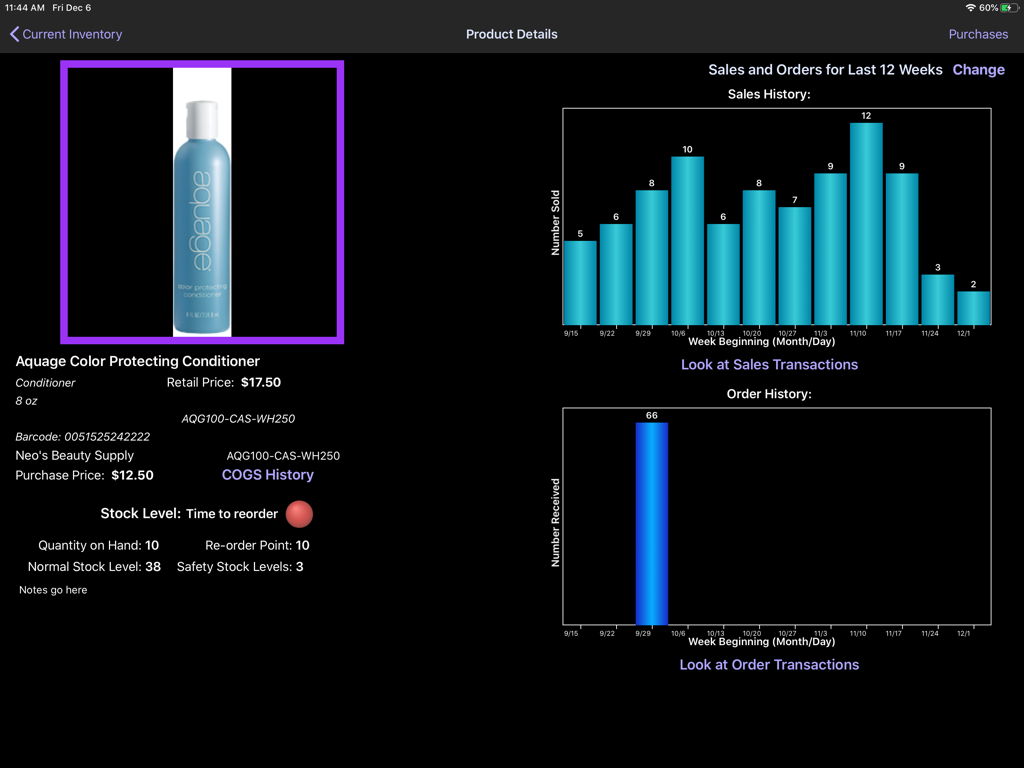
On Shelf - On Shelf iPad 앱 제품 상세 페이지, 재고 수준 및 판매 내역 차트 표시
On Shelf iPad 앱 제품 상세 페이지, 재고 수준 및 판매 내역 차트 표시

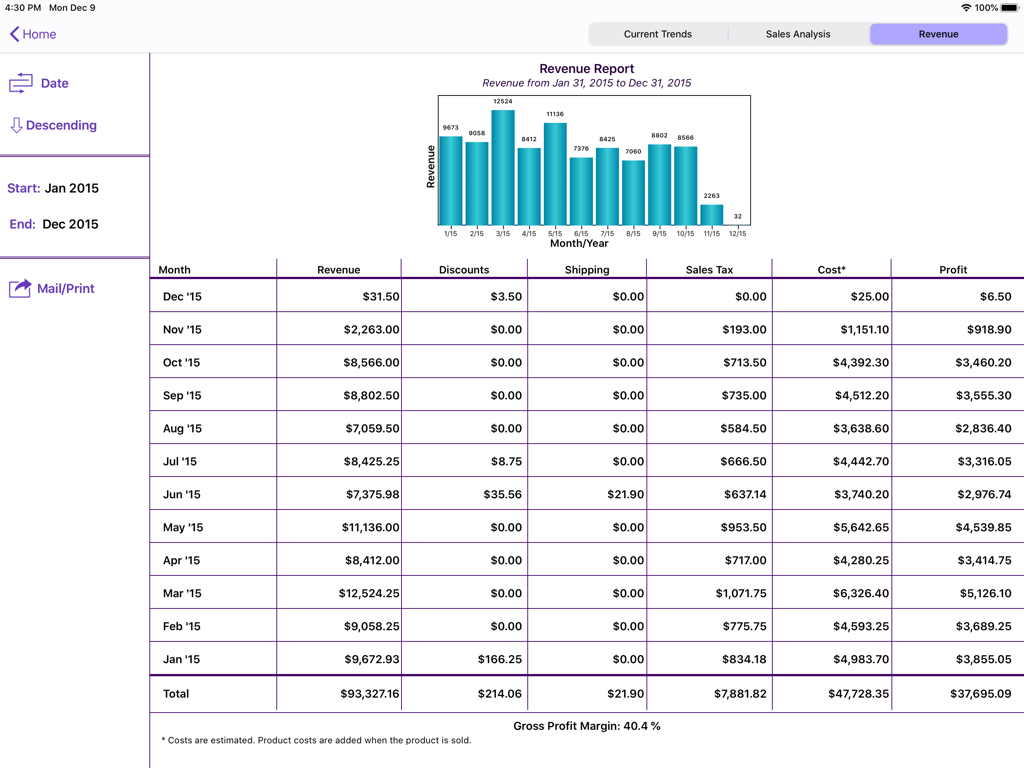
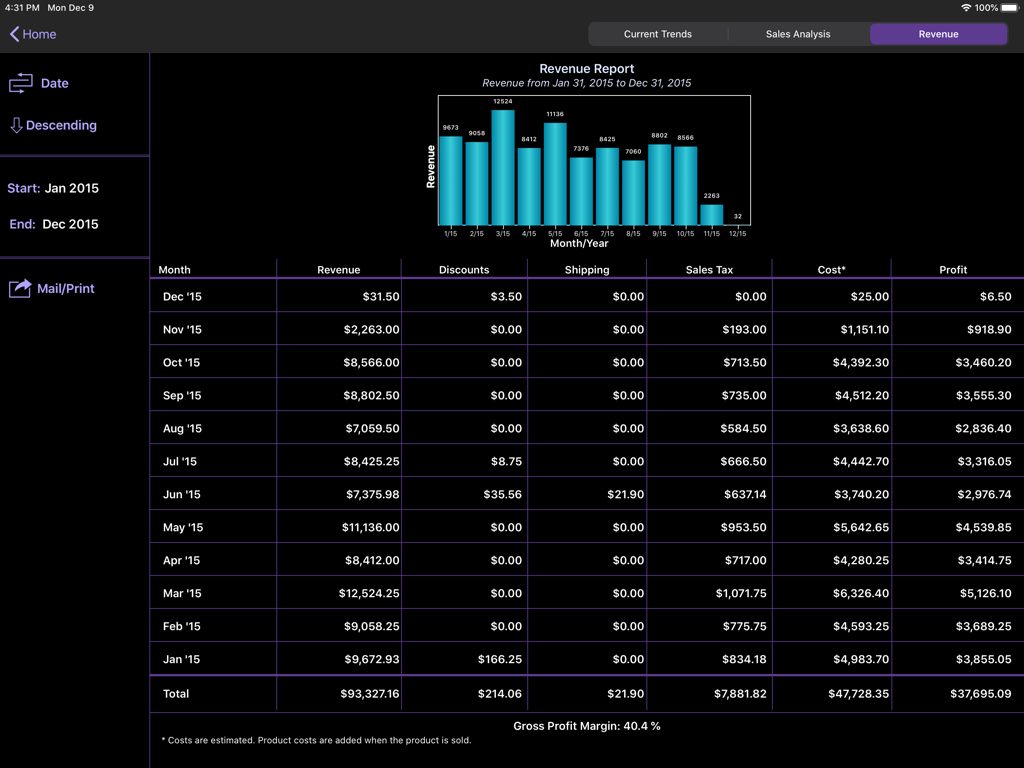
On Shelf - iPad의 수익 보고서 대시보드, 월간 판매 막대 차트 및 상세 재무 이익 테이블 표시
iPad의 수익 보고서 대시보드, 월간 판매 막대 차트 및 상세 재무 이익 테이블 표시

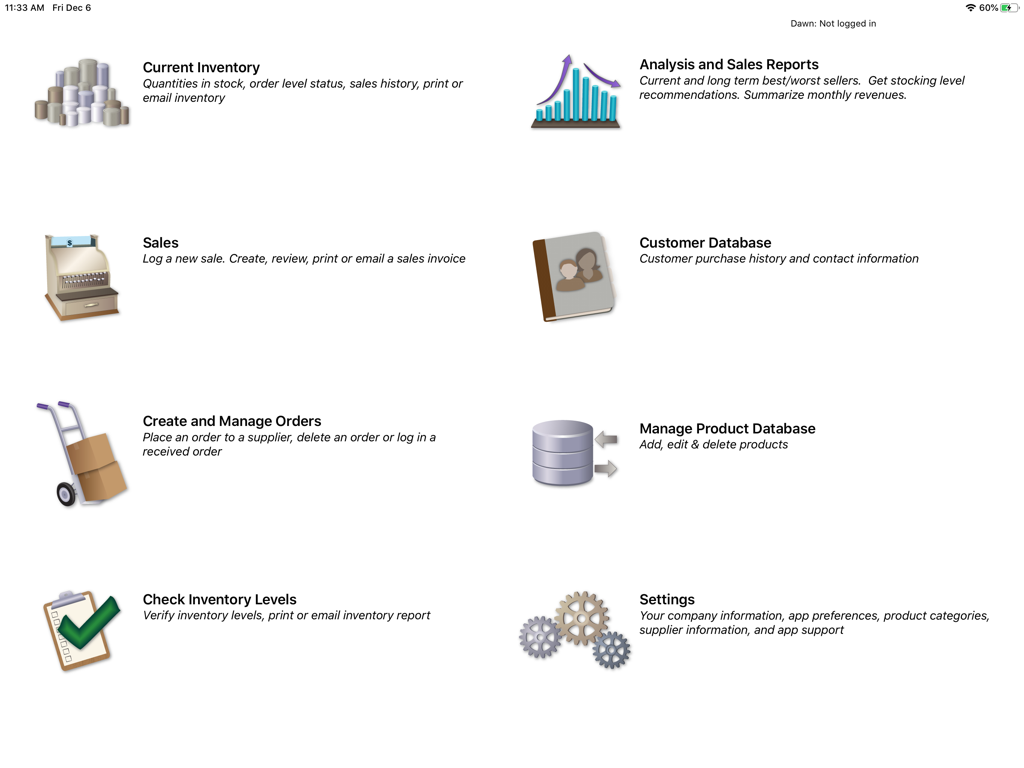
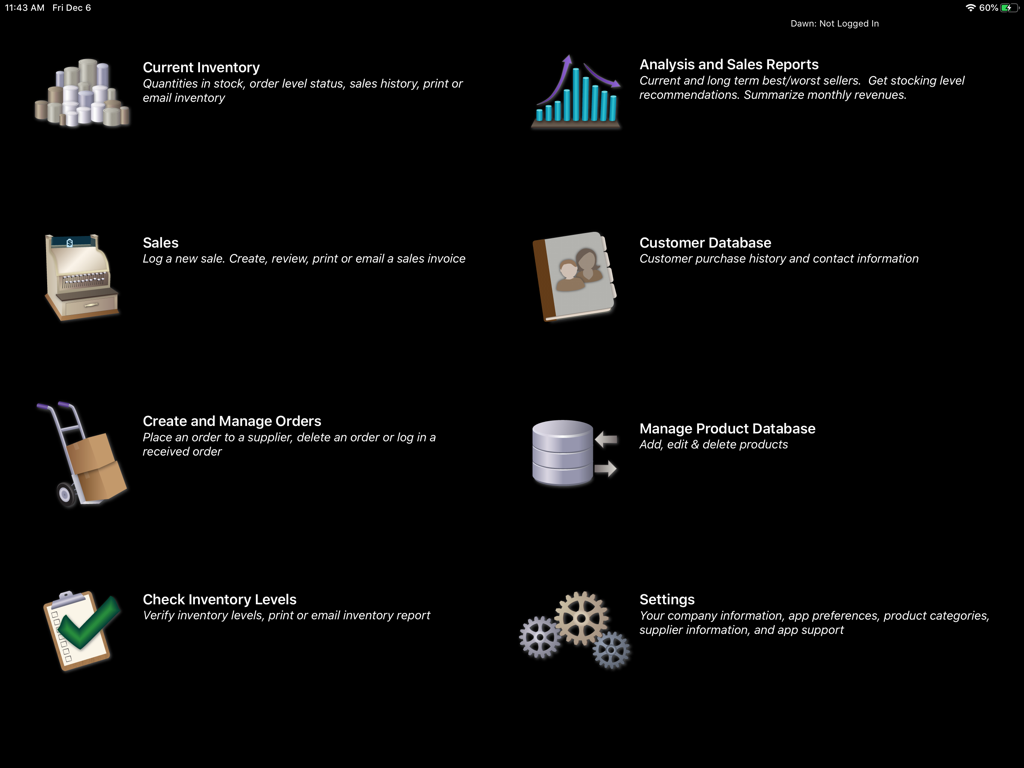
On Shelf - On Shelf 재고 관리 앱의 메인 대시보드 (iPad), 재고 판매 보고서 및 고객 데이터베이스와 같은 기능 표시
On Shelf 재고 관리 앱의 메인 대시보드 (iPad), 재고 판매 보고서 및 고객 데이터베이스와 같은 기능 표시

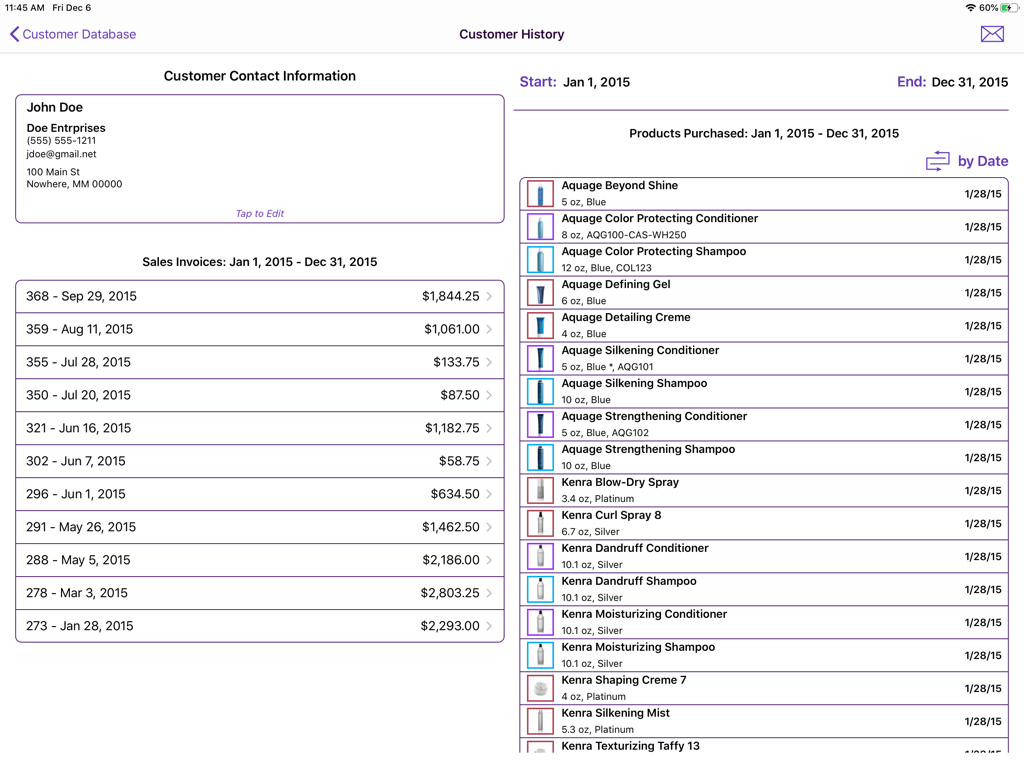
On Shelf - On Shelf 앱의 고객 기록 화면, 연락처 정보, 송장 및 구매한 상품 표시
On Shelf 앱의 고객 기록 화면, 연락처 정보, 송장 및 구매한 상품 표시

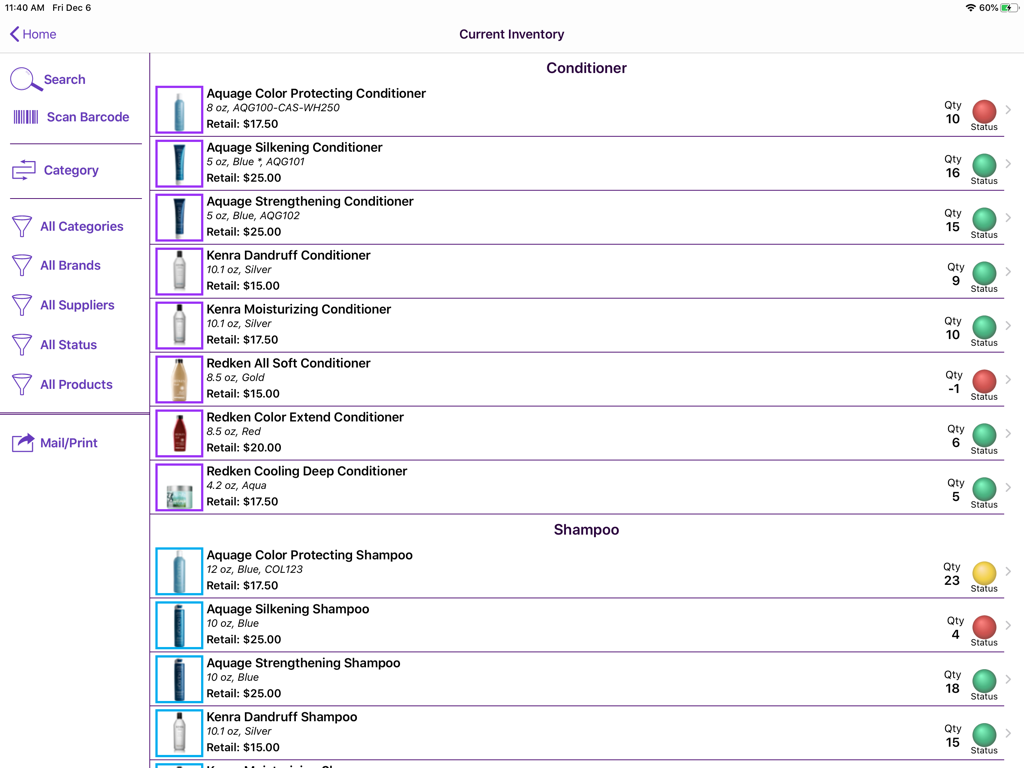
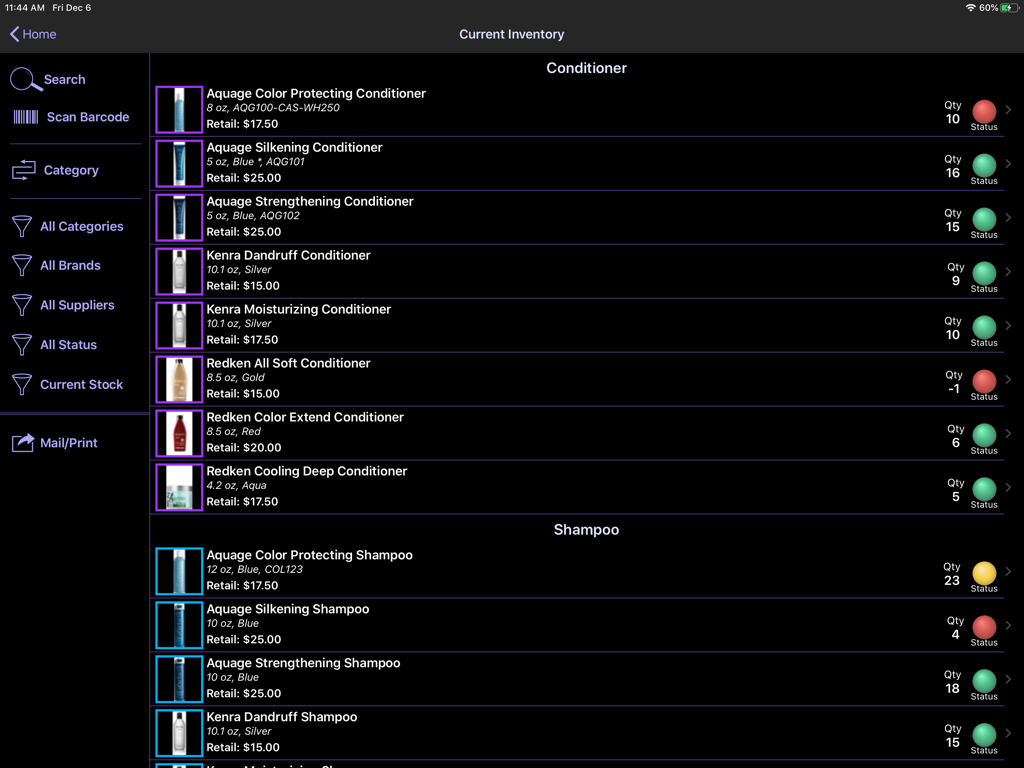
On Shelf - On Shelf 앱의 현재 재고 목록, 재고 상태 표시기 포함 (iPad 화면)
On Shelf 앱의 현재 재고 목록, 재고 상태 표시기 포함 (iPad 화면)

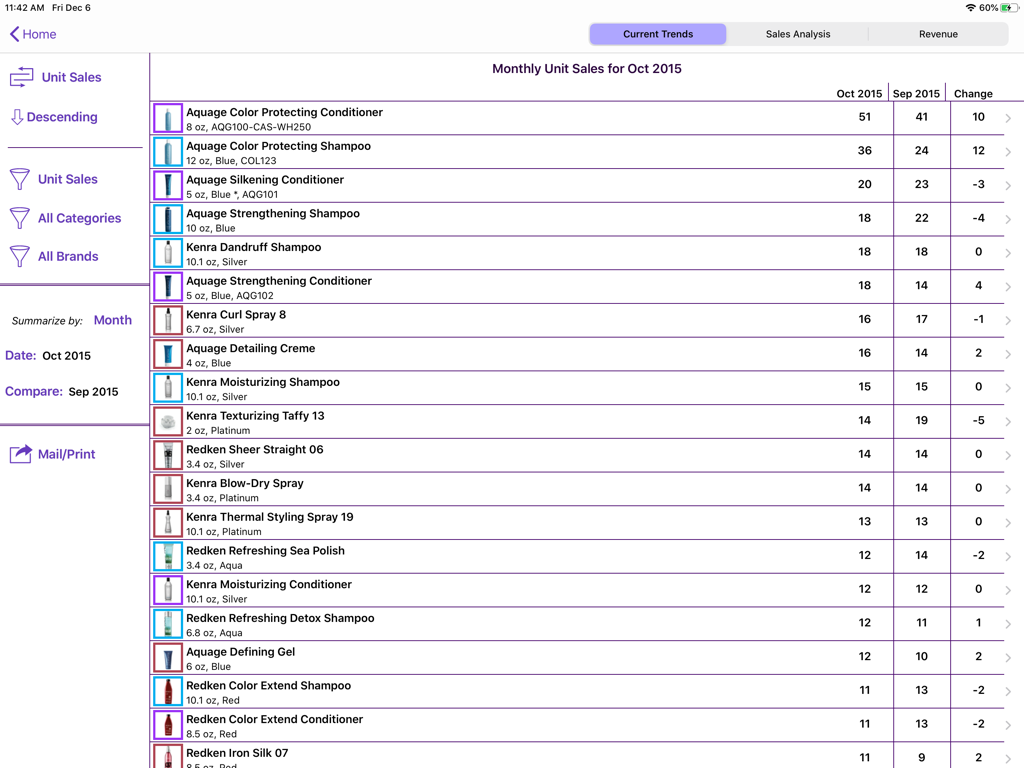
On Shelf - On Shelf 앱의 월간 단위 판매 보고서 (iPad 화면), 살롱 제품 목록 및 판매 트렌드 표시
On Shelf 앱의 월간 단위 판매 보고서 (iPad 화면), 살롱 제품 목록 및 판매 트렌드 표시

On Shelf - On Shelf iPad 앱의 재고 제품 상세 화면, 판매 내역 그래프 및 재고 알림 표시
On Shelf iPad 앱의 재고 제품 상세 화면, 판매 내역 그래프 및 재고 알림 표시

On Shelf - iPad 앱 화면, 월간 수익 보고서 표시, 소규모 비즈니스를 위한 막대 차트 및 재무 데이터 테이블 포함
iPad 앱 화면, 월간 수익 보고서 표시, 소규모 비즈니스를 위한 막대 차트 및 재무 데이터 테이블 포함

On Shelf - On Shelf iPad 앱의 메인 메뉴, 재고 판매 보고서, 고객 데이터베이스 및 주문 관리 아이콘 및 설명 표시
On Shelf iPad 앱의 메인 메뉴, 재고 판매 보고서, 고객 데이터베이스 및 주문 관리 아이콘 및 설명 표시

On Shelf - On Shelf 앱의 현재 재고 화면, 재고 수량 및 색상으로 구분된 상태 표시기가 있는 살롱 제품 표시

On Shelf 앱의 현재 재고 화면, 재고 수량 및 색상으로 구분된 상태 표시기가 있는 살롱 제품 표시

설명

Maximize your retail business by using On Shelf to help optimize your inventory levels. Don’t waste money on items that just sit on your shelves. Easily see which items are “hot” and those that are not. On Shelf is versatile - users include salons, bars, lounges and small stores. Note: On Shelf will leave the app store on 1 May 2026 OPTIMIZE YOUR INVENTORY LEVELS - On Shelf recommends the correct inventory levels for each product to maximize your potential sales. - Minimize the money wasted on items that are not selling well. - Determine which products are the most profitable - Inventory items with the most and the least movement are highlighted on a short-term and long-term basis. - Select the time periods that you wish to examine. SYNC YOUR DATA BETWEEN MULTIPLE USERS/DEVICES - Your first month is free for the first user - Your data is stored on each iPad and in the cloud - You can work offline, your data will sync when you log back into your account - Ability to sync between multiple users – no need to share your password! - Syncing with an iPhone requires the purchase of On Shelf for iPhone - Note: A sync account is only required if you wish to sync data between different devices. Your data may be deleted from the sync server six months after your subscription expires. SCAN BARCODES - Quickly scan products to add to a sales invoice, adjust the order quantity, check the amount of inventory in stock or to edit the product information. - Note this feature only works for 3rd Generation and later models (i.e., not the original iPad or the iPad 2). - Reads UPC-E, Code 39, Code 39 mod 43, EAN-13 (including UPC-A), EAN-8, Code 93, Code 128, and PDF417 barcodes. VIEW CUSTOMER HISTORY - Review your customers’ purchase history. - Mail customers who have purchased a specific product. - Import your customer information from the contacts app. - Email all of your customers TRACK ITEMS CURRENTLY IN STOCK - Identifies products with low inventory levels. - Graphs show the weekly and monthly sales trends for each product. - A glance tells you if demand for a product is increasing or decreasing QUICKLY DETERMINE WHAT ITEMS ARE LOW IN STOCK -Place an order with a supplier at a touch of a button. The order can be printed or sent directly to your supplier. - Check an order into inventory quickly. - Inventory levels are automatically updated. TRACK INVENTORY MOVEMENT - Use the sales screen to log an individual or daily sales - Or, use the check inventory screen to enter sales - Inventory levels are tracked with integers, not fractional, units - Choose whether or not you want to display the sales transaction amounts IMPORT/EXPORT PRODUCT DESCRIPTIONS - Edit your product descriptions using the export/import feature (New Feature) - Save time by importing your product descriptions into On Shelf - Enter your product information in your favorite spreadsheet program - Save it as a tab-delimited file and import it into On Shelf SEND AND PRINT REPORTS - Email tab-delimited attachments that are easily imported into spreadsheets - Reports include current inventory levels, order history, recent sales history, and the best and worst selling products - Sales invoices can be printed out or sent to customers using your business logo For more information, please see our website: littletandog.com. SUPPORT If you have any questions, we’d love to hear from you. Contact us by e-mail at support@littletandog.com.

Download

다운로드: App Store

이 페이지는 앱이나 개발자의 공식 페이지가 아니며, 정보 제공 및 논평을 목적으로 작성된 독립 편집 간행물입니다. 명시적으로 달리 언급되지 않는 한, 해당 앱이나 개발자는 MWM, Apple, Google Play, 앱 퍼블리셔 또는 앱 개발자와 제휴, 보증, 후원, 승인 또는 공식적으로 연결되어 있지 않으며, 이 페이지의 어떤 내용도 해당 앱이 MWM의 서비스를 사용하여 개발되었음을 의미하지 않습니다. 모든 상표, 로고, 스크린샷 및 기타 콘텐츠는 해당 소유자의 자산입니다.








