
이 페이지는 앱이나 개발자의 공식 페이지가 아니며, 정보 제공 및 논평을 목적으로 작성된 독립 편집 간행물입니다. 명시적으로 달리 언급되지 않는 한, 해당 앱이나 개발자는 MWM, Apple, Google Play, 앱 퍼블리셔 또는 앱 개발자와 제휴, 보증, 후원, 승인 또는 공식적으로 연결되어 있지 않으며, 이 페이지의 어떤 내용도 해당 앱이 MWM의 서비스를 사용하여 개발되었음을 의미하지 않습니다. 모든 상표, 로고, 스크린샷 및 기타 콘텐츠는 해당 소유자의 자산입니다.


Open Library Reader
호기심 많은 마음을 위한 필수 iPad 동반자. 디지털 책장을 관리하고 세계 최대의 개방형 아카이브에서 몰입감 있고 방해 없는 읽기 경험을 즐기세요.
다운로드
182K+사용자 평점
총 평가 수
100개발사
카테고리
Books지원 언어
1최신 버전
1.0.16+23크기
26.1 MB출시일
2021년 8월 5일수백만 권의 볼륨에 대한 개인 포털
전담 독자를 위해 설계된 저희 앱은 iPad에 최적화된 세련되고 방해 없는 인터페이스로 Open Library의 성능을 손끝으로 가져옵니다.
시각적 도서관 관리
사용자 지정 책장에 저장된 책을 손쉽게 정렬, 추적 및 관리하고 Open Library 계정과 즉시 동기화하세요.
방해 없는 몰입
원터치로 전체 화면 모드로 전환하여 모든 디지털 노이즈를 제거하고 화면의 한계까지 모든 페이지를 확장하여 깊이 읽을 수 있도록 합니다.
자주 묻는 질문
에 대해 알아야 할 모든 것 Open Library Reader
Open Library Reader 앱이란 무엇인가요?
Open Library Reader는 openlibrary.org의 인터페이스 역할을 하는 앱입니다. 사용자는 Open Library 플랫폼에서 직접 수백만 권의 책을 탐색하고, 대출하고, 추적하고, 읽을 수 있습니다.
Open Library Reader 앱을 사용하려면 인터넷 연결이 필요한가요?
네, Open Library Reader는 활성 인터넷 연결이 필요합니다. 모든 사용자 데이터와 책은 앱 자체 내에 있는 것이 아니라 openlibrary.org의 온라인에 호스팅됩니다.
Open Library Reader 앱으로 책을 어떻게 추적할 수 있나요?
네, Open Library Reader 앱을 사용하면 '읽는 중', '읽을 예정', '읽은 책' 선반을 관리하여 책을 추적할 수 있습니다. 또한 대출한 제한된 액세스 책의 남은 시간도 추적합니다.
Open Library Reader는 어떤 책 관리 기능을 제공하나요?
Open Library Reader는 내장 검색, 선반 관리(책 이동/제거, 판 변경), 관련 도서 검색, 선반 및 책 표시 사용자 지정 기능을 제공합니다.
Open Library Reader 앱은 iPad 사용자에게 최적화되어 있나요?
네, Open Library Reader는 iPad에 최적화되어 해당 장치에서 최고의 사용자 경험을 제공합니다. 또한 작은 화면에서도 작동합니다.
사용자는 Open Library Reader에서 어떻게 책을 검색하나요?
사용자는 내장 검색 기능을 통해 또는 저장된 컬렉션을 탐색하여 책을 찾습니다. 이 앱은 또한 선택한 제목에서 직접 유사한 책을 발견하기 위한 관련 도서 검색을 지원합니다.
Open Library Reader는 책을 어떻게 표시하나요?
Open Library Reader는 Open Library 웹사이트에 저장된 책을 화면에 배열하여 표시합니다. 사용자는 제목, 저자, 출판 날짜 및 저장 날짜별로 이러한 책을 정렬할 수 있습니다.
Open Library Reader는 전체 화면 읽기 모드를 제공하나요?
네, Open Library Reader의 읽기 인터페이스에서 책을 연 후 화면 상단을 탭하면 전체 화면 모드가 활성화됩니다. 이렇게 하면 읽기 영역을 최대화하고 방해 요소를 제거합니다.
다음 스크린샷과 설명은 앱의 공식 스토어 목록에서 직접 가져온 것이며 앱 개발자의 자산입니다.
앱 스토어
스크린샷
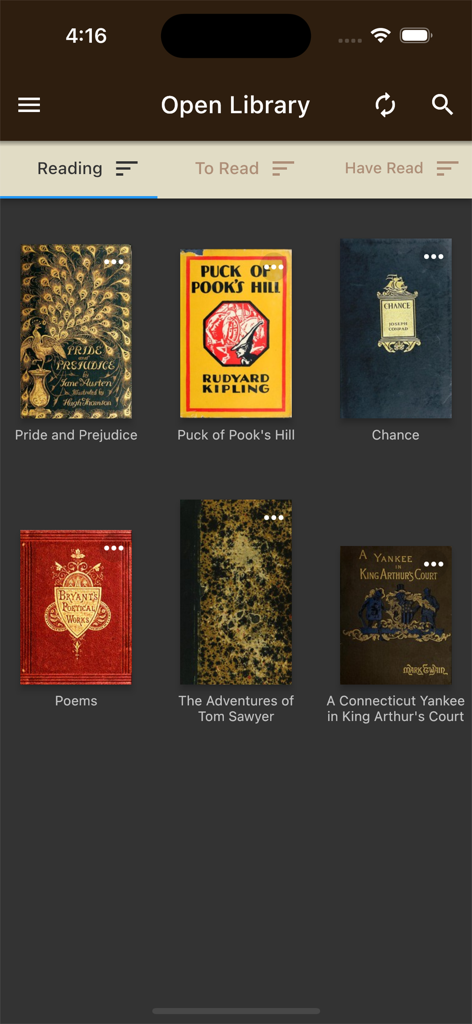
클래식 책 표지가 있는 Open Library Reader 앱의 디지털 책장 인터페이스.
설명
Download
비슷한 앱
유사한 기능과 사용자 경험을 가진 앱

CloudLibrary
OCLC

The Palace Project
LYRASIS, Inc.

Biblio
BookBites A/S
Onleihe 3
ekz.bibliotheksservice GmbH

Sora, by OverDrive Education
OverDrive, Inc.
online Bibliotheek
Koninklijke Bibliotheek

NLB Mobile
National Library Board

移动图书馆
Chengdu Superstar Digital Library Information Technology Co.,Ltd

교보문고 전자도서관
KYOBO BOOK CENTRE CO,.LTD
이 페이지는 앱이나 개발자의 공식 페이지가 아니며, 정보 제공 및 논평을 목적으로 작성된 독립 편집 간행물입니다. 명시적으로 달리 언급되지 않는 한, 해당 앱이나 개발자는 MWM, Apple, Google Play, 앱 퍼블리셔 또는 앱 개발자와 제휴, 보증, 후원, 승인 또는 공식적으로 연결되어 있지 않으며, 이 페이지의 어떤 내용도 해당 앱이 MWM의 서비스를 사용하여 개발되었음을 의미하지 않습니다. 모든 상표, 로고, 스크린샷 및 기타 콘텐츠는 해당 소유자의 자산입니다.