OpenManage Mobile
OpenManage Mobile
다운로드: App Store

이 페이지는 앱이나 개발자의 공식 페이지가 아니며, 정보 제공 및 논평을 목적으로 작성된 독립 편집 간행물입니다. 명시적으로 달리 언급되지 않는 한, 해당 앱이나 개발자는 MWM, Apple, Google Play, 앱 퍼블리셔 또는 앱 개발자와 제휴, 보증, 후원, 승인 또는 공식적으로 연결되어 있지 않으며, 이 페이지의 어떤 내용도 해당 앱이 MWM의 서비스를 사용하여 개발되었음을 의미하지 않습니다. 모든 상표, 로고, 스크린샷 및 기타 콘텐츠는 해당 소유자의 자산입니다.

로고: OpenManage Mobile
다운로드: App Store

OpenManage Mobile

언제 어디서든 Dell PowerEdge 서버 및 MX7000 섀시를 모니터링, 문제 해결 및 프로비저닝하는 자유를 IT 팀에 부여하세요. 실시간 알림, 원격 iDRAC 액세스 및 최첨단 AR 진단으로 다운타임을 앞서가세요.

주요 수치

다운로드

7K+

사용자 평점

1.0/5

총 평가 수

0

개발사

Dell Inc.

카테고리

Business

지원 언어

1

최신 버전

5.0

크기

91.9 MB

출시일

2015년 1월 22일
기능

재정의된 엔터프라이즈 인프라 관리

PowerEdge 서버 및 MX7000 섀시를 완벽하게 제어하세요. 손안에서 데이터 센터 하드웨어를 안전하게 프로비저닝, 모니터링 및 문제 해결하세요.

AR 기반 문제 해결

하드웨어 상태를 즉시 시각화하세요. MX7000 섀시에 카메라를 겨냥하여 직관적인 AR 오버레이를 통해 노트북을 열지 않고도 신속하게 구성 요소를 식별하세요.

완전한 원격 전원 제어

오전 3시 사무실 방문을 없애세요. 언제 어디서든 원격으로 서버를 켜거나, 끄거나, 다시 시작하고, iDRAC을 통해 베어메탈 구성을 안전하게 관리하세요.

다음 스크린샷과 설명은 앱의 공식 스토어 목록에서 직접 가져온 것이며 앱 개발자의 자산입니다.

앱 스토어

스크린샷
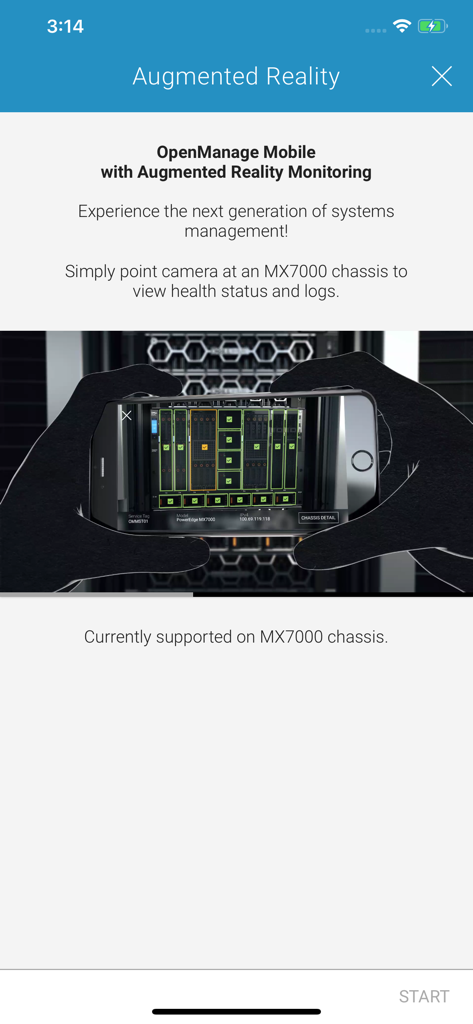
OpenManage Mobile - Dell OpenManage Mobile 앱이 MX7000 섀시의 서버 상태에 대한 증강 현실 모니터링을 보여줍니다.
Dell OpenManage Mobile 앱이 MX7000 섀시의 서버 상태에 대한 증강 현실 모니터링을 보여줍니다.

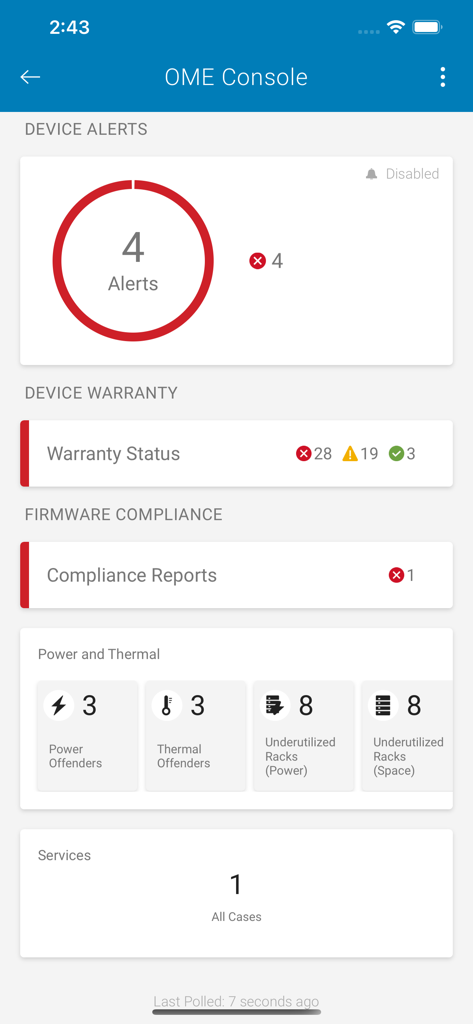
OpenManage Mobile - OpenManage Mobile OME 콘솔 대시보드가 장치 경고, 보증 상태, 전원 및 열 모니터링을 보여줍니다.
OpenManage Mobile OME 콘솔 대시보드가 장치 경고, 보증 상태, 전원 및 열 모니터링을 보여줍니다.

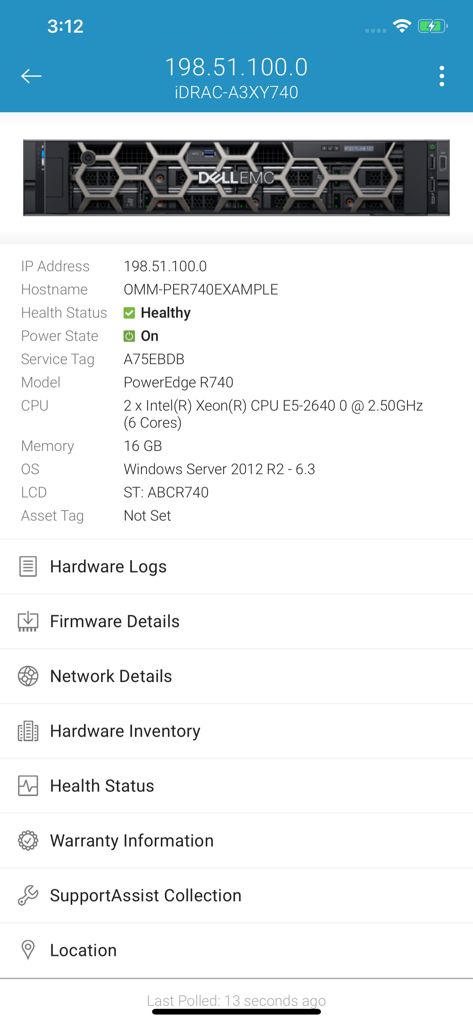
OpenManage Mobile - Dell OpenManage Mobile 인터페이스가 PowerEdge R740 서버 상태 및 인벤토리를 보여줍니다.
Dell OpenManage Mobile 인터페이스가 PowerEdge R740 서버 상태 및 인벤토리를 보여줍니다.

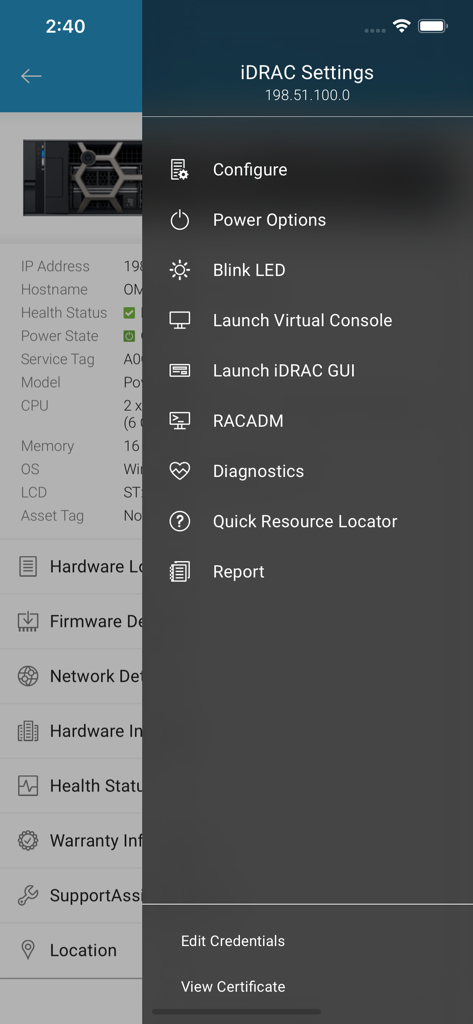
OpenManage Mobile - Dell OpenManage Mobile 앱이 원격 서버 관리를 위한 iDRAC 설정 메뉴를 보여줍니다.
Dell OpenManage Mobile 앱이 원격 서버 관리를 위한 iDRAC 설정 메뉴를 보여줍니다.

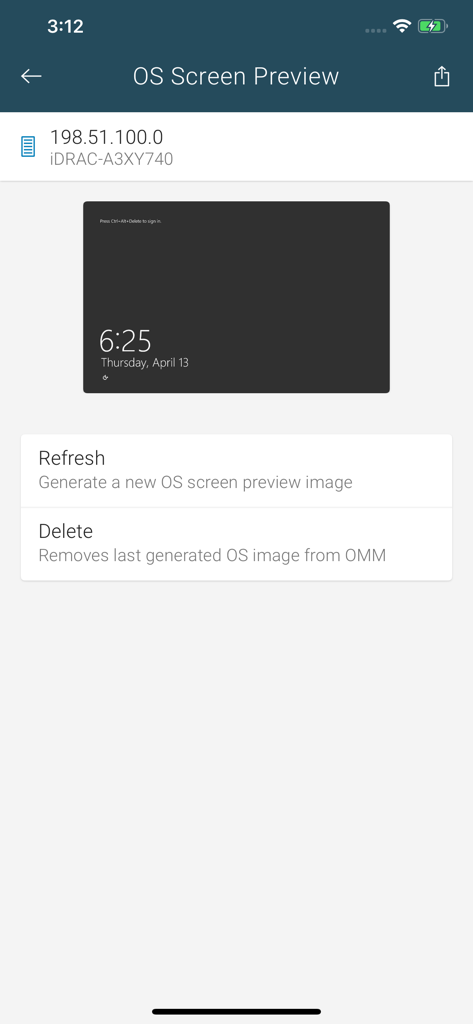
OpenManage Mobile - OpenManage Mobile 앱에서 원격 서버의 OS 화면 미리 보기
OpenManage Mobile 앱에서 원격 서버의 OS 화면 미리 보기

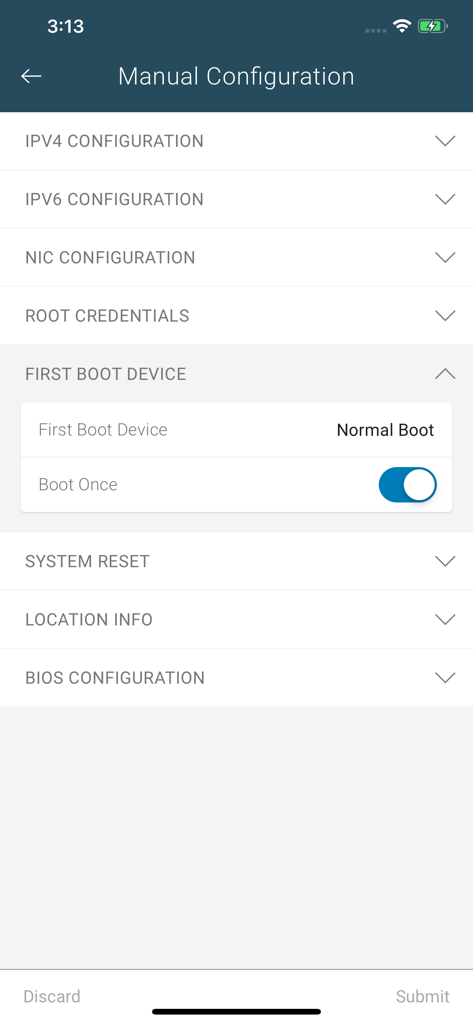
OpenManage Mobile - OpenManage Mobile 앱의 수동 구성 화면이 서버 관리를 위한 네트워크, 부팅 장치 및 BIOS 설정 옵션을 표시합니다.
OpenManage Mobile 앱의 수동 구성 화면이 서버 관리를 위한 네트워크, 부팅 장치 및 BIOS 설정 옵션을 표시합니다.

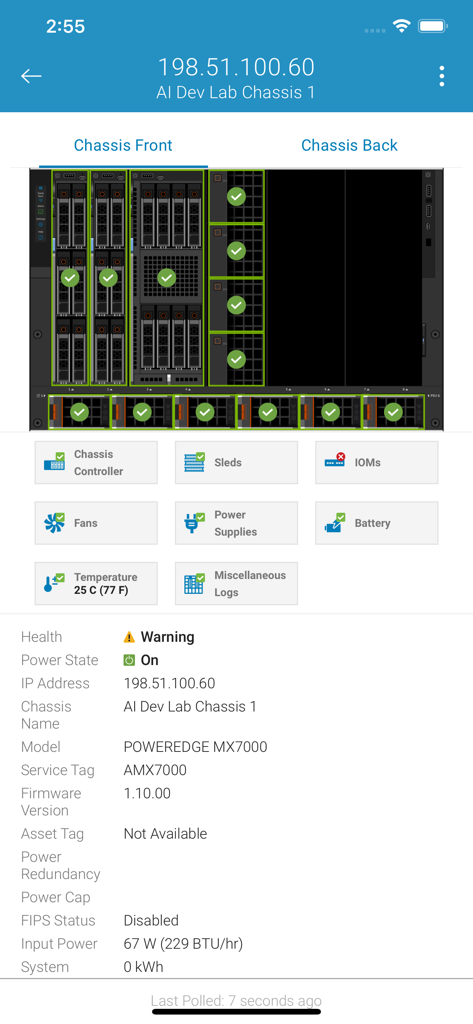
OpenManage Mobile - OpenManage Mobile 앱 인터페이스가 Dell PowerEdge MX7000 서버 섀시의 상태 및 구성 요소 레이아웃을 보여줍니다.
OpenManage Mobile 앱 인터페이스가 Dell PowerEdge MX7000 서버 섀시의 상태 및 구성 요소 레이아웃을 보여줍니다.

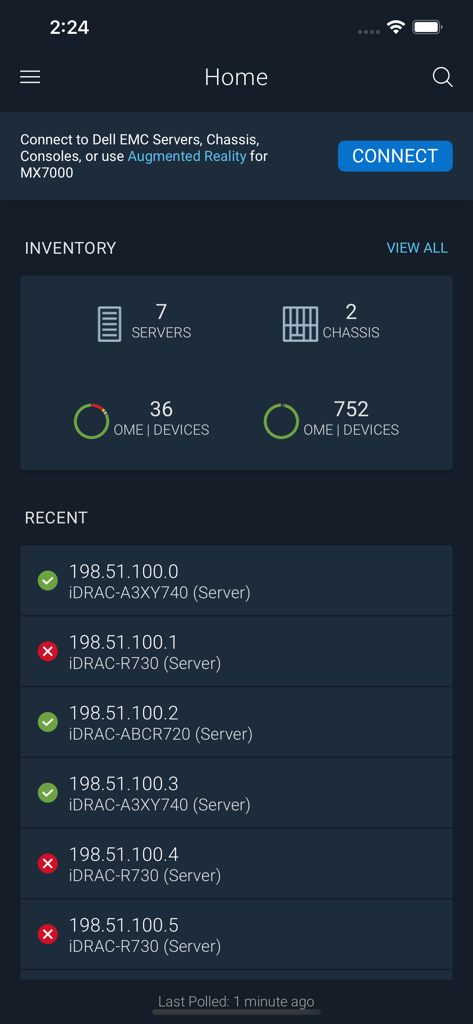
OpenManage Mobile - OpenManage Mobile 홈 화면이 서버 인벤토리 및 최근 장치 상태를 보여줍니다.
OpenManage Mobile 홈 화면이 서버 인벤토리 및 최근 장치 상태를 보여줍니다.

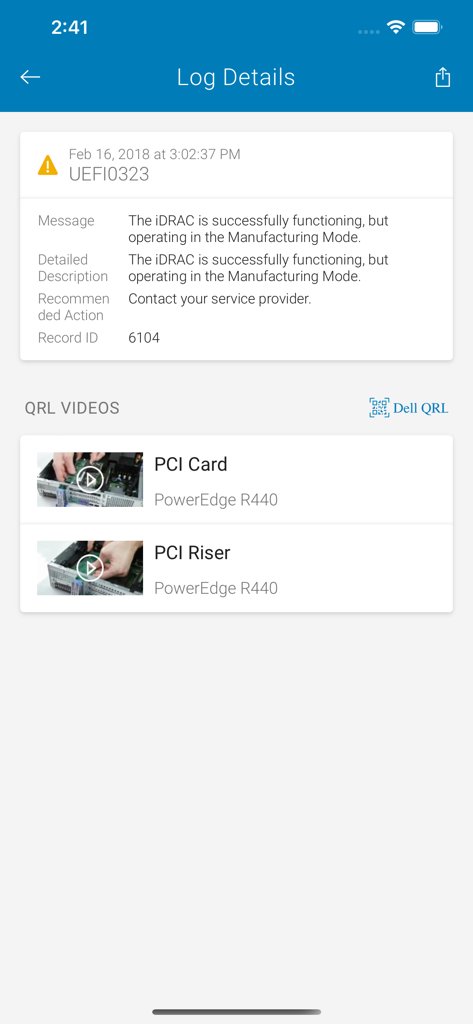
OpenManage Mobile - Dell OpenManage Mobile 앱의 로그 세부 정보 및 문제 해결 동영상

Dell OpenManage Mobile 앱의 로그 세부 정보 및 문제 해결 동영상

설명

MINIMUM REQUIREMENTS FOR REMOTE ACCESS OVER MANAGEMENT NETWORK • Remote access to iDRAC requires iDRAC7 or above • Remote access to OpenManage Enterprise requires version 3.9 or later *** OpenManage Mobile now leverages Augmented Reality to easily and quickly monitor & troubleshoot MX7000 modular chassis. Aim the camera at MX7000, connect, and view health overlays. Tap on a component to view more details. *** OVERVIEW OF OPENMANAGE MOBILE (OMM) Wireless and Mobility are now pervasive inside data centers and we can leverage it to simplify data center operations. Dell OpenManage Mobile (OMM) is an app that enables IT Administrators to securely provision, monitor, and troubleshoot Dell PowerEdge servers or MX7000 chassis directly from a mobile device. OMM can access and manage PowerEdge servers or MX7000 modular chassis either remotely (i.e. over management network) or from inside the data center (i.e. when an IT Administrator is physically present in front of server or a chassis). Following are the ways you can access a server or an MX7000 chassis: • Remote into a server (iDRAC7, iDRAC8 or iDRAC9) • Remote into an MX7000 chassis and sleds • Remote into a console (OpenManage Enterprise) • At-the-server access to a PowerEdge server with iDRAC9 • At-the-chassis access to an MX7000 chassis and sleds When connected through a console (OpenManage Enterprise), OMM can access Dell servers, chassis, storage, networking, and any other supported third-party appliances being managed through this console. For specific feature support on OpenManage Mobile, please visit Dell Tech Center at www.DellTechCenter.com/OMM SUPPORT FOR AT-THE-SERVER MANAGEMENT • At-the-server access is available on PowerEdge 14th Generation and above rack and towers which support Quick Sync 2. For the latest list of supported hardware models, please contact a Dell Sales representative. • Quick Sync 2 module utilizes Bluetooth Low Energy (BLE) and Wi-Fi to establish a secure connection between server and mobile device running OMM. SUPPORT FOR AT-THE-CHASSIS MANAGEMENT • Quick Sync 2 module for at-the-chassis access is available on MX7000 modular chassis FEATURES Supported features depend on the type of access (console or iDRAC) and the specific generation of server being accessed. For specific details or more information on OpenManage Mobile, please visit Dell Tech Center at www.DellTechCenter.com/OMM KEY USE CASES – SUPPORT VARIES BY TYPE OF ACCESS AND SERVER GENERATION • Get pro-active alert notifications automatically on your mobile device from OpenManage Enterprise consoles. • Browse server or chassis details, health status, hardware & firmware inventory, networking details, and System Event or LC logs. (For MX7000 chassis, use Augmented Reality feature to monitor and troubleshoot easily and quickly.) • Power On, shut down, or reboot your server from anywhere. • For “bare metal configuration,” assign IP address, change credentials, and update common BIOS attributes. • Access, share or upload SupportAssist Collection reports; View Last Crash screen and video (requires iDRAC9) • Access Virtual Console securely (and reduce the need for crash carts) with a Third-Party app – VNC Viewer by RealVNC or Remotix by Nulana LTD • Dell Quick Resource Locator (QRL) video remediation, available when connecting to an OpenManage Enterprise, server or chassis – displays context relevant videos about the hardware based on available error logs For any questions, please send an email to OM_Mobile_Feedback@Dell.com

Download

다운로드: App Store

이 페이지는 앱이나 개발자의 공식 페이지가 아니며, 정보 제공 및 논평을 목적으로 작성된 독립 편집 간행물입니다. 명시적으로 달리 언급되지 않는 한, 해당 앱이나 개발자는 MWM, Apple, Google Play, 앱 퍼블리셔 또는 앱 개발자와 제휴, 보증, 후원, 승인 또는 공식적으로 연결되어 있지 않으며, 이 페이지의 어떤 내용도 해당 앱이 MWM의 서비스를 사용하여 개발되었음을 의미하지 않습니다. 모든 상표, 로고, 스크린샷 및 기타 콘텐츠는 해당 소유자의 자산입니다.








