Optiway Multi Stop Planner

Optiway Multi Stop Planner

다운로드: App Store
로고: Optiway Multi Stop Planner

Optiway 멀티 스톱 플래너: 경로를 더 빠르게 완료하는 가장 스마트한 방법

전문적인 경로 최적화로 시간과 연료를 최대 30% 절약하세요. 200개 이상의 목적지를 초 단위로 계획하고, 정확한 도착 예정 시간을 받고, 일일 수입을 극대화하세요.

다운로드: App Store

개발사

Ihor Nosach

카테고리

Navigation

다운로드

118K+

사용자 평점

4.7/5

총 평가 수

800

지원 언어

8

효율성을 실제로 확인하세요

이 인터페이스를 사용하는 118K+ 명의 사용자.

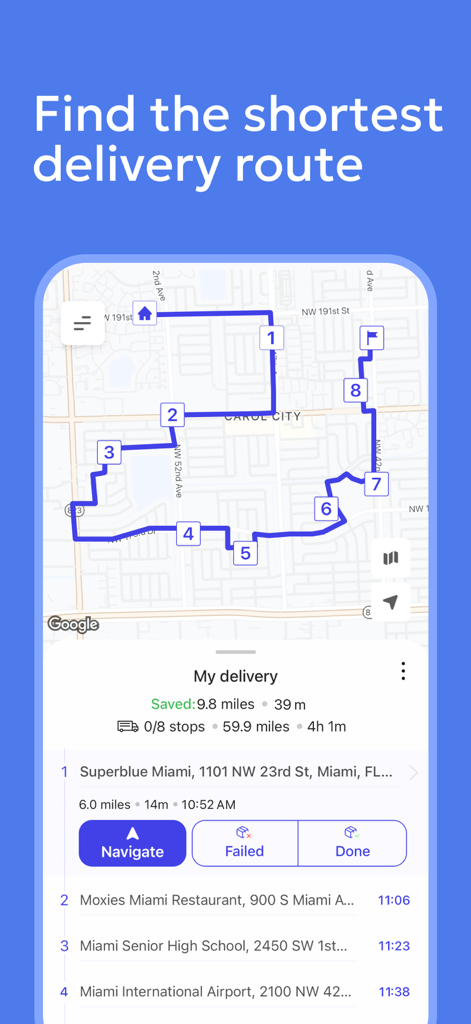
최적화된 멀티 스톱 배달 경로 및 탐색 목적지가 있는 지도 표시 Optiway 앱
최적화된 멀티 스톱 배달 경로 및 탐색 목적지가 있는 지도 표시 Optiway 앱

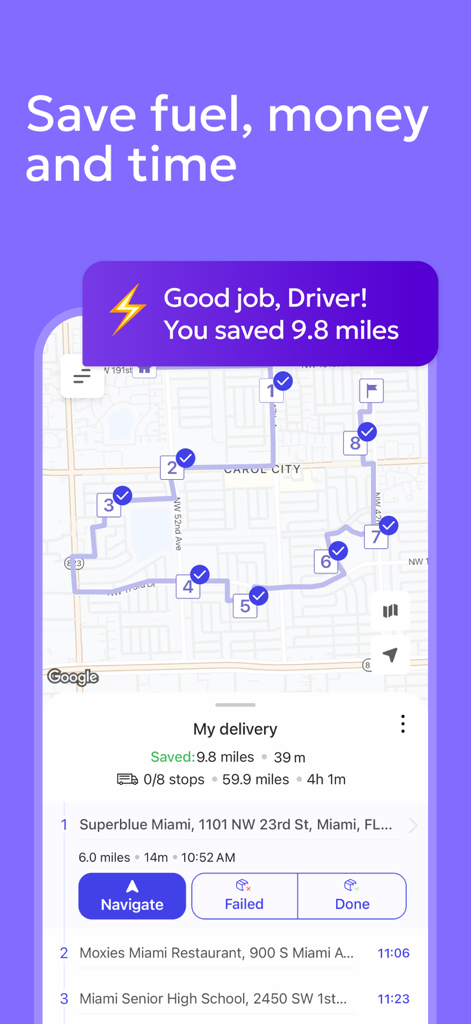
여러 목적지와 마일리지 절감액이 포함된 최적화된 배달 경로를 보여주는 Optiway 앱
여러 목적지와 마일리지 절감액이 포함된 최적화된 배달 경로를 보여주는 Optiway 앱

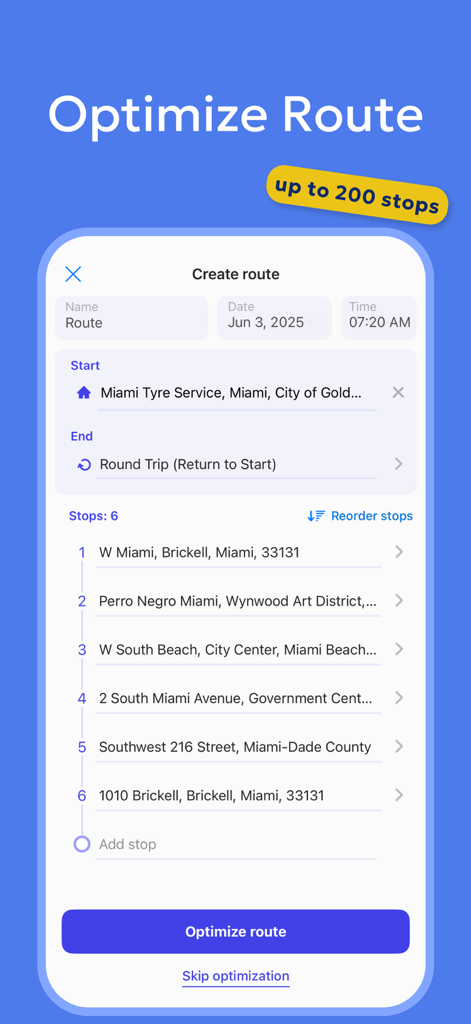
Optiway 앱의 스크린샷으로 배달 목적지 목록과 최적화 경로 버튼 표시
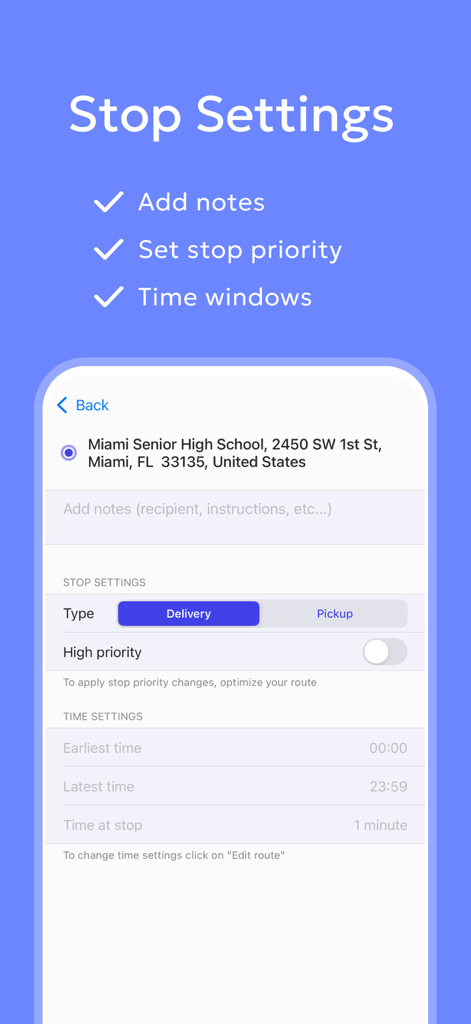
Optiway 앱의 스크린샷으로 배달 목적지 목록과 최적화 경로 버튼 표시

우선 순위 및 시간 창을 포함한 목적지 설정을 보여주는 Optiway 멀티 스톱 플래너의 인터페이스
우선 순위 및 시간 창을 포함한 목적지 설정을 보여주는 Optiway 멀티 스톱 플래너의 인터페이스

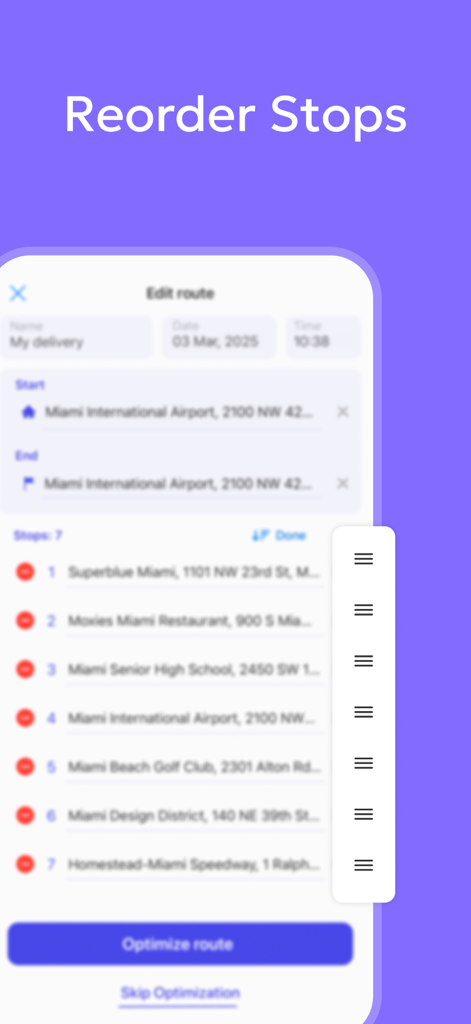
Optiway 멀티 스톱 경로 플래너 앱에서 목적지 수동 재정렬 방법을 보여주는 인터페이스
Optiway 멀티 스톱 경로 플래너 앱에서 목적지 수동 재정렬 방법을 보여주는 인터페이스

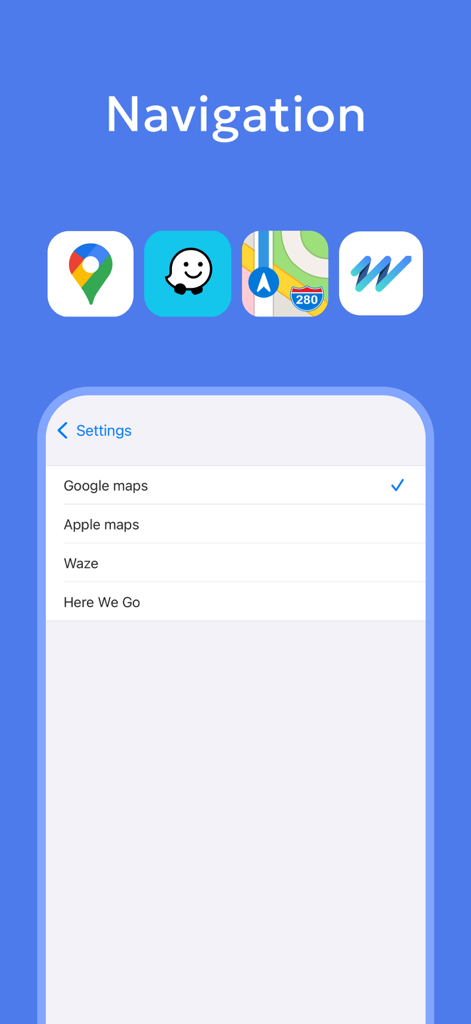
Optiway에서 Google 지도 또는 Waze와 같은 기본 탐색 앱 선택 화면

Optiway에서 Google 지도 또는 Waze와 같은 기본 탐색 앱 선택 화면

최대 효율을 위해 하루를 최적화하세요

이 앱을 돋보이게 하는 도구, 118K+ 명의 사용자가 선택.

번개처럼 빠른 멀티 스톱 계획

초당 수십 개의 목적지를 추가하고 즉시 가장 효율적인 경로를 생성하여 운전 시간을 최대 30% 단축하세요.

🗺️

즐겨 사용하는 지도와 함께 작동

Waze, Google 지도 또는 Apple 지도와 원활하게 동기화하여 최적화된 Optiway 경로를 따르는 동안 실시간 교통 정보를 받으세요.

🕒

전문 배달 도구

우선 순위 목적지와 엄격한 시간 창을 쉽게 관리하여 가장 중요한 고객에게 항상 정시에 도착하도록 보장하세요.

앱 소개

에 대해 알아야 할 모든 것 Optiway Multi Stop Planner.

설명

Optiway Route Planner for Multi-Stop Deliveries Optiway is the smart multistop Route Planner designed to optimize your delivery routes and build the most efficient routes. Whether you're a delivery driver, courier, field service agent, or a business owner, Optiway Route Planner ensures the fastest, most efficient routes for your deliveries. Why Choose Optiway Route Planner? 1. Fast & Easy multi-stop Route Planner – Add stops in seconds and get the best optimized multistop delivery route. 2. ETA for Stops – Get real-time estimated arrival times for stops in your multistop Optiway Route Planner. 3. Import Routes from XLSX/TXT files – Easily upload delivery routes from your files directly into your multistop Optiway Route Planner. 4. Export Routes – Share optimized delivery routes with your team or clients. 5. Time Windows & Priority Stops – Set delivery time windows and priority levels for specific stops with your Optiway Route Planner. 6. Works with navigation Apps – Use Google Maps, Apple Maps, Waze, or HERE WeGo with your Optiway Route Planner. How Optiway Route Planner Helps Delivery Drivers Save up to 30% in Time & Money? - Avoid Traffic & Delays – Optiway multi-stop delivery route planner maps the fastest paths, so you spend less time on the road. - Make Last-Minute Changes – Easily adjust your delivery route while on the go. - Set Priority Stops – Prioritize specific stops in your delivery route to improve efficiency. - Customize Stop Durations – Set stop times manually in your multi-stop route planner for maximum delivery efficiency. - Real-Time ETAs & Navigation – Get accurate arrival times for every stop with Optiway route planner. Who Uses Optiway Route Planner? 1. Delivery Drivers & Couriers – Optimize your delivery route planner to complete more stops in less time. 2. Field Service Agents, – Plan efficient service routes with Optiway route planner. 3. Business Owners – Organize multistop deliveries and client visits with Optiway route planner. 4. Sales, Insurance agents, Cleaning services, Landscapers, Food delivery, Realtors and more others… "I've tried multiple route planners, but Optiway saves me the most time on deliveries. It's easy to use, fast, and helps me complete my delivery routes more efficiently." – John, USA Start optimizing your delivery routes today with Optiway Route Planner! Free vs. Paying Optiway subscription plan • Optiway Route Planner Free Plan: Plan delivery routes with up to 5 stops per route, unlimited number of routes. • Optiway Route Planner Subscription Plan: Plan delivery routes with up to 200 stops per route, unlimited number of routes. The following plans are available for the user: Monthly The pass is valid for 1 month from the date of purchase. Annual The pass is valid for the 1 year from the date of purchase. The pass auto-renews at the end of the subscription period for the same duration until cancelled. The pass should be canceled 24 hours before the renewal for the renewal not to take effect. Your subscription will be charged to your iTunes account at confirmation of purchase and will automatically renew (at the duration selected) unless auto-renew is turned off at least 24 hours before the end of the current period. Pricing varies by country, and the exact cost will be displayed before checkout. Current subscription may not be cancelled during the active subscription period. However, you can manage your subscription and/or turn off auto-renewal by visiting your iTunes Account Settings after purchase. FAQ: Can I create multiple routes with Optiway Route Planner? Absolutely! Optiway Route Planner lets you generate unlimited delivery routes, regardless of whether you’re using the free version or a subscription plan. Still have questions? Contact our support team directly through Optiway Route Planner: support@optiway-app.com Privacy policy: https://optiway-app.com/Privacy_Policy/ Terms of use: https://optiway-app.com/terms/

최신 버전

1.75

크기

85.6 MB

출시일

2023년 1월 4일

경로를 30% 더 빠르게 완료할 준비가 되셨나요?

매일 시간과 연료를 절약하는 118,000명 이상의 택배 기사 및 현장 전문가 대열에 합류하세요. 지금 Optiway를 다운로드하고 멀티 스톱 계획의 스트레스를 덜어보세요.

다운로드: App Store
FAQ

자주 묻는 질문

에 대해 알아야 할 모든 것 Optiway Multi Stop Planner

Optiway Route Planner는 무엇인가요?

Optiway Route Planner는 배달 기사, 택배 기사 및 기업을 위해 설계된 다중 정류지 경로 최적화 앱입니다. 시간과 비용을 절약하기 위해 가장 빠르고 효율적인 배달 경로를 구축합니다.

Optiway Route Planner는 배달 경로를 어떻게 최적화하나요?

Optiway Route Planner는 가장 빠른 경로를 매핑하고, 교통 체증을 피하며, 막판 변경을 허용하여 경로를 최적화합니다. 또한 우선순위 정류지를 설정하고 정류지 시간을 사용자 정의하여 최대 효율성을 보장합니다.

Optiway Route Planner는 어떤 내비게이션 앱을 지원하나요?

Optiway Route Planner는 Google Maps, Apple Maps, Waze, HERE WeGo를 포함한 인기 있는 내비게이션 앱과 통합됩니다. 사용자는 앱 내에서 선호하는 내비게이션 서비스를 선택할 수 있습니다.

Optiway Route Planner를 사용하여 배달 시간창을 설정할 수 있나요?

네, Optiway Route Planner는 사용자가 개별 정류지에 대한 특정 배달 시간창과 우선순위 수준을 설정할 수 있도록 합니다. 이 기능은 예약된 배달을 효율적으로 관리하는 데 도움이 됩니다.

Optiway Route Planner의 무료 버전은 몇 개의 정류지를 처리할 수 있나요?

Optiway Route Planner의 무료 요금제는 사용자가 경로당 최대 5개의 정류지로 배달 경로를 계획할 수 있도록 합니다. 총 경로 수는 무제한으로 지원됩니다.

Optiway Route Planner 구독으로 경로당 최대 정류지 수는 몇 개인가요?

Optiway Route Planner 구독 요금제는 사용자가 경로당 최대 200개의 정류지로 배달 경로를 계획할 수 있도록 합니다. 이 요금제는 또한 무제한 경로 수를 제공합니다.

기존 배달 경로를 Optiway Route Planner로 가져올 수 있나요?

네, Optiway Route Planner는 배달 경로 가져오기를 지원합니다. 사용자는 XLSX 또는 TXT 파일에서 다중 정류지 경로 계획기로 경로를 직접 쉽게 업로드할 수 있습니다.

Optiway Route Planner는 정류지에 대한 예상 도착 시간(ETA)을 제공하나요?

네, Optiway Route Planner는 다중 정류지 배달 경로의 각 정류지에 대한 실시간 예상 도착 시간(ETA)을 제공합니다. 이는 운전자가 일정을 유지하는 데 도움이 됩니다.

일반적으로 Optiway Route Planner를 누가 사용하나요?

Optiway Route Planner는 배달 기사, 택배 기사, 현장 서비스 담당자, 사업주, 영업 담당자 및 최적화된 다중 정류지 경로가 필요한 다양한 전문가들이 활용합니다.

Optiway Route Planner 구독을 어떻게 취소하나요?

현재 기간이 종료되기 최소 24시간 전에 자동 갱신을 해제해야 합니다. 구매 후 iTunes 계정 설정으로 이동하여 구독 및 자동 갱신 설정을 관리하세요.

Optiway Route Planner는 경로상의 정류지 순서를 변경할 수 있나요?

네, Optiway Route Planner는 사용자가 정류지 순서를 수동으로 변경할 수 있도록 합니다. 이 기능을 통해 필요에 따라 배달 또는 픽업 순서를 조정할 수 있는 유연성을 제공합니다.

Optiway Route Planner에서 각 정류지의 소요 시간을 사용자 정의할 수 있나요?

네, Optiway Route Planner는 사용자가 정류지 시간을 수동으로 설정할 수 있도록 합니다. 이 사용자 정의는 각 위치에서의 다양한 서비스 시간을 고려하여 최대 배달 효율성을 보장합니다.

App information, icons, screenshots, and descriptions displayed on this page are sourced from the Apple App Store and are the property of their respective developers. Download estimates and rankings are based on MWM's proprietary models and may not reflect actual figures. This page is provided for informational and analytical purposes only.

Believe this page infringes your intellectual property? File a dispute