
이 페이지는 앱이나 개발자의 공식 페이지가 아니며, 정보 제공 및 논평을 목적으로 작성된 독립 편집 간행물입니다. 명시적으로 달리 언급되지 않는 한, 해당 앱이나 개발자는 MWM, Apple, Google Play, 앱 퍼블리셔 또는 앱 개발자와 제휴, 보증, 후원, 승인 또는 공식적으로 연결되어 있지 않으며, 이 페이지의 어떤 내용도 해당 앱이 MWM의 서비스를 사용하여 개발되었음을 의미하지 않습니다. 모든 상표, 로고, 스크린샷 및 기타 콘텐츠는 해당 소유자의 자산입니다.


Oracle Mobile Authenticator
엔터프라이즈급 다단계 인증으로 전문 계정을 보호하세요. 한 번의 탭으로 로그인을 승인하거나 오프라인 상태에서도 안전한 비밀번호를 생성할 수 있습니다.
다운로드
1M+사용자 평점
총 평가 수
100개발사
카테고리
Business지원 언어
27최신 버전
4.21크기
3.9 MB출시일
2014년 3월 21일엔터프라이즈 액세스 보안
Oracle Mobile Authenticator는 원활한 원탭 인증으로 전문 계정에 강력한 보안 계층을 추가합니다.
원탭 승인
코드를 건너뛰세요. 푸시 알림을 통해 로그인 요청을 즉시 승인하여 번거로움 없고 빠른 경험을 제공합니다.
오프라인 안정성
어디서든 생산성을 유지하세요. 기기가 오프라인 상태이거나 비행기 모드에서도 안전한 일회용 비밀번호를 생성할 수 있습니다.
자주 묻는 질문
에 대해 알아야 할 모든 것 Oracle Mobile Authenticator
Oracle Mobile Authenticator는 무엇에 사용되나요?
Oracle Mobile Authenticator는 모바일 장치를 인증 요소로 활용하여 사용자 신원을 안전하게 확인합니다. 일회용 비밀번호를 생성하고 승인을 위한 로그인 알림을 받아 온라인 애플리케이션에 중요한 보안 계층을 추가합니다.
Oracle Mobile Authenticator는 로그인 보안을 어떻게 개선하나요?
Oracle Mobile Authenticator는 추가 인증 계층을 추가하여 로그인 보안을 개선합니다. 향상된 보호를 위해 기존의 사용자 이름-비밀번호 방식을 보강하여 생성된 일회용 비밀번호 또는 푸시 알림을 통한 승인이 필요합니다.
Oracle Mobile Authenticator는 오프라인에서도 비밀번호를 생성할 수 있나요?
예, Oracle Mobile Authenticator는 모바일 장치가 오프라인 상태에서도 일회용 비밀번호를 생성할 수 있습니다. 이를 통해 사용자는 활성 인터넷 연결 없이도 안전하게 인증할 수 있습니다.
Oracle Mobile Authenticator는 여러 사용자 계정을 지원하나요?
예, Oracle Mobile Authenticator는 여러 사용자 계정을 지원합니다. 이 애플리케이션을 통해 사용자는 계정 인터페이스에 표시된 대로 여러 다른 계정에 대한 비밀번호를 동시에 관리하고 생성할 수 있습니다.
Oracle Mobile Authenticator에서 계정을 설정하는 옵션은 무엇인가요?
Oracle Mobile Authenticator의 계정은 QR 코드를 통해 설정하거나, 구성 URL을 사용하거나, 키를 수동으로 입력하여 설정할 수 있습니다. 이러한 유연한 옵션은 사용자의 초기 설정 프로세스를 단순화합니다.
Oracle Mobile Authenticator 앱은 어떻게 보호되나요?
Oracle Mobile Authenticator 앱은 Touch ID 또는 앱 PIN을 사용하여 보호됩니다. 이 보안 조치는 인증자 애플리케이션 자체에 대한 무단 액세스를 방지하여 저장된 계정과 비밀번호를 보호합니다.
Oracle Mobile Authenticator는 알림을 통해 로그인을 승인할 수 있나요?
예, Oracle Mobile Authenticator는 푸시 알림을 통해 로그인을 승인할 수 있습니다. 사용자는 알림을 받고 간단한 탭으로 인증 프로세스를 완료하여 로그인 환경을 간소화할 수 있습니다.
온라인 애플리케이션에서 Oracle Mobile Authenticator의 보안 이점은 무엇인가요?
Oracle Mobile Authenticator는 온라인 애플리케이션 로그인에 두 번째 요소를 추가하여 중요한 보안 이점을 제공합니다. 이 다단계 인증은 비밀번호가 손상되더라도 무단 액세스 위험을 크게 줄입니다.
다음 스크린샷과 설명은 앱의 공식 스토어 목록에서 직접 가져온 것이며 앱 개발자의 자산입니다.
앱 스토어
스크린샷
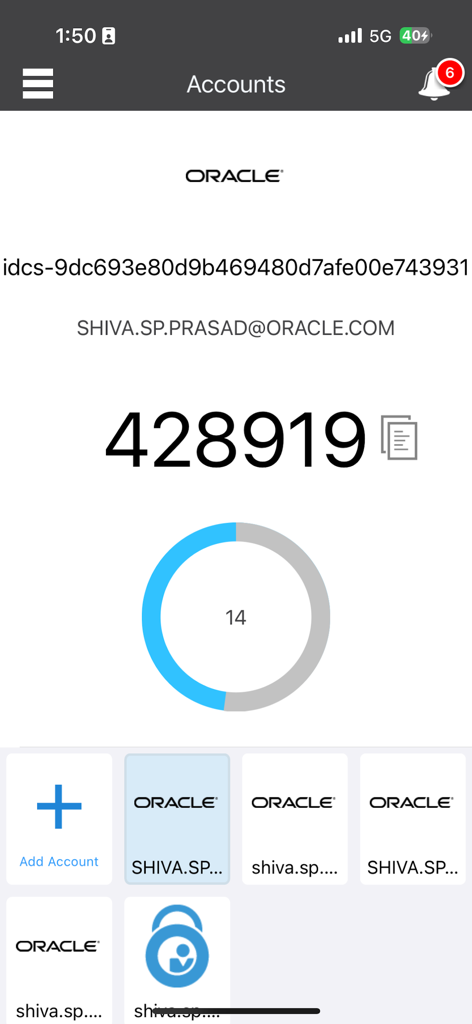
카운트다운 타이머와 계정 목록이 있는 6자리 일회용 비밀번호를 표시하는 Oracle Mobile Authenticator 앱
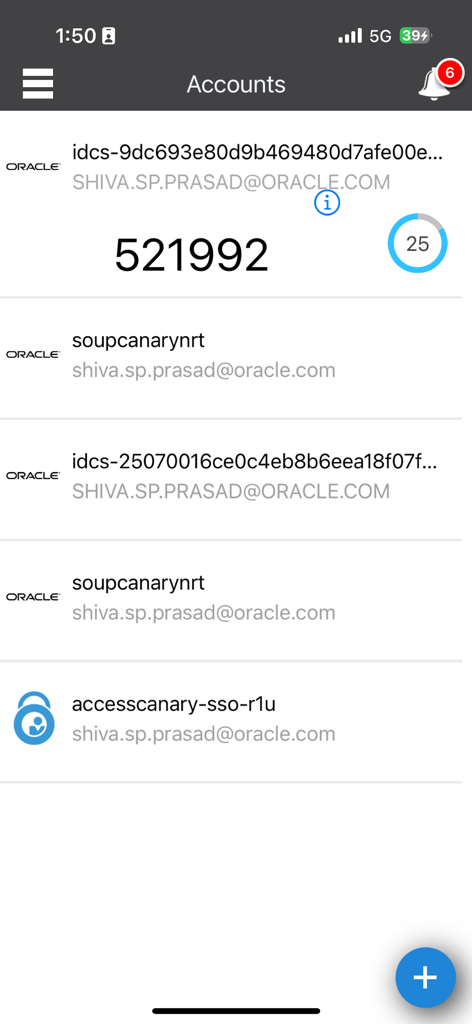
6자리 보안 코드가 있는 계정 목록을 보여주는 Oracle Mobile Authenticator 앱
설명
Download
비슷한 앱
유사한 기능과 사용자 경험을 가진 앱

Google Authenticator
Google LLC

Duo Mobile
Duo Security LLC

Authenticator App - 2FA &. MFA
APPLY DIJITAL HIZMETLER TICARET LIMITED SIRKETI

authenticator . app
Mustafa Uz

SafeNet MobilePASS+
Thales DIS (Singapore) Pte Ltd

Čítačka
Tatra banka, a.s.

Authenticator App - SafeAuth
Brilliant App Limited

Authenticator App - 2FA Auth
UNIVERSE DIJITAL HIZMETLER LIMITED SIRKETI

Authenticator App : Scan & 2FA
XSOFT GLOBAL LIMITED
이 페이지는 앱이나 개발자의 공식 페이지가 아니며, 정보 제공 및 논평을 목적으로 작성된 독립 편집 간행물입니다. 명시적으로 달리 언급되지 않는 한, 해당 앱이나 개발자는 MWM, Apple, Google Play, 앱 퍼블리셔 또는 앱 개발자와 제휴, 보증, 후원, 승인 또는 공식적으로 연결되어 있지 않으며, 이 페이지의 어떤 내용도 해당 앱이 MWM의 서비스를 사용하여 개발되었음을 의미하지 않습니다. 모든 상표, 로고, 스크린샷 및 기타 콘텐츠는 해당 소유자의 자산입니다.