Organize:Me To-Do's

Organize:Me To-Do's

다운로드: App Store
로고: Organize:Me To-Do's

Organize:Me To-Do's: 바쁜 일상 되찾기

단순한 체크리스트 그 이상을 필요로 하는 전문가를 위해 설계된 전문가급 작업 관리자. 모든 기기에서 원활하게 동기화되는 입증된 3단계 시스템으로 프로젝트를 캡처, 검토 및 완료하세요.

다운로드: App Store

개발사

taskfabric ltd

카테고리

Productivity

다운로드

3K+

사용자 평점

1.0/5

총 평가 수

0

지원 언어

-

시각화된 생산성

이 인터페이스를 사용하는 3K+ 명의 사용자.

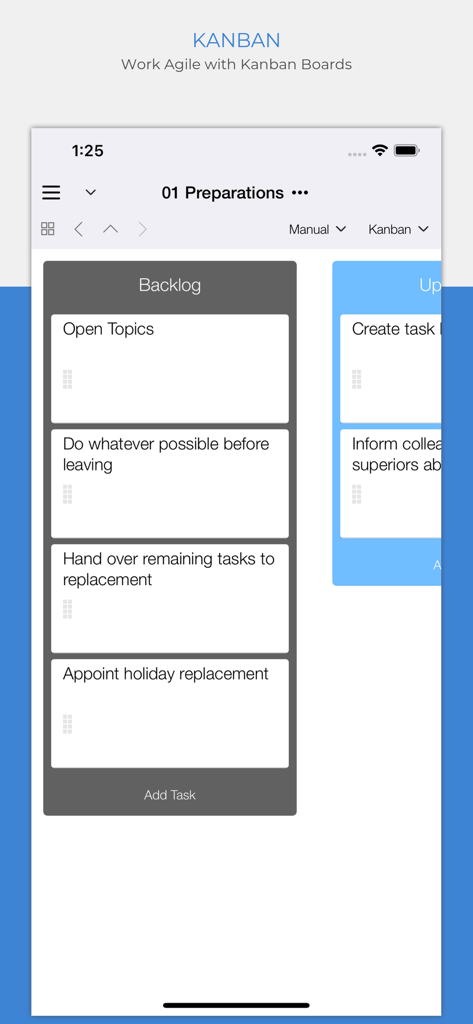
모바일 앱 인터페이스에 애자일 프로젝트 관리를 위한 작업 백로그 열이 있는 칸반 보드가 표시됩니다.

모바일 앱 인터페이스에 애자일 프로젝트 관리를 위한 작업 백로그 열이 있는 칸반 보드가 표시됩니다.

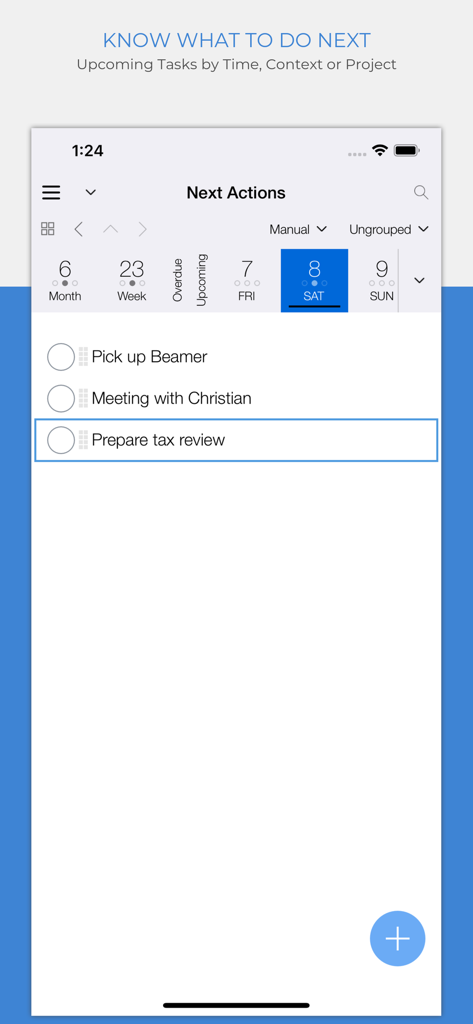
Organize Me 앱에 일일 작업 목록과 캘린더 보기가 있는 다음 작업 화면이 표시됩니다.

Organize Me 앱에 일일 작업 목록과 캘린더 보기가 있는 다음 작업 화면이 표시됩니다.

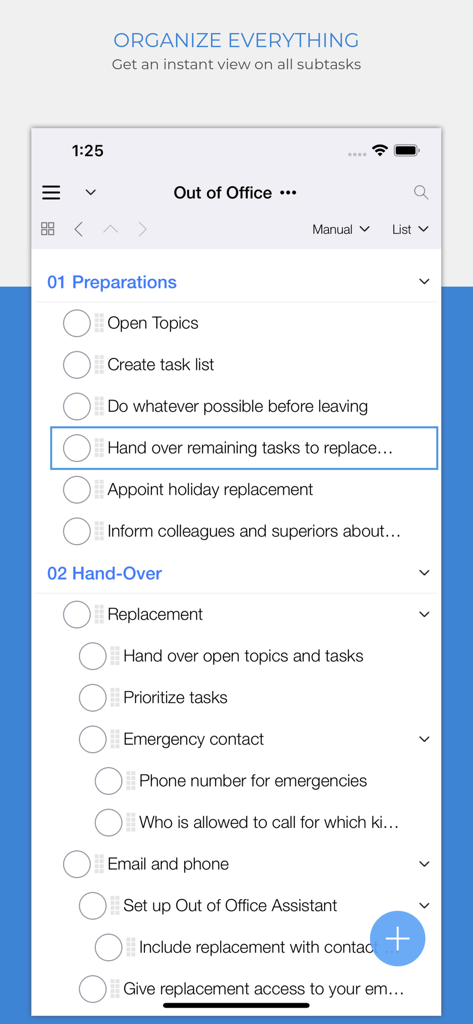
Organize:Me To-Do's 앱 인터페이스에 '외출 중' 프로젝트 목록 내 중첩된 하위 작업이 표시됩니다.

Organize:Me To-Do's 앱 인터페이스에 '외출 중' 프로젝트 목록 내 중첩된 하위 작업이 표시됩니다.

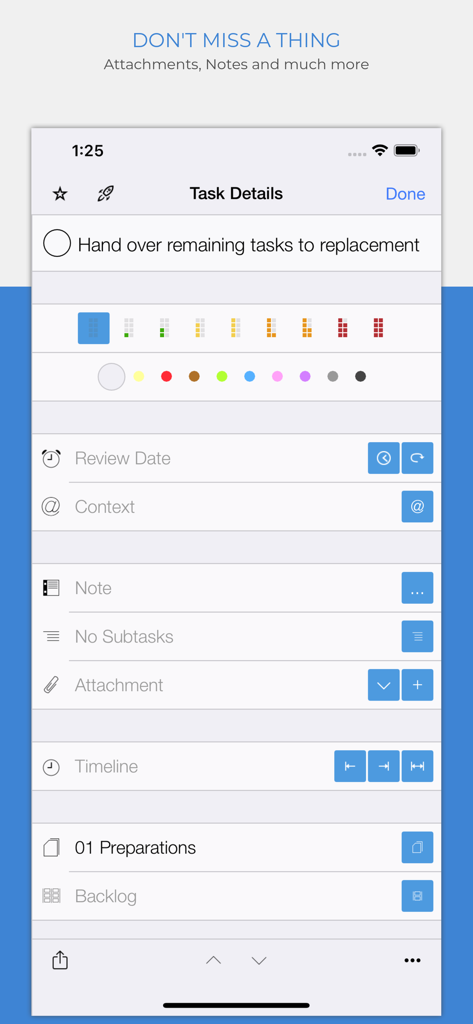
Organize Me To-Do 앱의 작업 세부 정보 화면에 작업 우선순위 및 첨부 옵션이 표시됩니다.

Organize Me To-Do 앱의 작업 세부 정보 화면에 작업 우선순위 및 첨부 옵션이 표시됩니다.

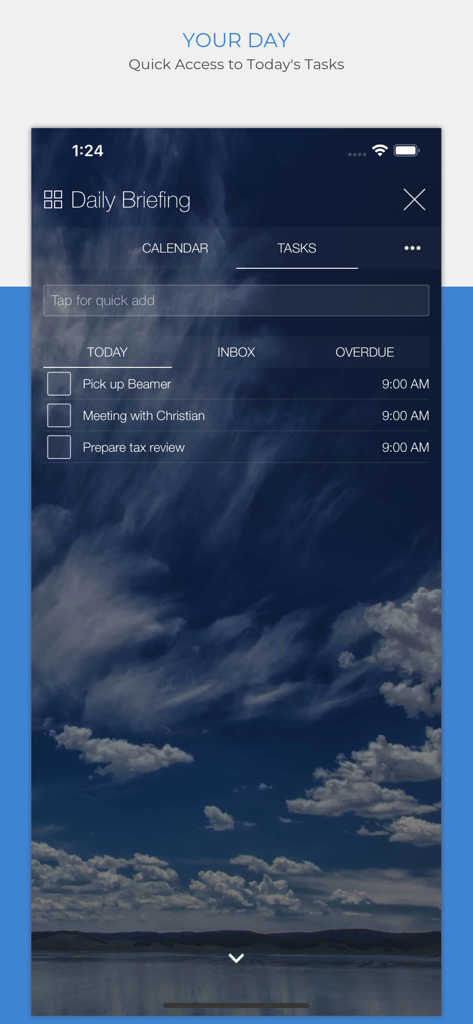
Organize Me 앱 일일 브리핑 화면에 오늘 작업 목록이 표시됩니다.

Organize Me 앱 일일 브리핑 화면에 오늘 작업 목록이 표시됩니다.

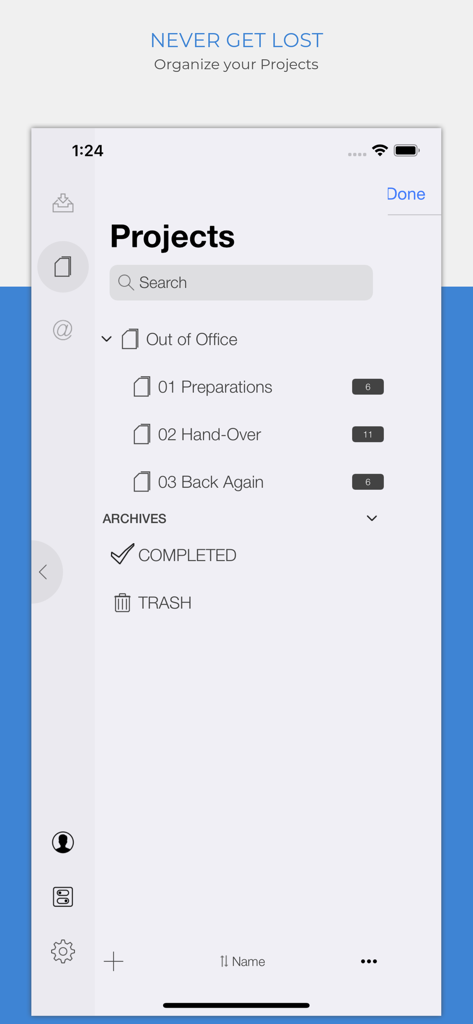
Organize Me 앱의 모바일 인터페이스에 분류된 하위 프로젝트 및 작업 수가 있는 프로젝트 화면이 표시됩니다.

Organize Me 앱의 모바일 인터페이스에 분류된 하위 프로젝트 및 작업 수가 있는 프로젝트 화면이 표시됩니다.

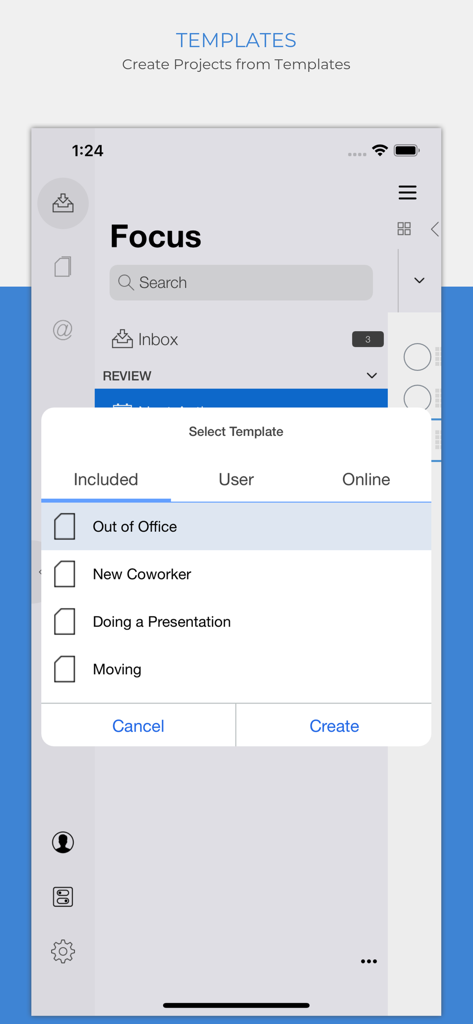
Organize Me 앱 프로젝트 템플릿 선택 화면에 '외출 중' 및 '신규 동료'와 같은 옵션이 표시됩니다.

Organize Me 앱 프로젝트 템플릿 선택 화면에 '외출 중' 및 '신규 동료'와 같은 옵션이 표시됩니다.

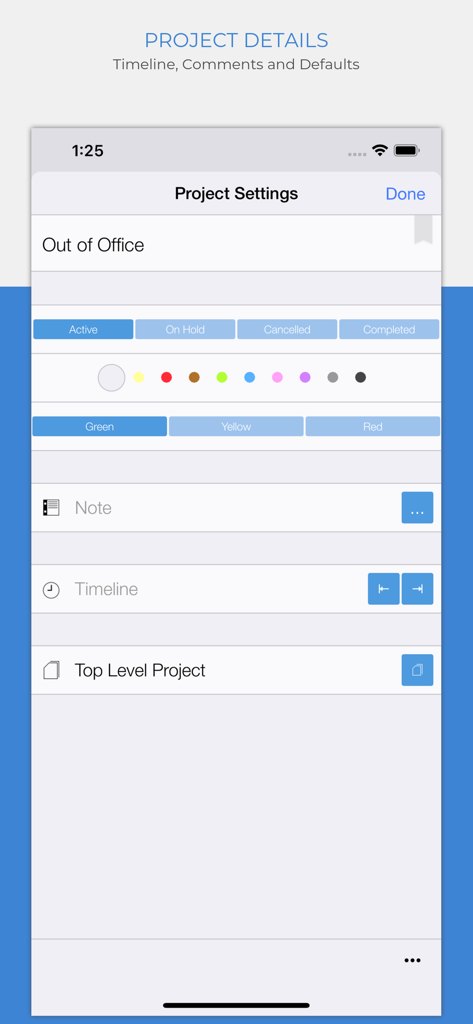
Organize Me 앱의 프로젝트 세부 정보 화면에 상태 옵션과 신호등 우선순위 표시기가 표시됩니다.

Organize Me 앱의 프로젝트 세부 정보 화면에 상태 옵션과 신호등 우선순위 표시기가 표시됩니다.

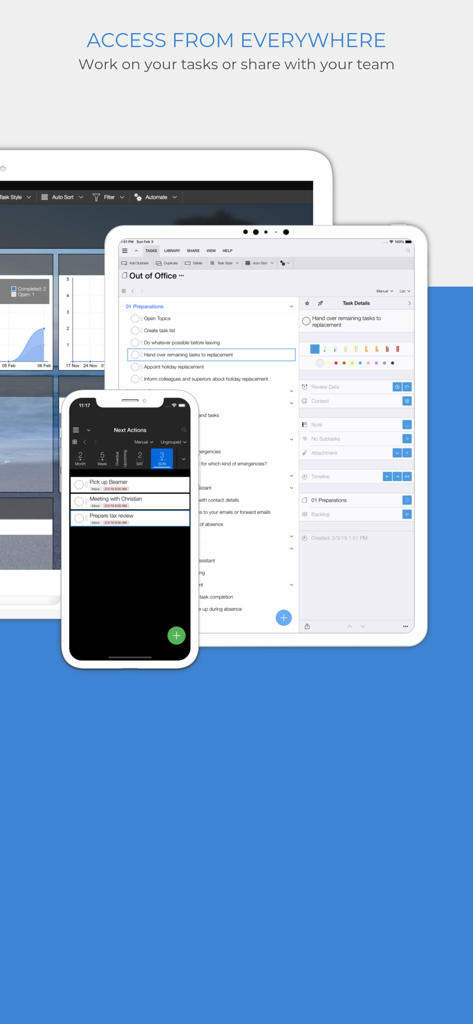
Organize Me To-Do 앱 인터페이스가 iPhone, iPad 및 데스크톱 장치에 표시되어 플랫폼 간 작업 관리가 가능합니다.

Organize Me To-Do 앱 인터페이스가 iPhone, iPad 및 데스크톱 장치에 표시되어 플랫폼 간 작업 관리가 가능합니다.

일상의 복잡성을 마스터하세요

이 앱을 돋보이게 하는 도구, 3K+ 명의 사용자가 선택.

🧠

스마트 3단계 실행

캡처, 검토, 완료. 입증된 시스템을 사용하여 압도적인 백로그를 실행 가능하고 우선순위가 높은 계획으로 전환하세요.

🚦

시각적 우선순위 추적

신호등 상태 표시기와 색상으로 구분된 프로젝트를 사용하여 의사 결정 피로를 제거하고 가장 중요한 것에 대한 즉각적인 명확성을 확보하세요.

☁️

어디서든 동기화 및 컨텍스트

위치 또는 이벤트별로 작업을 필터링하고 데스크톱 및 모바일에서 원활하게 동기화하여 어디서든 워크플로우를 유연하게 유지하세요.

앱 소개

에 대해 알아야 할 모든 것 Organize:Me To-Do's.

설명

Your personal task manager - if you need to handle more than just a simple list! Use it on all your devices - on all major mobile and desktop platforms, in your web browser and more. Organize:Me is easy to use for beginners and perfect for personal use. And if you need more, there's a whole family of products to support your business needs as well. Organize:Me helps you to cut complex situations down to what matters. With the built-in sync feature you can access your tasks with Organize:Me, Organize:Pro and Taskfabric for all major mobile and desktop platforms. Take back Control over your Tasks with a simple 3-Step System to Manage your Tasks: 1. Capture your ideas and tasks – quick and easy, wherever you are! 2. Review and process your tasks – prioritize, delegate or share your tasks 3. Complete your tasks – and keep track of the results Easily create new tasks • Quick-Add shortcuts to "just write down" your task list • Create subtasks by drag and drop • Manage repeating tasks • Add Images, Documents and Web Links to your tasks Organize your tasks • Create subtasks by drag and drop • Assign an unlimited number of contexts to each task • Color code special tasks • Unlimited number of subtasks Powerful review features • Powerful date based review • Review by date, project or context • Scope Bar to quickly filter by Project or Context Project Handling • Supports Projects, Meetings and Folders • Project Status: Active, On Hold, Cancelled, Completed • Traffic Light: Green, Yellow Red • Color code special Projects • Unlimited number of Subprojects Context Handling • Use Contexts to identify people, locations or events relevant for your tasks • Assign locations to your Contexts • Color code special Contexts • Unlimited number of Subcontexts • Easily convert Address Book entries into Contexts All the basics covered • Auto-sync with Organize:Me, Organize:Pro and Taskfabric for all major mobile and desktop platforms • Really fast search feature • Quick access to completed tasks • Multiple sorting options for projects, contexts and task lists • Choose from different interface themes and colors • Share task lists with others by Email, Print or Export • Password Protection for your Tasks • Supports notifications (reminders) Organize:Me easily handles your task lists. Straightforward and really simple to use. For a complete feature list for all Organize editions have a look at our web site.

최신 버전

4.10.59

크기

69.2 MB

출시일

2012년 11월 21일

오늘의 통제권을 되찾을 준비가 되셨나요?

모든 기기에서 원활하게 작업을 캡처, 검토 및 완료하는 입증된 3단계 시스템을 사용하는 수천 명의 전문가들과 함께하세요. 오늘 성공을 정리하기 시작하세요.

다운로드: App Store

App information, icons, screenshots, and descriptions displayed on this page are sourced from the Apple App Store and are the property of their respective developers. Download estimates and rankings are based on MWM's proprietary models and may not reflect actual figures. This page is provided for informational and analytical purposes only.

Believe this page infringes your intellectual property? File a dispute