Password management
Password management
다운로드: App Store

이 페이지는 앱이나 개발자의 공식 페이지가 아니며, 정보 제공 및 논평을 목적으로 작성된 독립 편집 간행물입니다. 명시적으로 달리 언급되지 않는 한, 해당 앱이나 개발자는 MWM, Apple, Google Play, 앱 퍼블리셔 또는 앱 개발자와 제휴, 보증, 후원, 승인 또는 공식적으로 연결되어 있지 않으며, 이 페이지의 어떤 내용도 해당 앱이 MWM의 서비스를 사용하여 개발되었음을 의미하지 않습니다. 모든 상표, 로고, 스크린샷 및 기타 콘텐츠는 해당 소유자의 자산입니다.


로고: Password management
다운로드: App Store

Password management

군사 등급 암호화와 즉각적인 FaceID 접근으로 비밀번호 피로에 종지부를 찍으세요. 궁극적인 마음의 평화를 위해 자격 증명을 안전하게, 엄격하게 오프라인 상태로 기기에 보관하세요.

주요 수치

다운로드

351K+

사용자 평점

4.5/5

총 평가 수

40K+

개발사

TSUKUTTEMITA, K.K.

카테고리

Productivity

지원 언어

1

최신 버전

9.6.0

크기

34.7 MB

출시일

2014년 11월 17일
기능

디지털 보안을 직접 제어하세요

단순성, 개인 정보 보호 및 번개처럼 빠른 접근을 위해 설계된 비밀번호 관리자로 궁극적인 마음의 평화를 경험하세요.

오프라인 우선 개인 정보 보호

민감한 데이터는 서버가 아닌 기기에 보관됩니다. AES-256 암호화를 사용하여 정보가 해커로부터 안전하고 비공개로 유지되도록 보장합니다.

원활한 생체 인식 접근

입력을 건너뛰고 즉시 로그인하세요. FaceID 또는 TouchID를 사용하여 금고에 접근하고 Safari에서 자격 증명을 직접 자동 채워 마찰 없는 경험을 제공하세요.

다음 스크린샷과 설명은 앱의 공식 스토어 목록에서 직접 가져온 것이며 앱 개발자의 자산입니다.

앱 스토어

스크린샷
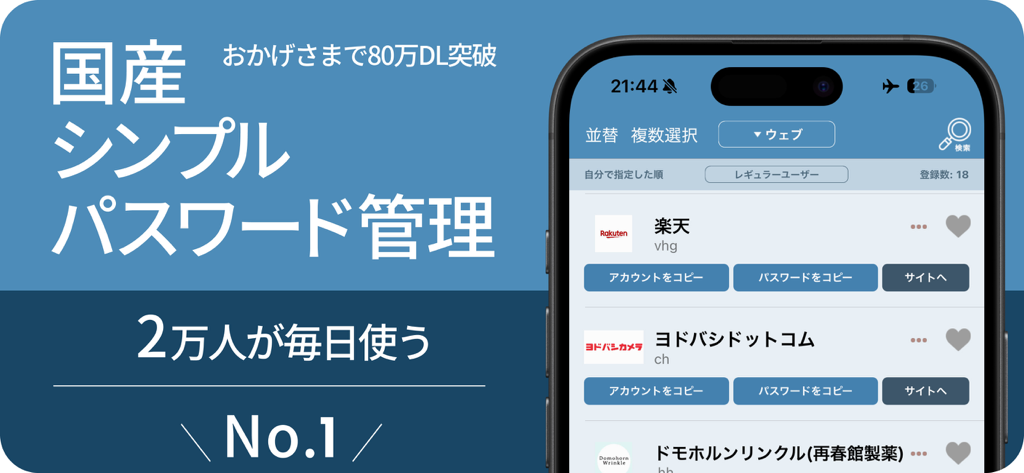
Password management - 저장된 비밀번호 및 계정 목록을 보여주는 iPhone의 PassManager 앱 인터페이스
저장된 비밀번호 및 계정 목록을 보여주는 iPhone의 PassManager 앱 인터페이스

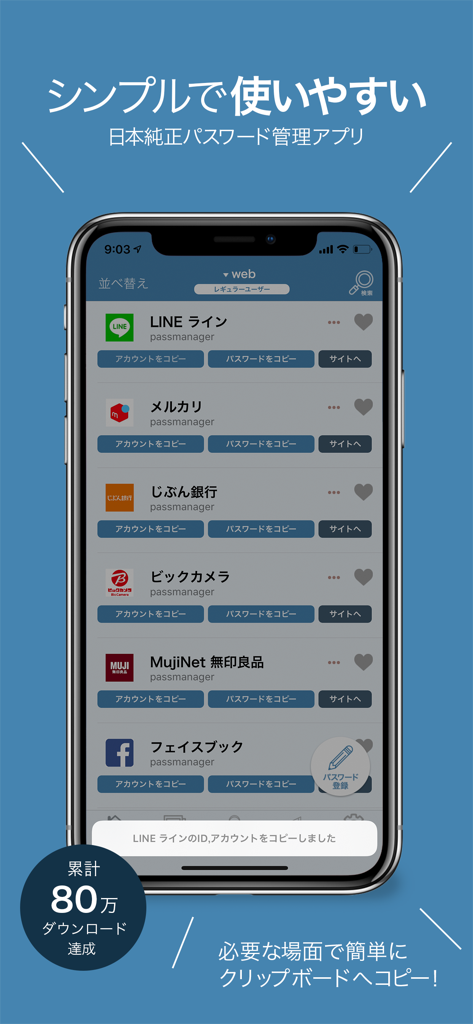
Password management - LINE 및 Facebook과 같은 저장된 계정 비밀번호 목록을 보여주는 iPhone의 PassManager 앱 인터페이스

LINE 및 Facebook과 같은 저장된 계정 비밀번호 목록을 보여주는 iPhone의 PassManager 앱 인터페이스
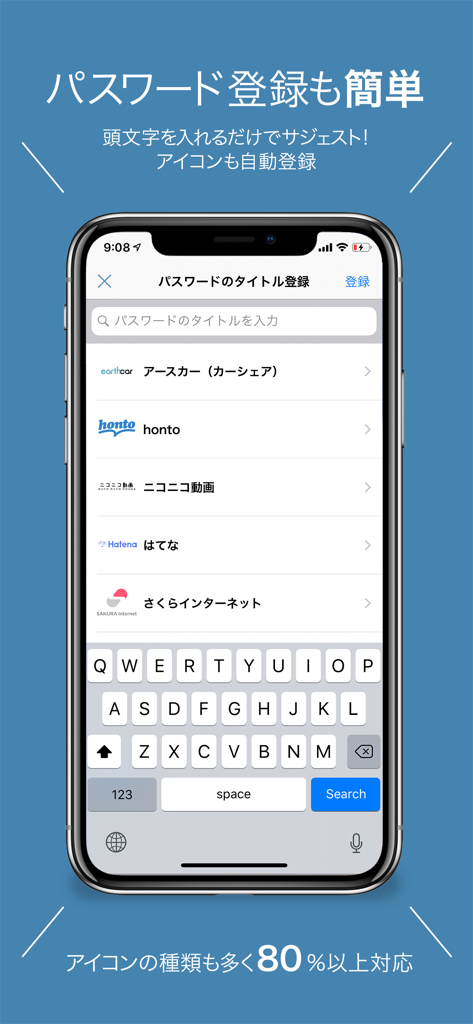
Password management - 서비스 제안 및 아이콘과 함께 쉬운 비밀번호 등록 화면을 보여주는 iPhone의 PassManager 앱 스크린샷
서비스 제안 및 아이콘과 함께 쉬운 비밀번호 등록 화면을 보여주는 iPhone의 PassManager 앱 스크린샷

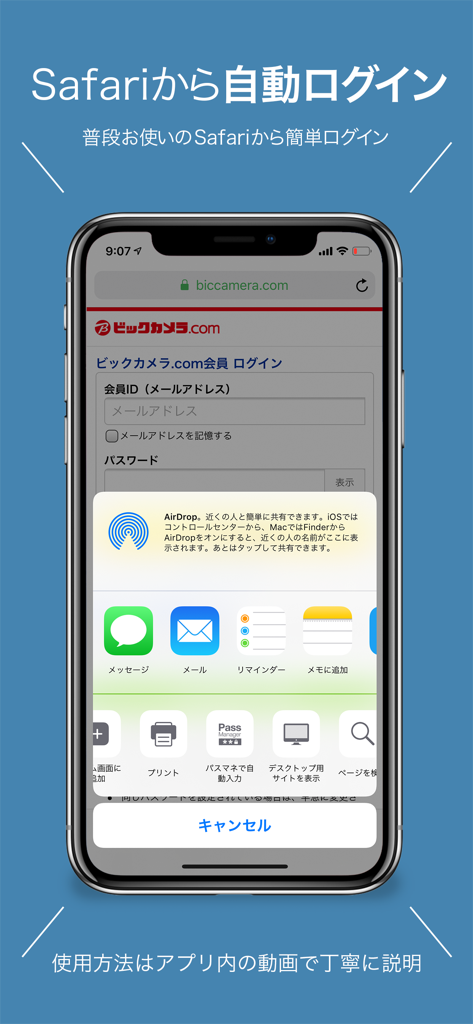
Password management - 웹사이트에서 원활한 자동 로그인을 위한 Safari의 PassManager 앱 확장 프로그램을 보여주는 iPhone 화면
웹사이트에서 원활한 자동 로그인을 위한 Safari의 PassManager 앱 확장 프로그램을 보여주는 iPhone 화면

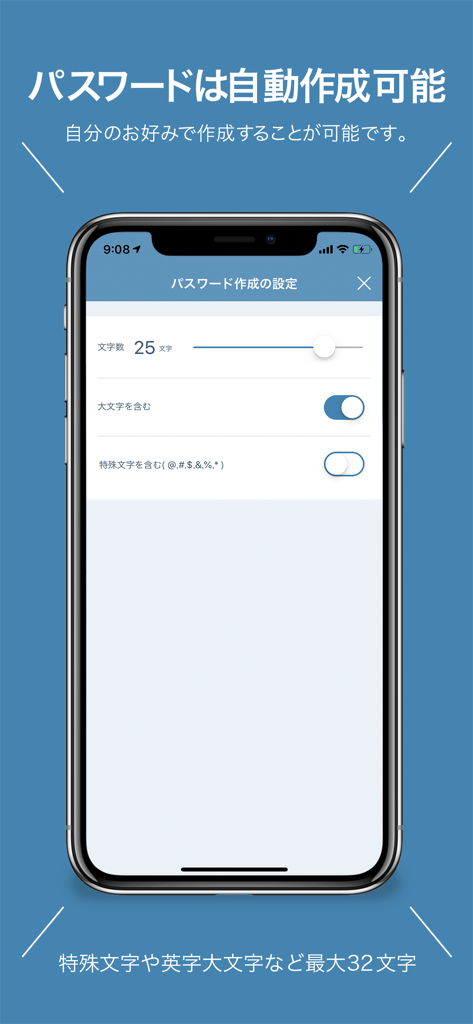
Password management - 길이 및 문자 옵션을 포함한 자동 비밀번호 생성 설정을 보여주는 iPhone의 PassManager 앱 인터페이스

길이 및 문자 옵션을 포함한 자동 비밀번호 생성 설정을 보여주는 iPhone의 PassManager 앱 인터페이스

설명

PassManager (path manager) is an application that can easily manage passwords. It is no exaggeration to go with the definitive version of the password management application. Main functions of PassManager: -------------------- ■ Automatic login from safari ■ Input fewer login faster! ■ Touch ID FaceID correspondence (face authentication) ■ One jump to the basic authentication site. Continue to login screen ■ Automatic generation of strong password ■ Jump easily in Chrome or safari ■ Export passwords as csv and back up ■ Copy from the notification center is possible ■ CSV / iCloud backup Powerful search function [Sites that can not auto-login at the moment] Hot Pepper Beauty GMAIL Price Com Desk net Other non-survey Fingerprint authentication can be used on ios terminals with iOS 8 or later and Touch ID Face ID. With ios 8, you can use it by entering a password even if it does not support fingerprint authentication. You can log in to the registered Basic certified site with just one button. Have you ever experienced such a problem? -ID, I do not remember much account password. - Many accounts use the same password - Did you forget your password? What shall I do - I can not manage more than one account and password We will solve these problems. Reason for PassManager (path manager) to be safe · Do not connect to the Internet · Fingerprint authentication adopted · The built-in password generator generates a password. It is possible to generate a high-intensity random password. It is simpler to make than any password management application. Register the password you want to register from the button on the upper right. All passwords are managed with 1 password (one password). Log in with fingerprint authentication when starting up. Tap the button from the password list you registered. Then the password is copied to the clipboard and you can jump directly to the WEB site. You can manage passwords on the web, applications, You can manage various passwords and ID such as basic authentication. [Security · Encryption method] AES 256 Leave the management for personal information 【About monthly fee function】 The monthly charged feature is called platinum user. You can use it by paying monthly 180 yen It is automatic continuing billing once a month. Function · Delete ad · Automatic password creation · Basic authentication breaking function · Automatic login function · Abolition of categories creation restrictions · ICloud backup · ICloud auto backup · CSV export of password · CSV import of password · Abolition of the maximum number of favorites list · Automatic login function from Safari · Icon free selection function 【About automatic continuing billing】 • The contract term will be updated if it is not canceled more than 24 hours before the end of the term. • Payment will be charged to your iTunes account. • Registration will be automatically renewed unless automatic renewal has been turned off for at least 24 hours before the end of the current period • The account will be charged for updates within 24 hours prior to the end of the current period and the cost of the update will be identified • Subscriptions are managed by users and automatic updates may turn off when you go to your account settings after purchase • The unused portion of the free trial period expires if the user purchases a subscription to the book, if applicable • Subscription period one month 【Confirmation and Cancellation of Automatic Update】 Select "Recommended" at the bottom of the AppStore application -> Select AppleID -> select "passmanager" from "Administration" in subscription. From this screen you can check the next automatic update timing and cancel / set automatic update. 【terms of use and privacy policy】 https://ynmain.github.io/passmanager/app/passmanager/privacy.html

Download

다운로드: App Store

이 페이지는 앱이나 개발자의 공식 페이지가 아니며, 정보 제공 및 논평을 목적으로 작성된 독립 편집 간행물입니다. 명시적으로 달리 언급되지 않는 한, 해당 앱이나 개발자는 MWM, Apple, Google Play, 앱 퍼블리셔 또는 앱 개발자와 제휴, 보증, 후원, 승인 또는 공식적으로 연결되어 있지 않으며, 이 페이지의 어떤 내용도 해당 앱이 MWM의 서비스를 사용하여 개발되었음을 의미하지 않습니다. 모든 상표, 로고, 스크린샷 및 기타 콘텐츠는 해당 소유자의 자산입니다.







