Password Manager Secure Vault
다운로드: App Store

이 페이지는 앱이나 개발자의 공식 페이지가 아니며, 정보 제공 및 논평을 목적으로 작성된 독립 편집 간행물입니다. 명시적으로 달리 언급되지 않는 한, 해당 앱이나 개발자는 MWM, Apple, Google Play, 앱 퍼블리셔 또는 앱 개발자와 제휴, 보증, 후원, 승인 또는 공식적으로 연결되어 있지 않으며, 이 페이지의 어떤 내용도 해당 앱이 MWM의 서비스를 사용하여 개발되었음을 의미하지 않습니다. 모든 상표, 로고, 스크린샷 및 기타 콘텐츠는 해당 소유자의 자산입니다.


로고: Password Manager Secure Vault
다운로드: App Store

Password Manager Secure Vault

군사 등급 AES-256 암호화로 비밀번호 스트레스를 없애세요. 로컬 저장소로 자격 증명을 보호하세요. 클라우드 없음, 유출 없음, 디지털 생활을 위한 궁극의 프라이버시를 보장합니다.

주요 수치

다운로드

711K+

사용자 평점

4.4/5

총 평가 수

46K+

개발사

Masaki Sato

카테고리

Business

지원 언어

5

최신 버전

1.9.8

크기

14.9 MB

출시일

2019년 4월 5일
기능

당신의 제어 하에 있는 보안

클라우드에 의존하지 않고 디지털 생활을 보호하기 위해 군사 등급 오프라인 금고를 신뢰하는 120만 명 이상의 사용자와 함께하세요.

제로 클라우드 프라이버시

데이터가 기기에 100% 로컬로 저장됩니다. 해커에게 보이지 않으며 뉴스에서 보는 대규모 클라우드 유출로부터 안전합니다.

즉각적인 보안 액세스

'비밀번호 찾기'의 반복을 멈추세요. Face ID로 전체 금고의 잠금을 해제하고 원터치 복사로 몇 초 만에 모든 사이트에 로그인하세요.

다음 스크린샷과 설명은 앱의 공식 스토어 목록에서 직접 가져온 것이며 앱 개발자의 자산입니다.

앱 스토어

스크린샷
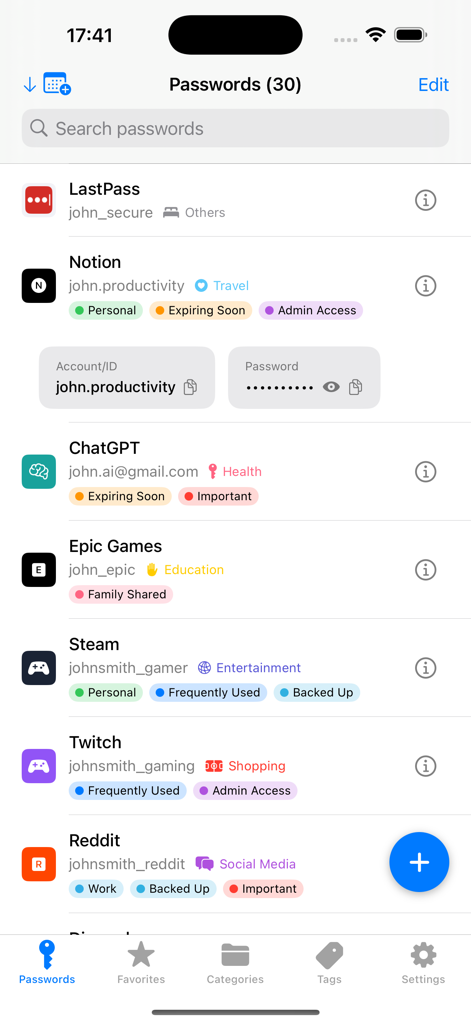
Password Manager Secure Vault - 개인 및 중요와 같은 카테고리에 대한 색상 태그가 있는 보안 금고 앱 인터페이스에 저장된 비밀번호 목록
개인 및 중요와 같은 카테고리에 대한 색상 태그가 있는 보안 금고 앱 인터페이스에 저장된 비밀번호 목록

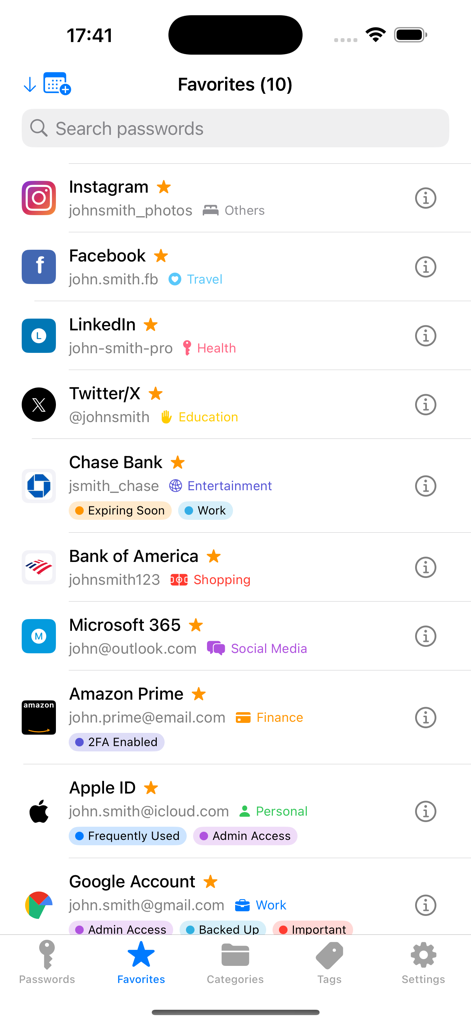
Password Manager Secure Vault - 사용자 지정 태그가 있는 저장된 소셜 미디어 및 은행 계좌 목록을 보여주는 비밀번호 관리자 보안 금고 앱의 즐겨찾기 화면
사용자 지정 태그가 있는 저장된 소셜 미디어 및 은행 계좌 목록을 보여주는 비밀번호 관리자 보안 금고 앱의 즐겨찾기 화면

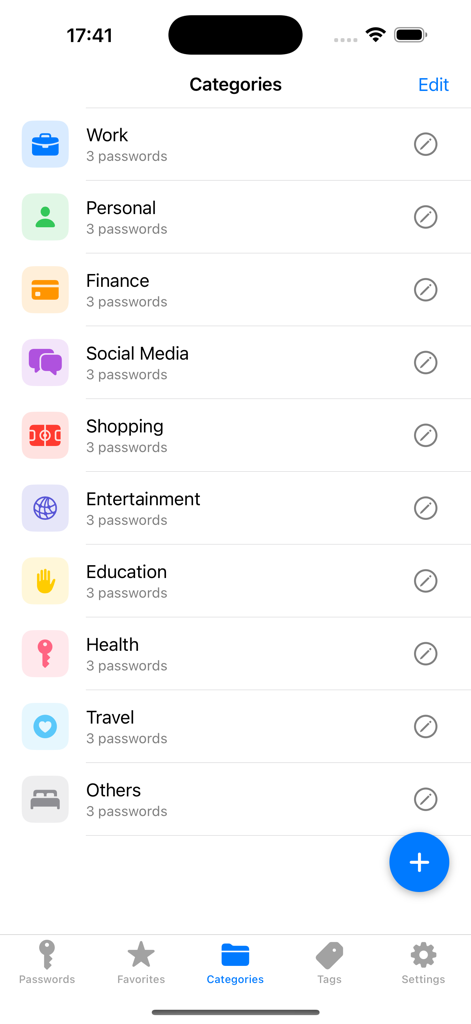
Password Manager Secure Vault - 업무, 개인, 금융 및 소셜 미디어를 포함한 체계적인 비밀번호 카테고리를 보여주는 모바일 앱 인터페이스
업무, 개인, 금융 및 소셜 미디어를 포함한 체계적인 비밀번호 카테고리를 보여주는 모바일 앱 인터페이스

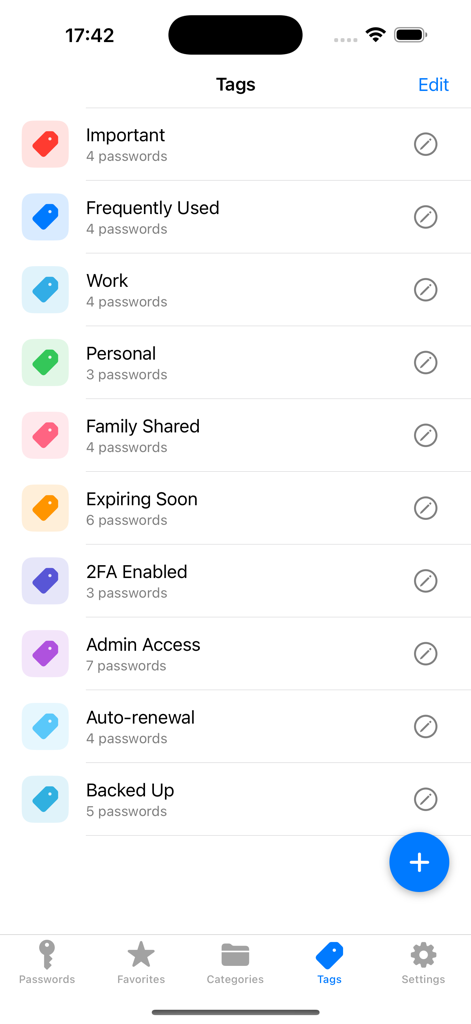
Password Manager Secure Vault - 자격 증명을 정리하기 위해 업무 및 개인과 같은 사용자 지정 태그 목록을 보여주는 비밀번호 관리자 보안 금고 앱의 인터페이스.
자격 증명을 정리하기 위해 업무 및 개인과 같은 사용자 지정 태그 목록을 보여주는 비밀번호 관리자 보안 금고 앱의 인터페이스.

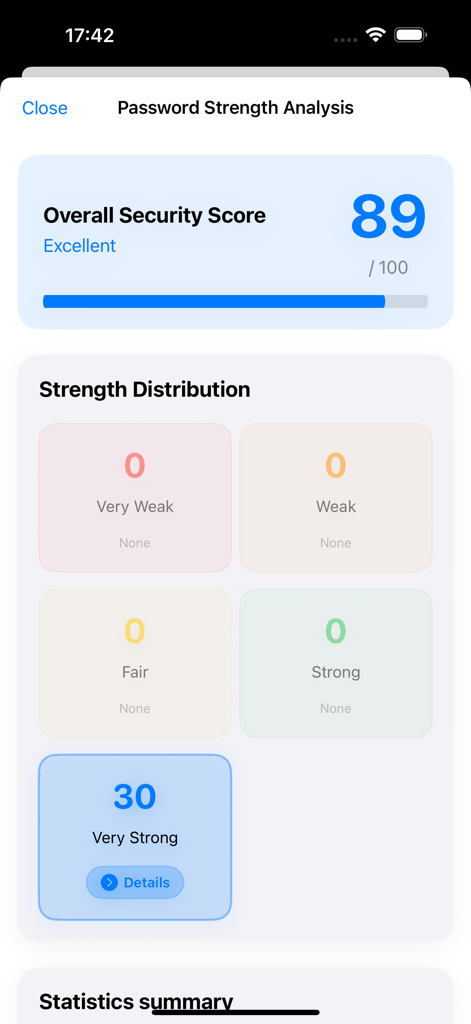
Password Manager Secure Vault - 30개의 매우 강력한 비밀번호와 함께 89점의 우수한 보안 점수를 보여주는 비밀번호 강도 분석 인터페이스
30개의 매우 강력한 비밀번호와 함께 89점의 우수한 보안 점수를 보여주는 비밀번호 강도 분석 인터페이스

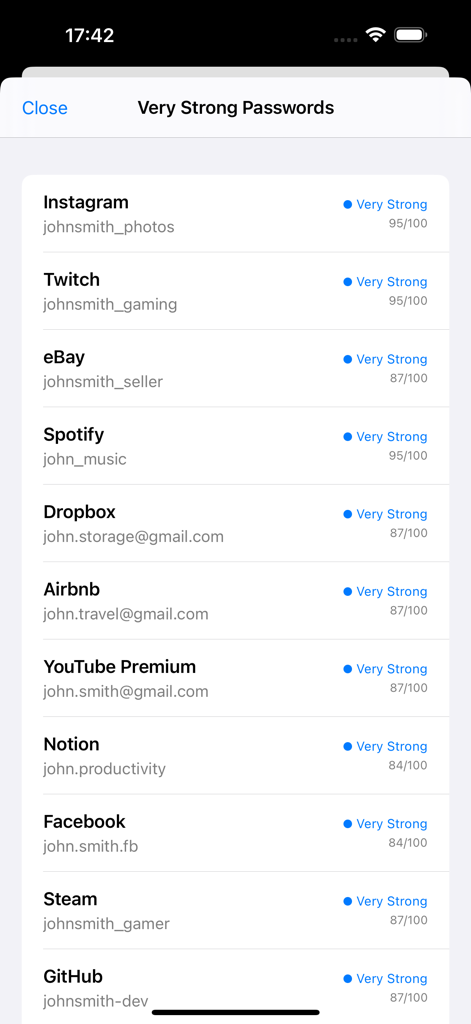
Password Manager Secure Vault - 비밀번호 금고 애플리케이션에서 보안 강도 점수가 높은 디지털 계정 목록
비밀번호 금고 애플리케이션에서 보안 강도 점수가 높은 디지털 계정 목록

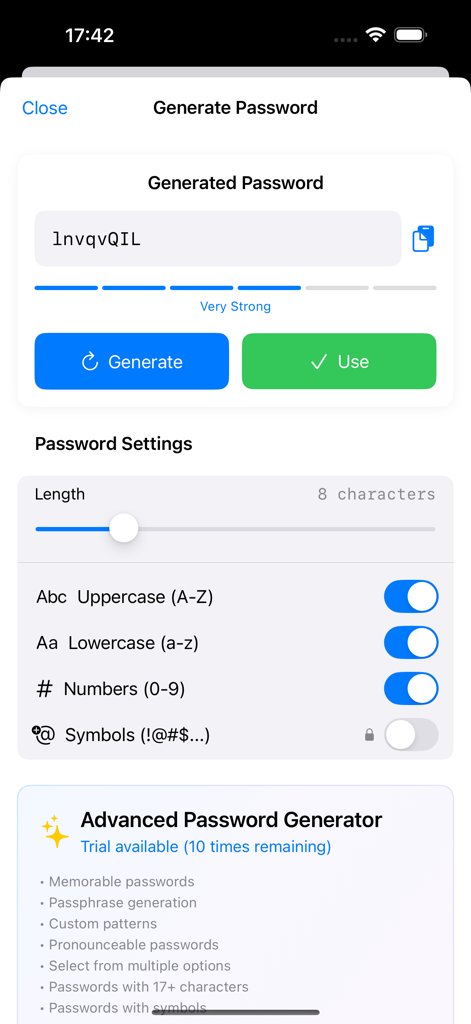
Password Manager Secure Vault - 조절 가능한 길이 및 문자 유형 설정이 포함된 안전한 비밀번호 생성 인터페이스.
조절 가능한 길이 및 문자 유형 설정이 포함된 안전한 비밀번호 생성 인터페이스.

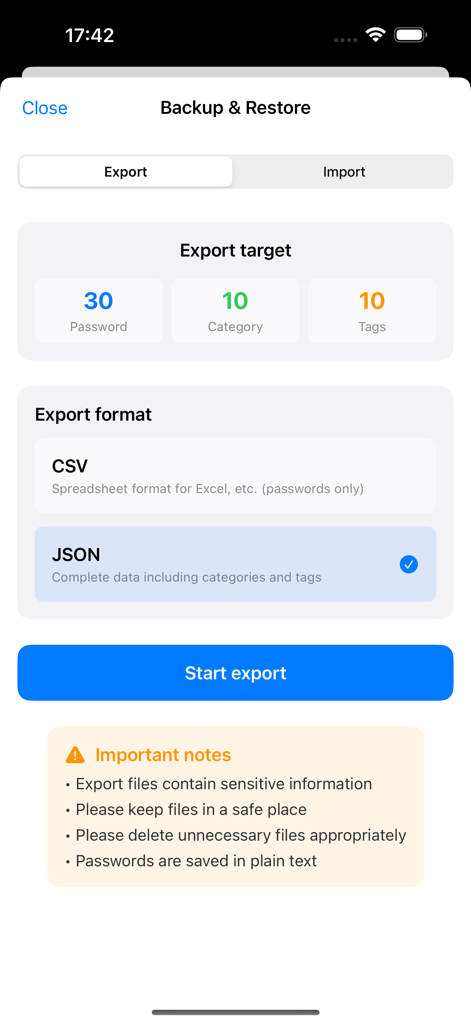
Password Manager Secure Vault - JSON 또는 CSV 형식의 비밀번호 및 카테고리에 대한 데이터 내보내기 옵션을 보여주는 앱의 백업 및 복구 화면.
JSON 또는 CSV 형식의 비밀번호 및 카테고리에 대한 데이터 내보내기 옵션을 보여주는 앱의 백업 및 복구 화면.

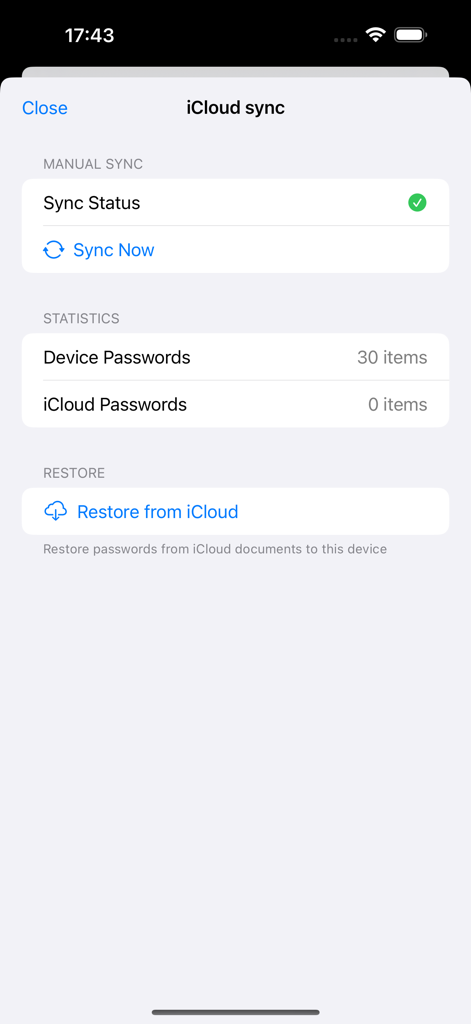
Password Manager Secure Vault - 비밀번호 관리자 보안 금고의 iCloud 동기화 및 복구 설정 인터페이스
비밀번호 관리자 보안 금고의 iCloud 동기화 및 복구 설정 인터페이스

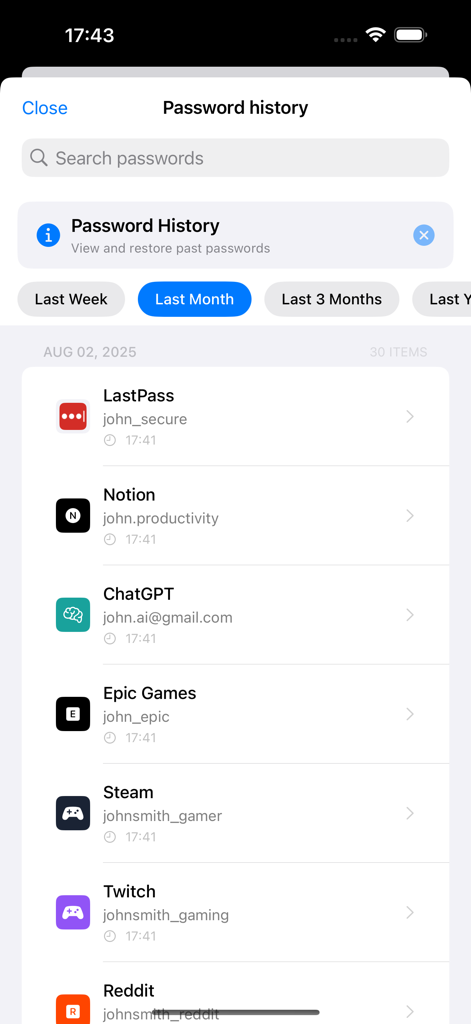
Password Manager Secure Vault - 다양한 앱 및 서비스에 대해 저장된 자격 증명을 시간 순서대로 보여주는 비밀번호 기록 화면.

다양한 앱 및 서비스에 대해 저장된 자격 증명을 시간 순서대로 보여주는 비밀번호 기록 화면.

설명

#1 Password Manager - 1.2M+ Downloads, 30K Daily Active Users! Stop Password Chaos! One Master Password = Access Everything Military-Grade AES-256 Encryption + Face ID/Touch ID = Ultimate Security 100% Offline Storage = Your Data Never Leaves Your Device The most secure, user-friendly password manager that actually makes your life easier. 【Why Users Love Our Password Manager】 ■ Smart Password Management ・Custom Fields - Add any information beyond passwords ・Password History - View and restore previous passwords ・Trash - Recover deleted passwords within 30 days ・Advanced Sorting - Organize by frequency, date, or category ・Favorites - Quick access to frequently used passwords ■ Bank-Level Security ・Password Strength Analysis - Identify weak passwords ・Duplicate Detection - Alerts for reused passwords ・Security Audit - Comprehensive safety evaluation ・AES-256 Encryption - Military-grade protection ・Complete Offline - Data stored only on device ■ Intelligent Password Generator ・Smart Generator - Create optimal passwords ・Templates - Save frequently used formats ・Bulk Updates - Change multiple passwords at once ・Password Notes - Store security questions ・One-Tap Copy - Instantly copy passwords ■ Beautiful & Intuitive Design ・Dark Mode - Eye-friendly dark theme ・Color Themes - Customize appearance ・Intuitive Interface - Simple management ・Fast Search - Find passwords instantly ■ Seamless Data Management ・CSV/JSON Export - Easy backup ・Import Function - Seamless migration ・Automatic Backup - Protect passwords 【Perfect For You If You】 • Use the same password everywhere (dangerous!) • Forget passwords constantly • Manage work & personal accounts • Want military-grade security • Need family password sharing 【Premium Features - Unlock Everything】 LIMITED TIME OFFER • Monthly: $7.99/month • Annual: $79.99/year (Save 17%!) • 7-14 Day FREE Trial ●Benefits ・No ads ・Unlimited passwords ・Password history ・Advanced search ・Security audit ・Custom fields ・Trash (30 days) ・14 themes ・iCloud sync ・Priority support ●Auto-Renewal Automatically renews unless canceled 24 hours before period end. ●Manage Subscription Settings > Subscriptions > Password Manager ●Free Trial 3 days free for new users. ●Restore Purchases Settings → Premium → Restore 【Security Features】 ・Face ID/Touch ID ・Passcode Lock ・Auto-Lock ・Clipboard Auto-Clear 【User Reviews】 "Best password manager!" "So easy to use" "Perfect security" "No more password stress" "Essential app" 【Why We're #1】 • 1.2M+ Happy Users • 100% Offline = 100% Secure • 5-Star Average Rating • Lightning Fast Performance • Award-Winning Design Download NOW and Never Forget a Password Again! Get Premium for 7 Days - No Credit Card Required! 【Notes】 ・Remember master password ・Backup for device changes ・Local storage only ・iTunes billing 【Support】 https://web-app-e823f.web.app/support.html 【Legal】 Privacy: https://web-app-e823f.web.app/privacy.html Terms: https://web-app-e823f.web.app/terms.html Terms of Use (EULA): https://www.apple.com/legal/internet-services/itunes/dev/stdeula/

Download

다운로드: App Store

이 페이지는 앱이나 개발자의 공식 페이지가 아니며, 정보 제공 및 논평을 목적으로 작성된 독립 편집 간행물입니다. 명시적으로 달리 언급되지 않는 한, 해당 앱이나 개발자는 MWM, Apple, Google Play, 앱 퍼블리셔 또는 앱 개발자와 제휴, 보증, 후원, 승인 또는 공식적으로 연결되어 있지 않으며, 이 페이지의 어떤 내용도 해당 앱이 MWM의 서비스를 사용하여 개발되었음을 의미하지 않습니다. 모든 상표, 로고, 스크린샷 및 기타 콘텐츠는 해당 소유자의 자산입니다.







