
이 페이지는 앱이나 개발자의 공식 페이지가 아니며, 정보 제공 및 논평을 목적으로 작성된 독립 편집 간행물입니다. 명시적으로 달리 언급되지 않는 한, 해당 앱이나 개발자는 MWM, Apple, Google Play, 앱 퍼블리셔 또는 앱 개발자와 제휴, 보증, 후원, 승인 또는 공식적으로 연결되어 있지 않으며, 이 페이지의 어떤 내용도 해당 앱이 MWM의 서비스를 사용하여 개발되었음을 의미하지 않습니다. 모든 상표, 로고, 스크린샷 및 기타 콘텐츠는 해당 소유자의 자산입니다.

다운로드
250k+사용자 평점
총 평가 수
473개발사
카테고리
Utilities지원 언어
15최신 버전
8.2크기
105.0 MB출시일
2025년 1월 21일효율적인 문서 관리를 위한 올인원 모바일 솔루션
PDF Reader - Editor & Scanner 앱 분석
AI 스마트 스캔 및 문서 인식
이 앱은 종이 문서를 자동으로 스캔하고, 가장자리를 정확하게 감지하며, 이미지 품질을 향상시키고, OCR을 통해 텍스트를 추출하여 디지털화합니다.
포괄적인 PDF 변환 기능
이 도구는 워드, 엑셀, 이미지 등 다양한 형식의 파일을 PDF로 변환하거나, PDF를 다른 파일 형식으로 쉽게 변환할 수 있는 기능을 갖추고 있습니다.
원활한 클라우드 통합 및 파일 관리
사용자가 Google Drive 및 OneDrive와 같은 클라우드 서비스에 파일을 안전하게 업로드하고, 저장된 PDF에 쉽게 접근하여 관리할 수 있게 해줍니다.
직관적인 PDF 보기 및 검색
이 앱은 기기 내 모든 PDF 파일을 자동으로 찾아주고, 부드러운 읽기 환경을 제공하며, 특정 페이지로 이동하거나 텍스트를 빠르게 검색할 수 있게 해줍니다.
실용적인 PDF 편집 및 주석 도구
사용자가 PDF 문서에 주석을 달고, 하이라이트를 추가하며, 직접 서명하고, 양식을 작성하는 등 다양한 편집 작업을 수행할 수 있습니다.
AI 기반 문서 요약
이 도구는 문서의 핵심 내용을 AI가 자동으로 요약하여 빠르고 효율적인 정보 검토를 가능하게 합니다.
고급 PDF 처리 도구
사용자가 여러 PDF 파일을 하나로 병합하거나, 큰 파일을 분할하고, 비밀번호로 문서를 보호하며, 파일 크기를 압축하여 효율적으로 관리할 수 있습니다.
통합 오피스 문서 뷰어
이 앱은 PDF 외에도 Word, Excel, PowerPoint 문서를 앱 내에서 직접 열람할 수 있어 다양한 문서 형식을 한 곳에서 관리할 수 있게 해줍니다.
자주 묻는 질문
에 대해 알아야 할 모든 것 PDF Reader - Editor & Scanner
What is PDF Reader - Editor & Scanner?
PDF Reader - Editor & Scanner is a comprehensive app providing PDF reading, intelligent scanning, and AI-powered editing. It serves as a centralized hub for managing, converting, and annotating documents on iPhone and iPad.
Can I scan documents with PDF Reader - Editor & Scanner?
Yes, PDF Reader - Editor & Scanner features AI scanning to digitize paper files, receipts, notes, and business cards using your camera. It includes auto edge detection and image enhancement for clear scans.
Does PDF Reader - Editor & Scanner convert files to PDF?
Yes, PDF Reader - Editor & Scanner converts Word, Excel, PowerPoint, Markdown, text, and images into PDF format. It also converts PDFs back into these formats, supporting a wide range of document types.
How can I sign documents in PDF Reader - Editor & Scanner?
PDF Reader - Editor & Scanner allows you to add handwritten signatures to digital documents. You can sign documents easily using your finger or a stylus directly within the app, completing forms and agreements.
Does PDF Reader - Editor & Scanner support cloud storage?
Yes, PDF Reader - Editor & Scanner supports secure cloud backup and management. You can upload files to the app's secure cloud and access, view, and edit documents from Google Drive and OneDrive seamlessly.
Can I merge multiple PDFs with PDF Reader - Editor & Scanner?
Yes, PDF Reader - Editor & Scanner includes an advanced tool to merge multiple PDF files into a single document. This feature simplifies organization and management of various files efficiently.
Does PDF Reader - Editor & Scanner offer password protection for files?
Yes, PDF Reader - Editor & Scanner allows users to lock PDFs with password protection. This feature enhances security for sensitive documents, helping prevent unauthorized access within the app.
How do I annotate PDFs in PDF Reader - Editor & Scanner?
PDF Reader - Editor & Scanner provides practical editing features to annotate PDFs. You can highlight, underline, strikethrough text, and use various other annotation tools directly within the document for review.
Is PDF Reader - Editor & Scanner a free app?
Yes, PDF Reader - Editor & Scanner is described as a free and lightweight office app. It offers powerful features for document management and scanning without an initial cost.
What document formats can PDF Reader - Editor & Scanner view?
PDF Reader - Editor & Scanner views PDFs, Word documents (DOC, DOCX), Excel spreadsheets (XLS, XLSX), and PowerPoint presentations. It supports seamless reading across these various office document formats.
Does PDF Reader - Editor & Scanner offer an AI summary feature?
Yes, PDF Reader - Editor & Scanner includes an AI Summary feature. This allows users to quickly generate concise summaries of key points in their documents, facilitating faster review and comprehension.
Can PDF Reader - Editor & Scanner perform OCR?
Yes, PDF Reader - Editor & Scanner features OCR Recognition. This allows users to extract and copy text from scanned pages with one tap, making digitized documents editable and searchable.
Where can I find the privacy policy for PDF Reader - Editor & Scanner?
The privacy policy for PDF Reader - Editor & Scanner is available at https://getpdfreader.github.io/ipdfreader/privacypolicy.html. This link is provided directly in the app description for user access.
다음 스크린샷과 설명은 앱의 공식 스토어 목록에서 직접 가져온 것이며 앱 개발자의 자산입니다.
앱 스토어
스크린샷
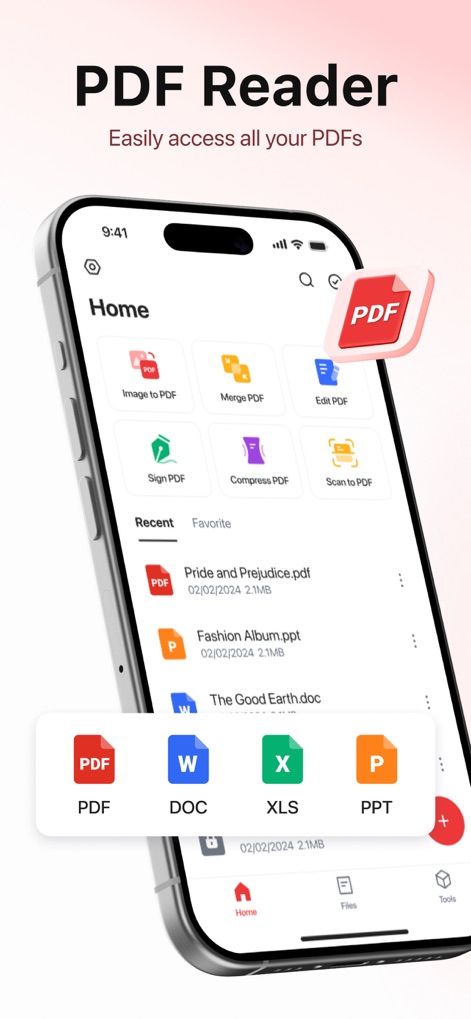
이 앱은 홈 화면에서 모든 PDF 파일을 손쉽게 관리할 수 있도록 다양한 도구를 제공하며, 최근 문서 목록과 새로운 파일 유형 생성을 위한 빠른 접근을 보여줍니다.
PDF 관리 허브
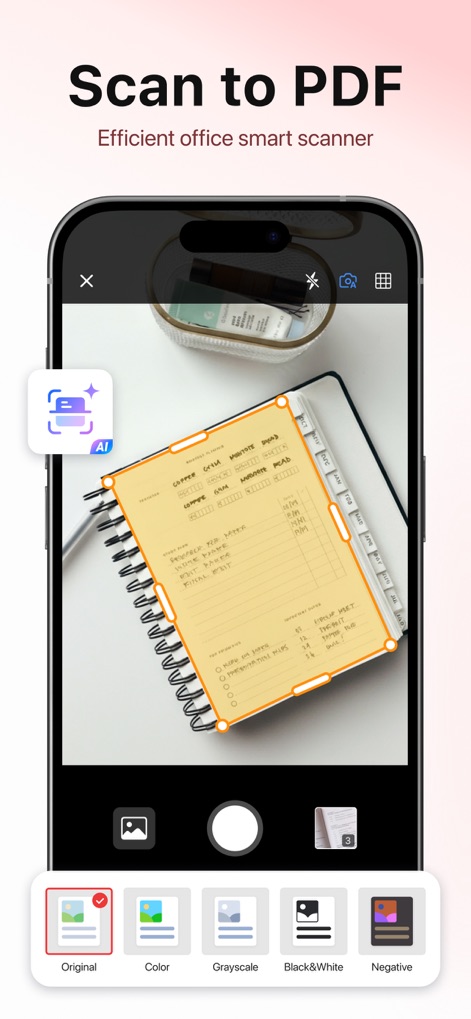
이 도구는 AI 기반의 스마트 스캐닝 기능을 통해 종이 문서를 디지털화하며, 자동 테두리 감지 및 다양한 이미지 필터를 제공합니다.
스마트 스캔 기능
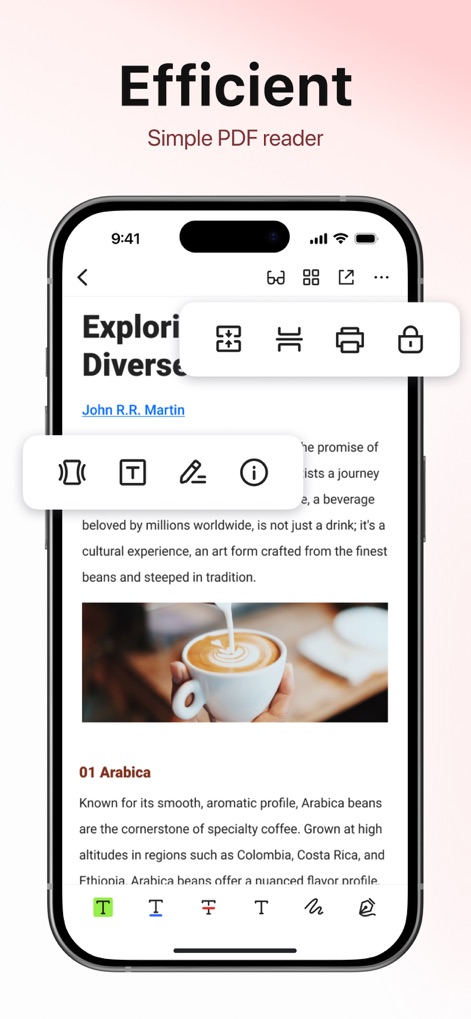
사용자는 이 앱에서 PDF 문서를 열람하고 주석을 달 수 있으며, 중요한 내용을 강조하거나 텍스트를 삽입하는 다양한 편집 도구를 활용할 수 있습니다.
문서 주석 및 편집
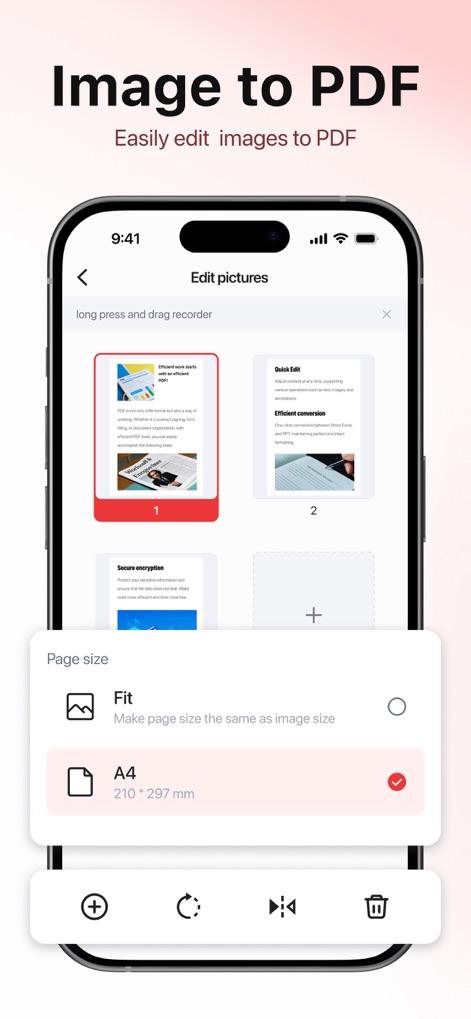
이 앱은 사용자가 여러 이미지를 하나의 PDF 파일로 쉽게 변환할 수 있도록 지원하며, 이미지 미리보기와 A4 같은 다양한 페이지 크기 옵션을 제공합니다.
이미지 PDF 변환
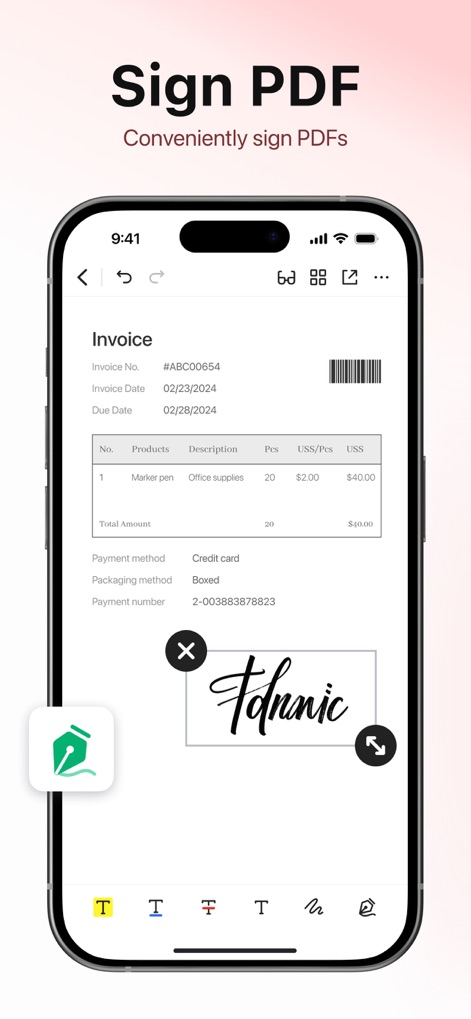
사용자는 이 도구로 PDF 문서에 직접 손글씨 서명을 추가할 수 있으며, 서명의 위치와 크기를 자유롭게 조절할 수 있습니다.
간편한 전자 서명
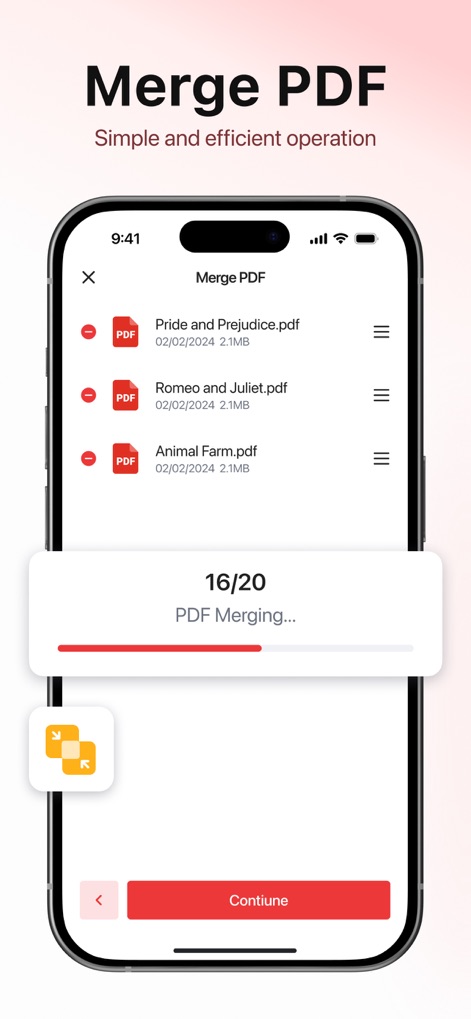
이 앱은 여러 PDF 파일을 손쉽게 하나로 합칠 수 있는 기능을 제공하며, 병합할 파일 목록을 명확하게 보여주고 병합 진행 상황을 표시합니다.
PDF 파일 병합
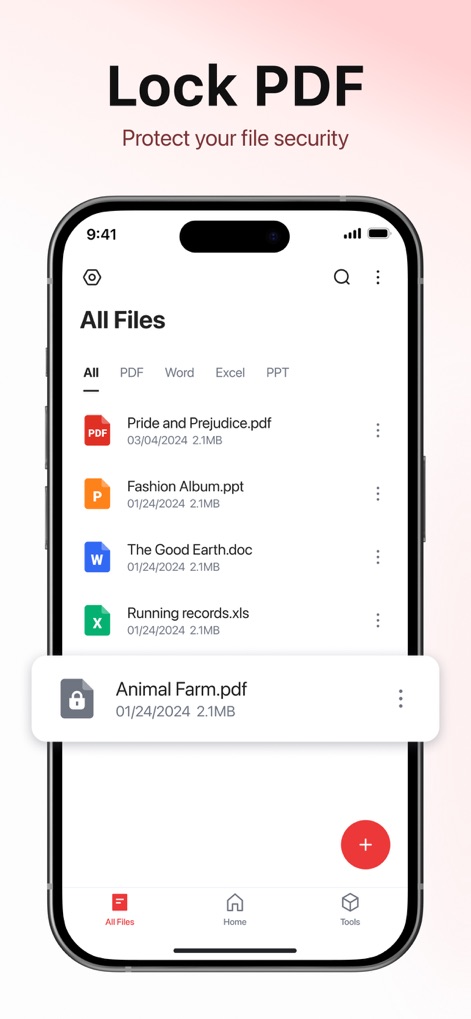
사용자는 이 앱에서 모든 파일을 관리하고, 특정 PDF 문서에 잠금 기능을 적용하여 중요한 정보를 보호할 수 있습니다.
PDF 보안 설정
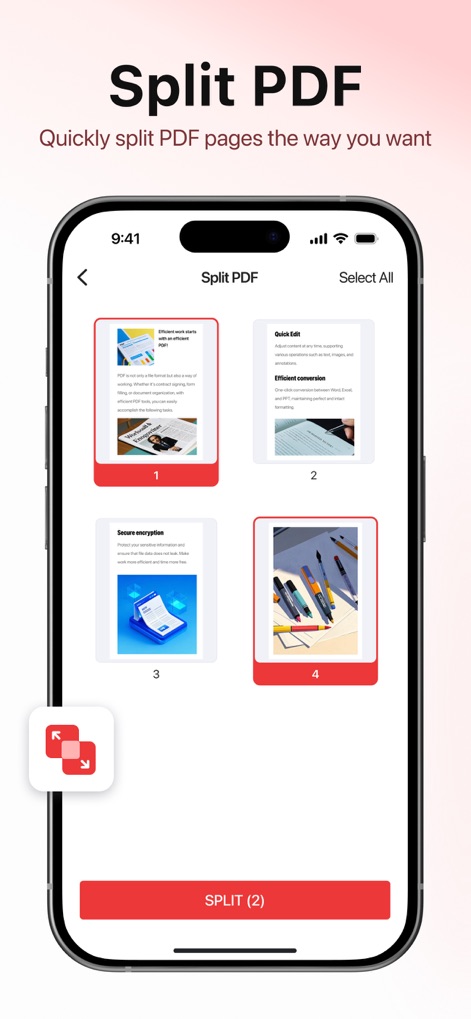
이 도구는 PDF 문서를 원하는 대로 여러 페이지로 분할할 수 있도록 지원하며, 각 페이지의 미리보기와 분할할 페이지를 선택하는 옵션을 제공합니다.
PDF 페이지 분할
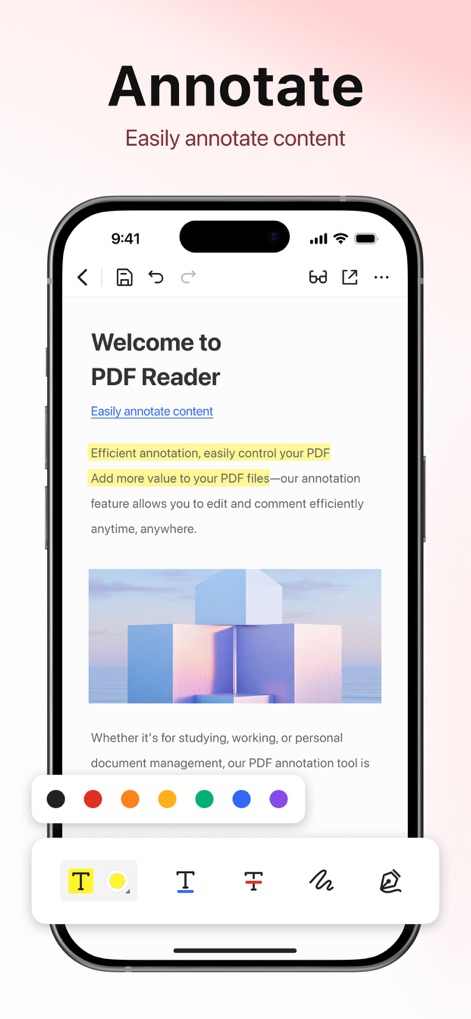
이 앱을 사용하면 PDF 문서에 쉽게 주석을 달 수 있으며, 다양한 색상 팔레트와 텍스트 강조, 그리기 도구를 활용하여 콘텐츠를 명확하게 표시할 수 있습니다.
간편한 주석 달기
설명
Download
비슷한 앱
유사한 기능과 사용자 경험을 가진 앱

Converter Files & PDF Editor
Shenzhen Miguo Qudong Technology Co., Ltd

文档手机版-word文档编辑,手机office办公软件
喜存 岳

PDF Maker - Convert to PDF
KUPERTINO BIL. YAZ. HALIL IBRAHIM KARAHAN SAFFET ARSLAN MUSTAFA AYTEN MUHAMMET YALCIN OZDEMIR K. S.

PDF Converter & PDF Creator
The Last Sunrise LLC

PDF Maker: Editor & Converter
SolveIt Inc.

PDF Editor・PDF File Converter
VISARGERD, S.L.

PDFit-AI PDF&Scanner
FAST LINE NETWORK TECHNOLOGY LIMITED

PDF Converter・Doc Scanner
Nikolai Ivanenko

PDF Editor | Files Converter
Yehor Karataiev
이 페이지는 앱이나 개발자의 공식 페이지가 아니며, 정보 제공 및 논평을 목적으로 작성된 독립 편집 간행물입니다. 명시적으로 달리 언급되지 않는 한, 해당 앱이나 개발자는 MWM, Apple, Google Play, 앱 퍼블리셔 또는 앱 개발자와 제휴, 보증, 후원, 승인 또는 공식적으로 연결되어 있지 않으며, 이 페이지의 어떤 내용도 해당 앱이 MWM의 서비스를 사용하여 개발되었음을 의미하지 않습니다. 모든 상표, 로고, 스크린샷 및 기타 콘텐츠는 해당 소유자의 자산입니다.