PDF to Pages by PDF2Office

PDF to Pages by PDF2Office

다운로드: App Store
로고: PDF to Pages by PDF2Office

PDF to Pages by PDF2Office: 정적 PDF를 완전 편집 가능한 Pages 문서로 변환

다시 입력하는 것을 멈추고 편집을 시작하세요. iPhone에서 직접 전문적인 정확도로 레이아웃, 스타일, 표를 유지하세요. 전체 파일 또는 특정 영역을 변환하고 iCloud, Dropbox, Google Drive와 원활하게 동기화하세요.

개발사

Recosoft Corporation

카테고리

Productivity

다운로드

32K+

사용자 평점

1.0/5

총 평가 수

0

지원 언어

5

정확성을 실제로 확인하세요

이 인터페이스를 사용하는 32K+ 명의 사용자.

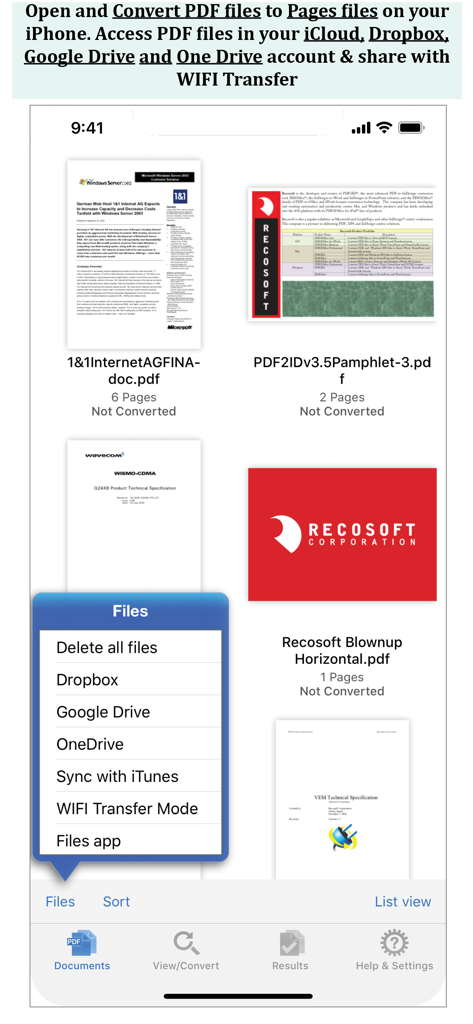
PDF 파일 목록과 Dropbox, Google Drive, OneDrive 옵션 메뉴가 표시된 iPhone 앱 화면

PDF 파일 목록과 Dropbox, Google Drive, OneDrive 옵션 메뉴가 표시된 iPhone 앱 화면

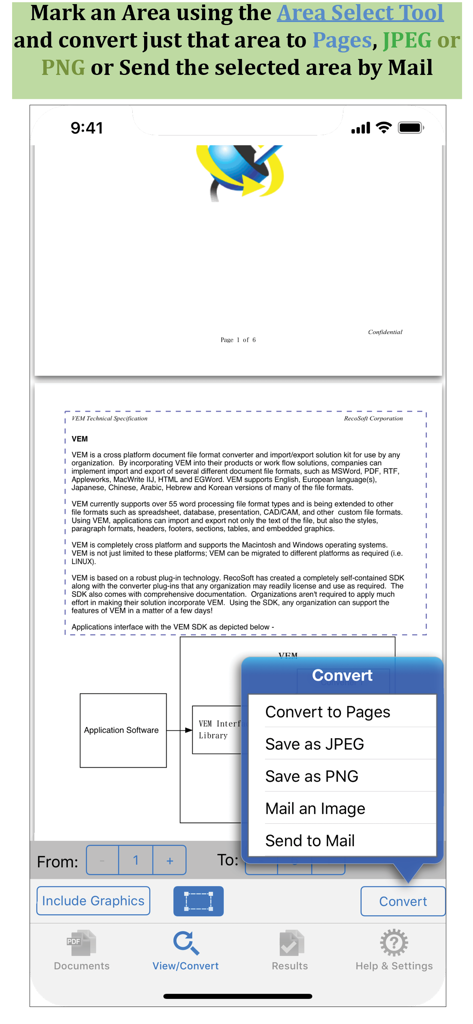
특정 문서 섹션 변환을 위한 영역 선택 도구를 보여주는 PDF to Pages 앱 스크린샷

특정 문서 섹션 변환을 위한 영역 선택 도구를 보여주는 PDF to Pages 앱 스크린샷

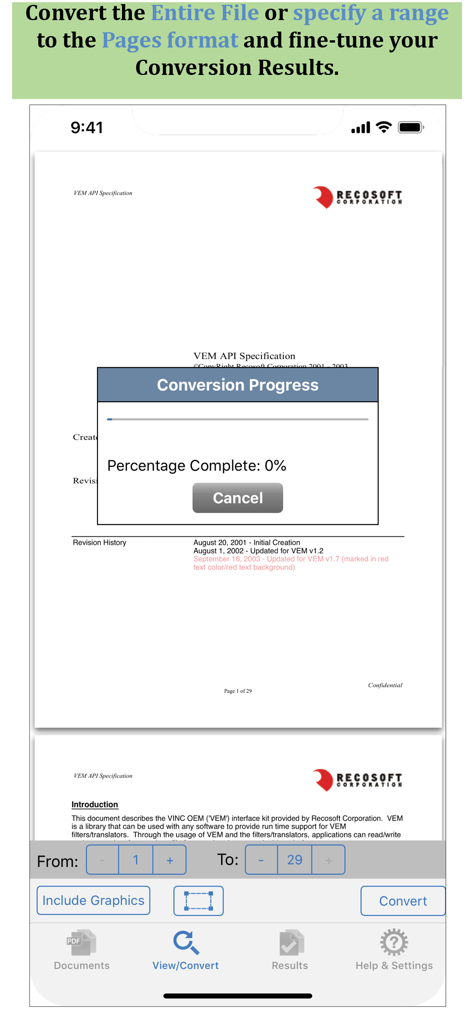
변환 진행률 창과 페이지 범위 선택 옵션을 보여주는 PDF to Pages 앱 인터페이스

변환 진행률 창과 페이지 범위 선택 옵션을 보여주는 PDF to Pages 앱 인터페이스

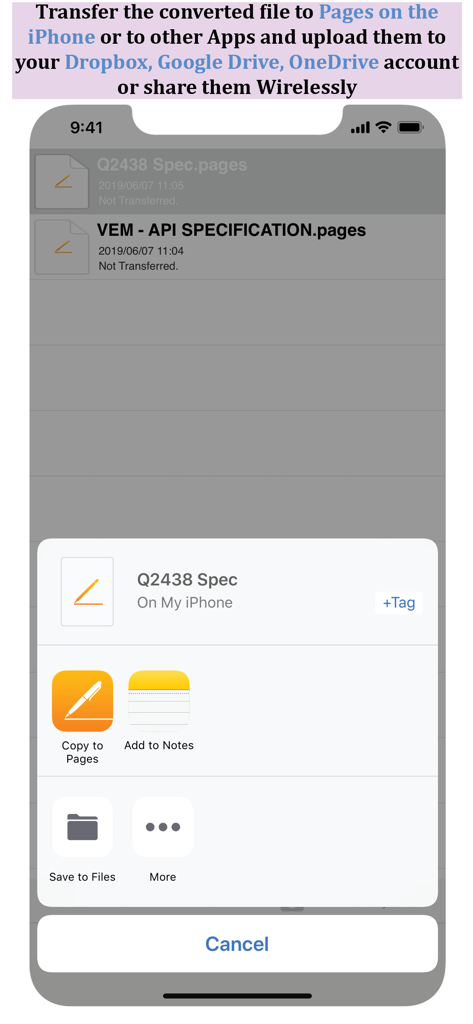
iPhone에서 Pages로 변환된 파일을 복사하거나 클라우드 스토리지에 저장하는 옵션을 보여주는 공유 시트

iPhone에서 Pages로 변환된 파일을 복사하거나 클라우드 스토리지에 저장하는 옵션을 보여주는 공유 시트

정적 PDF를 동적 Pages 문서로 변환

이 앱을 돋보이게 하는 도구, 32K+ 명의 사용자가 선택.

📄

높은 충실도의 레이아웃 유지

단락, 표, 스타일을 완벽하게 그대로 유지하세요. 서식 다시 지정은 건너뛰고 즉시 Pages에서 편집을 시작하세요.

🎯

정확한 영역 선택

필요한 것만 변환하세요. 특정 섹션을 선택하여 편집 가능한 텍스트 또는 이미지로 추출하여 빠르게 공유하고 재사용하세요.

☁️

원활한 워크플로우 통합

Dropbox, Google Drive에 연결하거나 WiFi 전송을 사용하여 Apple 생태계 전체에서 문서를 손쉽게 동기화하세요.

앱 소개

에 대해 알아야 할 모든 것 PDF to Pages by PDF2Office.

설명

PDF to Pages by PDF2Office converts your PDF to editable Pages files on your iPhone. Convert PDF to Pages documents instantly with a simple tap. Convert the entire document, range of pages or select and mark specific areas in a page to convert using the Area Select tool and have it editable on your iPhone! PDF to Pages converts PDF files to fully editable Pages files by recreating the intended construction and layout of the document. PDF to Pages forms paragraphs; applies styles; re-groups independent graphic elements; extracts images and creates tables automatically. PDF to Pages also provides detailed options for fine-tuning the conversion process. Every page in a PDF file is converted to an equivalent page in the resulting Pages document. PDF to Pages comes with a fully integrated PDF viewer allowing you to view the file you want to convert. Features * Convert PDFs to editable Pages files * Read PDF Files using the integrated PDF viewer. * Mark just the area within a page to convert. You can convert just the marked area to Pages, JPEG or PNG types * Select an area and have the contents embedded into a new Mail automatically. * Cloud services integration allows you to transfer files between your Dropbox/OneDrive/GoogleDrive account * Use WIFI transfer mode to transfer files between your computer and iPhone * Use standard Pinch in/Pinch Out to change the viewing magnification * Use the all in 1 interface to Convert and View PDF files. * The converted result is easily editable in Pages * Transfer your converted files to any other software on the iPhone that can accept Pages files. * Convert the entire file or a range of pages only Recosoft is the developer of PDF2Office the de-facto PDF conversion software for the Mac and iPad; PDF2ID the PDF-to-InDesign converter and ID2Office, the InDesign to Word/PowerPoint tool. Refer to our web site to view the entire desktop line of products that we are now bringing to the iOS. Note: PDF to Pages by PDF2Office does not perform Optical Character Recognition. An image in a PDF file is treated as an image.

최신 버전

1.7.5

크기

57.8 MB

출시일

2013년 12월 13일

PDF를 편집 가능한 Pages 문서로 변환

다시 입력하는 것을 멈추고 편집을 시작하세요. PDF2Office를 사용하여 모바일 워크플로우를 정확하고 쉽게 유지하는 32,000명 이상의 전문가와 함께하세요.

다운로드: App Store

App information, icons, screenshots, and descriptions displayed on this page are sourced from the Apple App Store and are the property of their respective developers. Download estimates and rankings are based on MWM's proprietary models and may not reflect actual figures. This page is provided for informational and analytical purposes only.

Believe this page infringes your intellectual property? File a dispute