
이 페이지는 앱이나 개발자의 공식 페이지가 아니며, 정보 제공 및 논평을 목적으로 작성된 독립 편집 간행물입니다. 명시적으로 달리 언급되지 않는 한, 해당 앱이나 개발자는 MWM, Apple, Google Play, 앱 퍼블리셔 또는 앱 개발자와 제휴, 보증, 후원, 승인 또는 공식적으로 연결되어 있지 않으며, 이 페이지의 어떤 내용도 해당 앱이 MWM의 서비스를 사용하여 개발되었음을 의미하지 않습니다. 모든 상표, 로고, 스크린샷 및 기타 콘텐츠는 해당 소유자의 자산입니다.


다운로드
1M+사용자 평점
총 평가 수
14.6K개발사
카테고리
Photo & Video지원 언어
22최신 버전
2.1.1크기
63.9 MB출시일
2024년 1월 10일앱 'Photo Collage Maker・Pic Layout'에 대한 주요 기능 분석입니다.
핵심 기능 분석: Photo Collage Maker・Pic Layout
깔끔하고 간소화된 인터페이스
이 앱은 모든 요소가 체계적으로 정리되어 있어 사용자가 방해 없이 창작에 집중할 수 있도록 깔끔하고 간소화된 인터페이스를 제공합니다.
고품질 내보내기
이 앱은 소셜 미디어 공유나 엄선된 형식으로 소중한 순간을 저장하기에 이상적인 고품질 내보내기 기능을 지원합니다.
다양한 템플릿 컬렉션
이 앱은 미니멀한 그리드부터 특정 분위기나 행사를 위한 테마 레이아웃까지 다양한 템플릿을 제공하여 사용자가 어떤 경우에도 적합한 콜라주를 만들 수 있게 해줍니다.
유연한 디자인 옵션
사용자는 간격, 비율 및 테두리 스타일을 조정하여 모든 세부 사항을 맞춤 설정할 수 있는 유연한 디자인 옵션을 활용할 수 있습니다.
자주 묻는 질문
에 대해 알아야 할 모든 것 Photo Collage Maker・Pic Layout
What is Photo Collage Maker・Pic Layout?
Photo Collage Maker・Pic Layout is an intuitive app that helps users create stylish photo collages. It features an easy-to-use interface and tools to transform favorite photos into polished layouts quickly.
Does Photo Collage Maker・Pic Layout offer templates?
Yes, Photo Collage Maker・Pic Layout offers a diverse collection of templates. These range from minimal grids to themed layouts for various moods or occasions, enabling users to create polished collages.
Can I edit photos within Photo Collage Maker・Pic Layout?
Yes, Photo Collage Maker・Pic Layout includes essential editing tools. Users can flip, rotate, resize, and freely reposition photos within their collages for perfect composition.
How do I manage subscriptions for Photo Collage Maker・Pic Layout?
Users manage Photo Collage Maker・Pic Layout subscriptions and turn off auto-renewal in their App Store account settings after purchase. Cancellations are also handled through Apple ID settings.
What design options are available in Photo Collage Maker・Pic Layout?
Photo Collage Maker・Pic Layout provides flexible design options. Users can adjust spacing, proportions, and border styles to customize every detail of their photo collages.
Does Photo Collage Maker・Pic Layout support themed collages?
Yes, Photo Collage Maker・Pic Layout supports themed collages. It offers themed layouts for occasions such as travel, birthdays, fashion, and holidays, as seen in its template collections.
How many layouts does Photo Collage Maker・Pic Layout offer?
Photo Collage Maker・Pic Layout offers over 300 layouts. This collection includes both classic and stylish grid options, providing extensive choices for collage creation.
Where can I find the Privacy Policy for Photo Collage Maker・Pic Layout?
The Privacy Policy for Photo Collage Maker・Pic Layout is available at https://polbudapp.com/policy.html. This link provides detailed information on data handling.
Does Photo Collage Maker・Pic Layout forfeit unused free trial periods upon subscription purchase?
Yes, any unused portion of a free trial period for Photo Collage Maker・Pic Layout is forfeited when a user purchases a subscription. This policy applies upon conversion.
Can Photo Collage Maker・Pic Layout export high-quality images?
Photo Collage Maker・Pic Layout enables high-quality exports. These are ideal for sharing on social media platforms or for saving cherished moments in a curated format directly from the app.
다음 스크린샷과 설명은 앱의 공식 스토어 목록에서 직접 가져온 것이며 앱 개발자의 자산입니다.
앱 스토어
스크린샷
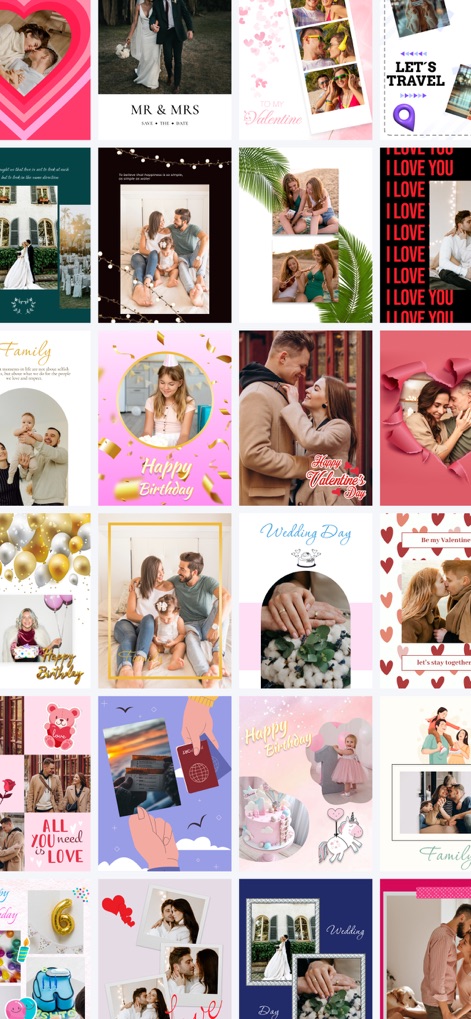
이 앱은 하트 모양 레이아웃과 생일 축하 테마 등 다양한 스타일의 콜라주 예시를 통해 사용자의 창의적인 표현을 돕습니다.
다양한 콜라주 스타일
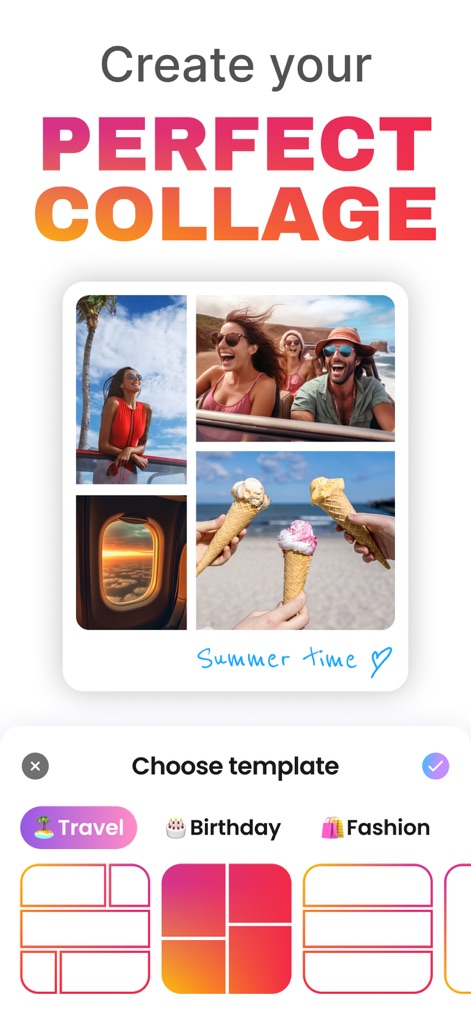
사용자는 '완벽한 콜라주 만들기'라는 목표 아래, 직관적인 템플릿 선택 화면에서 '여행' 카테고리 템플릿과 여러 그리드 레이아웃을 선택할 수 있습니다.
완벽한 콜라주 만들기
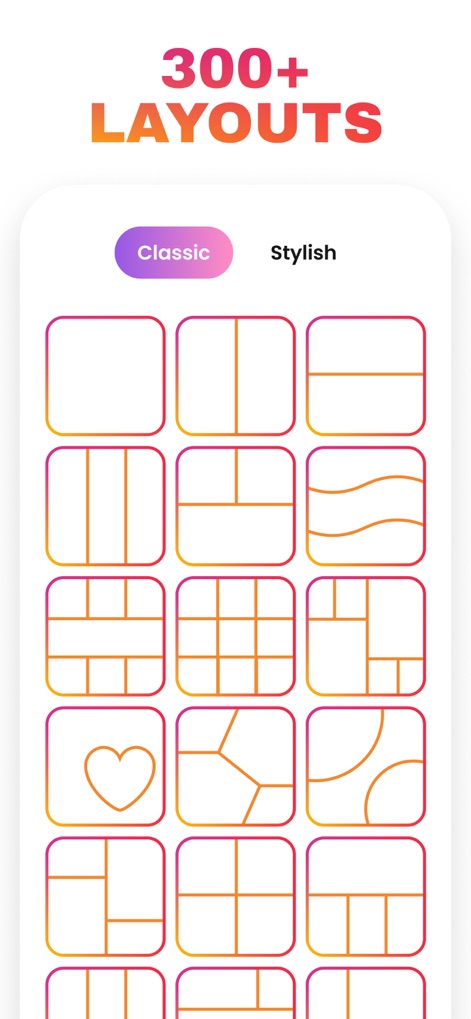
이 도구는 '클래식' 및 '스타일리시' 카테고리로 분류된 300개 이상의 다양한 레이아웃 옵션을 제공하여, 사용자가 하트 모양 레이아웃이나 복합 그리드 패턴을 손쉽게 적용할 수 있도록 합니다.
300개 이상 레이아웃
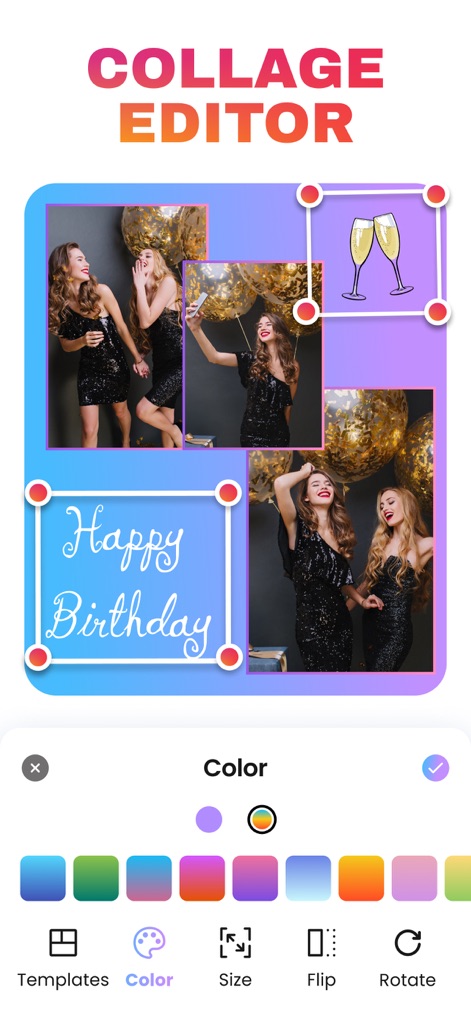
이 앱의 콜라주 편집기는 '색상' 팔레트를 포함한 다양한 디자인 도구를 통해 사용자가 사진을 회전시키고 텍스트를 추가하는 등 세부적인 조정을 할 수 있게 합니다.
콜라주 편집 도구
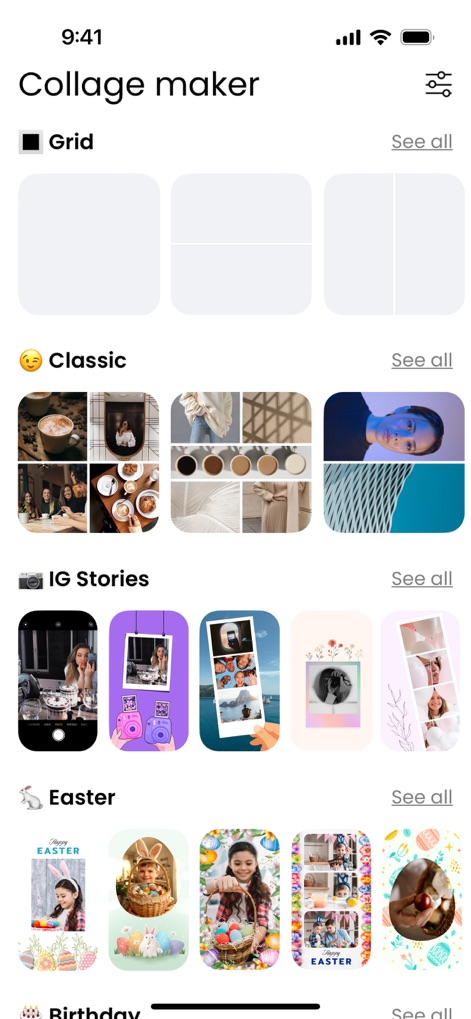
사용자는 '클래식' 콜라주 스타일과 'IG Stories'에 최적화된 레이아웃을 포함한 다양한 카테고리별 템플릿을 탐색하여 자신만의 이야기를 시작할 수 있습니다.
다양한 템플릿 탐색
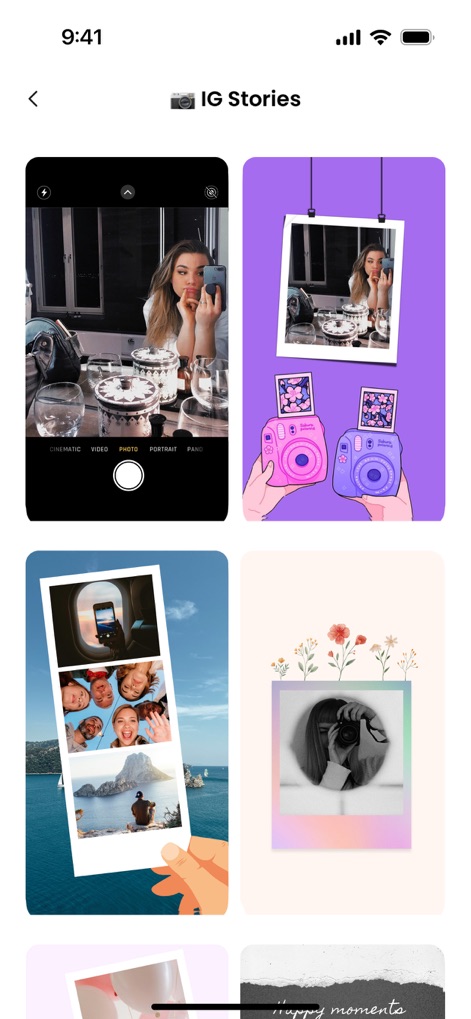
이 앱은 'IG Stories' 섹션에서 폴라로이드 스타일의 템플릿과 필름 스트립 레이아웃 등 소셜 미디어 공유에 최적화된 시각적 요소를 제공합니다.
인스타그램 스토리 템플릿
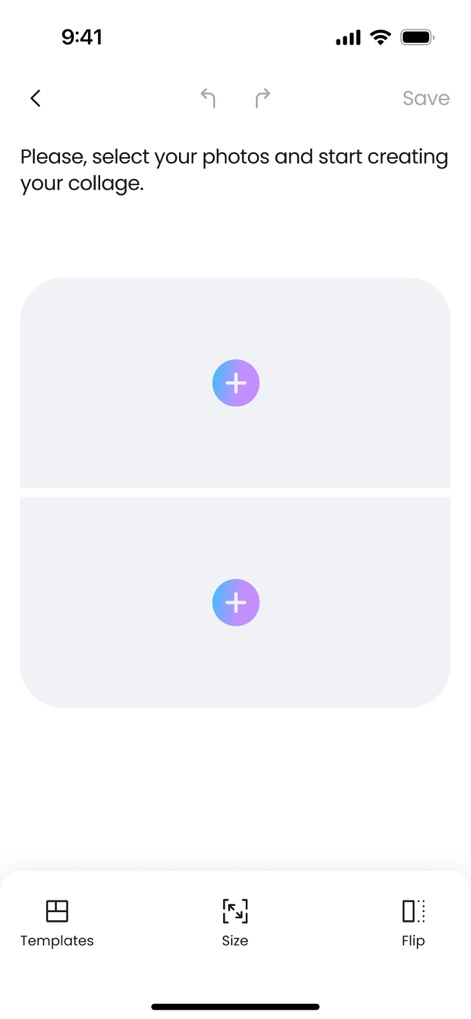
사용자는 '+' 아이콘을 탭하여 사진을 추가하고, '템플릿' 또는 '크기' 조절 기능을 사용하여 원하는 레이아웃으로 콜라주를 쉽게 시작할 수 있습니다.
간편한 콜라주 시작
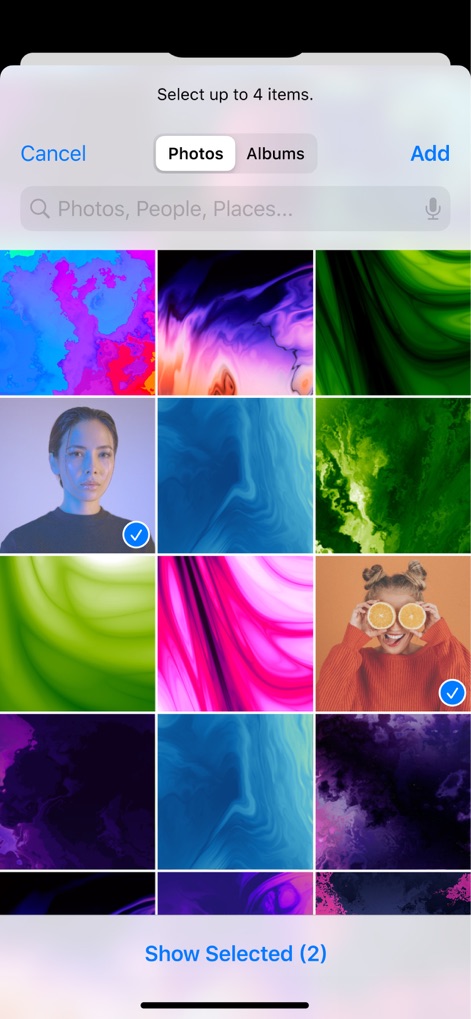
이 앱은 사용자 갤러리에서 여러 사진을 동시에 선택할 수 있는 기능을 제공하며, 선택된 이미지에는 확인 표시가 명확하게 표시되어 편집을 위한 준비를 간소화합니다.
사진 선택 및 추가
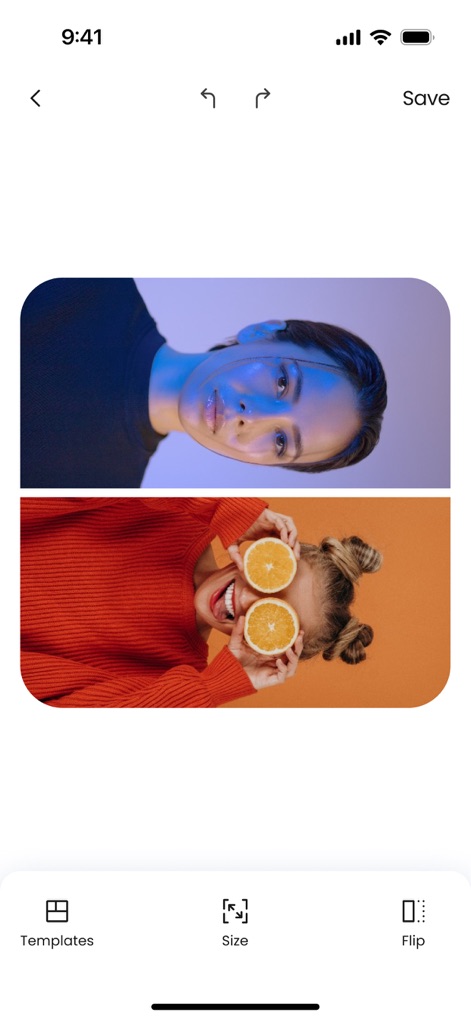
선택된 두 장의 사진은 즉시 템플릿에 배치되며, 사용자는 '뒤집기' 및 '크기' 조절과 같은 기본 편집 도구를 활용하여 이미지를 최적화할 수 있습니다.
사진 배치 및 조정
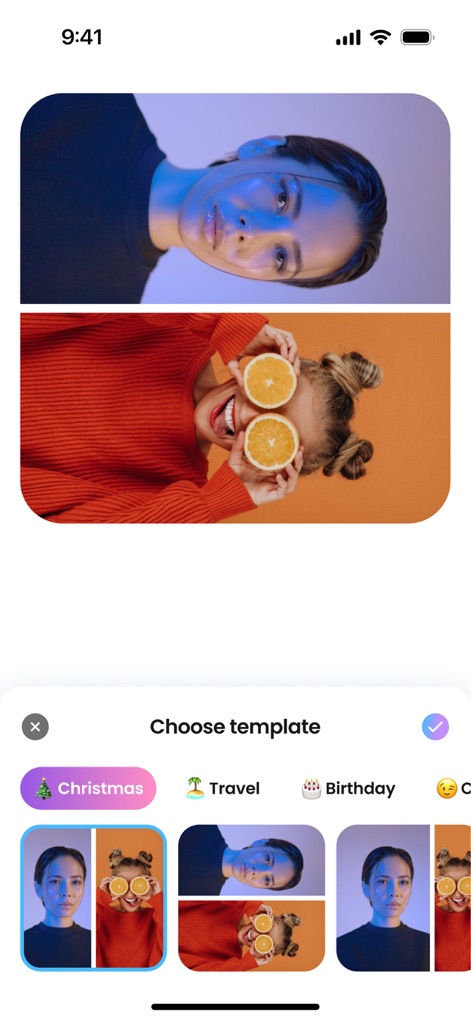
사용자가 선택한 사진은 '크리스마스' 및 '여행' 테마의 다양한 템플릿 미리보기에 실시간으로 적용되어, 가장 적합한 레이아웃을 시각적으로 쉽게 선택할 수 있습니다.
실시간 템플릿 미리보기
설명
Download
비슷한 앱
유사한 기능과 사용자 경험을 가진 앱

SCRL: Photo Collage Maker
Appostrophe AB

PhotoGrid: Video Collage Maker
JUPITER PALACE PTE. LTD.

Layout for Instagram: Collage
Shamble, Inc.

Photo Collage Maker: InCollage
SHANTANU PTE. LTD.

TicPic
Zhuhai Kuxiong Network Technology Co., Ltd.

Collage Maker: CollagePlus
Shamble, Inc.

Photo Collage Montage Maker
Honk Honk Punch Pty Ltd

Photo Collage Maker & Creator
Honk Honk Punch Pty Ltd

Photo Collage Montage & Layout
Honk Honk Punch Pty Ltd
이 페이지는 앱이나 개발자의 공식 페이지가 아니며, 정보 제공 및 논평을 목적으로 작성된 독립 편집 간행물입니다. 명시적으로 달리 언급되지 않는 한, 해당 앱이나 개발자는 MWM, Apple, Google Play, 앱 퍼블리셔 또는 앱 개발자와 제휴, 보증, 후원, 승인 또는 공식적으로 연결되어 있지 않으며, 이 페이지의 어떤 내용도 해당 앱이 MWM의 서비스를 사용하여 개발되었음을 의미하지 않습니다. 모든 상표, 로고, 스크린샷 및 기타 콘텐츠는 해당 소유자의 자산입니다.