
이 페이지는 앱이나 개발자의 공식 페이지가 아니며, 정보 제공 및 논평을 목적으로 작성된 독립 편집 간행물입니다. 명시적으로 달리 언급되지 않는 한, 해당 앱이나 개발자는 MWM, Apple, Google Play, 앱 퍼블리셔 또는 앱 개발자와 제휴, 보증, 후원, 승인 또는 공식적으로 연결되어 있지 않으며, 이 페이지의 어떤 내용도 해당 앱이 MWM의 서비스를 사용하여 개발되었음을 의미하지 않습니다. 모든 상표, 로고, 스크린샷 및 기타 콘텐츠는 해당 소유자의 자산입니다.


Photo Retouch - Remove object
당신은 더 이상 완벽한 한 장을 망치는 걸림돌에 묶여 있지 않습니다. 이 앱은 시각적 방해물을 제거하고 개인적인 터치를 더할 수 있는 거친 힘을 제공합니다.
다운로드
2.5M+사용자 평점
총 평가 수
29.6K개발사
카테고리
Photo & Video지원 언어
33최신 버전
2.6크기
71.6 MB출시일
2018년 7월 29일테크 분석가가 제시하는 핵심 기능 및 사용자 영향도 평가
앱 'Photo Retouch - Remove object' 기능 분석 보고서
고급 객체 제거
이 앱은 사용자가 사진 및 비디오에서 원치 않는 인물, 사물 또는 결함을 정밀하게 제거하여 완벽한 시각적 콘텐츠를 만들 수 있도록 지원합니다. 복잡하거나 단순한 배경 등 다양한 환경에 최적화된 여러 제거 알고리즘을 제공합니다.
워터마크 및 스티커/텍스트 추가
이 도구는 사용자가 이모티콘, 스티커 또는 텍스트를 추가하여 사진 및 비디오를 개인화하고, 소셜 미디어 공유를 위한 독특한 콘텐츠를 만들 수 있게 해줍니다.
비디오 자르기 및 길이 조절
이 앱은 사용자가 비디오의 특정 부분을 잘라내거나 길이를 조절하여 불필요한 장면을 제거하고 영상의 핵심 메시지를 효과적으로 전달할 수 있도록 돕습니다.
비디오 속도 변경
이 앱은 사용자가 비디오의 재생 속도를 빠르게 또는 느리게 조절하여 드라마틱하거나 코믹한 효과를 연출하고, 콘텐츠의 분위기를 다양하게 변화시킬 수 있도록 지원합니다.
비디오 커버 이미지 설정
이 도구는 사용자가 비디오를 대표하는 커버 이미지를 사용자 정의하여, 소셜 미디어 피드나 개인 아카이브에서 비디오의 시각적 매력을 높이고 주목도를 향상시킬 수 있게 해줍니다.
비디오 회전
이 앱은 사용자가 잘못된 방향으로 촬영된 비디오를 정확한 방향으로 회전시켜 시청 경험을 개선하고, 콘텐츠를 올바르게 감상할 수 있도록 합니다.
자주 묻는 질문
에 대해 알아야 할 모든 것 Photo Retouch - Remove object
What is Photo Retouch - Remove object app used for?
Photo Retouch - Remove object edits photos and videos. It removes unwanted items, adds watermarks, and includes video tools like trimming, cropping, rotating, reversing, and changing playback rate and covers.
How does Photo Retouch - Remove object remove unwanted items from photos?
Photo Retouch - Remove object uses three algorithms: Complex, Simple, or Single color background. Users select the appropriate mode and smear the item. This removes objects like unwanted people or unsightly pimples.
Can Photo Retouch - Remove object edit videos?
Yes, Photo Retouch - Remove object provides extensive video editing. Users can crop, trim, rotate, reverse, and change a video's cover and playback rate. It enhances video content.
Does Photo Retouch - Remove object allow adding watermarks?
Yes, Photo Retouch - Remove object enables users to add watermarks. This feature supports adding Emojis, Stickers, or Text to both photos and videos for personalization or branding purposes.
How can I get the professional version of Photo Retouch - Remove object?
Users can purchase the professional version of Photo Retouch - Remove object through a one-time payment. This provides permanent access to all professional features, valid forever.
Is there an annual subscription for Photo Retouch - Remove object?
Yes, Photo Retouch - Remove object offers an Annual professional version. This is an auto-renewable subscription that automatically renews upon expiration unless manually turned off.
How do I manage or cancel the auto-renewal for Photo Retouch - Remove object's subscription?
Users manage subscriptions and turn off auto-renewal in their iTunes Account Settings. This must occur at least 24 hours before the current period ends to avoid being charged for the next renewal.
Where is the Privacy Policy for Photo Retouch - Remove object located?
The Privacy Policy for Photo Retouch - Remove object is available on the official website. The direct link is: https://huameivideoretouch.web.app/privacypolicy.html.
다음 스크린샷과 설명은 앱의 공식 스토어 목록에서 직접 가져온 것이며 앱 개발자의 자산입니다.
앱 스토어
스크린샷

이 도구는 사진 속 방해 요소를 제거하여 완벽한 구도를 만들 수 있게 돕습니다. 사용자는 다양한 배경 유형에 맞춰 복잡한 배경 제거 알고리즘과 단색 배경 제거 알고리즘 중 선택하여 깔끔한 결과물을 얻을 수 있습니다.
원치 않는 개체 제거
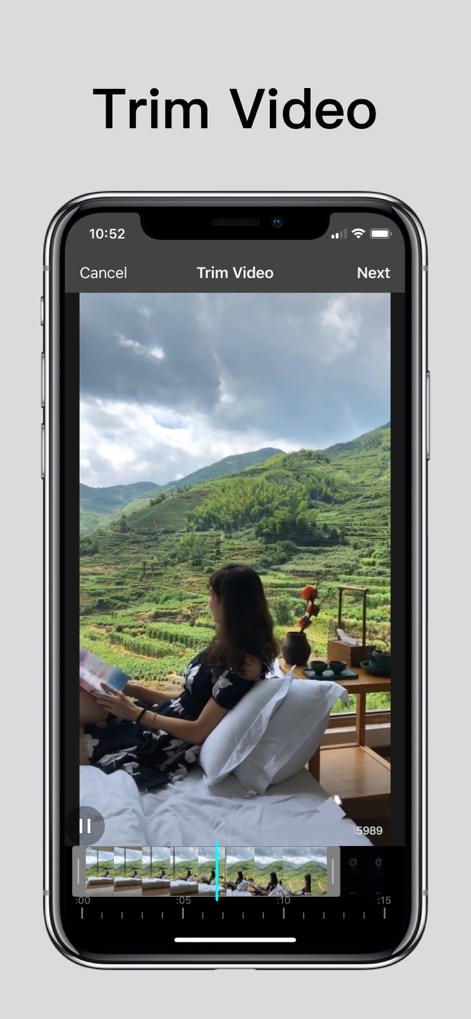
사용자는 직관적인 타임라인 인터페이스를 통해 비디오의 시작점과 끝점을 쉽게 조정하여 불필요한 장면을 잘라내고 원하는 길이로 비디오를 다듬을 수 있습니다.
비디오 길이 조절
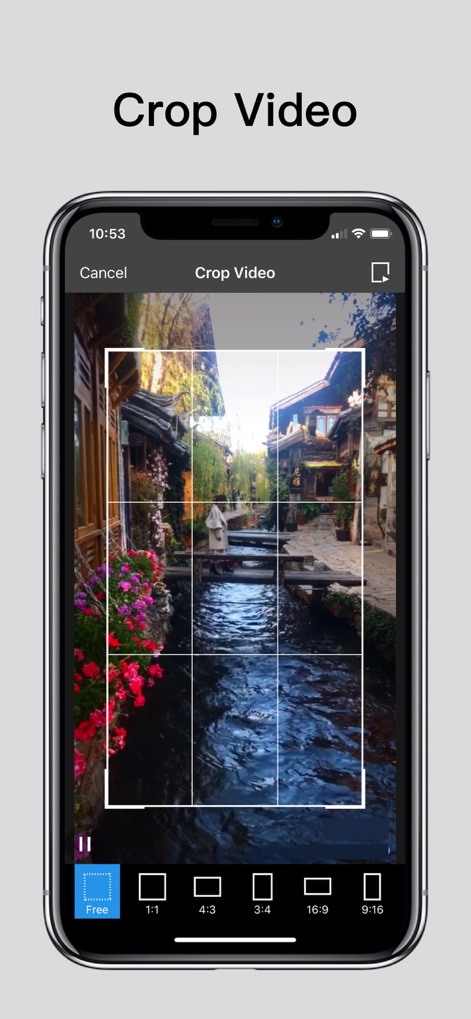
이 앱은 사용자가 비디오의 화면 영역을 자유롭게 선택하여 자를 수 있게 하며, '1:1' 또는 '16:9'와 같은 다양한 종횡비 옵션을 제공하여 콘텐츠에 최적화된 화면을 만들 수 있습니다.
비디오 화면 자르기
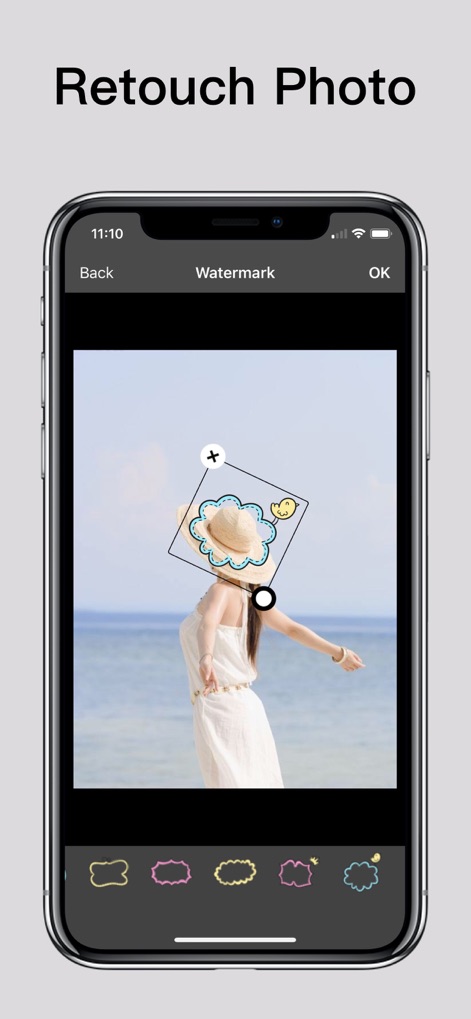
사용자는 이 기능을 활용하여 사진에 텍스트 또는 이모티콘 워터마크를 쉽게 추가할 수 있으며, 개성 있는 스티커 옵션으로 이미지를 더욱 풍성하게 꾸밀 수 있습니다.
사진 워터마크 추가
설명
Download
비슷한 앱
유사한 기능과 사용자 경험을 가진 앱

CocoAI - BG Remover
Beijing Jianchang Technology Co., Ltd.

水印宝-视频水印助手软件
Beijing Pengtuzhumeng Technology Co., Ltd.

PhotoBy-Batch adding borders
岳森 刘

Watermarkly ― Watermark Maker
Julia Nikitina

去水印大师-短视频编辑助手
志阳 郭

大神水印-照片图像制作修图神器
伟 黄

Add Watermark -Batch Process
Saraswati Javalkar

Background Eraser: AI Remove
SUNWOONG JANG

AnyEraser: Remove Objects AI
Zankhana Pte Ltd
이 페이지는 앱이나 개발자의 공식 페이지가 아니며, 정보 제공 및 논평을 목적으로 작성된 독립 편집 간행물입니다. 명시적으로 달리 언급되지 않는 한, 해당 앱이나 개발자는 MWM, Apple, Google Play, 앱 퍼블리셔 또는 앱 개발자와 제휴, 보증, 후원, 승인 또는 공식적으로 연결되어 있지 않으며, 이 페이지의 어떤 내용도 해당 앱이 MWM의 서비스를 사용하여 개발되었음을 의미하지 않습니다. 모든 상표, 로고, 스크린샷 및 기타 콘텐츠는 해당 소유자의 자산입니다.