
이 페이지는 앱이나 개발자의 공식 페이지가 아니며, 정보 제공 및 논평을 목적으로 작성된 독립 편집 간행물입니다. 명시적으로 달리 언급되지 않는 한, 해당 앱이나 개발자는 MWM, Apple, Google Play, 앱 퍼블리셔 또는 앱 개발자와 제휴, 보증, 후원, 승인 또는 공식적으로 연결되어 있지 않으며, 이 페이지의 어떤 내용도 해당 앱이 MWM의 서비스를 사용하여 개발되었음을 의미하지 않습니다. 모든 상표, 로고, 스크린샷 및 기타 콘텐츠는 해당 소유자의 자산입니다.


Pic Stitch - Collage Editor
당신은 평범한 사진을 꿰뚫는 시선을 얻게 됩니다. 여러 순간을 하나의 이야기로 엮어내는 힘을 휘두르세요.
다운로드
7.5M+사용자 평점
총 평가 수
111.3K개발사
카테고리
Photo & Video지원 언어
18최신 버전
8.3.25크기
417.5 MB출시일
2011년 8월 15일소셜 미디어 콘텐츠 제작자를 위한 주요 기능 평가
Pic Stitch - Collage Editor 앱 기술 분석
사용자 지정 워터마크 추가
이 앱은 사용자가 자신의 브랜드 로고나 맞춤형 워터마크를 추가하여 콘텐츠를 보호하고 개인 브랜딩을 강화할 수 있도록 합니다.
사진 및 비디오 혼합 콜라주
이 도구는 사진과 비디오를 모두 활용하여 역동적이고 시각적으로 매력적인 콜라주를 하나로 결합하는 기능을 갖추고 있습니다.
다양한 콜라주 레이아웃
사용자가 400개 이상의 방대한 레이아웃 컬렉션 중에서 선택하여 독창적이고 시각적으로 풍부한 콜라주를 만들 수 있게 해줍니다.
소셜 미디어 최적화된 종횡비
이 앱은 9x16과 같은 15가지 다양한 소셜 미디어 최적화 종횡비를 제공하여 여러 플랫폼에 콜라주를 원활하게 공유할 수 있도록 합니다.
강력한 사진 및 비디오 편집 도구
이 도구는 노출, 대비, 채도 등 고급 사진 및 비디오 편집 기능을 포함하여 사용자가 콘텐츠를 세밀하게 조정하고 개선할 수 있게 합니다.
고급 텍스트 및 밈 편집기
이 앱은 콜라주에 텍스트 오버레이를 추가하고, 다양한 폰트 스타일을 선택하며, 유행하는 밈을 손쉽게 만들 수 있는 기능을 제공합니다.
전문 필터 및 테두리 팩
이 앱은 25개 이상의 필터 팩과 30개 이상의 테두리 팩을 제공하여 사진의 분위기를 바꾸고 개성을 더할 수 있도록 돕습니다.
고해상도 내보내기
이 앱은 제작된 콜라주를 고해상도로 내보내어 인쇄 및 전문적인 사용에도 적합한 최상의 이미지 품질을 보장합니다.
자주 묻는 질문
에 대해 알아야 할 모든 것 Pic Stitch - Collage Editor
What is Pic Stitch?
Pic Stitch is a collage maker app for iPhone and iPad. It transforms your camera roll into stunning photo and video collages using robust editing tools and various layouts.
How many collage layouts does Pic Stitch offer?
Pic Stitch offers over 400 different collage layouts. Users can explore trending layouts and also create custom layouts for their photos and videos to fit any creative need.
Can Pic Stitch edit both photos and videos?
Yes, Pic Stitch works with both photos and videos. It provides robust editing tools for trimming videos and enhancing photos with various filters, effects, and adjustments.
What social media platforms does Pic Stitch support for sharing?
Pic Stitch supports sharing masterpieces directly to popular social media networks including Facebook, Twitter, and Instagram. Users can also save their creations to their device's photo album.
Does Pic Stitch include filters and borders for collages?
Yes, Pic Stitch includes 25 filter packs to enhance photos and over 30 border packs to customize layouts. These options help users make their collages visually appealing.
Has Pic Stitch received notable recognition for its performance?
Yes, Mashable recognized Pic Stitch as one of the Top 7 photo apps and among the Top 100 apps of all time. This highlights its significant standing in the app market.
Does Pic Stitch offer iOS Home Screen Widgets?
Yes, Pic Stitch features iOS Home Screen Widget Wallpapers. Users can explore these widgets to display their most recent collages directly on their device's home screen for quick access.
What photo aspect ratios are available in Pic Stitch?
Pic Stitch provides 15 different photo aspect ratios, optimized for sharing on various platforms. Examples include 9x16 for social stories and common ratios like 4x3, 5x7, and 8x10.
Can users add text and stickers to their collages in Pic Stitch?
Yes, Pic Stitch allows users to add text overlays with various font styles, colors, and backgrounds. Users can also decorate their photo collages with favorite stickers powered by Giphy.
Where can I find the Privacy Policy for Pic Stitch?
The Privacy Policy for Pic Stitch is available at the provided URL: https://maplemedia.io/privacy/. This document outlines how the app handles user data and ensures transparency.
다음 스크린샷과 설명은 앱의 공식 스토어 목록에서 직접 가져온 것이며 앱 개발자의 자산입니다.
앱 스토어
스크린샷

이 앱은 사용자가 직관적인 UI를 통해 여러 장의 사진을 결합하고, 다양한 레이아웃과 그림자 효과로 완벽한 콜라주를 만들 수 있도록 돕습니다.
콜라주 편집 마스터
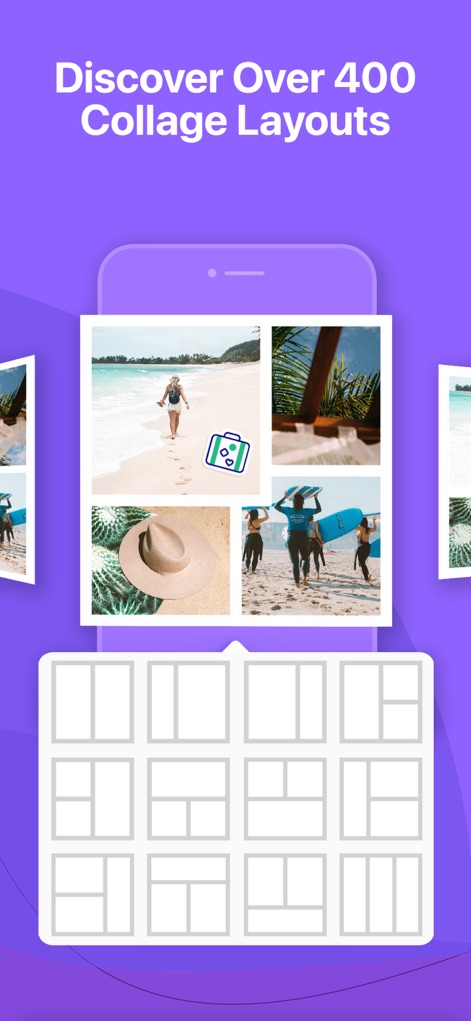
사용자는 400개 이상의 다양한 콜라주 레이아웃 중에서 선택하여 사진과 비디오를 독창적으로 배치하고, 시각적으로 매력적인 구도를 손쉽게 구성할 수 있습니다.
400개 이상 레이아웃

이 앱은 사용자가 영상 트리밍을 통해 정확한 순간을 포착하고, 다양한 필터 팩과 노출 조정 기능으로 사진과 비디오를 전문적으로 보정할 수 있게 합니다.
강력한 편집 도구

사용자는 30개 이상의 독특한 테두리 팩을 활용하여 콜라주에 개성을 더하고, 기하학적 패턴이나 꽃무늬 같은 다양한 스타일의 테두리로 이미지를 꾸밀 수 있습니다.
맞춤형 테두리 설정
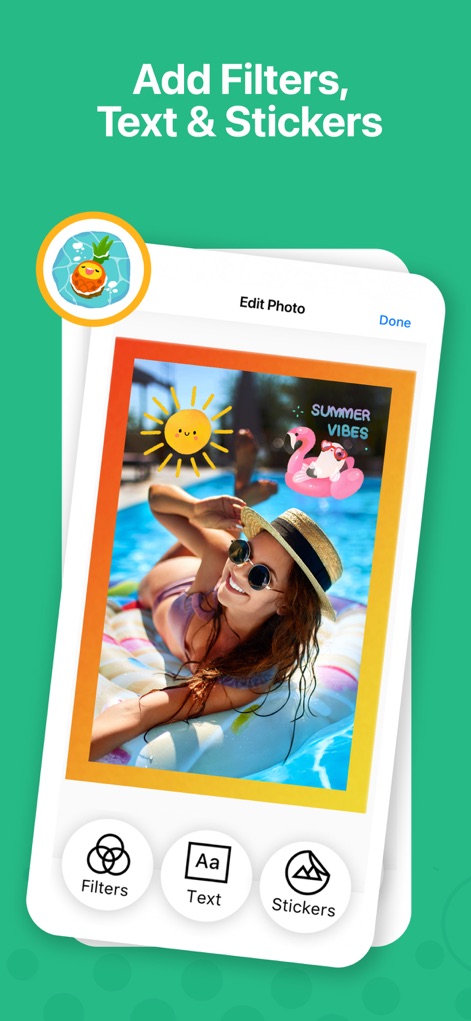
이 도구는 사용자가 Giphy 스티커를 통해 사진에 재미를 더하고, 텍스트 오버레이 기능으로 개성 있는 메시지를 추가하여 콘텐츠를 더욱 풍성하게 만들 수 있습니다.
필터, 텍스트, 스티커 추가

사용자는 하트 패턴 테두리나 크리스마스 테마 프레임과 같은 다양한 시즈널 및 테마별 콜라주 템플릿을 탐색하여 특별한 순간을 더욱 기억에 남게 기록할 수 있습니다.
테마별 콜라주 탐색

이 앱은 사용자가 여러 사진을 자유롭게 배치하고, 다양한 셀 분할 옵션을 활용하여 완전히 새로운 맞춤형 콜라주 레이아웃을 직접 만들 수 있도록 지원합니다.
나만의 레이아웃 제작
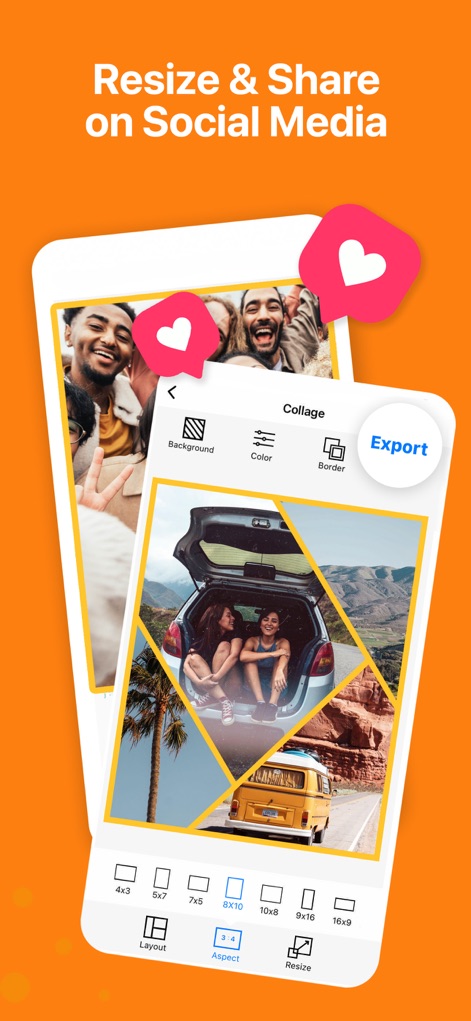
사용자는 8x10 비율과 같은 다양한 사진 비율을 선택하여 콜라주 크기를 최적화하고, 완성된 작품을 여러 소셜 미디어 플랫폼에 즉시 공유할 수 있습니다.
크기 조절 및 공유

이 앱은 사용자가 제작한 최신 콜라주를 홈 화면 위젯으로 설정하여 즉시 감상하고, 다양한 크기의 위젯 옵션을 통해 개인화된 화면을 구성할 수 있도록 제공합니다.
홈 화면 위젯 활용
설명
Download
비슷한 앱
유사한 기능과 사용자 경험을 가진 앱

SCRL: Photo Collage Maker
Appostrophe AB

PhotoGrid: Video Collage Maker
JUPITER PALACE PTE. LTD.

Layout for Instagram: Collage
Shamble, Inc.

Photo Collage Maker: InCollage
SHANTANU PTE. LTD.

TicPic
Zhuhai Kuxiong Network Technology Co., Ltd.

Collage Maker: CollagePlus
Shamble, Inc.

Photo Collage Montage Maker
Honk Honk Punch Pty Ltd

Photo Collage Maker & Creator
Honk Honk Punch Pty Ltd

Photo Collage Montage & Layout
Honk Honk Punch Pty Ltd
이 페이지는 앱이나 개발자의 공식 페이지가 아니며, 정보 제공 및 논평을 목적으로 작성된 독립 편집 간행물입니다. 명시적으로 달리 언급되지 않는 한, 해당 앱이나 개발자는 MWM, Apple, Google Play, 앱 퍼블리셔 또는 앱 개발자와 제휴, 보증, 후원, 승인 또는 공식적으로 연결되어 있지 않으며, 이 페이지의 어떤 내용도 해당 앱이 MWM의 서비스를 사용하여 개발되었음을 의미하지 않습니다. 모든 상표, 로고, 스크린샷 및 기타 콘텐츠는 해당 소유자의 자산입니다.