Picai - Photo
Picai - Photo
다운로드: App Store

이 페이지는 앱이나 개발자의 공식 페이지가 아니며, 정보 제공 및 논평을 목적으로 작성된 독립 편집 간행물입니다. 명시적으로 달리 언급되지 않는 한, 해당 앱이나 개발자는 MWM, Apple, Google Play, 앱 퍼블리셔 또는 앱 개발자와 제휴, 보증, 후원, 승인 또는 공식적으로 연결되어 있지 않으며, 이 페이지의 어떤 내용도 해당 앱이 MWM의 서비스를 사용하여 개발되었음을 의미하지 않습니다. 모든 상표, 로고, 스크린샷 및 기타 콘텐츠는 해당 소유자의 자산입니다.


로고: Picai - Photo
다운로드: App Store

Picai - Photo

AI 기반 배경 교체 기능으로 어떤 사진이든 스튜디오 품질의 인물 사진으로 바꿔보세요. 완벽한 개인 정보 보호를 통해 LinkedIn 프로필, 여권 사진 및 비즈니스 프로필 사진을 가장 빠르게 제작하는 방법입니다.

주요 수치

다운로드

7K+

사용자 평점

4.6/5

총 평가 수

1K+

개발사

Kunming Dianhao Technology Co., Ltd.

카테고리

Developer Tools

지원 언어

1

최신 버전

1.1.0

크기

30.1 MB

출시일

2025년 11월 26일
기능

몇 초 만에 완성하는 전문 인물 사진

고급 AI를 활용하여 집을 떠나지 않고도 어떤 사진이든 스튜디오 품질의 프로필 사진이나 정부 규격 ID 사진으로 바꿔보세요.

정밀 AI 배경 제거

고급 알고리즘이 픽셀 단위의 정확도로 피사체를 지능적으로 분리하여 모든 디테일을 보존하여 자연스럽고 전문적인 외관을 선사합니다.

개인 정보 보호 중심 처리

보안에 민감한 전문가를 위해 설계되었습니다. 당사는 얼굴 데이터나 개인 이미지를 서버에 저장하지 않습니다. 귀하의 개인 정보는 보장됩니다.

다음 스크린샷과 설명은 앱의 공식 스토어 목록에서 직접 가져온 것이며 앱 개발자의 자산입니다.

앱 스토어

스크린샷

Picai - Photo - Picai 앱의 스크린샷으로, 원탭 AI 의상 변경 기능이 흰색 셔츠를 다채로운 비키니로 변환하는 모습을 보여줍니다.
Picai 앱의 스크린샷으로, 원탭 AI 의상 변경 기능이 흰색 셔츠를 다채로운 비키니로 변환하는 모습을 보여줍니다.

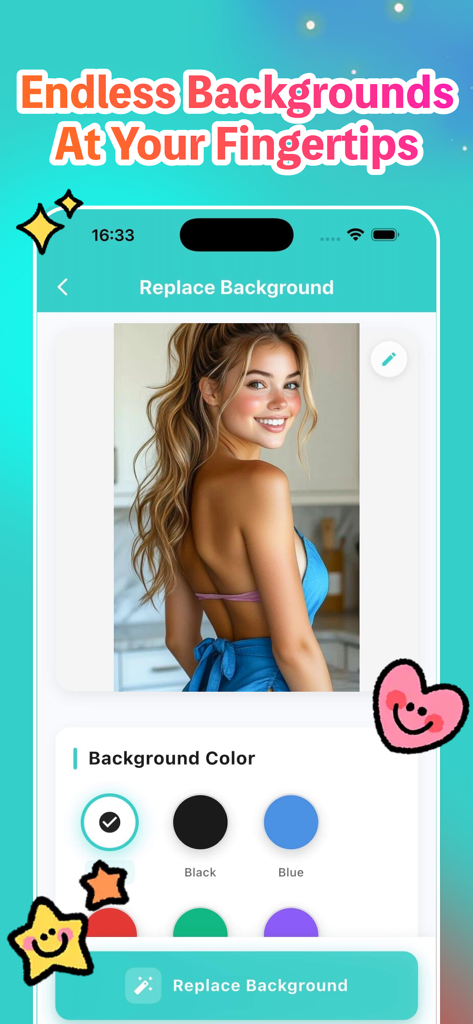
Picai - Photo - Picai 앱 인터페이스로, 사용자가 인물 사진에 단색 배경을 선택하는 모습을 보여줍니다.
Picai 앱 인터페이스로, 사용자가 인물 사진에 단색 배경을 선택하는 모습을 보여줍니다.

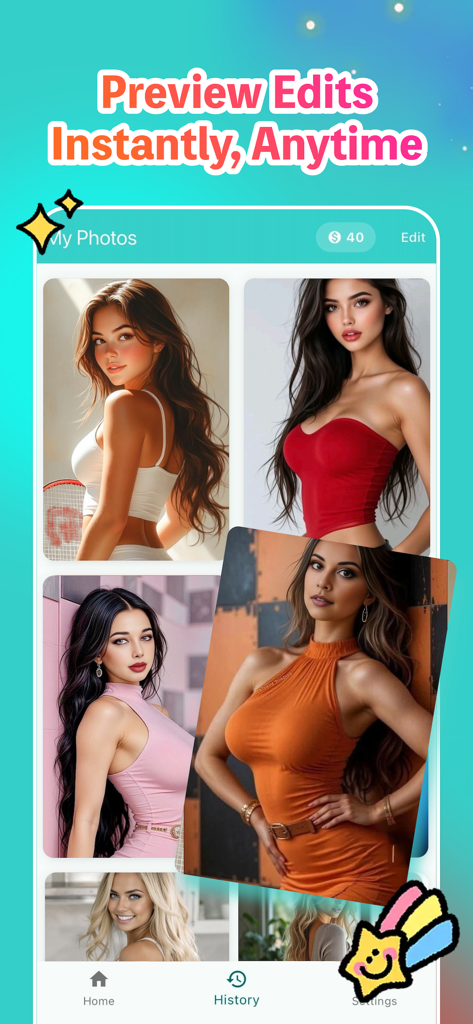
Picai - Photo - Picai Photo 앱의 기록 화면으로, AI 편집 배경이 있는 인물 사진 모음을 보여줍니다.
Picai Photo 앱의 기록 화면으로, AI 편집 배경이 있는 인물 사진 모음을 보여줍니다.

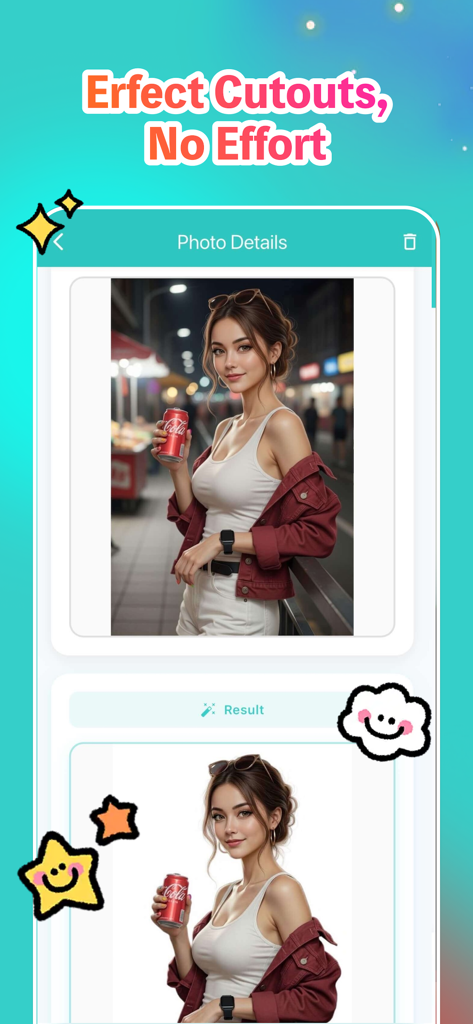
Picai - Photo - Picai AI를 사용하여 거리 배경 사진이 깔끔한 흰색 배경으로 교체되는 사진의 전후 비교.

Picai AI를 사용하여 거리 배경 사진이 깔끔한 흰색 배경으로 교체되는 사진의 전후 비교.

설명

Picai is a powerful yet simple iOS app that helps you replace photo backgrounds with solid colors using advanced AI technology. Perfect for creating professional ID photos, social media content, or business headshots - all with just a few taps. Key Features: AI-Powered Background Replacement Transform your photos instantly with intelligent AI that automatically detects and preserves your subject while replacing the background with a clean, solid color. Our advanced AI technology ensures natural-looking results while maintaining the original quality of your photos. Multiple Background Colors Choose from 9 carefully selected background colors: White, Black, Blue, Red, Green, Purple, Pink, Orange, and Gray. Each color is optimized for different use cases, from professional ID photos to creative social media posts. Easy Photo Upload Upload photos directly from your photo library or take a new photo using your device's camera. The app supports various image formats and maintains the original aspect ratio of your photos. High-Quality Results Generate high-resolution images that preserve all the details of your original photo. All processing is done using advanced AI algorithms to ensure professional-quality results. Save & Share Save your edited photos directly to your device's photo library in high quality. Share your creations with friends, family, or colleagues through any app that supports image sharing. History Management Keep track of all your edited photos in one convenient place. View your creation history, compare original and edited versions, and easily access previous work for saving or sharing again. Flexible Pricing Options Choose the plan that works best for you: - Pay-per-use with coins: Purchase coins to use the app as needed - Subscription plans: Monthly, 6-month, or annual subscriptions for unlimited use Privacy & Security Your privacy is our top priority. Picai does not collect, store, or transmit any personal information, facial data, or biometric information. All photo processing happens locally on your device or through secure, privacy-focused AI services that do not retain your images. We do not track your usage, collect analytics, or share your data with third parties. Your photos remain yours - we simply provide the tools to enhance them. Perfect For: - Creating professional ID photos and passport photos - Social media profile pictures and posts - Business headshots and professional portraits - Creative projects requiring clean backgrounds - Any scenario where you need a solid color background How It Works: 1. Upload a photo from your library or take a new one 2. Select your preferred background color 3. Let our AI process your image (usually takes just a few seconds) 4. Review the result with side-by-side comparison 5. Save to your photo library or share with others Subscription Information: Subscriptions automatically renew unless cancelled at least 24 hours before the end of the current period. Manage your subscription and turn off auto-renewal in your Apple ID Account Settings after purchase. Privacy Commitment: Picai is designed with privacy in mind. We do not collect facial recognition data, biometric information, or any personal identifiers from your photos. All images are processed securely, and we never store your photos on our servers. Your data stays on your device, giving you complete control over your privacy. The subscription service provided: Monthly Subscription, Price: $24 / month, Half Year Subscription, Price: $96 / 6 months, Yearly Subscription, Price: $160 / year User Agreement: https://docs.google.com/document/d/1iecMEMty61RZpLgY8w5vXdPqrauaauvAVbhM46cuxzg/edit?usp=sharing Privacy Policy: https://docs.google.com/document/d/1xVb445dXsdmzuZeZ_kbBu7gKFRxBBd2cPseTWfTT7Gk/edit?usp=sharing Subscription Agreement: https://docs.google.com/document/d/1n90wD9U--2Hx_0Td5ATYOpmJQR-h3oUDS7wJ5O2Z_sg/edit?usp=sharing

Download

다운로드: App Store

이 페이지는 앱이나 개발자의 공식 페이지가 아니며, 정보 제공 및 논평을 목적으로 작성된 독립 편집 간행물입니다. 명시적으로 달리 언급되지 않는 한, 해당 앱이나 개발자는 MWM, Apple, Google Play, 앱 퍼블리셔 또는 앱 개발자와 제휴, 보증, 후원, 승인 또는 공식적으로 연결되어 있지 않으며, 이 페이지의 어떤 내용도 해당 앱이 MWM의 서비스를 사용하여 개발되었음을 의미하지 않습니다. 모든 상표, 로고, 스크린샷 및 기타 콘텐츠는 해당 소유자의 자산입니다.








