
이 페이지는 앱이나 개발자의 공식 페이지가 아니며, 정보 제공 및 논평을 목적으로 작성된 독립 편집 간행물입니다. 명시적으로 달리 언급되지 않는 한, 해당 앱이나 개발자는 MWM, Apple, Google Play, 앱 퍼블리셔 또는 앱 개발자와 제휴, 보증, 후원, 승인 또는 공식적으로 연결되어 있지 않으며, 이 페이지의 어떤 내용도 해당 앱이 MWM의 서비스를 사용하여 개발되었음을 의미하지 않습니다. 모든 상표, 로고, 스크린샷 및 기타 콘텐츠는 해당 소유자의 자산입니다.


Picsew - Screenshot Stitching
이 앱은 스크린샷을 찍는 당신을 디지털 환경의 지배자로 만듭니다. 이제 더 이상 수많은 작은 조각들 속에 헤매지 마십시오.
다운로드
5M+사용자 평점
총 평가 수
57.3K개발사
카테고리
Photo & Video지원 언어
4최신 버전
3.16.1크기
55.9 MB출시일
2017년 2월 28일주요 기능 및 사용자 영향 분석
Picsew - 스크린샷 스티칭 앱 분석
스마트 스티칭
이 앱은 고급 자동 스티칭 알고리즘을 통해 깔끔하고 완벽한 스크린샷을 생성합니다.
스크롤샷 녹화
이 도구는 화면 녹화를 통해 긴 스크린샷을 자동으로 생성하여 사용자가 일일이 스크린샷을 찍을 필요가 없도록 합니다.
전체 웹 페이지 캡처
이 기능은 단 한 번의 탭으로 전체 웹 페이지를 캡처할 수 있게 하여 정보 수집에 매우 유용합니다.
주석 및 편집
사용자는 워터마크 추가, 민감한 정보 흐림 처리, 주석 달기, 프레임 추가 등 전문가 수준의 편집을 할 수 있습니다.
일괄 처리
이 앱은 최대 300개의 이미지를 한 번에 스티칭하여 사용자의 시간과 노력을 크게 절약합니다.
다양한 내보내기 옵션
이 도구는 PDF 또는 슬라이스 형태로 내보낼 수 있는 기능을 제공하여 공유 및 편집 편의성을 높입니다.
수동 스티칭
사용자는 수직 및 수평 스티칭을 지원하여 복잡한 시나리오에서도 유연하게 이미지를 처리할 수 있습니다.
스마트 최적화
이 앱은 상태 표시줄을 자동으로 제거하여 스크린샷을 더욱 깔끔하고 전문적으로 만듭니다.
자주 묻는 질문
에 대해 알아야 할 모든 것 Picsew - Screenshot Stitching
What is Picsew?
Picsew is an award-winning screenshot stitching tool that seamlessly stitches various scrollable content, including chat logs, articles, and web pages. It simplifies the process of combining multiple screenshots.
How does Picsew stitch screenshots automatically?
Yes, Picsew utilizes an advanced auto-stitching algorithm for smart stitching, producing smooth and seamless results. It also offers Scrollshot Recording to automatically generate scrollshots by recording the screen.
Does Picsew allow both vertical and horizontal stitching?
Yes, Picsew supports both vertical and horizontal stitching. This feature provides the flexibility to handle complex scenarios and diverse content layouts effectively.
Can Picsew combine photos other than screenshots?
Yes, Picsew offers Photo Stitching to seamlessly stitch regular photos into a large image. This extends its functionality beyond just combining screenshots.
How many images can Picsew process at once?
Picsew supports batch processing, allowing users to stitch up to 300 images at once. This ensures fast and efficient handling of large sets of screenshots.
Does Picsew allow editing and annotations on stitched images?
Yes, Picsew includes annotations and editing features. Users can add watermarks, blur sensitive information, annotate, and frame their screenshots with ease.
Can Picsew capture entire web pages?
Yes, Picsew provides a Web Snapshot Extension that captures full-length web pages with a single tap. This feature simplifies saving complete web content.
Does Picsew support accessibility features like VoiceOver?
Yes, Picsew fully supports VoiceOver, providing an accessible experience for more users. This demonstrates its commitment to inclusive design.
Does the Picsew app display advertisements?
No, Picsew features a minimalist design with no ads. It offers smooth operation and a clean, simple interface for an uninterrupted user experience.
Can Picsew automatically remove status bars from screenshots?
Yes, Picsew includes Smart Optimization to automatically remove status bars from screenshots. This creates cleaner and more professional images without manual editing.
다음 스크린샷과 설명은 앱의 공식 스토어 목록에서 직접 가져온 것이며 앱 개발자의 자산입니다.
앱 스토어
스크린샷

이 앱은 채팅 스레드를 스크롤샷 녹화 기능으로 손쉽게 길게 연결하여, 복잡한 대화 내용을 한눈에 볼 수 있도록 합니다.
긴 스크린샷

이 앱은 이미지들을 수직 및 수평 스티칭 방식으로 결합하여, 다양한 레이아웃의 콘텐츠를 유연하게 정리할 수 있습니다.
수직 수평 연결
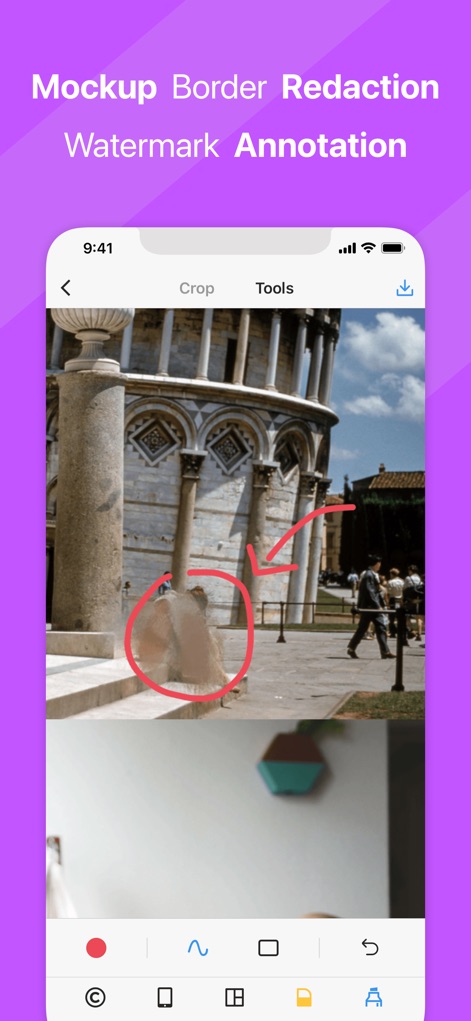
이 앱은 스크린샷 내 민감한 정보를 흐림 처리할 수 있으며, 주석 도구를 활용하여 특정 영역을 강조하거나 가릴 수 있습니다.
개인 정보 편집
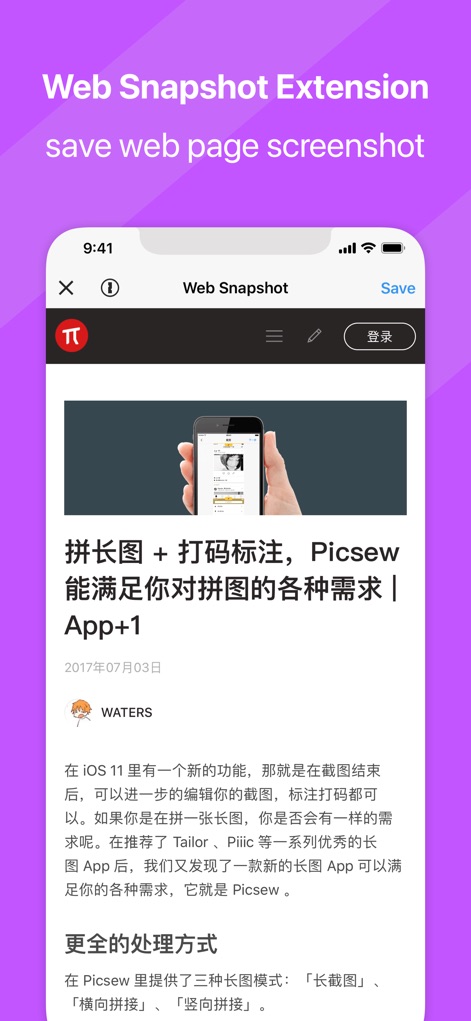
전체 웹 페이지를 캡처하는 확장 기능으로, 기사와 같은 온라인 콘텐츠를 한 번의 탭으로 스크린샷으로 저장할 수 있습니다.
웹 페이지 캡처

이 위젯은 최근 캡처한 스크린샷을 앱을 열지 않고도 즉시 감지하여 병합하고, 사용자에게 편리한 워크플로우를 제공합니다.
위젯 빠른 병합
설명
Download
비슷한 앱
유사한 기능과 사용자 경험을 가진 앱

Photo Stitch!
Thanh Hai Le

StitchPics-Stitch Screenshots
磊 马

Pic Stitch:stitch long image
Hangzhou Keyi Network Technology Co., Ltd

ScreenShot-Webpage Snapshoot
潇 罗

Frame Grabber
Appcano LLC

Castly+
HONGKONG BLUE WHALE AND OCEAN TECHNOLOGY CO., LIMITED

Panorama 360 Camera
松滔 袁

Auto Screenshots Stitch Tailor
Xiamen Dehui Chengzhen Network Technology Co., Ltd.

Tailor - Screenshot Stitching
Foundry 63, LLC
이 페이지는 앱이나 개발자의 공식 페이지가 아니며, 정보 제공 및 논평을 목적으로 작성된 독립 편집 간행물입니다. 명시적으로 달리 언급되지 않는 한, 해당 앱이나 개발자는 MWM, Apple, Google Play, 앱 퍼블리셔 또는 앱 개발자와 제휴, 보증, 후원, 승인 또는 공식적으로 연결되어 있지 않으며, 이 페이지의 어떤 내용도 해당 앱이 MWM의 서비스를 사용하여 개발되었음을 의미하지 않습니다. 모든 상표, 로고, 스크린샷 및 기타 콘텐츠는 해당 소유자의 자산입니다.