Pixel Converter Pro
Pixel Converter Pro
다운로드: App Store

이 페이지는 앱이나 개발자의 공식 페이지가 아니며, 정보 제공 및 논평을 목적으로 작성된 독립 편집 간행물입니다. 명시적으로 달리 언급되지 않는 한, 해당 앱이나 개발자는 MWM, Apple, Google Play, 앱 퍼블리셔 또는 앱 개발자와 제휴, 보증, 후원, 승인 또는 공식적으로 연결되어 있지 않으며, 이 페이지의 어떤 내용도 해당 앱이 MWM의 서비스를 사용하여 개발되었음을 의미하지 않습니다. 모든 상표, 로고, 스크린샷 및 기타 콘텐츠는 해당 소유자의 자산입니다.

로고: Pixel Converter Pro
다운로드: App Store

Pixel Converter Pro

워크플로에서의 추측을 멈추세요. 전문적인 정확도로 PPI 및 타이포그래피 스케일을 마스터하면서 픽셀, rem, 인치 간을 즉시 변환하세요.

주요 수치

다운로드

2K+

사용자 평점

1.0/5

총 평가 수

0

개발사

HWY Enigma LLC

카테고리

Developer Tools

지원 언어

1

최신 버전

2.0

크기

1.2 MB

출시일

2024년 9월 27일
기능

디자인 정밀도 마스터하기

일상 워크플로를 위해 설계된 전문적인 도구로 물리적 측정과 디지털 화면 간의 격차를 해소하세요.

다중 단위 즉시 변환

픽셀, 인치, em 또는 rem과 같은 상대 단위를 실시간으로 전환합니다. 반응형 레이아웃 코딩 또는 절대 정확도로 인쇄 에셋 준비에 완벽합니다.

화면 크기 및 PPI 계산기

모든 디스플레이에서 디자인이 선명하게 보이도록 합니다. 추측 없이 Retina 및 고밀도 화면에 최적화하기 위해 PPI 및 화면 비율을 즉시 계산합니다.

다음 스크린샷과 설명은 앱의 공식 스토어 목록에서 직접 가져온 것이며 앱 개발자의 자산입니다.

앱 스토어

스크린샷
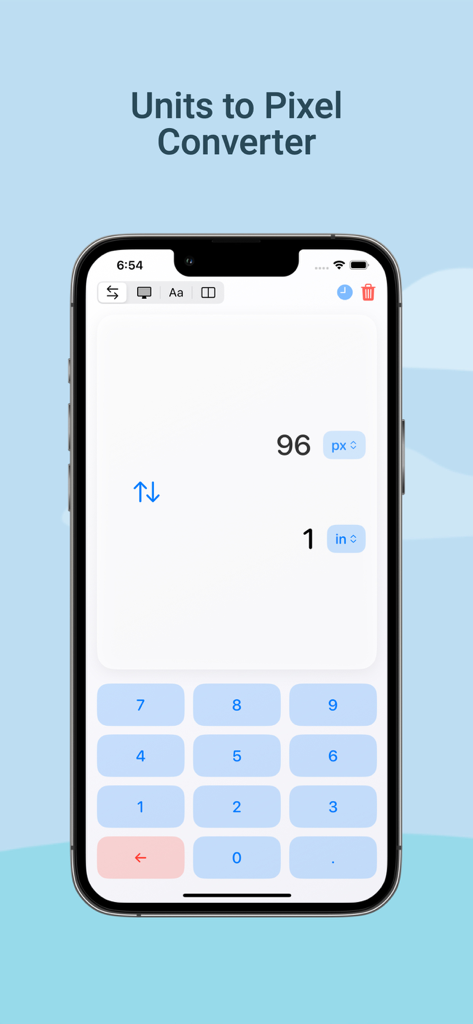
Pixel Converter Pro - Pixel Converter Pro 앱 인터페이스, 1인치를 96픽셀로 변환하는 화면 표시
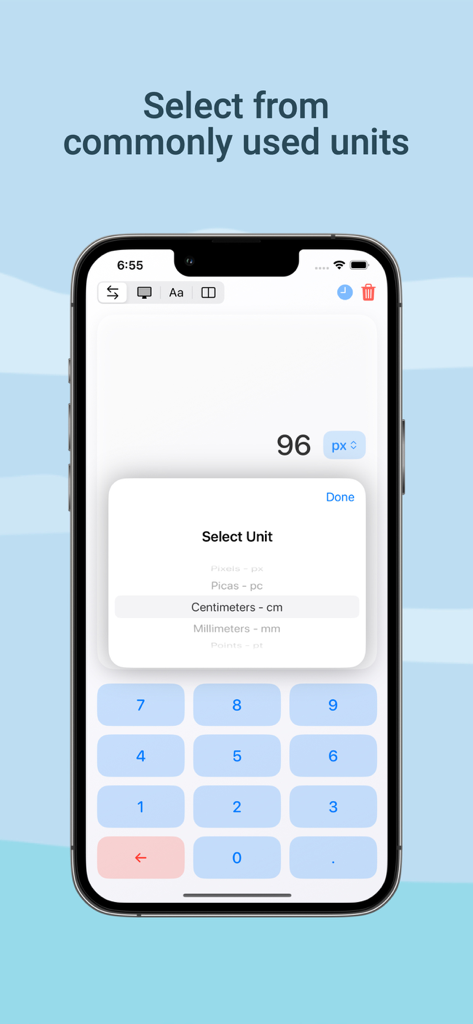
Pixel Converter Pro 앱 인터페이스, 1인치를 96픽셀로 변환하는 화면 표시

Pixel Converter Pro - Pixel Converter Pro 앱의 단위 선택 인터페이스, 픽셀, 피카, 센티미터 옵션 표시
Pixel Converter Pro 앱의 단위 선택 인터페이스, 픽셀, 피카, 센티미터 옵션 표시

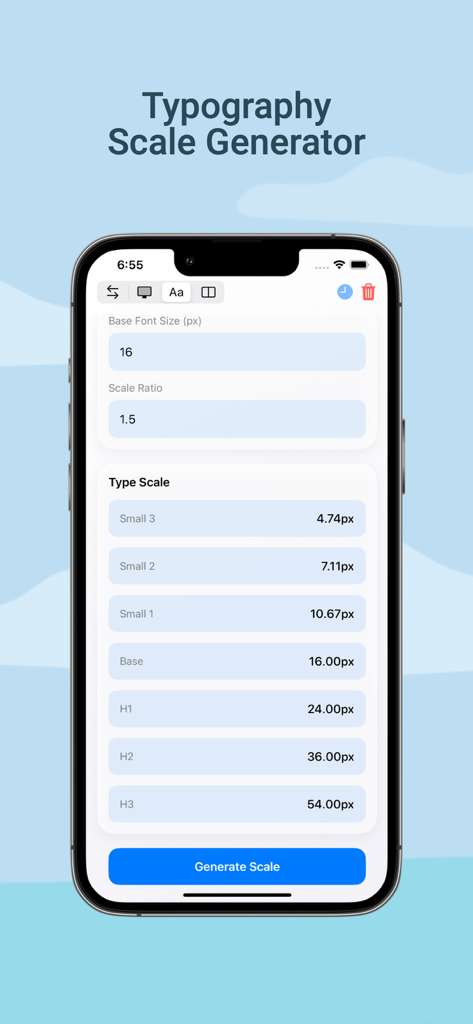
Pixel Converter Pro - Pixel Converter Pro 앱의 타이포그래피 스케일 생성기 도구, 디자인 프로젝트를 위한 글꼴 크기 계산 표시
Pixel Converter Pro 앱의 타이포그래피 스케일 생성기 도구, 디자인 프로젝트를 위한 글꼴 크기 계산 표시

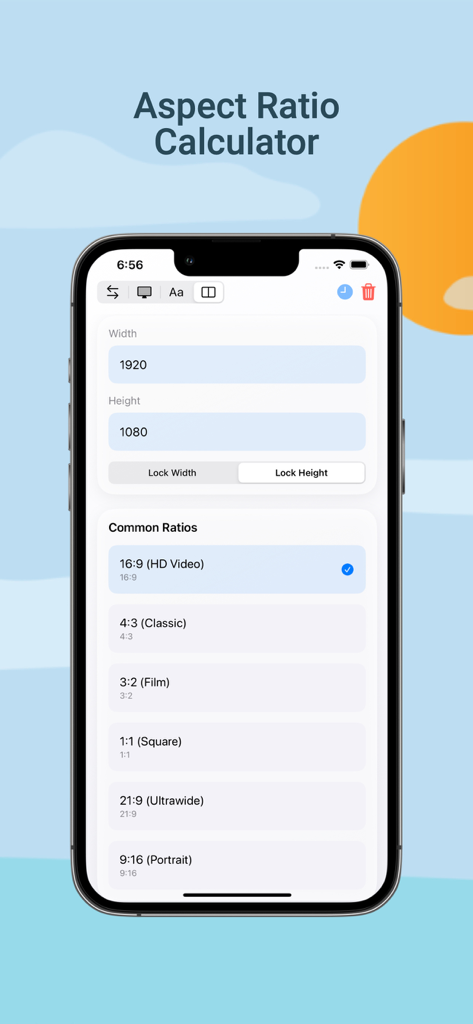
Pixel Converter Pro - Pixel Converter Pro 앱 스크린샷, 너비 및 높이 입력과 16:9와 같은 일반 사전 설정이 있는 화면 비율 계산기 표시
Pixel Converter Pro 앱 스크린샷, 너비 및 높이 입력과 16:9와 같은 일반 사전 설정이 있는 화면 비율 계산기 표시

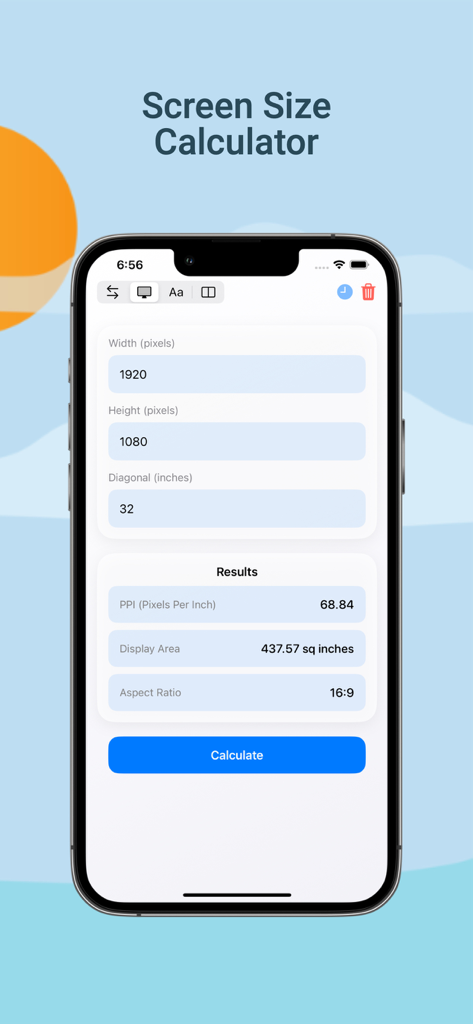
Pixel Converter Pro - Pixel Converter Pro 화면 크기 계산기의 iPhone 스크린샷, PPI 및 화면 비율 결과 표시

Pixel Converter Pro 화면 크기 계산기의 iPhone 스크린샷, PPI 및 화면 비율 결과 표시

설명

Pixel Converter Pro is your go-to unit conversion tool, specially designed for graphic designers, web developers, and anyone working with pixels, inches, centimeters, and other measurement units. Whether you're designing websites, working on digital content, or creating print layouts, Pixel Converter Pro makes it simple to convert between inches, centimeters, and pixels with absolute precision. UNIQUE FEATURES: - The ONLY true pixel converter app on the iOS App Store! - Real-time conversions with instant updates - Professional-grade accuracy - Clean, intuitive interface KEY CONVERSIONS: - Inches to Pixels: Convert inches to pixels for pixel-perfect web and digital designs - Centimeters to Pixels: Seamlessly transition between print and digital formats - Screen Size Calculator: Calculate PPI, screen dimensions, and aspect ratios - Typography Scale Generator: Create harmonious type hierarchies SUPPORTED UNITS: - Pixels (px) - Inches (in) - Centimeters (cm) - Millimeters (mm) - Picas (pc) - Points (pt) - em (Base 16) - rem (Base 16) - Viewport (vw) - DPI - PPI PROFESSIONAL TOOLS: - Screen PPI Calculator - Aspect Ratio Calculator - Typography Scale Generator - Conversion History - Common Design Presets PERFECT FOR: - UI/UX Designers - Web Developers - Digital Artists - Print Designers - Design Students Never struggle with unit conversions again. Download Pixel Converter Pro today and experience the most precise and user-friendly conversion tool available for iOS. LICENSE AND USAGE This application is licensed, not sold, to you by HWY Enigma LLC for use strictly in accordance with the Standard License Agreement ("EULA") of Apple Inc. This Standard EULA governs your use of the application and any updates or supplements to it. By downloading, installing, or using this application, you agree to be bound by the terms of Apple's Standard EULA. The full text of Apple's Standard EULA can be found at: https://www.apple.com/legal/internet-services/itunes/dev/stdeula/ PRIVACY POLICY This application does not collect any personal data. Please review our Privacy Policy at https://www.hwyenigma.com/privacy-policy

Download

다운로드: App Store

이 페이지는 앱이나 개발자의 공식 페이지가 아니며, 정보 제공 및 논평을 목적으로 작성된 독립 편집 간행물입니다. 명시적으로 달리 언급되지 않는 한, 해당 앱이나 개발자는 MWM, Apple, Google Play, 앱 퍼블리셔 또는 앱 개발자와 제휴, 보증, 후원, 승인 또는 공식적으로 연결되어 있지 않으며, 이 페이지의 어떤 내용도 해당 앱이 MWM의 서비스를 사용하여 개발되었음을 의미하지 않습니다. 모든 상표, 로고, 스크린샷 및 기타 콘텐츠는 해당 소유자의 자산입니다.








