
이 페이지는 앱이나 개발자의 공식 페이지가 아니며, 정보 제공 및 논평을 목적으로 작성된 독립 편집 간행물입니다. 명시적으로 달리 언급되지 않는 한, 해당 앱이나 개발자는 MWM, Apple, Google Play, 앱 퍼블리셔 또는 앱 개발자와 제휴, 보증, 후원, 승인 또는 공식적으로 연결되어 있지 않으며, 이 페이지의 어떤 내용도 해당 앱이 MWM의 서비스를 사용하여 개발되었음을 의미하지 않습니다. 모든 상표, 로고, 스크린샷 및 기타 콘텐츠는 해당 소유자의 자산입니다.


Planit - To-Do List & Calendar
당신의 정신을 지배하는 혼돈을 끝내십시오. 'Planit'은 당신의 하루를 가차없이 통제하는 힘을 부여합니다.
다운로드
750k+사용자 평점
총 평가 수
37.9K개발사
카테고리
Productivity지원 언어
1최신 버전
9.3.6크기
175.7 MB출시일
2022년 2월 18일효율적인 작업 및 일정 관리를 위한 핵심 기능 검토
Planit - To-Do List & Calendar 앱 분석
위젯 기반 빠른 접근성
이 앱은 사용자가 홈 화면에서 할 일 목록과 일정을 신속하게 확인하고 관리할 수 있도록 다양한 위젯 기능을 제공합니다.
Apple 생태계 연동
이 도구는 사용자가 모든 Apple 기기에서 일관된 경험을 유지하며 작업과 일정을 동기화할 수 있게 해줍니다.
직관적인 할 일 관리
이 앱은 사용자가 일일 작업을 생성, 정리 및 추적하여 생산성을 높일 수 있는 강력한 할 일 관리 기능을 제공합니다.
통합 캘린더 일정
이 앱은 사용자가 시각적으로 명확한 캘린더 인터페이스를 통해 약속과 이벤트를 손쉽게 예약하고 관리할 수 있도록 돕습니다.
깔끔하고 현대적인 UI
이 도구는 현대적이고 깔끔한 디자인을 통해 사용자가 정보를 쉽게 파악하고 앱을 직관적으로 탐색할 수 있도록 합니다.
스마트 알림 기능
이 앱은 중요한 작업이나 이벤트에 대한 적시 알림을 제공하여 사용자가 마감일을 놓치지 않도록 지원합니다.
자주 묻는 질문
에 대해 알아야 할 모든 것 Planit - To-Do List & Calendar
What is Planit?
Planit is a mobile application designed to help users plan their day efficiently through an integrated to-do list and calendar system, enabling detailed task organization and event scheduling.
Does Planit include a calendar feature?
Yes, Planit features a comprehensive calendar view where users can see their scheduled tasks and events, facilitating clear organization of daily, weekly, and monthly commitments.
How does Planit organize tasks?
Planit allows users to organize tasks into distinct categories like 'Today' and 'Someday.' Users can add tasks with specific dates, reminders, and assign them to custom groups like 'Family' or 'Important.'
Can Planit sync tasks across multiple devices?
Yes, Planit supports synchronization across multiple devices. This feature allows users to access and manage their to-do lists and calendar events seamlessly on different platforms.
Does Planit offer widgets for the home and lock screen?
Yes, Planit offers both Lock Screen Widgets and Home Widgets. These widgets provide quick access to view upcoming tasks and calendar events directly from the device's main screens.
How do I add a new to-do item in Planit?
To add a new to-do item in Planit, users navigate to the main task view and select the '+ Add a Task' button. They then input the task details, including date, reminders, and categories.
Where can I find the privacy policy for Planit?
The privacy policy for the Planit app is accessible at the provided URL: https://www.notion.so/Privacy-Policy-44e805eaaa4b428fae5a2a3256dcdb28?pvs=4.
Where can I find the terms of use for Planit?
The terms of use for the Planit application are available at the following URL: https://www.apple.com/legal/internet-services/itunes/dev/stdeula/.
다음 스크린샷과 설명은 앱의 공식 스토어 목록에서 직접 가져온 것이며 앱 개발자의 자산입니다.
앱 스토어
스크린샷

이 앱은 오늘의 할 일과 '언젠가' 할 일을 명확하게 구분하여 보여주며, 색상 구분된 할 일 카드와 진행 상황 체크박스를 통해 효율적인 관리를 지원합니다.
직관적인 할 일 목록
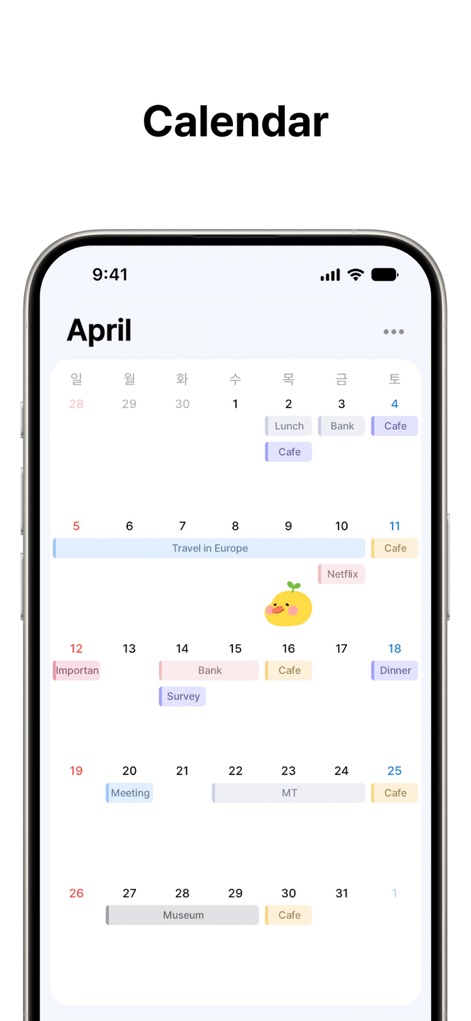
이 달력 보기는 한 달 전체 일정을 직관적으로 보여주며, 특정 날짜의 여러 이벤트와 시각적으로 구분된 바 형태의 일정 표시를 통해 사용자가 계획을 쉽게 파악할 수 있도록 돕습니다.
한눈에 보는 달력
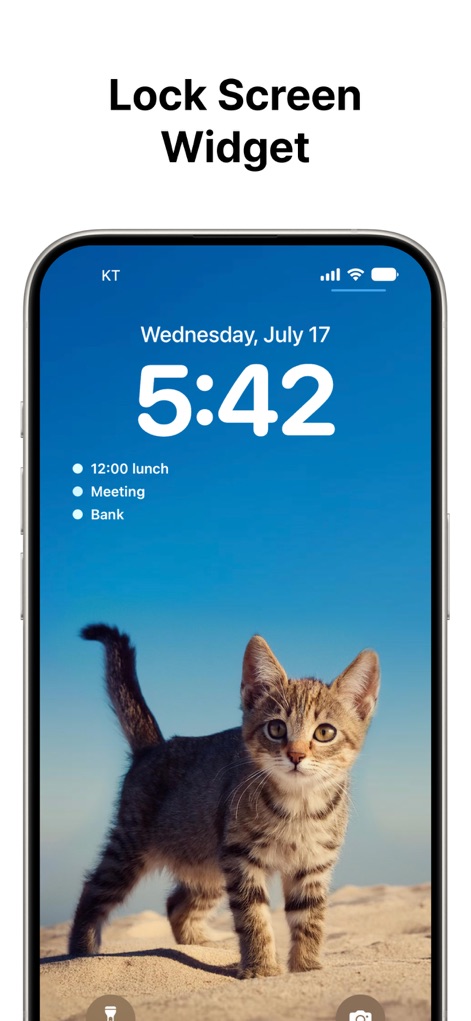
잠금 화면 위젯을 통해 사용자는 화면을 잠금 해제하지 않고도 중요한 일정을 즉시 확인할 수 있으며, 현재 시간과 다음 다가오는 세 개의 일정이 명확하게 표시됩니다.
빠른 잠금 화면
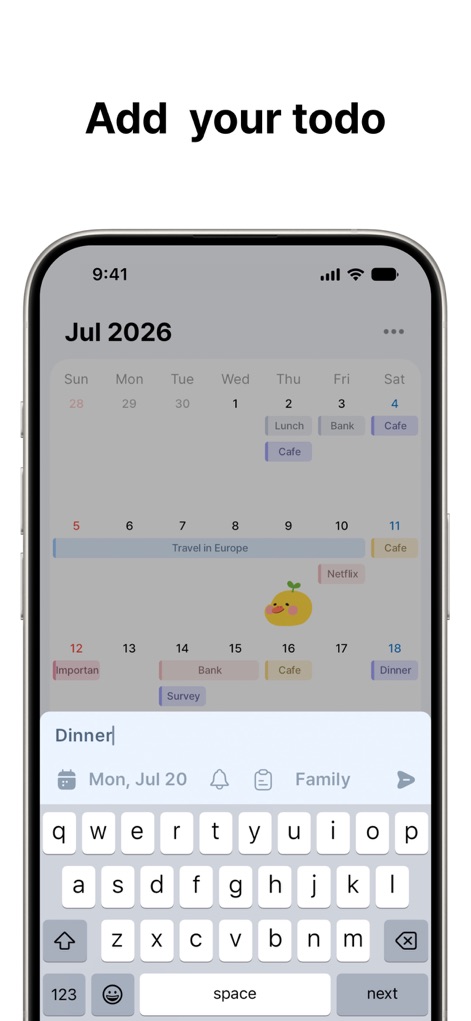
이 앱은 달력에서 직접 새로운 할 일을 추가할 수 있도록 지원하며, 키보드 입력 인터페이스와 날짜 및 알림 설정 옵션을 제공하여 간편한 입력을 가능하게 합니다.
간편한 할 일 추가

이 도구는 노트북과 태블릿 등 다양한 기기에서 일정과 할 일을 완벽하게 동기화하여, 사용자가 모든 플랫폼에서 일관된 사용자 경험과 최신 정보를 유지할 수 있도록 합니다.
기기 간 동기화

이 앱은 다양한 크기의 홈 화면 위젯을 제공하여 사용자가 자신의 필요에 맞게 정보를 구성할 수 있으며, 월별 달력 보기와 다가오는 할 일 목록이 위젯 내에 명확하게 표시됩니다.
맞춤형 홈 위젯
설명
Download
비슷한 앱
유사한 기능과 사용자 경험을 가진 앱

Smile Todo - Time Management
EMMO Corp.

That Shopping List
Markus Liebschner

Lists To do
Thomas Tsopanakis

To Do List Widget
TAPUNIVERSE LLC

Daily Planner & Task Manager
Konstantin Bolgar

DailyTodo - To-Do List & Tasks
SEOLHEE LEE
Table Notes Spreadsheet maker
WEBDIA INC.

Minimal Tabbed ToDo List
App Palette LLC

Do! - Simple To Do List
SIMPLERION Co., Ltd
이 페이지는 앱이나 개발자의 공식 페이지가 아니며, 정보 제공 및 논평을 목적으로 작성된 독립 편집 간행물입니다. 명시적으로 달리 언급되지 않는 한, 해당 앱이나 개발자는 MWM, Apple, Google Play, 앱 퍼블리셔 또는 앱 개발자와 제휴, 보증, 후원, 승인 또는 공식적으로 연결되어 있지 않으며, 이 페이지의 어떤 내용도 해당 앱이 MWM의 서비스를 사용하여 개발되었음을 의미하지 않습니다. 모든 상표, 로고, 스크린샷 및 기타 콘텐츠는 해당 소유자의 자산입니다.