
이 페이지는 앱이나 개발자의 공식 페이지가 아니며, 정보 제공 및 논평을 목적으로 작성된 독립 편집 간행물입니다. 명시적으로 달리 언급되지 않는 한, 해당 앱이나 개발자는 MWM, Apple, Google Play, 앱 퍼블리셔 또는 앱 개발자와 제휴, 보증, 후원, 승인 또는 공식적으로 연결되어 있지 않으며, 이 페이지의 어떤 내용도 해당 앱이 MWM의 서비스를 사용하여 개발되었음을 의미하지 않습니다. 모든 상표, 로고, 스크린샷 및 기타 콘텐츠는 해당 소유자의 자산입니다.


다운로드
12.5M+사용자 평점
총 평가 수
188.5K개발사
카테고리
Lifestyle지원 언어
24최신 버전
4.99.0크기
801.4 MB출시일
2013년 4월 30일Planner 5D: AI 홈 디자인 앱 심층 분석
주택 인테리어 및 정원 설계를 위한 핵심 기능 평가
사실적인 이미지 렌더링
이 도구는 미래 주택의 놀랍고 사실적인 이미지를 생성하는 '스냅샷' 기능을 갖추고 있습니다.
AI 기반 주택 디자인 및 가구 배치
이 앱은 고급 생성형 AI를 활용하여 개인화된 디자인 결과를 제공하며, 사용자가 AI 기반으로 실내 디자인을 생성하고 가구를 배치할 수 있게 해줍니다.
상세 2D 및 3D 평면도 생성
사용자가 상세한 2D 및 3D 평면도를 쉽고 직관적으로 생성할 수 있게 해줍니다.
휴대폰 카메라를 이용한 3D 홈 모델링
이 앱은 휴대폰 카메라를 사용하여 사용자의 집 디지털 사본을 만들고 3D 모델링을 할 수 있도록 지원합니다.
드래그 앤 드롭 편집 도구
이 도구는 사용자가 드래그 앤 드롭 방식으로 레이아웃과 디자인 요소를 쉽게 편집할 수 있도록 합니다.
방대한 가구 및 장식 아이템 카탈로그
이 앱은 8,400개 이상의 다양한 가구 및 장식 아이템으로 구성된 방대한 카탈로그를 제공합니다.
다양한 색상, 질감, 패턴 카탈로그
이 앱은 디자인을 개인화할 수 있는 600개 이상의 색상, 질감, 패턴 카탈로그를 제공합니다.
2D 및 3D 모드 전환
이 도구는 사용자가 디자인을 다양한 관점에서 확인할 수 있도록 2D와 3D 모드를 자유롭게 전환할 수 있는 기능을 갖추고 있습니다.
자주 묻는 질문
에 대해 알아야 할 모든 것 Planner 5D: AI Home Design
What is Planner 5D: AI Home Design app?
Planner 5D is an AI Home Design and Room Planner app. It allows users to create detailed 2D & 3D floor plans, explore over 8,400 furniture items, and generate realistic images of home designs.
What are the main features of the Planner 5D app?
Planner 5D offers features like 2D & 3D floor plan creation, a catalog of 8,400+ furniture items, realistic image generation ('Snapshot'), AI-powered design, cross-platform access, and 3D home modeling via camera.
How do I create a 3D model of my home using the Planner 5D app?
To create a 3D model, open Planner 5D, go to Camera Mode, snap photos of your space, and the app generates a digital 3D copy. You can then edit it using drag-and-drop tools.
Is the Planner 5D: AI Home Design app free?
Yes, Planner 5D offers a free version with a 2D & 3D editor, 150+ decor items, unlimited projects, and multi-platform synchronization. A premium subscription unlocks more features.
What features does the Planner 5D Premium version include?
The Premium version of Planner 5D provides access to the entire 8400+ item catalog, the ability to alter the size and appearance of furniture, and advanced AI designer mode for furnishing rooms.
How many furniture and decor items are in the Planner 5D catalog?
Planner 5D offers a catalog of over 8,400 furniture and decor items. The free version provides access to 150+ items, while the premium version unlocks the full catalog.
Does the Planner 5D: AI Home Design app work offline?
Yes, Planner 5D supports offline access. Users can continue working on their design projects without an internet connection.
Does Planner 5D support Apple Pencil for design?
Yes, Planner 5D supports Apple Pencil. This feature enhances the precision and usability for design enthusiasts creating detailed plans and interiors.
Can I view my designs in Augmented Reality (AR) with Planner 5D?
Yes, Planner 5D allows users to view designs in AR. Screenshot #5 shows a design integrated into a real-world environment, indicating AR viewing capability.
How does Planner 5D utilize AI for home design?
Planner 5D uses advanced Generative AI and machine learning for smarter, personalized results. It includes AI-powered home design generation, an AI Design Generator, and advanced AI designer mode for furnishing rooms.
How many people use and love the Planner 5D app?
Planner 5D is loved by over 120 million amateur designers. It has also been used to create over 400 million interior design projects.
Can users share their design projects created with Planner 5D?
Yes, users can share their projects with friends or professional designers for feedback or collaboration. This feature promotes teamwork and external input.
What are the subscription pricing options for Planner 5D?
Planner 5D offers a premium subscription for $9.99/month or $59.99/year. Prices may vary by region and payment is charged to the iTunes account.
How do I cancel my Planner 5D subscription?
Subscriptions auto-renew unless canceled at least 24 hours before the end of the term. Users manage their subscription in iTunes account settings.
Does Planner 5D support both Metric and Imperial measurement systems?
Yes, Planner 5D allows users to switch between Metric and Imperial systems. This ensures flexibility for users worldwide.
Can I upload an existing floor plan to Planner 5D for conversion to 3D?
Yes, Planner 5D allows users to upload blueprint images in JPEG or PNG format. The app converts them into a fully customizable 3D project.
Does Planner 5D include accessibility features for users?
Yes, Planner 5D offers Basic Accessibility for the visually impaired. This feature aims to make the app more inclusive.
Does Planner 5D offer a feature for participating in design battles?
Yes, users can participate in design battles within Planner 5D. Screenshot #6 displays a 'Participate in design battles' section showing user submissions and rankings.
How do I contact support for the Planner 5D app?
Users can contact Planner 5D support at support@planner5d.com. Alternatively, they can tap 'Report a Problem' in their profile within the app.
What is the 'Snapshot' feature in Planner 5D: AI Home Design?
The 'Snapshot' feature in Planner 5D generates photo-realistic images of designs. These images include realistic lighting, textures, and shadows, enhancing visualization.
다음 스크린샷과 설명은 앱의 공식 스토어 목록에서 직접 가져온 것이며 앱 개발자의 자산입니다.
앱 스토어
스크린샷
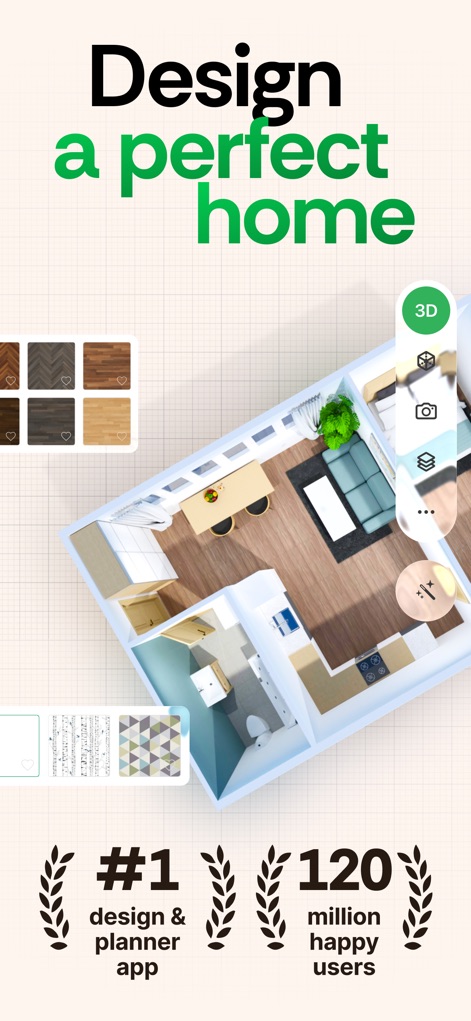
완벽한 공간 디자인
이 앱은 사용자가 상세한 2D/3D 평면도를 손쉽게 만들고, 다양한 마감재(바닥재) 옵션을 미리 확인할 수 있도록 돕습니다.
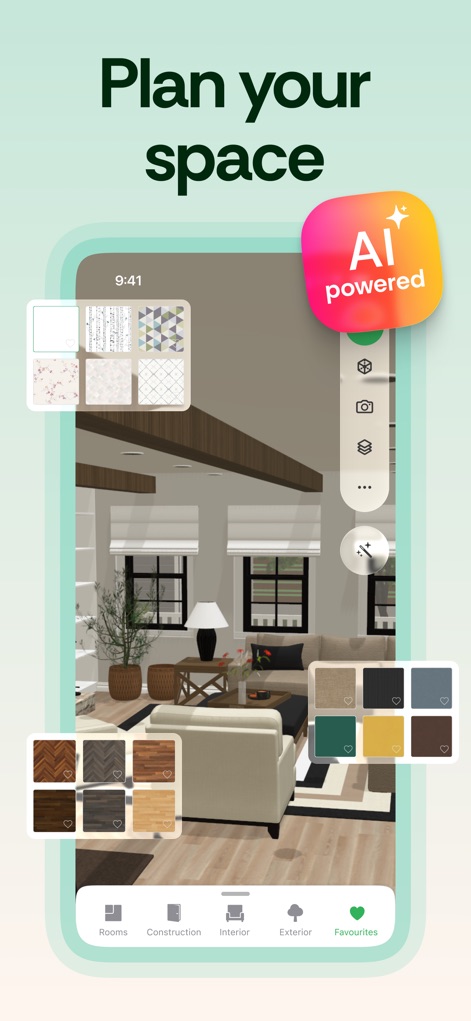
AI로 공간 계획
인테리어 디자인 앱은 고급 AI 기술을 활용하여 사용자에게 개인화된 디자인 결과를 제공하고, 다양한 벽지 및 마감재 옵션을 탐색하게 합니다.
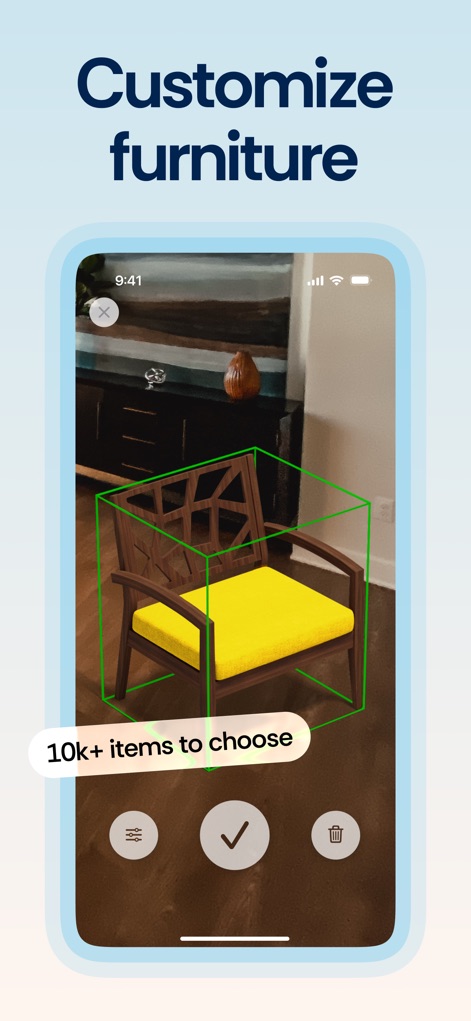
가구 맞춤 설정
이 도구는 사용자가 1만 개 이상의 방대한 가구 목록에서 원하는 아이템을 선택하고, 가구의 크기 및 색상(노란색 쿠션)을 자유롭게 변경하여 개인화할 수 있게 합니다.
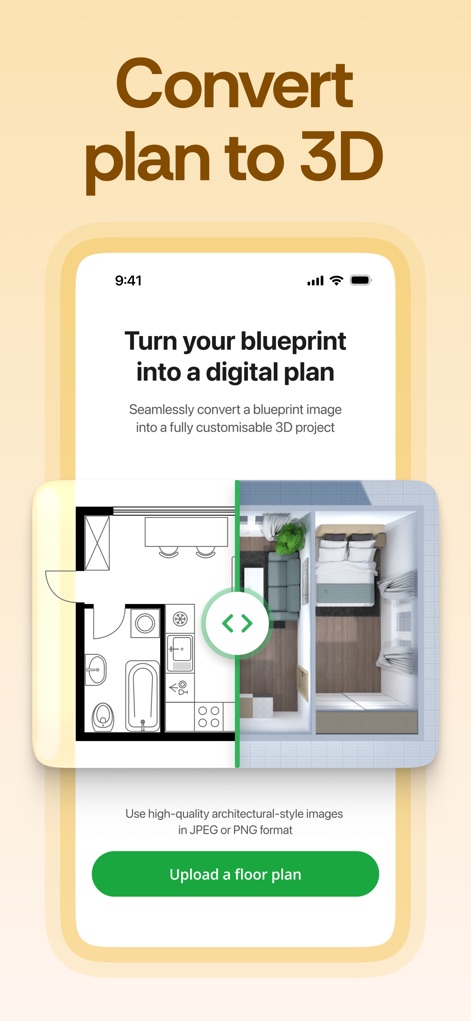
2D 도면을 3D로
앱은 기존 2D 평면도(도면)를 손쉽게 디지털 3D 프로젝트로 전환하여, 사용자가 건축 도면을 기반으로 사실적인 3D 공간을 즉시 시각화할 수 있도록 지원합니다.
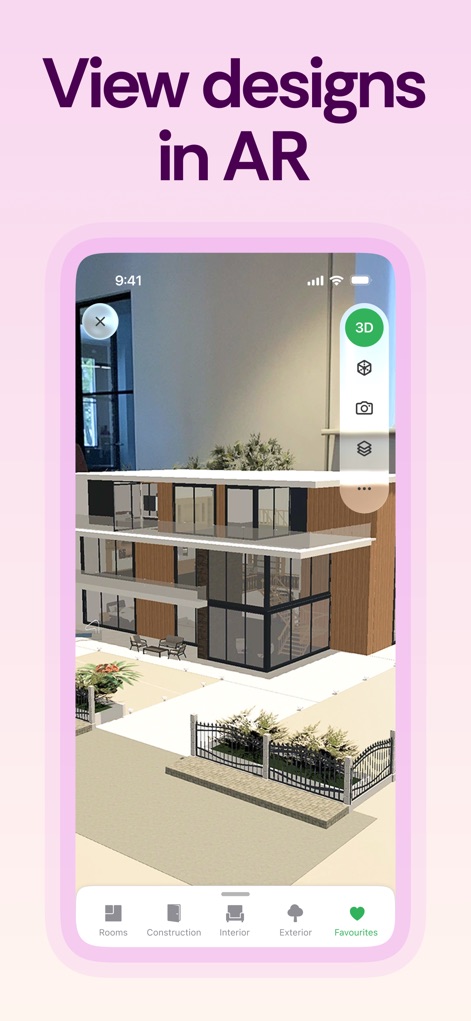
AR로 디자인 보기
사용자는 증강 현실(AR) 기능을 통해 디자인된 공간을 실제 환경에 투영하여 확인하고, 상세한 건물 외관과 조경(외부 구조물)을 몰입감 있게 경험할 수 있습니다.
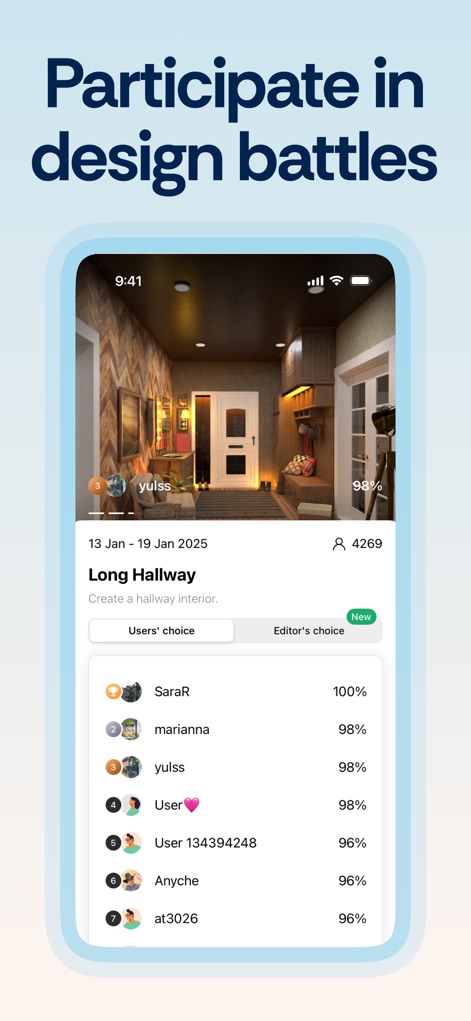
디자인 배틀 참여
이 앱은 사용자들이 디자인 배틀에 참여하여 다른 사용자들의 창작물과 자신의 디자인을 비교하고, 인기 있는 작품(상위 랭크 디자인)과 점수(퍼센트 점수)를 확인할 수 있도록 합니다.
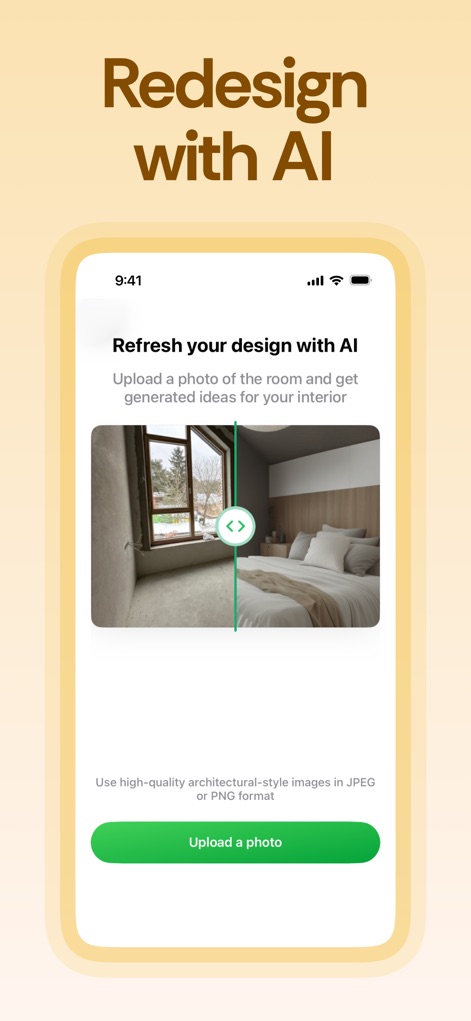
AI로 디자인 리프레시
AI 디자인 생성기는 사용자가 기존 방 사진(원본 사진)을 업로드하여 즉시 인테리어를 새롭게 꾸민 모습(AI 제안 디자인)을 받아볼 수 있도록 지원합니다.
설명
Download
비슷한 앱
유사한 기능과 사용자 경험을 가진 앱

AI Decor - AI Home Design
Yspira Digital Limited

Remodel AI - Home Design
REIMAGE AI INC.
Interior Design:AI Spacely
翠霞 郭
AI Home Design - Homely AI
OCEAN FLOAT MOBILE LIMITED

Smartist: Art Preview on Wall
Smartist, Inc.

AI Interior Design Home Decor
Ngoan Doan Thi

AI Interior Design Decor Home.
Le Khanh
Deco: AI Remodel & Home Design
ANCIENDA TEKNOLOJI YAZILIM VE PAZARLAMA ANONIM SIRKETI

HOQI - Home Staging AI
Intella
이 페이지는 앱이나 개발자의 공식 페이지가 아니며, 정보 제공 및 논평을 목적으로 작성된 독립 편집 간행물입니다. 명시적으로 달리 언급되지 않는 한, 해당 앱이나 개발자는 MWM, Apple, Google Play, 앱 퍼블리셔 또는 앱 개발자와 제휴, 보증, 후원, 승인 또는 공식적으로 연결되어 있지 않으며, 이 페이지의 어떤 내용도 해당 앱이 MWM의 서비스를 사용하여 개발되었음을 의미하지 않습니다. 모든 상표, 로고, 스크린샷 및 기타 콘텐츠는 해당 소유자의 자산입니다.