
이 페이지는 앱이나 개발자의 공식 페이지가 아니며, 정보 제공 및 논평을 목적으로 작성된 독립 편집 간행물입니다. 명시적으로 달리 언급되지 않는 한, 해당 앱이나 개발자는 MWM, Apple, Google Play, 앱 퍼블리셔 또는 앱 개발자와 제휴, 보증, 후원, 승인 또는 공식적으로 연결되어 있지 않으며, 이 페이지의 어떤 내용도 해당 앱이 MWM의 서비스를 사용하여 개발되었음을 의미하지 않습니다. 모든 상표, 로고, 스크린샷 및 기타 콘텐츠는 해당 소유자의 자산입니다.


Polycam 3D Scans & Floor Plans
당신의 아이폰은 이제 단순한 휴대폰이 아닙니다. Polycam은 이 기기를 현실을 디지털 모델로 해체하고 재구성하는 정밀 3D 스캐닝 장비로 변모시키는 것이 확인됩니다. 이 앱은 공간 전문가들에게 세상을 재창조할 무한한 가능성을 부여합니다.
다운로드
12.5M+사용자 평점
총 평가 수
114.6K개발사
카테고리
Photo & Video지원 언어
27최신 버전
5.2.12크기
490.8 MB출시일
2020년 9월 28일Polycam 3D 스캔 및 평면도 앱 분석
건축, 디자인 및 3D 모델링 전문가를 위한 핵심 기능 평가
정밀 평면도 및 청사진 생성
이 앱은 3D 룸 스캔에서 정밀한 2D 평면도와 축척에 맞는 청사진을 즉시 생성하며, AutoCAD와 같은 인기 소프트웨어와 호환되는 형식으로 내보내기를 지원하여 건축 및 디자인 워크플로에 통합될 수 있습니다.
혁신적인 실내 공간 LiDAR 스캔 (룸 모드)
이 기능은 LiDAR를 사용하여 실내 공간의 상세하고 정확한 3D 모델을 즉시 생성하며, 건축가, 디자이너 및 부동산 전문가들에게 최적화된 몰입형 룸 플래너 뷰를 제공합니다.
다양한 형식의 매끄러운 내보내기 옵션
이 앱은 .obj, .dae, .fbx, .stl과 같은 다양한 형식으로 상세한 3D 모델을 내보낼 수 있게 하여, 사용자가 즐겨 사용하는 3D 소프트웨어에 직접 통합할 수 있도록 지원합니다.
최고 수준의 LiDAR 3D 스캐너
이 도구는 LiDAR 기술을 활용하여 공간을 빠르고 정확하게 스캔하며, 사용자들은 상세한 3D 스캔 데이터를 생성하여 다른 디자인 소프트웨어(예: Blender, SketchUp)로 가져올 수 있습니다.
고품질 3D 모델 생성 (포토그래메트리/가우시안 스플랫)
이 앱은 일상적인 사진을 사용하여 고품질 3D 모델을 생성하며, 포토그래메트리 및 가우시안 스플랫 기술을 통해 복잡한 개체와 장면을 정밀하게 캡처합니다.
무제한 포토그래메트리 및 가우시안 스플랫
이 기능은 사용자에게 무제한으로 고품질 포토그래메트리 및 가우시안 스플랫 스캔을 처리할 수 있는 기능을 제공하여, 프로젝트에 필요한 모든 세부 사항을 제약 없이 캡처할 수 있도록 합니다.
웹 액세스를 통한 고급 편집 기능
이 플랫폼은 사용자가 컴퓨터에서 고급 편집 도구, AI 텍스처 생성 및 클라우드 동기화를 통해 모바일 기기에서 캡처한 모델을 작업하고 향상시킬 수 있게 합니다.
정밀 편집 및 측정 도구
이 도구는 강력한 온디바이스 편집 기능을 통해 사용자가 3D 모델을 자르고, 회전하고, 크기를 조정하며, 측정하는 등 정밀하게 미세 조정할 수 있게 해줍니다.
몰입형 360° 경험 생성
이 앱은 아이폰을 360° 카메라로 변환하여 몰입형 파노라마 경험을 생성하고, AI 기술로 보이지 않는 영역을 채워 완전한 가상 환경을 제공합니다.
간편한 3D 캡처 공유
이 앱은 간단한 링크를 통해 3D 캡처를 즉시 공유할 수 있도록 하여, 전문가의 피드백과 협업을 용이하게 합니다.
자주 묻는 질문
에 대해 알아야 할 모든 것 Polycam 3D Scans & Floor Plans
What is Polycam used for?
Polycam is a 3D scanning platform for iPhone and iPad. It creates high-quality 3D models from photos, generates LiDAR scans, and captures 360° images for editing and export to industry-standard software.
Can Polycam generate 3D models from photos?
Yes, Polycam generates high-quality 3D models from photos using photogrammetry and Gaussian splats. This feature functions across all iPhones and iPads.
Does Polycam support LiDAR scanning?
Yes, Polycam offers top-rated LiDAR scanning for rapid, accurate captures of space. This feature requires an iPhone or iPad equipped with LiDAR technology.
What devices are compatible with Polycam's 360° camera feature?
Polycam's 360° camera feature is compatible with iPhone 11 and later models. It transforms the device into a full-fledged 360° camera for immersive panoramic experiences.
Can Polycam create floor plans from 3D scans?
Yes, Polycam generates detailed 3D models of rooms using LiDAR in Room Mode, and instantly creates 2D floor plans and scale-accurate blueprints from these scans.
What file formats can Polycam export 3D models in?
Polycam exports detailed 3D models in .obj, .dae, .fbx, and .stl formats, and color point clouds as .dxf and .ply. Floor plans are exported for AutoCAD, SketchUp, and Adobe Illustrator.
Does Polycam offer on-device editing tools?
Yes, Polycam provides powerful on-device tools for precise editing and measuring. Users can crop, rotate, rescale, and measure their 3D models directly on their iPhone or iPad.
How does Polycam facilitate collaboration on projects?
Polycam facilitates collaboration through easy sharing via simple links and streamlined teamwork using shared libraries. Users can also connect with a community of creators on Polycam Explore.
Is Polycam Web Access included with the app?
Yes, Polycam Web Access is included free. It allows users to edit, enhance, and share models from their computer, featuring advanced editing, AI texture generation, and cloud syncing.
Does Polycam Pro offer unlimited 3D model creation?
Yes, Polycam Pro offers unlimited photogrammetry and Gaussian splats. This allows users to capture and process any number of high-quality 3D models for their projects without restrictions.
Can Polycam be used for measuring distances in 3D scans?
Yes, Polycam allows precise measurement within 3D scans. The app provides tools to measure distances in seconds directly on the device, as shown with dimensions displayed on screen.
How can I view the Privacy Policy for Polycam?
The Privacy Policy for Polycam is accessible via the link: https://poly.cam/privacy_policy.pdf. This document details how Polycam handles user data and privacy practices.
다음 스크린샷과 설명은 앱의 공식 스토어 목록에서 직접 가져온 것이며 앱 개발자의 자산입니다.
앱 스토어
스크린샷
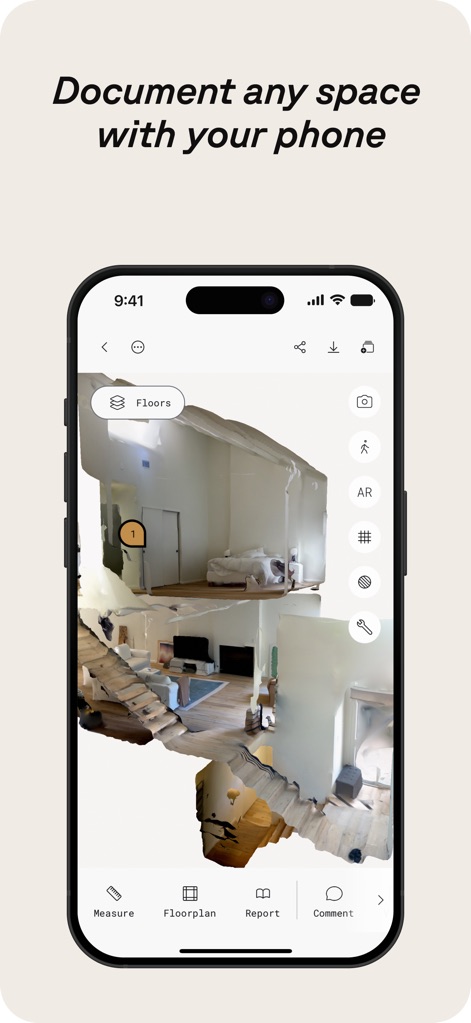
공간 정밀 스캔
사용자는 이 앱으로 실제 공간의 상세한 3D 모델을 만들 수 있으며, 텍스처와 가구 배치가 돋보이는 몰입감 있는 시각화를 제공합니다.
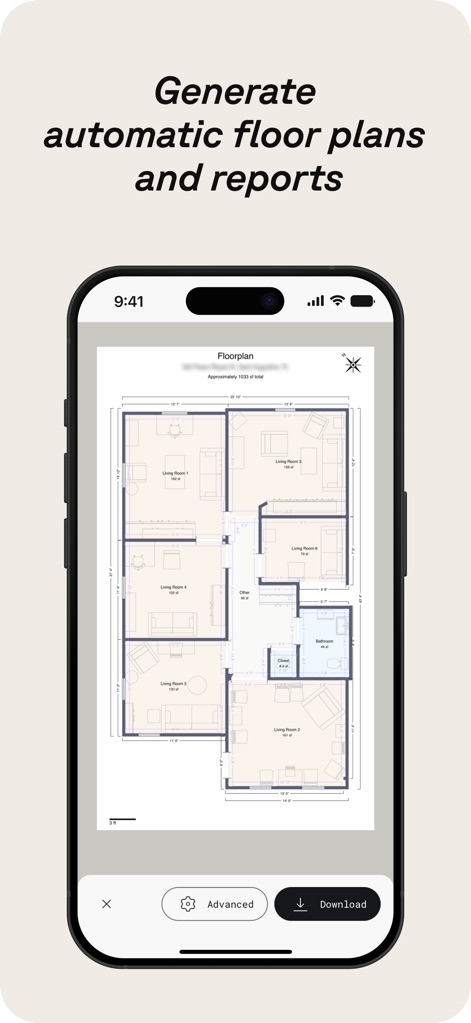
자동 평면도 생성
이 도구는 스캔된 공간을 기반으로 정확한 2D 평면도를 자동 생성하며, 각 방의 레이블과 정밀한 치수가 명확하게 표시됩니다.
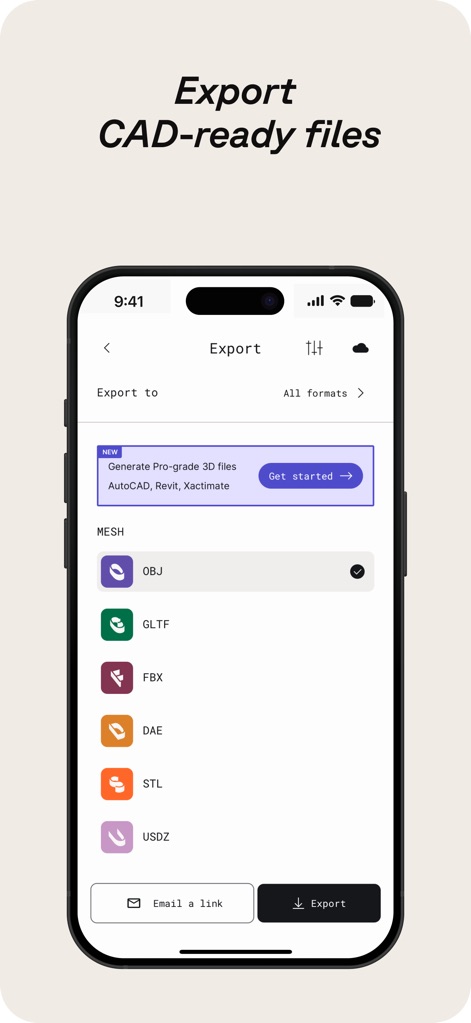
CAD 호환 내보내기
사용자는 다양한 산업 표준 형식으로 3D 모델을 내보낼 수 있으며, OBJ 및 FBX와 같은 전문적인 파일 유형을 지원하여 워크플로우 통합을 용이하게 합니다.
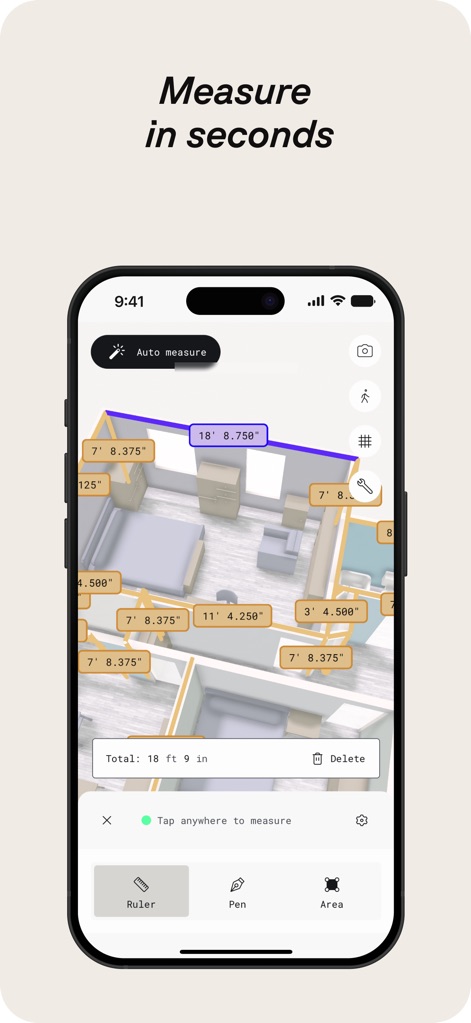
즉각적인 정밀 측정
이 앱은 3D 스캔 내에서 빠르고 정확한 측정을 지원하며, 자동 측정 기능과 다양한 측정 도구(자, 펜)를 제공하여 사용자가 쉽게 활용할 수 있습니다.
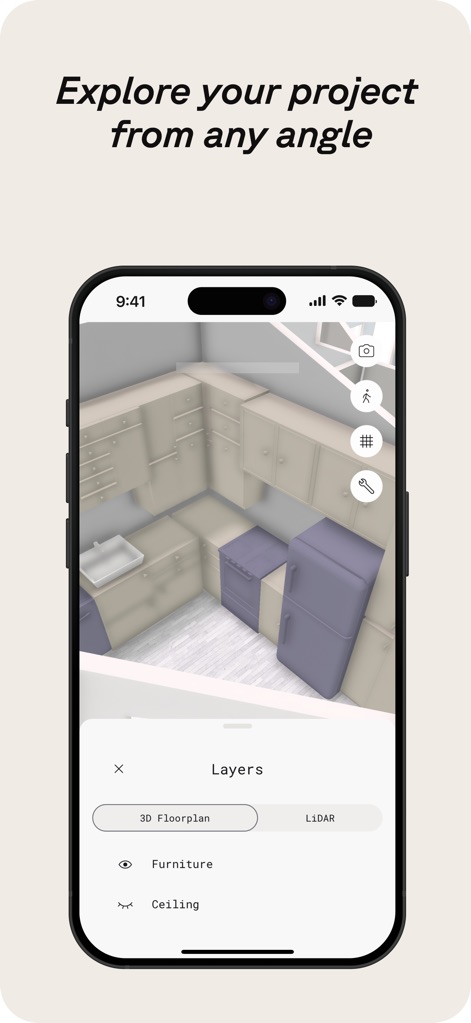
다각도 프로젝트 탐색
사용자는 3D 모델을 다양한 각도에서 자유롭게 탐색할 수 있으며, 가구 레이어와 LiDAR 데이터를 전환하여 상세한 시각적 분석을 수행할 수 있습니다.
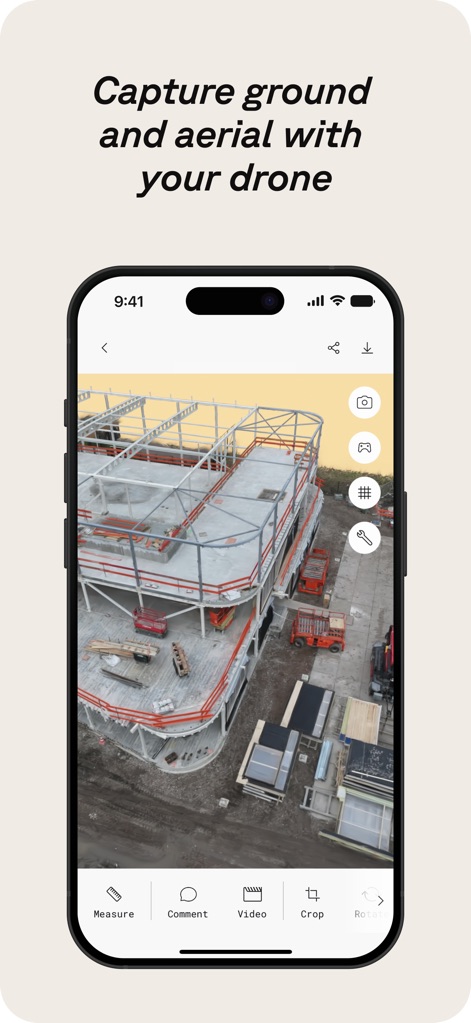
드론 스캔 통합
이 도구는 드론으로 촬영된 지상 및 항공 이미지를 통합하여 광범위한 건축 현장을 3D로 재구성하며, 측정 및 주석 기능을 활용할 수 있습니다.
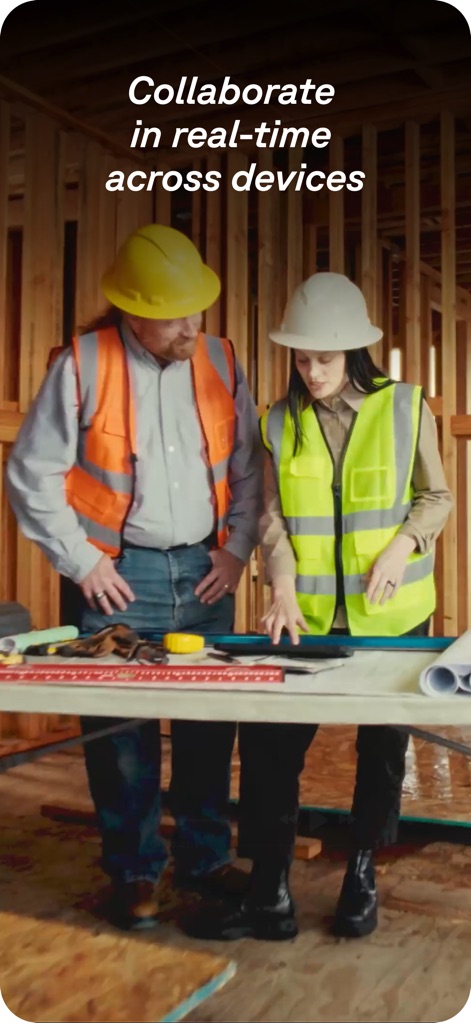
실시간 협업 지원
이 앱은 전문가들이 프로젝트를 실시간으로 공유하고 협업할 수 있도록 지원하여, 현장 팀 간의 효율적인 의사소통과 빠른 의사결정을 가능하게 합니다.
설명
Download
비슷한 앱
유사한 기능과 사용자 경험을 가진 앱

Pocket Bubble Level XXL
ExaMobile S.A.

Measuring Tape +ㅤ
Rocket Apps GmbH

CamToPlan - 3D Scanner & LiDAR
Tasmanic Editions

Tape Measure: AR Ruler
Veysel OTI

Home Planner - AI Room Design
Room Planner Ltd

Measuring Tape+ Measure AR app
MEASURE TECH SOCIEDAD LIMITADA

Tape Measure®
AI Photo Editor Lab SRL

Bubble Level for iPhone
Lemondo Apps LLC
CamToPlan - AR tape measure
Tasmanic Editions
이 페이지는 앱이나 개발자의 공식 페이지가 아니며, 정보 제공 및 논평을 목적으로 작성된 독립 편집 간행물입니다. 명시적으로 달리 언급되지 않는 한, 해당 앱이나 개발자는 MWM, Apple, Google Play, 앱 퍼블리셔 또는 앱 개발자와 제휴, 보증, 후원, 승인 또는 공식적으로 연결되어 있지 않으며, 이 페이지의 어떤 내용도 해당 앱이 MWM의 서비스를 사용하여 개발되었음을 의미하지 않습니다. 모든 상표, 로고, 스크린샷 및 기타 콘텐츠는 해당 소유자의 자산입니다.