
이 페이지는 앱이나 개발자의 공식 페이지가 아니며, 정보 제공 및 논평을 목적으로 작성된 독립 편집 간행물입니다. 명시적으로 달리 언급되지 않는 한, 해당 앱이나 개발자는 MWM, Apple, Google Play, 앱 퍼블리셔 또는 앱 개발자와 제휴, 보증, 후원, 승인 또는 공식적으로 연결되어 있지 않으며, 이 페이지의 어떤 내용도 해당 앱이 MWM의 서비스를 사용하여 개발되었음을 의미하지 않습니다. 모든 상표, 로고, 스크린샷 및 기타 콘텐츠는 해당 소유자의 자산입니다.


Power Automate
현대 전문가를 위한 필수 로우코드 도구입니다. 손안에서 손쉽게 워크플로를 트리거하고, 승인을 허가하며, 즐겨 사용하는 Microsoft 365 앱을 동기화하세요.
다운로드
905K+사용자 평점
총 평가 수
5K+개발사
카테고리
Business지원 언어
37최신 버전
3.0.977크기
48.6 MB출시일
2016년 6월 20일제한 없는 생산성
수동 작업을 자동화된 워크플로로 전환하고, 어디에 있든 비즈니스를 계속 전진시키세요.
원터치 승인
휴대전화에서 바로 비용, 휴가 또는 계약 요청을 즉시 검토하고 승인하여 팀의 흐름을 유지하세요.
즉시 흐름 트리거
홈 화면에서 탭 한 번으로 복잡한 다단계 자동화 시퀀스를 직접 실행하세요.
자주 묻는 질문
에 대해 알아야 할 모든 것 Power Automate
Microsoft Power Automate란 무엇인가요?
Microsoft Power Automate는 팀 생산성을 높이기 위해 설계된 모바일 워크플로우 자동화 서비스입니다. 이를 통해 사용자는 모바일 장치에서 직접 작업을 자동화하고, 다양한 애플리케이션을 연결하며, 비즈니스 프로세스를 간소화할 수 있습니다.
Power Automate 모바일 앱의 주요 기능은 무엇인가요?
Power Automate 모바일 앱을 사용하면 이동 중에 흐름을 트리거하고 생성하며, 흐름 활동을 모니터링하고, 실행 세부 정보를 확인하며, 승인을 부여할 수 있습니다. 또한 푸시 알림을 보내고 받는 기능도 지원합니다.
Power Automate가 제 휴대폰으로 알림을 보낼 수 있나요?
예, Power Automate는 푸시 알림을 모바일 장치로 직접 보내고 받습니다. 사용자는 특정 연락처의 이메일 알림이나 작업 항목의 업데이트에 대한 알림도 받을 수 있습니다.
모바일에서 Power Automate로 요청을 어떻게 승인하나요?
사용자는 Power Automate 모바일 앱을 통해 직접 승인을 관리합니다. 전용 "승인" 섹션을 통해 보류 중인 요청을 검토하고 "승인" 또는 "거부"를 탭하여 즉시 조치를 취할 수 있습니다.
어떤 애플리케이션이 Microsoft Power Automate와 통합되나요?
Power Automate는 수백 개의 애플리케이션 및 서비스와 통합됩니다. 여기에는 OneDrive, Office 365, Outlook, Microsoft Teams, JIRA, Google Drive, Azure 및 Dropbox와 같은 인기 있는 플랫폼이 포함됩니다.
Power Automate 모바일 앱으로 흐름을 만들고 편집할 수 있나요?
예, Power Automate 모바일 앱을 사용하면 모바일 장치에서 직접 자동화 흐름을 만들고 편집할 수 있습니다. 이를 통해 이동 중에도 워크플로를 관리할 수 있는 완전한 유연성을 제공합니다.
Power Automate에서 인스턴트 흐름의 예는 무엇인가요?
Power Automate의 인스턴트 흐름에는 위치 기반 푸시 알림 보내기, 아픈 동료에게 이메일 보내기, 회의 참석자 식별 또는 자동으로 회의 시간 차단 및 Slack 음소거 등이 포함됩니다.
Power Automate에서 흐름 활동 및 실행 세부 정보를 어떻게 볼 수 있나요?
Power Automate 앱을 사용하면 모바일 장치에서 직접 모든 흐름 활동을 모니터링하고 자세한 실행 정보를 볼 수 있습니다. 이를 통해 자동화된 작업에 대한 포괄적인 감독을 제공합니다.
다음 스크린샷과 설명은 앱의 공식 스토어 목록에서 직접 가져온 것이며 앱 개발자의 자산입니다.
앱 스토어
스크린샷
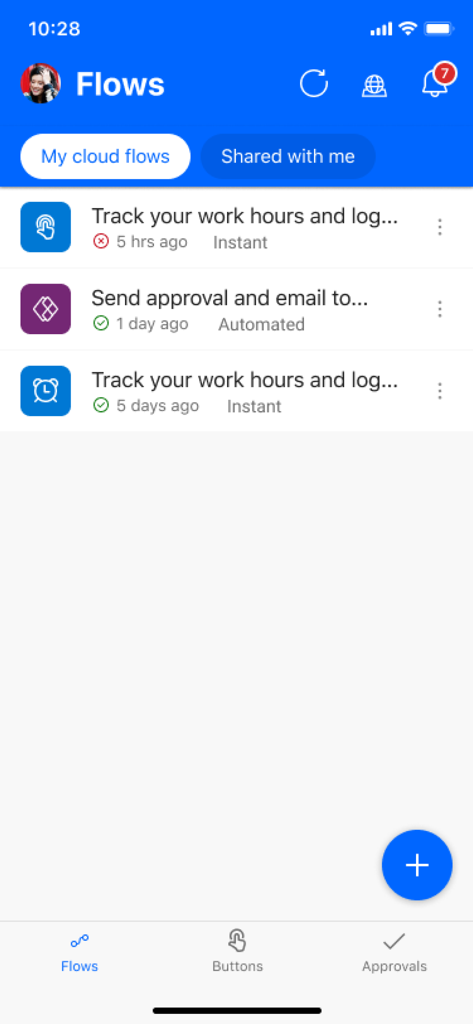
자동화된 워크플로 및 클라우드 흐름 목록을 표시하는 Microsoft Power Automate 앱 대시보드
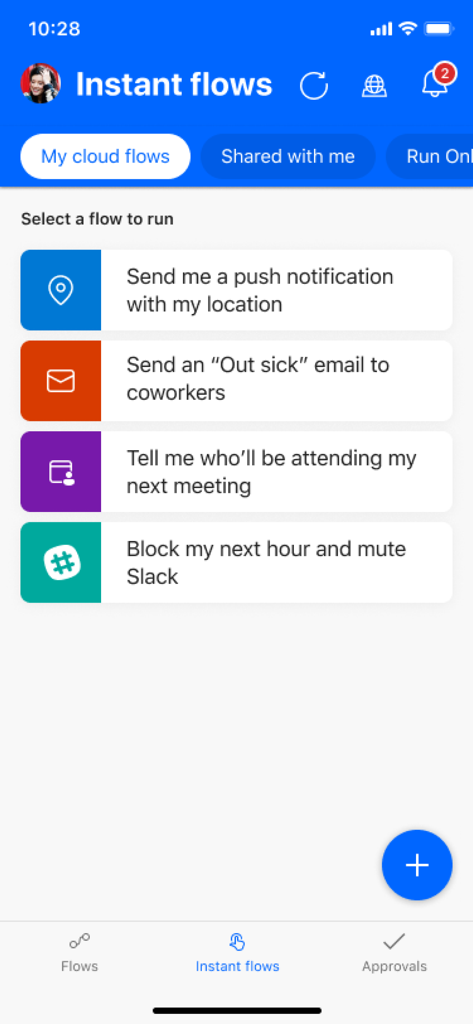
빠른 작업 실행을 위한 즉시 흐름 목록을 표시하는 Microsoft Power Automate 모바일 앱 인터페이스.
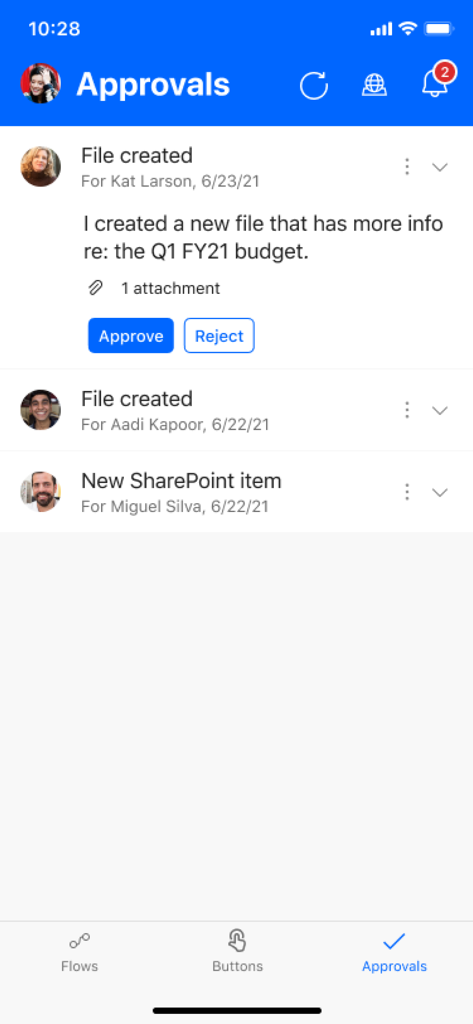
승인 또는 거부 버튼과 함께 대기 중인 워크플로 승인 요청 목록을 보여주는 Microsoft Power Automate의 모바일 앱 인터페이스.
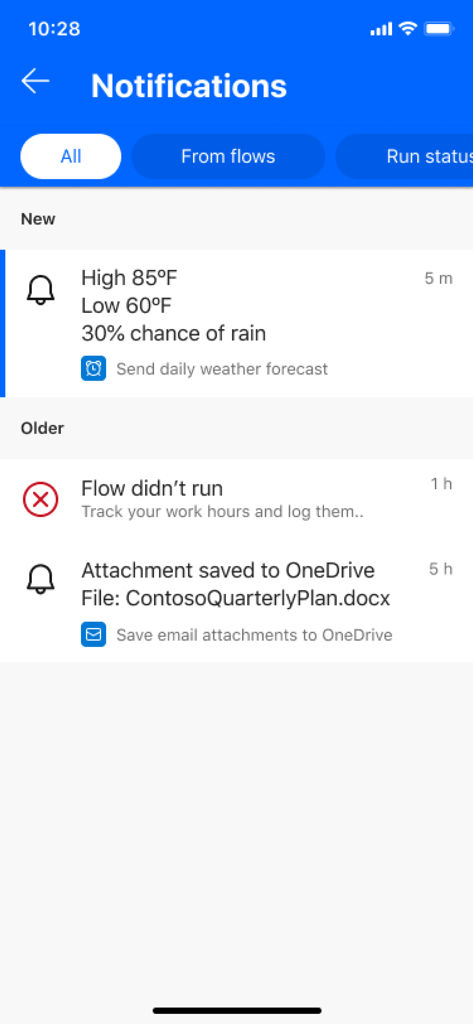
워크플로 상태 업데이트 및 자동화된 작업 알림을 보여주는 Microsoft Power Automate 앱 알림 화면
설명
Download
비슷한 앱
유사한 기능과 사용자 경험을 가진 앱

Toast Now
Toast, Inc.

Microsoft Azure
Microsoft Corporation

Tabby Business
Tabby Technology LTD

Scan-IT to Office
TEC-IT Datenverarbeitung GmbH

Salesforce
salesforce.com

Microsoft 365 Admin
Microsoft Corporation

MISA AMIS
MISA JSC

AWS Console
AMZN Mobile LLC

文华随身行
Webstock Information Systems Co., Ltd.
이 페이지는 앱이나 개발자의 공식 페이지가 아니며, 정보 제공 및 논평을 목적으로 작성된 독립 편집 간행물입니다. 명시적으로 달리 언급되지 않는 한, 해당 앱이나 개발자는 MWM, Apple, Google Play, 앱 퍼블리셔 또는 앱 개발자와 제휴, 보증, 후원, 승인 또는 공식적으로 연결되어 있지 않으며, 이 페이지의 어떤 내용도 해당 앱이 MWM의 서비스를 사용하여 개발되었음을 의미하지 않습니다. 모든 상표, 로고, 스크린샷 및 기타 콘텐츠는 해당 소유자의 자산입니다.