
이 페이지는 앱이나 개발자의 공식 페이지가 아니며, 정보 제공 및 논평을 목적으로 작성된 독립 편집 간행물입니다. 명시적으로 달리 언급되지 않는 한, 해당 앱이나 개발자는 MWM, Apple, Google Play, 앱 퍼블리셔 또는 앱 개발자와 제휴, 보증, 후원, 승인 또는 공식적으로 연결되어 있지 않으며, 이 페이지의 어떤 내용도 해당 앱이 MWM의 서비스를 사용하여 개발되었음을 의미하지 않습니다. 모든 상표, 로고, 스크린샷 및 기타 콘텐츠는 해당 소유자의 자산입니다.


PureStatus: ByeBye Blur Status
당신은 더 이상 흐릿한 사진의 희생자가 아닙니다. 이 앱은 왓츠앱이 화질을 망치는 것에 종지부를 찍습니다.
다운로드
1M+사용자 평점
총 평가 수
54.4K개발사
카테고리
Photo & Video지원 언어
6최신 버전
2024.08크기
60.5 MB출시일
2022년 12월 8일WhatsApp 상태 업데이트의 화질 저하 문제 해결을 위한 핵심 기능 평가
PureStatus: ByeBye Blur Status 앱 분석
고화질 WhatsApp 비디오 상태 유지
이 앱은 WhatsApp의 자동 압축으로 인한 화질 저하 없이 고해상도 비디오를 상태로 공유할 수 있도록 합니다.
선명한 WhatsApp 사진 상태 업로드
이 도구는 WhatsApp에 사진 상태를 공유할 때 픽셀 손실 없이 선명하고 고화질의 이미지를 유지할 수 있도록 돕습니다.
정밀한 비디오 크기 최적화
이 앱은 WhatsApp 상태에서 최고 수준의 HD 비디오 품질을 보장하기 위해 비디오 크기를 정밀하게 줄여줍니다.
긴 비디오를 위한 자동 상태 분할
이 앱은 긴 비디오를 WhatsApp 상태 제한에 맞춰 30초 길이로 정확하게 분할하여 더 긴 콘텐츠를 쉽게 공유할 수 있도록 합니다.
자주 묻는 질문
에 대해 알아야 할 모든 것 PureStatus: ByeBye Blur Status
What is PureStatus: ByeBye Blur Status?
PureStatus is an app designed to prevent WhatsApp from reducing the quality of videos and photos when uploaded as a status. It precisely compresses media to maintain the highest possible HD quality for your WhatsApp status.
How does PureStatus improve WhatsApp video status quality?
PureStatus precisely compresses videos before upload, ensuring that WhatsApp's size reduction process results in the highest possible HD video quality for your status. It prevents blurriness and pixel loss.
Can PureStatus improve the quality of already low-quality videos?
No, PureStatus cannot improve the original quality of already low-quality or previously shared videos. It is designed to maintain the HD quality of high-quality videos when shared on WhatsApp status.
How do I use PureStatus to upload HD WhatsApp status?
To use PureStatus, download the app, open it, select your video, compress it, and then share it directly to your WhatsApp status to enjoy crystal-clear HD videos.
Does PureStatus offer a video splitting feature?
Yes, PureStatus includes a Video Status Splitter feature. It automatically cuts longer videos into 30-second parts, allowing users to upload extended videos to their WhatsApp status while maintaining HD quality.
What happens if I edit a video after compressing it with PureStatus?
If you edit or crop a video after compressing it with PureStatus, the quality will be lost when you upload it to your WhatsApp status. It is recommended to avoid post-compression edits.
Can PureStatus be used for sharing HD photos on WhatsApp status?
Yes, the photo function in PureStatus is specifically for uploading HD photos to your WhatsApp status. If you send them in chats, they will be sent as a video.
Does PureStatus support sharing to social media other than WhatsApp?
Yes, the PureStatus app allows direct sharing to your favorite social media platforms, including Status, Stories, and DMs, for your compressed media.
What types of videos are best for compression with PureStatus?
For the best results, always compress high-quality videos in PureStatus. The app maintains the quality of HD videos but does not improve already low-quality content or previously shared videos.
Is PureStatus easy to use for video compression?
Yes, PureStatus features an easy-to-use interface with simple one-touch compression. It aims to provide a fast, easy, and clean user experience for maintaining video quality.
다음 스크린샷과 설명은 앱의 공식 스토어 목록에서 직접 가져온 것이며 앱 개발자의 자산입니다.
앱 스토어
스크린샷

이 앱은 PureStatus 사용 시 선명한 이미지와 PureStatus 미사용 시 흐릿한 이미지를 대조하여 보여주며, 품질 저하 없이 공유할 수 있음을 강조합니다.
선명함의 차이

사용자는 PureStatus 적용 후 선명한 사진과 적용 전 픽셀화된 사진을 비교하여, 소중한 순간을 원본 그대로 보존할 수 있습니다.
추억을 선명하게

이 스크린샷은 PureStatus를 통해 뚜렷한 파티 장면과 압축되지 않은 흐릿한 원본 영상의 품질 차이를 명확하게 보여줍니다.
최고의 영상 압축
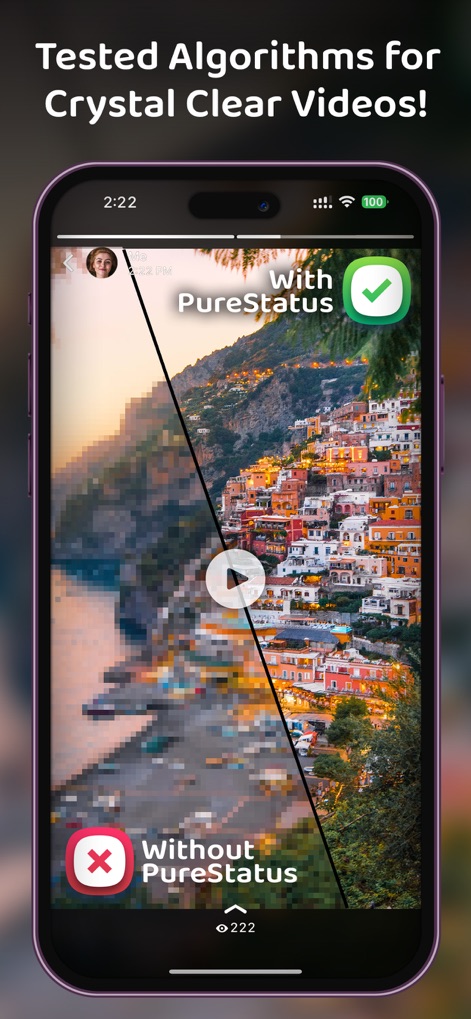
앱은 PureStatus 적용으로 깨끗하게 표현된 풍경 이미지와 적용하지 않아 픽셀화된 부분을 대조하여 고화질 영상 처리 기술을 시각적으로 입증합니다.
선명한 영상 알고리즘

사용자는 깔끔하게 정돈된 비디오 및 사진 갤러리 인터페이스를 통해 미디어를 쉽게 탐색하고, 명확하게 구분된 탭으로 원하는 콘텐츠를 빠르게 찾을 수 있습니다.
쉬운 인터페이스

이 화면은 사용자가 단 한 번의 터치로 비디오를 압축하는 과정을 보여주며, 명확한 압축 안내 메시지와 함께 간편한 조작을 강조합니다.
원터치 압축 기능

앱은 긴 비디오를 30초 클립으로 자동 분할하는 기능을 제공하며, 사용자는 분할된 영상 미리보기와 함께 품질 유지 팁을 확인할 수 있습니다.
자동 영상 분할

사용자는 압축된 미디어를 WhatsApp 상태로 바로 공유할 수 있으며, 이 도구는 최상의 결과를 위한 중요 알림과 함께 원활한 공유 경험을 제공합니다.
소셜 미디어 공유
설명
Download
비슷한 앱
같은 카테고리의 상위 앱

CapCut: Photo & Video Editor
BYTEDANCE PTE. LTD.

Instagram, Inc.

YouTube
Google LLC

Canva: AI Photo & Video Editor
Canva Pty Ltd

Snapchat
Snap, Inc.

快手
Beijing Kwai Technology Co., Ltd.

Edits: Video Editor
Instagram, Inc.

Meitu- AI Photo & Video Editor
Xiamen Meitu Technology Co., Ltd.

Google Photos: Backup & Edit
Google LLC
이 페이지는 앱이나 개발자의 공식 페이지가 아니며, 정보 제공 및 논평을 목적으로 작성된 독립 편집 간행물입니다. 명시적으로 달리 언급되지 않는 한, 해당 앱이나 개발자는 MWM, Apple, Google Play, 앱 퍼블리셔 또는 앱 개발자와 제휴, 보증, 후원, 승인 또는 공식적으로 연결되어 있지 않으며, 이 페이지의 어떤 내용도 해당 앱이 MWM의 서비스를 사용하여 개발되었음을 의미하지 않습니다. 모든 상표, 로고, 스크린샷 및 기타 콘텐츠는 해당 소유자의 자산입니다.