Q Share – Quiz & Sharing App –

Q Share – Quiz & Sharing App –

다운로드: App Store
로고: Q Share – Quiz & Sharing App –

Q Share – 노트에서 마스터까지 AI 학습 지름길

플래시카드 타이핑에 몇 시간씩 낭비하는 것을 멈추세요. AI를 사용하여 교과서 사진을 대화형 퀴즈로 변환하고, 개인화된 피드백을 받고, QR 코드를 사용하여 그룹과 즉시 스터디 세트를 공유하세요.

다운로드: App Store

개발사

yuto kobayashi

카테고리

Education

다운로드

0

사용자 평점

1.0/5

총 평가 수

0

지원 언어

1

당신의 스터디 도구, 시각적으로 확인하세요

이 인터페이스를 사용하는 0 명의 사용자.

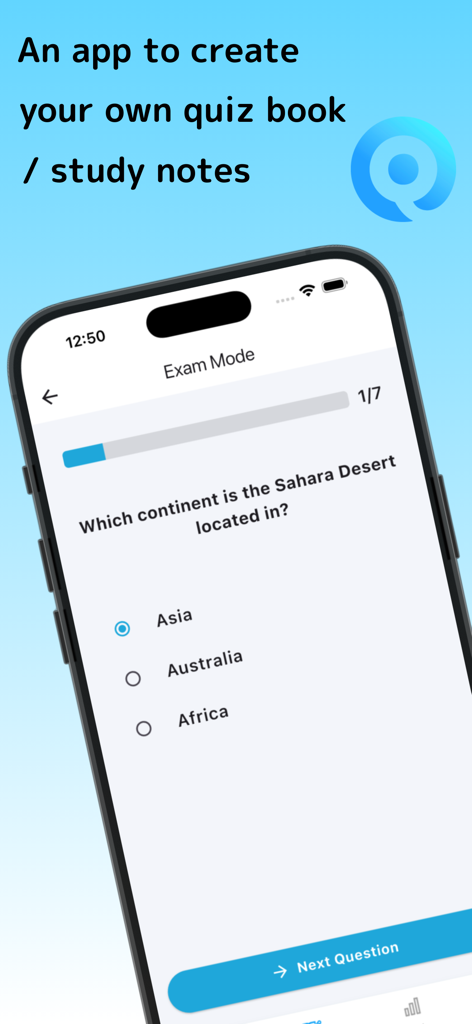
시험 모드에서 객관식 문제가 있는 Q Share 퀴즈 앱을 보여주는 스마트폰 화면
시험 모드에서 객관식 문제가 있는 Q Share 퀴즈 앱을 보여주는 스마트폰 화면

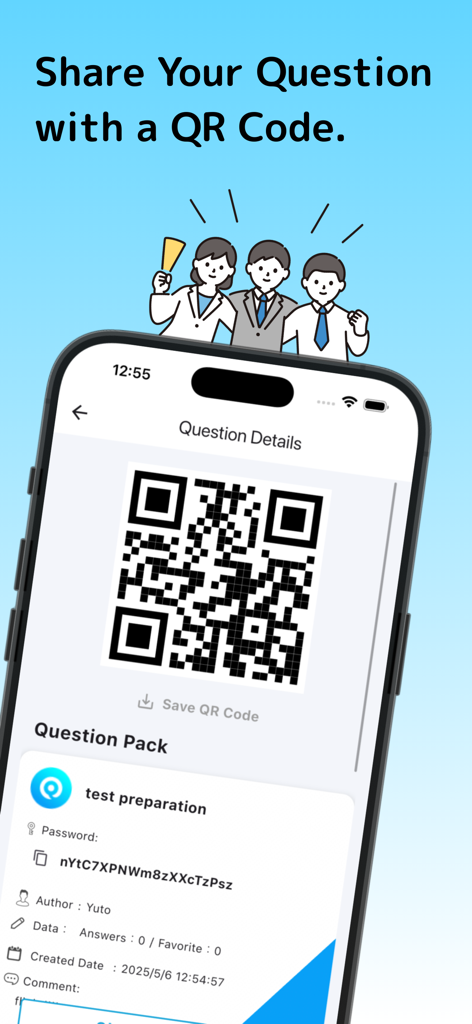
다른 사용자와 테스트 준비 퀴즈 팩을 공유하기 위한 QR 코드를 보여주는 Q Share 앱의 스마트폰 화면
다른 사용자와 테스트 준비 퀴즈 팩을 공유하기 위한 QR 코드를 보여주는 Q Share 앱의 스마트폰 화면

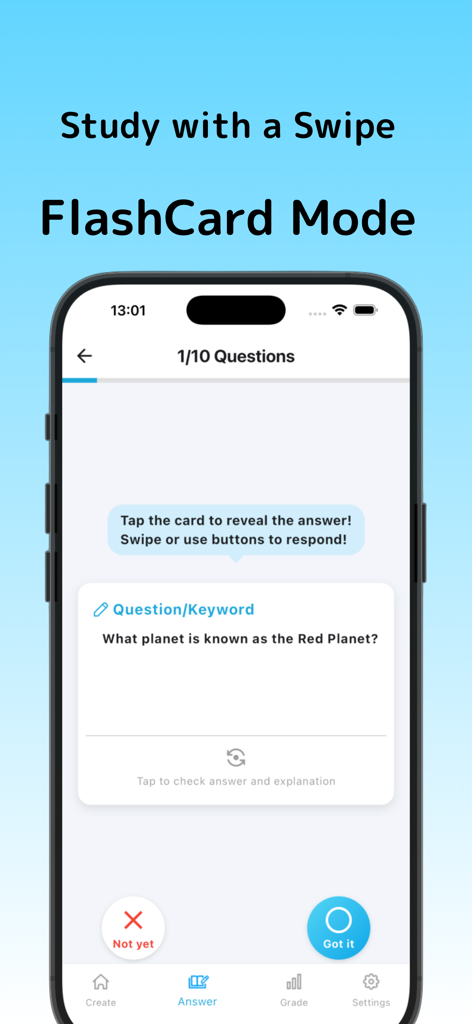
붉은 행성에 대한 질문이 있는 Q Share의 플래시카드 모드를 보여주는 모바일 앱 인터페이스
붉은 행성에 대한 질문이 있는 Q Share의 플래시카드 모드를 보여주는 모바일 앱 인터페이스

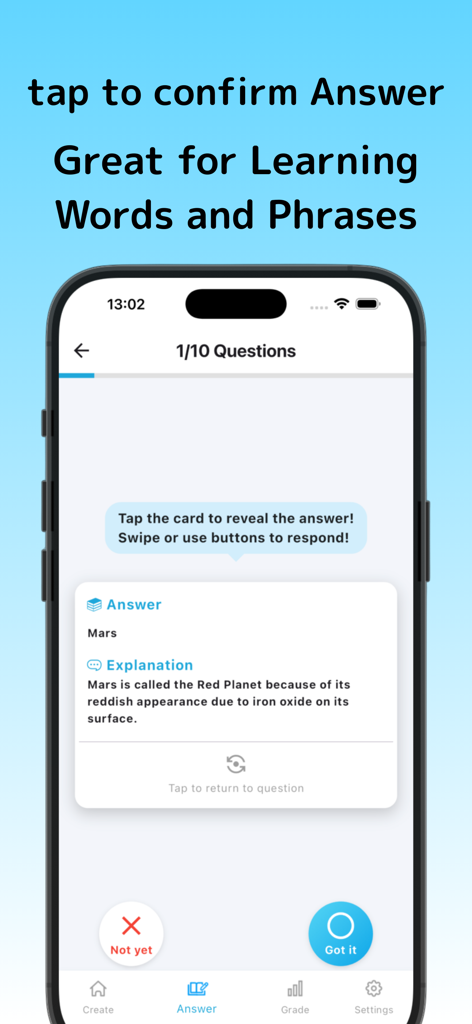
화성에 대한 퀴즈 질문에 대한 자세한 답변과 설명을 보여주는 Q Share 앱의 모바일 화면
화성에 대한 퀴즈 질문에 대한 자세한 답변과 설명을 보여주는 Q Share 앱의 모바일 화면

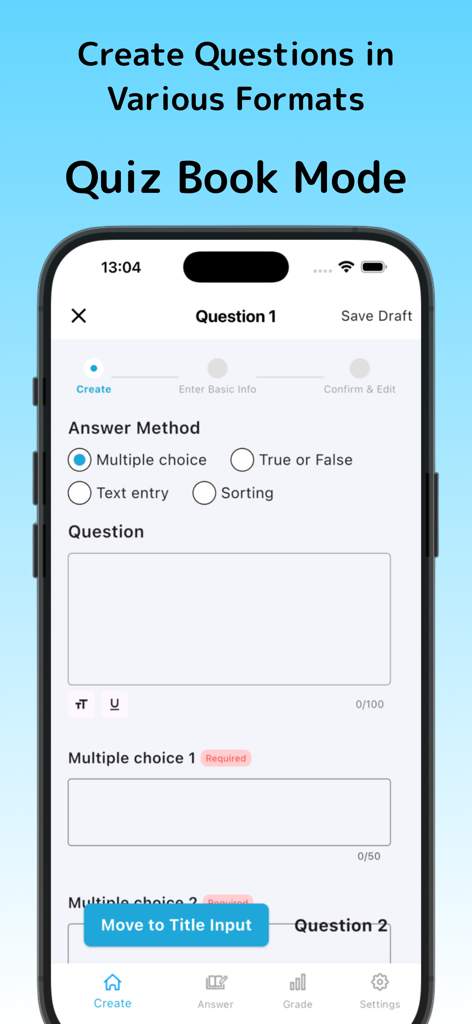
객관식, 참/거짓, 텍스트 입력 및 정렬 옵션을 보여주는 Q Share의 퀴즈 생성 인터페이스
객관식, 참/거짓, 텍스트 입력 및 정렬 옵션을 보여주는 Q Share의 퀴즈 생성 인터페이스

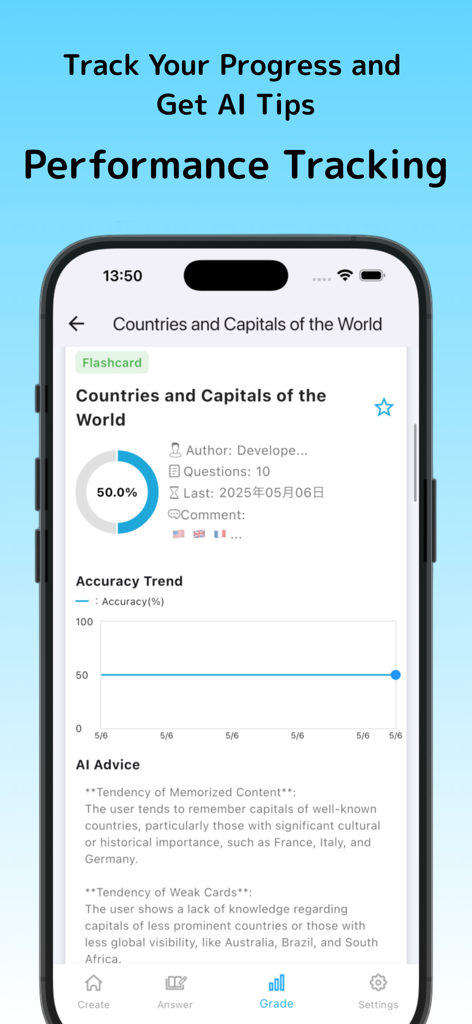
지리 퀴즈의 정확도 추세 및 AI 학습 조언을 보여주는 성능 추적 대시보드
지리 퀴즈의 정확도 추세 및 AI 학습 조언을 보여주는 성능 추적 대시보드

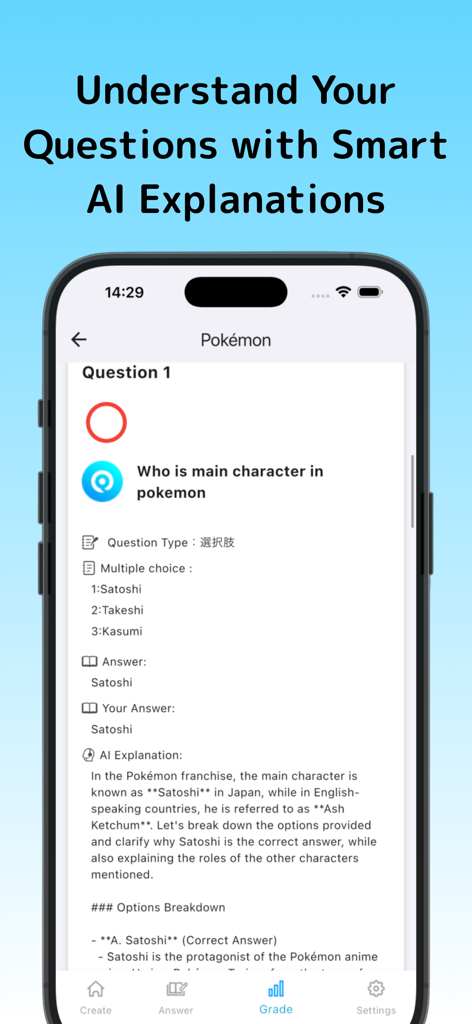
포켓몬에 대한 퀴즈 질문과 AI가 생성한 정답에 대한 자세한 설명을 보여주는 Q Share 앱의 인터페이스
포켓몬에 대한 퀴즈 질문과 AI가 생성한 정답에 대한 자세한 설명을 보여주는 Q Share 앱의 인터페이스

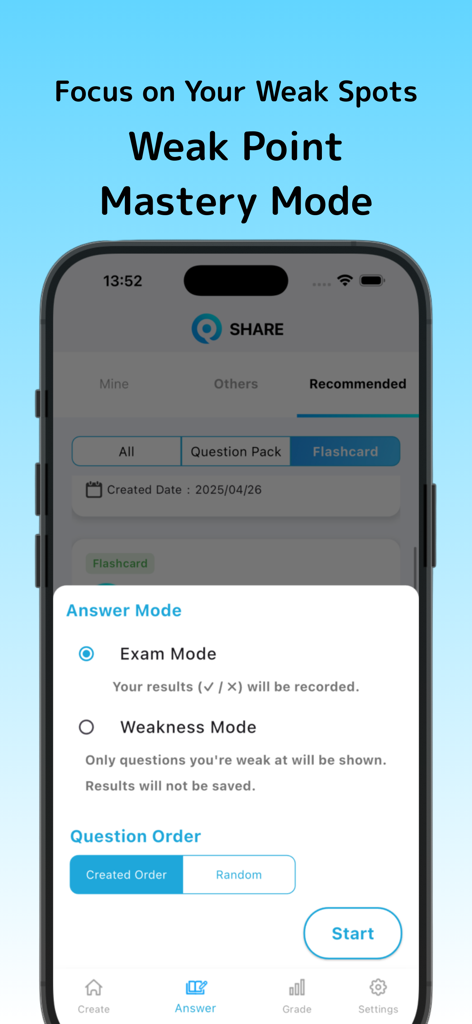
타겟 학습을 위한 시험 모드 및 약점 모드를 포함한 답변 모드 옵션을 보여주는 Q Share 앱의 휴대폰 화면

타겟 학습을 위한 시험 모드 및 약점 모드를 포함한 답변 모드 옵션을 보여주는 Q Share 앱의 휴대폰 화면

커리큘럼을 더 빠르게 마스터하세요

이 앱을 돋보이게 하는 도구, 0 명의 사용자가 선택.

📸

사진-퀴즈 AI 마법

타이핑은 그만, 학습을 시작하세요. 교과서 페이지나 손으로 쓴 노트 사진을 찍으면 AI가 즉시 연습 문제를 생성해 드립니다.

🤝

바이럴 준비 QR 공유

스터디 그룹의 리더가 되세요. 계정 동기화나 복잡한 이메일 링크 없이 QR 코드를 통해 맞춤 퀴즈를 즉시 공유하세요.

🧠

능동적 회상 플래시카드

스마트 플래시카드로 시험을 완벽하게 준비하세요. 스와이프 제스처를 사용하여 아는 것을 추적하고 앱이 가장 약한 주제에 집중하도록 하세요.

앱 소개

에 대해 알아야 할 모든 것 Q Share – Quiz & Sharing App –.

설명

Q-Share is a powerful and easy-to-use quiz and flashcard creation app designed for learners of all levels. Whether you're preparing for exams, studying languages, reviewing facts, or just testing your memory, Q-Share gives you the freedom to make your own study tools. No technical knowledge is required—just open the app, create questions, and start learning right away. The app supports multiple question formats, including multiple-choice, true or false, fill-in-the-blank, ordering, and flashcards. You can add explanations, comments, and even images to each question. This flexibility allows you to study in the way that suits you best. You can create detailed quizzes or simple flashcards, depending on your goals. One of Q-Share’s standout features is AI-powered support. You can take a photo of a textbook or notes, and the app will automatically generate questions based on the image. It can also provide advice and explanations after you complete a quiz, helping you understand your weak areas and learn more effectively. All your content is stored in the cloud, so you can access it from any device. If you switch phones, your questions and results come with you. You can also share your questions with others using QR codes. This is perfect for classroom use, group study, or sharing fun quizzes with friends. In flashcard mode, you swipe or tap to mark whether you’ve memorized the card or not. The app tracks your progress and helps you focus on cards you haven’t remembered yet. It’s ideal for short, focused study sessions throughout the day. You can save your work as drafts, allowing you to build content gradually. Add more questions later, update explanations, or organize your sets into categories. You’re in full control. With premium features, you can create unlimited quizzes and cards, receive more detailed AI feedback, and access advanced study analytics. Q-Share helps you track your learning history, visualize your progress, and improve over time. Whether you’re a student, teacher, or professional, Q-Share adapts to your learning style. It’s perfect for schools, training, test prep, and self-study. Create. Learn. Share. With Q-Share.

최신 버전

7.1

크기

78.2 MB

출시일

2024년 4월 10일

학습의 달인이 될 준비가 되셨나요?

수동 준비에 몇 시간씩 낭비하는 것을 멈추세요. 교과서를 즉각적인 AI 기반 퀴즈로 변환하고 학습 시간을 되찾으세요. 지금 Q-Share를 다운로드하고 어떤 과목이든 마스터하기 시작하세요.

다운로드: App Store

App information, icons, screenshots, and descriptions displayed on this page are sourced from the Apple App Store and are the property of their respective developers. Download estimates and rankings are based on MWM's proprietary models and may not reflect actual figures. This page is provided for informational and analytical purposes only.

Believe this page infringes your intellectual property? File a dispute