Recorder Plus - Audio Editor
다운로드: App Store

이 페이지는 앱이나 개발자의 공식 페이지가 아니며, 정보 제공 및 논평을 목적으로 작성된 독립 편집 간행물입니다. 명시적으로 달리 언급되지 않는 한, 해당 앱이나 개발자는 MWM, Apple, Google Play, 앱 퍼블리셔 또는 앱 개발자와 제휴, 보증, 후원, 승인 또는 공식적으로 연결되어 있지 않으며, 이 페이지의 어떤 내용도 해당 앱이 MWM의 서비스를 사용하여 개발되었음을 의미하지 않습니다. 모든 상표, 로고, 스크린샷 및 기타 콘텐츠는 해당 소유자의 자산입니다.

로고: Recorder Plus - Audio Editor
다운로드: App Store

Recorder Plus - Audio Editor

10년 이상 90만 명 이상의 사용자에게 신뢰받고 있습니다. 무제한 녹음, 고급 편집 도구로 다듬기, 음성을 텍스트로 전사하기—모두 안전한 자동 클라우드 백업으로 가능합니다.

주요 수치

다운로드

911K+

사용자 평점

4.7/5

총 평가 수

12K+

개발사

Turbokey Studio

카테고리

Utilities

지원 언어

11

최신 버전

3.11.25

크기

22.5 MB

출시일

2012년 2월 24일
기능

전문가용 오디오 워크플로우를 위한 고급 도구

전문가 수준의 녹음, AI 기반 전사, 중요한 결과물을 위한 정밀 편집으로 기본 음성 메모를 뛰어넘으세요.

정밀 편집 및 마커

기기에서 직접 오디오를 쉽게 자르고, 복사하고, 붙여넣으세요. 긴 강의나 인터뷰 중에 실시간으로 마커와 메모를 추가하여 주요 통찰력을 강조하세요.

AI 전사 및 효과

음성을 즉시 텍스트로 변환하여 작업 시간을 절약하세요. 전문적인 노이즈 감소, 게인 제어, 템포 조절로 사운드를 다듬으세요.

다음 스크린샷과 설명은 앱의 공식 스토어 목록에서 직접 가져온 것이며 앱 개발자의 자산입니다.

앱 스토어

스크린샷
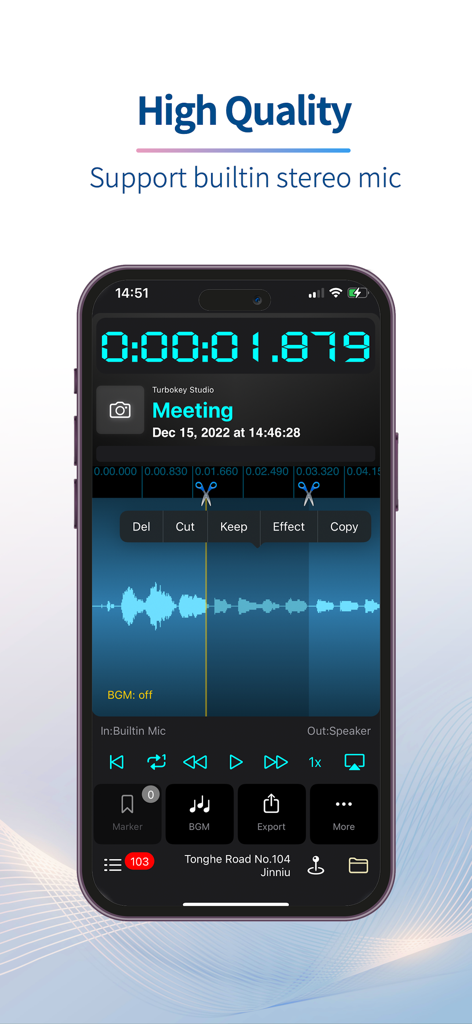
Recorder Plus - Audio Editor - Recorder Plus 앱 스크린샷으로, 녹음된 회의를 위한 잘라내기 및 복사와 같은 오디오 파형 및 편집 도구가 표시됩니다.
Recorder Plus 앱 스크린샷으로, 녹음된 회의를 위한 잘라내기 및 복사와 같은 오디오 파형 및 편집 도구가 표시됩니다.

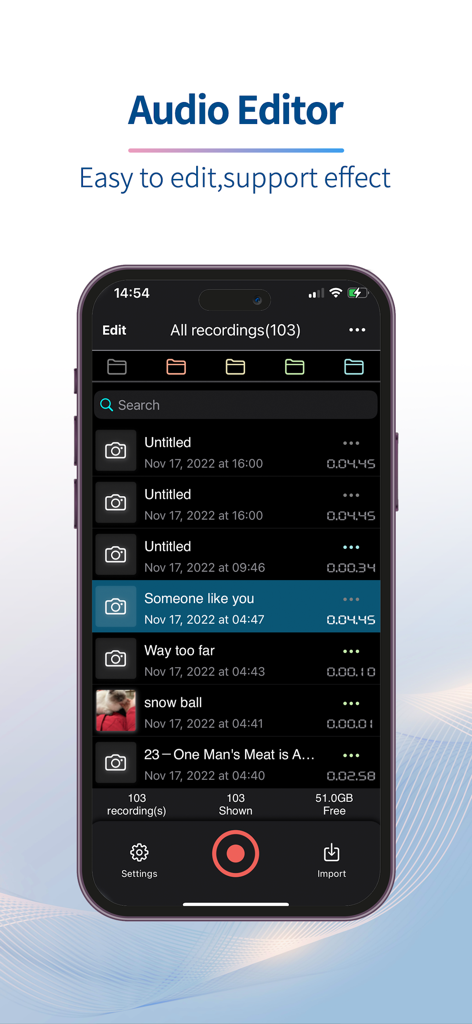
Recorder Plus - Audio Editor - Recorder Plus 오디오 편집기 모바일 앱 인터페이스로, iPhone에 있는 오디오 녹음 목록을 보여줍니다.
Recorder Plus 오디오 편집기 모바일 앱 인터페이스로, iPhone에 있는 오디오 녹음 목록을 보여줍니다.

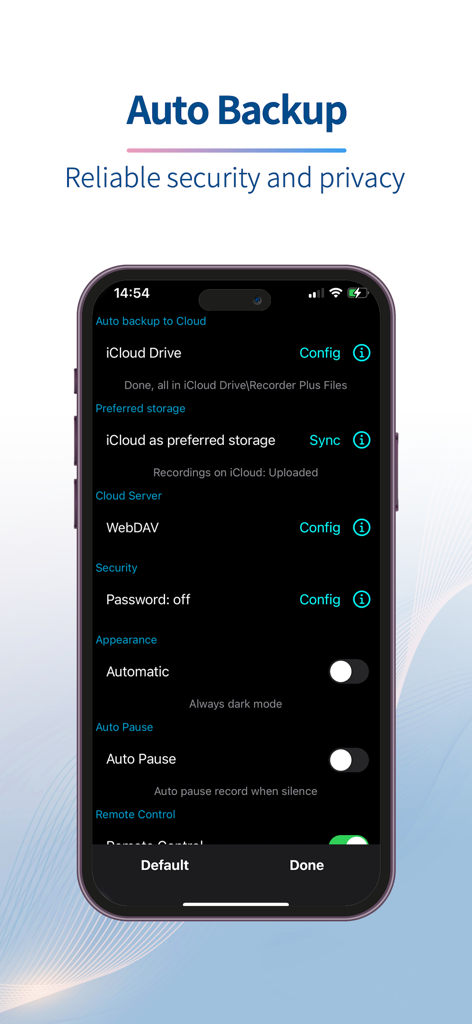
Recorder Plus - Audio Editor - Recorder Plus 앱 인터페이스로, 클라우드 백업 및 보안 구성 옵션을 표시합니다.

Recorder Plus 앱 인터페이스로, 클라우드 백업 및 보안 구성 옵션을 표시합니다.

설명

After nearly ten years of improvement, Recorder Plus has evolved into a simple, easy-to-use and powerful recorder - download now for FREE! Record: There is no limitation on recording time length and times. You can record as long as you want and as many times as you want. It's only up to the storage and battery power of your iPhone/iPad. And you can add markers when recording. Edit: (In-App purchase) Cut, Copy, Paste, even between different recordings. Undo, Redo, and you can get back original file easily. Add markers and notes for the markers. Import audio file from other apps or from Cloud drive. Security: Backup recordings automatically to your iCloud drive or Google Drive. So your recordings will be safe even if your iPhone/iPad get lost. And you can set iCloud as preferred storage in the app, so you can access all recordings on other devices(iPhone/iPad). Share: Share recordings by Email, Messages, other apps, cloud drive(iCloud drive, Dropbox, GoogleDrive, OneDrive, Box...). Also you can download recordings by USB cable or WiFi sync. Effect:(Subscription needed) Tempo, Pitch, Gain, Noise reduction, Background music Yes, this app is not only a recorder, but also a powerful audio editor. Audio synthesis: Text to speech support for 38 countries with 54 voices. Speech to text: Transcribe English speech to text. More information about subscription($4.99/year): 1.Payment will be charged to iTunes Account at confirmation of purchase 2.Subscription automatically renews unless auto-renew is turned off at least 24-hours before the end of the current period. 3.Subscriptions may be managed by the user and auto-renewal may be turned off by going to the user's Account Settings after purchase Terms of use: https://recorderplus.com/termsofuse.html Privacy Policy: https://recorderplus.com/privacy.html

Download

다운로드: App Store

이 페이지는 앱이나 개발자의 공식 페이지가 아니며, 정보 제공 및 논평을 목적으로 작성된 독립 편집 간행물입니다. 명시적으로 달리 언급되지 않는 한, 해당 앱이나 개발자는 MWM, Apple, Google Play, 앱 퍼블리셔 또는 앱 개발자와 제휴, 보증, 후원, 승인 또는 공식적으로 연결되어 있지 않으며, 이 페이지의 어떤 내용도 해당 앱이 MWM의 서비스를 사용하여 개발되었음을 의미하지 않습니다. 모든 상표, 로고, 스크린샷 및 기타 콘텐츠는 해당 소유자의 자산입니다.








