REDCap Mobile App
REDCap Mobile App
다운로드: App Store

이 페이지는 앱이나 개발자의 공식 페이지가 아니며, 정보 제공 및 논평을 목적으로 작성된 독립 편집 간행물입니다. 명시적으로 달리 언급되지 않는 한, 해당 앱이나 개발자는 MWM, Apple, Google Play, 앱 퍼블리셔 또는 앱 개발자와 제휴, 보증, 후원, 승인 또는 공식적으로 연결되어 있지 않으며, 이 페이지의 어떤 내용도 해당 앱이 MWM의 서비스를 사용하여 개발되었음을 의미하지 않습니다. 모든 상표, 로고, 스크린샷 및 기타 콘텐츠는 해당 소유자의 자산입니다.

로고: REDCap Mobile App
다운로드: App Store

REDCap Mobile App

연구원을 위한 필수 모바일 확장 기능으로, 모든 환경에서 고품질 데이터, 멀티미디어, 서명을 캡처하고 기관 REDCap 서버로 원활하게 동기화할 수 있습니다.

주요 수치

다운로드

163K+

사용자 평점

2.8/5

총 평가 수

0

개발사

Vanderbilt University Medical Center

카테고리

Medical

지원 언어

1

최신 버전

5.30.10

크기

25.8 MB

출시일

2015년 4월 15일
기능

어디서든 현장 연구 지원

기관 표준에 맞춰 설계된 안전한 오프라인 우선 모바일 워크플로로 원격 데이터 수집과 REDCap 서버 간의 격차를 해소하세요.

안정적인 오프라인 모드

종이 서식을 제거하세요. 병원 음영 지역이나 원격 현장에서 데이터를 수집하고 인터넷이 가능해지면 서버로 안전하게 동기화하세요.

기관 등급 보안

암호화된 저장소, 다중 사용자 보안 로그인, 기관 REDCap 프로젝트에 직접 동기화되는 전체 감사 로그를 통해 데이터 무결성을 유지하세요.

다음 스크린샷과 설명은 앱의 공식 스토어 목록에서 직접 가져온 것이며 앱 개발자의 자산입니다.

앱 스토어

스크린샷
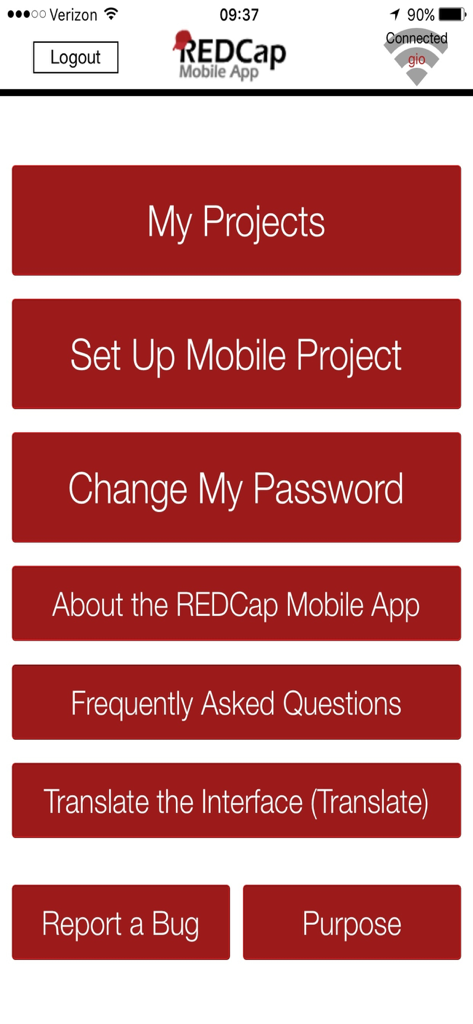
REDCap Mobile App - REDCap 모바일 앱의 메인 메뉴 화면, 임상 연구 프로젝트 관리 옵션을 보여줌
REDCap 모바일 앱의 메인 메뉴 화면, 임상 연구 프로젝트 관리 옵션을 보여줌

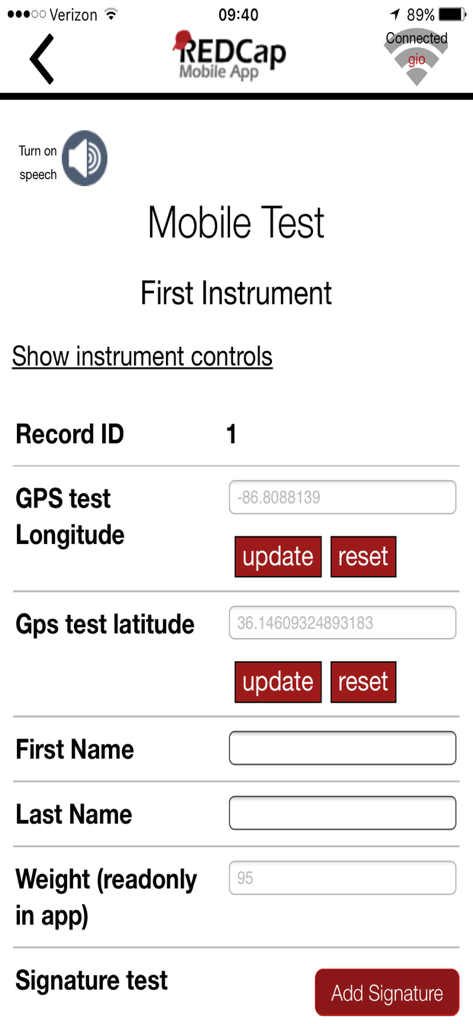
REDCap Mobile App - REDCap 모바일 앱의 스크린샷, GPS 및 서명 필드가 있는 임상 연구 데이터 수집 양식을 보여줌

REDCap 모바일 앱의 스크린샷, GPS 및 서명 필드가 있는 임상 연구 데이터 수집 양식을 보여줌

설명

Collect your REDCap data in an offline environment in the REDCap mobile app, and then sync your data back to your project on a REDCap server. REDCap is a web application, which requires the Internet to be used, but the REDCap mobile app allows for offline data collection for your REDCap projects. You can create your project in REDCap, securely download your project to the REDCap mobile app on your iPad or iPhone, collect data on the device (with or without an Internet connection), and then securely send your data back to your project on a REDCap server. Features • Multi-user interface with secure login that allows each user account to collect data for multiple REDCap projects in the app. • In addition to text and structured data, you can store and transmit photos, videos, signatures, and audio to REDCap. • When collecting data in the app from a participant, for security purposes you can easily restrict access to the rest of the app as they enter their data. • All user activity in the app is logged for audit purposes. The full logging history can be sent to your project on the REDCap server. Who is the REDCap Mobile App for? In order to use the REDCap Mobile App, REDCap must be installed on your institution’s server and must be at version 6.5.0 or higher. The REDCap Mobile App is designed to fit the following scenarios: • A REDCap project that needs data to be collected without any Internet access available. • A REDCap project that needs data to be collected with sporadic Internet access. If mobile devices are desired for use in REDCap data collection, and if WiFi or cellular Internet is amply available, then it is suggested to use the REDCap mobile web view that is available on the REDCap server, which provides real-time access to data. What is REDCap? REDCap is a mature, secure web application for building and managing online surveys and databases, and it is used by hundreds of thousands of users around the world (http://projectredcap.org). Before setting up a REDCap project in the app, you must already have a user account on a REDCap server hosted by a participating REDCap partner institution. If you belong to an institution that does not have REDCap, please visit http://projectredcap.org/participate.php to learn how to get REDCap where you are. What are some limitations of this app? The REDCap mobile app runs in conjunction with the REDCap web application software. You must already have a REDCap user account and project on a REDCap server before being able to download the project to the app. The app cannot function or stand independently without a REDCap server.

Download

다운로드: App Store

이 페이지는 앱이나 개발자의 공식 페이지가 아니며, 정보 제공 및 논평을 목적으로 작성된 독립 편집 간행물입니다. 명시적으로 달리 언급되지 않는 한, 해당 앱이나 개발자는 MWM, Apple, Google Play, 앱 퍼블리셔 또는 앱 개발자와 제휴, 보증, 후원, 승인 또는 공식적으로 연결되어 있지 않으며, 이 페이지의 어떤 내용도 해당 앱이 MWM의 서비스를 사용하여 개발되었음을 의미하지 않습니다. 모든 상표, 로고, 스크린샷 및 기타 콘텐츠는 해당 소유자의 자산입니다.









