
이 페이지는 앱이나 개발자의 공식 페이지가 아니며, 정보 제공 및 논평을 목적으로 작성된 독립 편집 간행물입니다. 명시적으로 달리 언급되지 않는 한, 해당 앱이나 개발자는 MWM, Apple, Google Play, 앱 퍼블리셔 또는 앱 개발자와 제휴, 보증, 후원, 승인 또는 공식적으로 연결되어 있지 않으며, 이 페이지의 어떤 내용도 해당 앱이 MWM의 서비스를 사용하여 개발되었음을 의미하지 않습니다. 모든 상표, 로고, 스크린샷 및 기타 콘텐츠는 해당 소유자의 자산입니다.


다운로드
250k+사용자 평점
총 평가 수
8개발사
카테고리
Entertainment지원 언어
1최신 버전
3.3크기
92.8 MB출시일
2024년 5월 20일스마트 TV 및 스트리밍 장치 제어의 효율성을 높이는 핵심 기능들
'Remote Control - All TV' 주요 기능 분석
스마트폰 리모컨 기능
이 앱은 사용자가 스마트폰을 사용하여 TV를 직접 제어할 수 있도록 하여 별도의 리모컨 없이 메뉴 탐색 및 설정 조정을 가능하게 합니다.
범용 TV 호환성
이 도구는 삼성, Roku, LG 등 다양한 TV 브랜드와 원활하게 연결되어, 사용자가 어떤 TV를 소유하든 제어할 수 있도록 해줍니다.
원터치 전원 제어
사용자는 간단한 탭으로 TV를 켜거나 끌 수 있으며, 여러 리모컨을 찾을 필요 없이 스마트폰 하나로 모든 것을 해결합니다.
스마트 검색 기능
이 앱은 직관적인 검색 기능을 통해 사용자가 좋아하는 프로그램, 영화 및 스포츠 이벤트를 쉽게 찾을 수 있도록 하며, 여러 채널에서 콘텐츠를 발견하는 것을 용이하게 합니다.
정교한 볼륨 조절
이 도구는 사용자가 스마트폰에서 직접 볼륨을 조절할 수 있도록 하여, 영화나 음악 채널의 사운드를 손쉽게 미세 조정할 수 있게 합니다.
간편한 채널 변경
사용자는 실제 리모컨 없이도 채널을 변경할 수 있으며, 전문가처럼 채널을 스크롤하여 쉽게 탐색할 수 있습니다.
자주 묻는 질문
에 대해 알아야 할 모든 것 Remote Control - All TV
What is the Remote Control - All TV app?
The "Remote Control - All TV" app transforms your phone into a smart TV controller. It offers seamless navigation and enhances your entertainment experience, putting you in charge of your TV.
How do I connect the Remote Control - All TV app to my television?
To connect "Remote Control - All TV", ensure your phone and TV are on the same Wi-Fi network. Open the app, tap the icon, and follow on-screen instructions to pair with your television.
Is the Remote Control - All TV app compatible with major TV brands?
Yes, "Remote Control - All TV" offers universal compatibility. It seamlessly connects with a wide range of major TV brands, including Samsung, Roku, LG, Sony, TCL, Aqua WebOS, and Sharp.
Can I customize themes in the Remote Control - All TV app?
Yes, you can customize themes within the "Remote Control - All TV" app. It provides a variety of themes to personalize your remote interface, matching your preferred style.
Does Remote Control - All TV allow changing TV channels?
Yes, the "Remote Control - All TV" app makes channel surfing easy. You can change channels directly from your phone, eliminating the need for a physical remote.
Can the Remote Control - All TV app mirror photos and videos?
Yes, "Remote Control - All TV" supports mirroring. The app enables quick mirroring of photos and videos from your phone to your TV, enhancing your viewing experience.
How can I power my TV on or off with Remote Control - All TV?
Yes, "Remote Control - All TV" offers a One-Touch Power feature. You can turn your TV on or off with a simple tap directly from the app on your phone.
Does Remote Control - All TV provide quick access to streaming services?
Yes, "Remote Control - All TV" provides quick access to streaming services. You can directly launch apps like Netflix, YouTube, Disney+, and Prime Video from the app interface.
다음 스크린샷과 설명은 앱의 공식 스토어 목록에서 직접 가져온 것이며 앱 개발자의 자산입니다.
앱 스토어
스크린샷
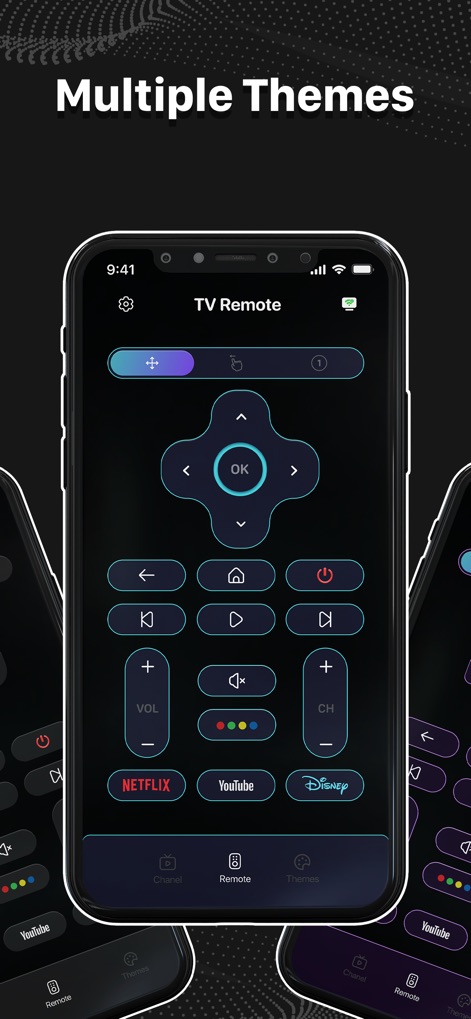
사용자는 앱의 다양한 테마를 탐색할 수 있으며, 특히 어두운 배경과 눈에 띄는 방향 패드 및 스트리밍 서비스 버튼이 시각적으로 돋보입니다.
테마 맞춤 설정

이 앱은 깔끔한 디자인의 리모컨 인터페이스를 제공하며, 중앙의 방향 패드와 하단의 볼륨 및 채널 제어 버튼으로 편리한 조작을 가능하게 합니다.
직관적인 리모컨
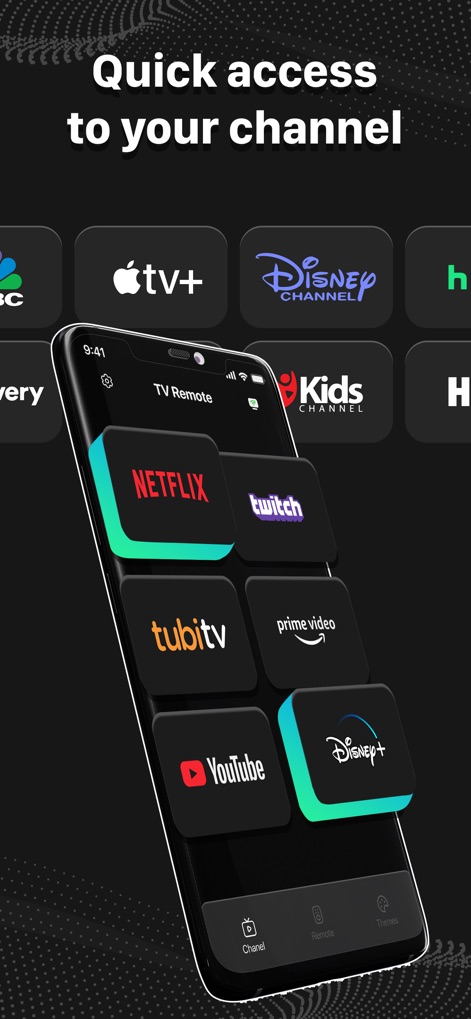
사용자는 이 앱을 통해 넷플릭스 및 애플 TV+와 같은 즐겨 찾는 스트리밍 채널에 빠르게 접근할 수 있으며, 깔끔하게 정렬된 아이콘들로 쉽게 탐색할 수 있습니다.
빠른 채널 접근

이 앱은 삼성 TV 및 Roku TV와 같은 다양한 TV 브랜드를 지원하여 사용자가 자신의 스마트 TV를 손쉽게 선택하고 연결할 수 있습니다.
다양한 기기 호환

사용자는 모바일 화면의 게임을 TV로 미러링하여 큰 화면으로 즐길 수 있으며, 하단의 Wi-Fi 연결 아이콘과 비디오/사진 전송 기능이 명확하게 표시됩니다.
간편한 화면 미러링
설명
Download
비슷한 앱
유사한 기능과 사용자 경험을 가진 앱

The Roku App (Official)
ROKU INC

TV Remote & Smart TV Control
To Ngoc Mai

Universal TV Remote Control .
Apps Venture Inc.

TV Remote, Universal Remote
Hangzhou Yingshitong Technology Co., Ltd.

TV Remote Control “Universo”
Nemo Apps LLC

TV Remote・Universal Control #1
Mihai Turlea

Remote Smart Tv Universal
clement gasner

Remote TV Control TCL Onn App
CEMAL CAGLAR KIRICI

TV Remote Control Universal AI
Anh Ngo
이 페이지는 앱이나 개발자의 공식 페이지가 아니며, 정보 제공 및 논평을 목적으로 작성된 독립 편집 간행물입니다. 명시적으로 달리 언급되지 않는 한, 해당 앱이나 개발자는 MWM, Apple, Google Play, 앱 퍼블리셔 또는 앱 개발자와 제휴, 보증, 후원, 승인 또는 공식적으로 연결되어 있지 않으며, 이 페이지의 어떤 내용도 해당 앱이 MWM의 서비스를 사용하여 개발되었음을 의미하지 않습니다. 모든 상표, 로고, 스크린샷 및 기타 콘텐츠는 해당 소유자의 자산입니다.