Remote, Mouse & Keyboard Pro
다운로드: App Store

이 페이지는 앱이나 개발자의 공식 페이지가 아니며, 정보 제공 및 논평을 목적으로 작성된 독립 편집 간행물입니다. 명시적으로 달리 언급되지 않는 한, 해당 앱이나 개발자는 MWM, Apple, Google Play, 앱 퍼블리셔 또는 앱 개발자와 제휴, 보증, 후원, 승인 또는 공식적으로 연결되어 있지 않으며, 이 페이지의 어떤 내용도 해당 앱이 MWM의 서비스를 사용하여 개발되었음을 의미하지 않습니다. 모든 상표, 로고, 스크린샷 및 기타 콘텐츠는 해당 소유자의 자산입니다.

로고: Remote, Mouse & Keyboard Pro
다운로드: App Store

Remote, Mouse & Keyboard Pro

마찰을 줄이고 작업 공간을 통합하세요. iPhone 또는 iPad를 Mac, Windows, Apple TV를 위한 강력한 무선 마우스, 키보드 및 자동화 허브로 전문적인 정확도로 바꿔보세요.

주요 수치

다운로드

465K+

사용자 평점

4.8/5

총 평가 수

22K+

개발사

Remote Sunrise LTD

카테고리

Utilities

지원 언어

33

최신 버전

2026.1

크기

70.8 MB

출시일

2014년 6월 7일
기능

모든 화면을 완벽하게 제어

디지털 생태계를 통합하고 마찰을 줄이세요. 현대적인 다중 기기 사용자를 위해 설계된 단 하나의 강력한 앱으로 Mac, PC, Apple TV, iPad를 제어하세요.

통합 데스크톱 마스터리

iPhone을 고정밀 무선 마우스 및 키보드로 변환하세요. 컴퓨터 화면을 실시간으로 보고 유려한 터치 제스처로 Mac 또는 Windows를 탐색하세요.

궁극의 엔터테인먼트 허브

잃어버린 리모컨을 더 이상 찾지 마세요. 휴대폰의 익숙한 키보드와 터치패드를 사용하여 Apple TV에서 앱을 쉽게 검색, 실행하고 재생을 제어하세요.

다음 스크린샷과 설명은 앱의 공식 스토어 목록에서 직접 가져온 것이며 앱 개발자의 자산입니다.

앱 스토어

스크린샷
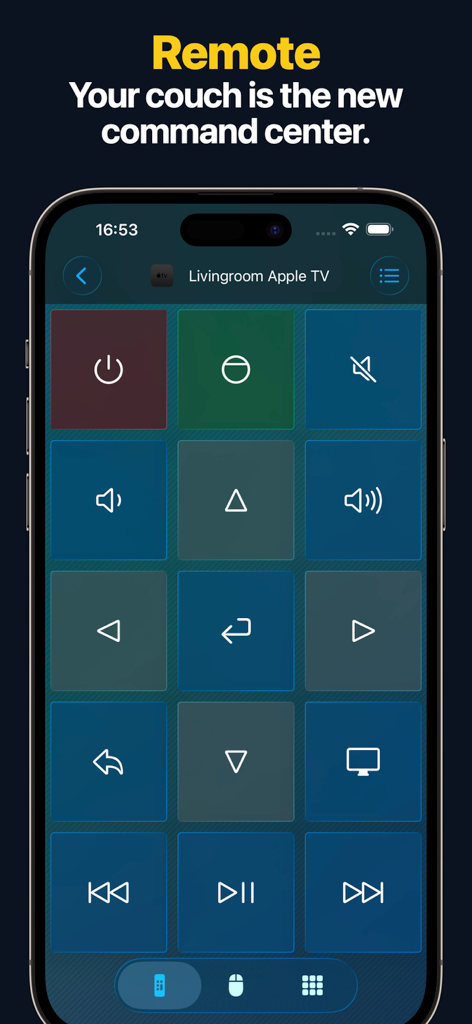
Remote, Mouse & Keyboard Pro - iPhone 화면에 내비게이션 및 미디어 제어 버튼 그리드가 있는 Apple TV용 리모컨 인터페이스가 표시됩니다.
iPhone 화면에 내비게이션 및 미디어 제어 버튼 그리드가 있는 Apple TV용 리모컨 인터페이스가 표시됩니다.

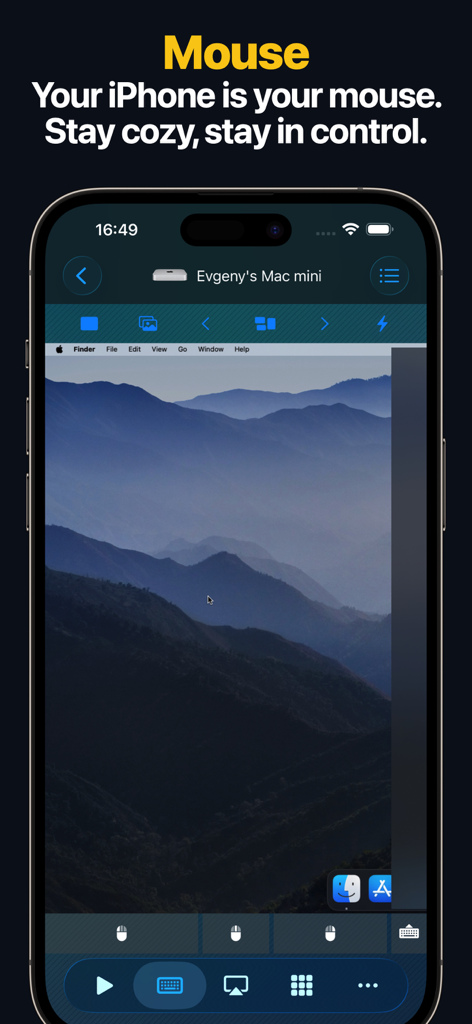
Remote, Mouse & Keyboard Pro - iPhone 화면에 원격 마우스 및 트랙패드 제어로 사용되는 Mac 데스크톱이 표시됩니다.
iPhone 화면에 원격 마우스 및 트랙패드 제어로 사용되는 Mac 데스크톱이 표시됩니다.

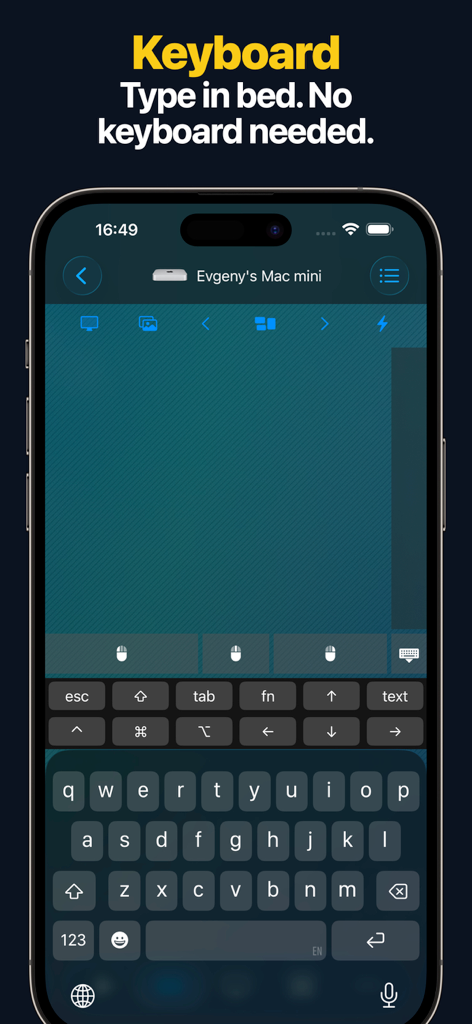
Remote, Mouse & Keyboard Pro - 무선으로 Mac mini에 입력하는 데 사용되는 iPhone의 원격 키보드 인터페이스
무선으로 Mac mini에 입력하는 데 사용되는 iPhone의 원격 키보드 인터페이스

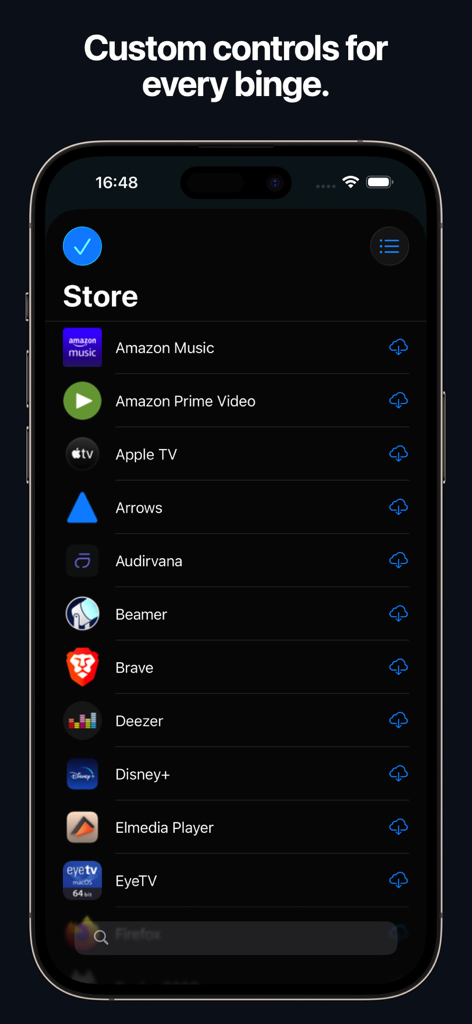
Remote, Mouse & Keyboard Pro - 리모컨 애플리케이션에서 스트리밍 앱용 사용자 지정 제어 저장소를 보여주는 스마트폰 화면
리모컨 애플리케이션에서 스트리밍 앱용 사용자 지정 제어 저장소를 보여주는 스마트폰 화면

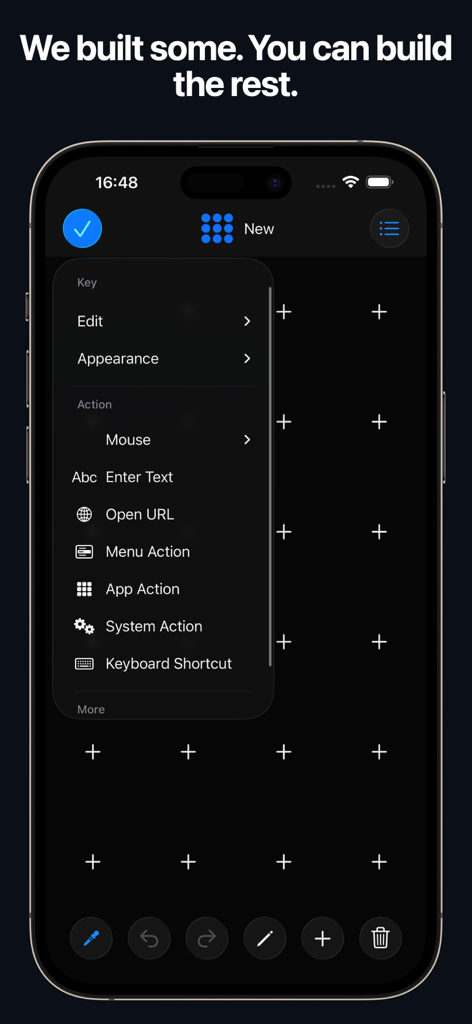
Remote, Mouse & Keyboard Pro - Remote Mouse and Keyboard Pro 앱 인터페이스에서 동작 및 단축키로 사용자 지정 제어판을 만드는 방법 표시
Remote Mouse and Keyboard Pro 앱 인터페이스에서 동작 및 단축키로 사용자 지정 제어판을 만드는 방법 표시

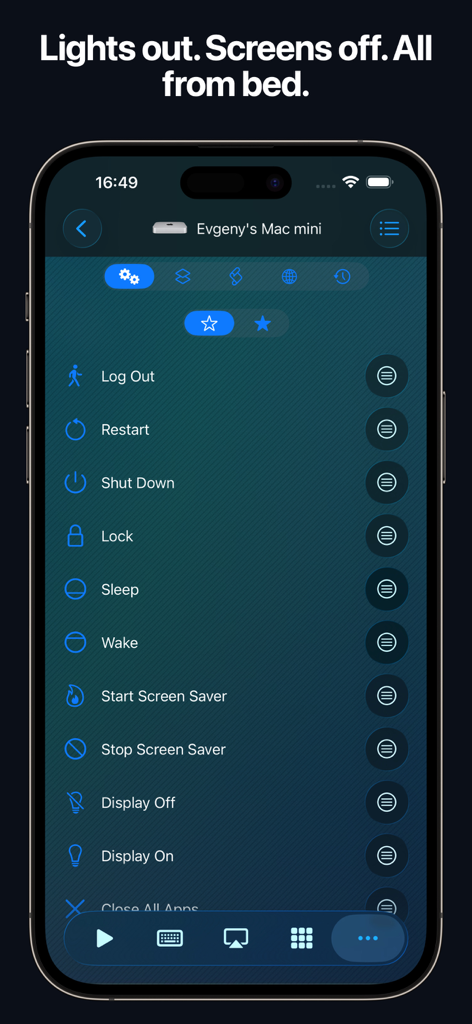
Remote, Mouse & Keyboard Pro - iPhone 인터페이스에 Mac의 종료 및 절전과 같은 원격 시스템 제어 옵션 표시
iPhone 인터페이스에 Mac의 종료 및 절전과 같은 원격 시스템 제어 옵션 표시

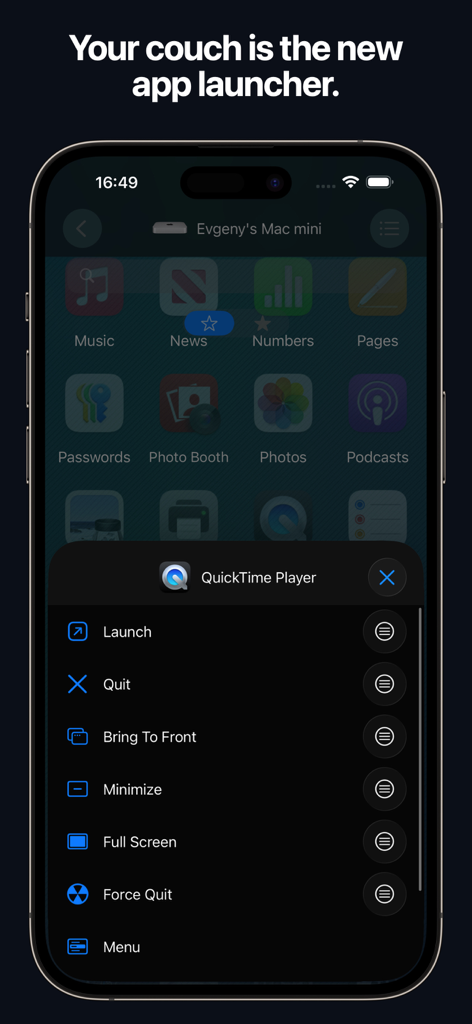
Remote, Mouse & Keyboard Pro - Mac의 QuickTime Player를 제어하는 iPhone의 원격 앱 실행기.
Mac의 QuickTime Player를 제어하는 iPhone의 원격 앱 실행기.

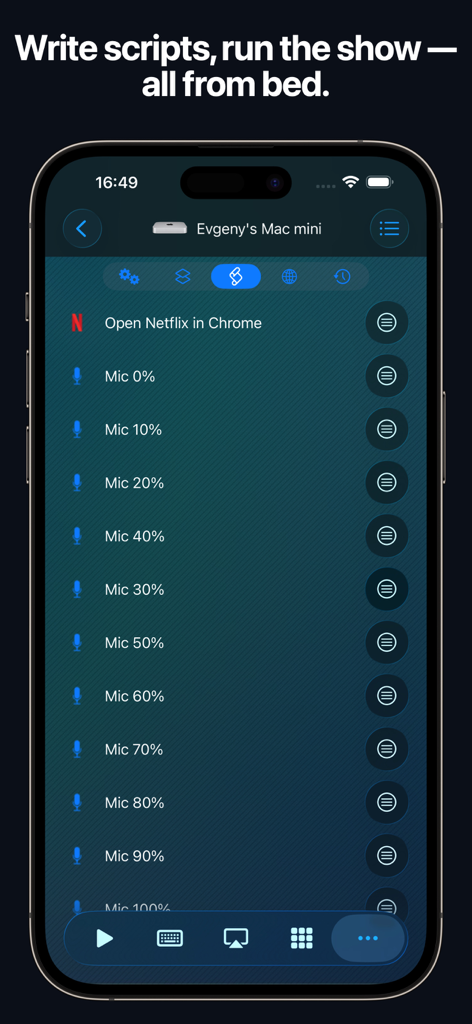
Remote, Mouse & Keyboard Pro - iPhone의 Remote Mouse and Keyboard 앱 인터페이스에 자동화 스크립트 및 Mac 제어 표시
iPhone의 Remote Mouse and Keyboard 앱 인터페이스에 자동화 스크립트 및 Mac 제어 표시

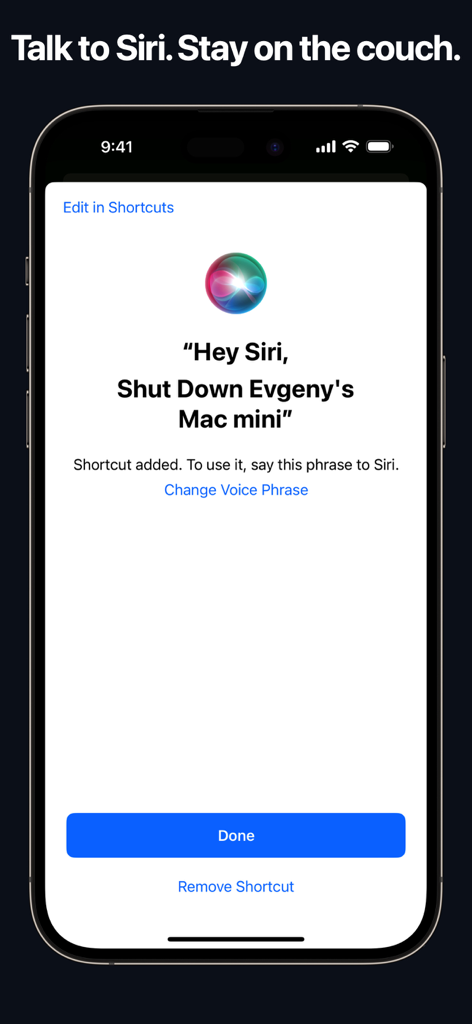
Remote, Mouse & Keyboard Pro - Mac을 원격으로 종료하는 Siri 음성 단축키를 보여주는 iPhone 화면

Mac을 원격으로 종료하는 Siri 음성 단축키를 보여주는 iPhone 화면

설명

# REMOTE, MOUSE & KEYBOARD — YOUR ALL-IN-ONE CONTROL CENTER Turn your iPhone or iPad into a universal remote, wireless mouse, keyboard, and automation hub — all in one powerful app. With Remote, Mouse & Keyboard, you can control your Apple TV, Mac, Windows PC, or even another iPad seamlessly over Wi-Fi or Bluetooth. Whether you’re streaming, presenting, or working remotely — take full control of your digital world. # APPLE TV REMOTE — SIMPLE AND INTUITIVE No more lost remotes or endless scrolling. Connect via Wi-Fi and take charge of your Apple TV with ease. - Works with all Apple TV models - Control volume, playback, and media functions - Navigate with a smooth touchpad - Type comfortably with the built-in keyboard - Launch apps instantly from your device (Older Apple TV models such as Gen 1–3 require one-time PIN entry using a physical remote.) Your iPhone becomes the most advanced Apple TV remote ever. # COMPUTER CONTROL — MAC & WINDOWS Take full command of your computer — Mac or Windows — directly from your iPhone or iPad. Designed for productivity, comfort, and speed. Remote Control & Media: - Adjust volume, playback, and tracks - Use pre-made control panels for popular apps and websites - Create custom control panels for any software Mouse & Keyboard: - Turn your device into a wireless mouse and keyboard - View your computer screen live on your phone or tablet - Capture screenshots remotely - Use gestures like scroll and zoom Apps & Automation: - Launch or quit apps, access menus, and trigger shortcuts - Integrate Siri Shortcuts and Timers - Perform system actions — sleep, restart, logout, and more - Create custom automation scripts - Open websites in your preferred browser - Manage all scheduled actions in one place Requirements: - macOS 10.13 or newer or Windows 7 or newer - Free helper app download: https://rs.ltd/get Your all-in-one remote desktop and input tool — secure, fast, and intuitive. # IPAD CONTROL — DUAL-DEVICE BRILLIANCE Use your iPhone to control another iPad via Bluetooth. Perfect for multitasking, streaming, or creative setups. - Adjust volume and playback - Type and navigate using keyboard and touchpad Your iPhone becomes the perfect companion for your iPad. # WHY YOU’LL LOVE IT - All-in-one app for Apple TV, Mac, Windows, and iPad - Customizable control panels and shortcuts - Live screen view for real-time interaction - Siri & Shortcuts integration - Timer automation for smart workflows - Secure Wi-Fi and Bluetooth connections - Free companion helper app for computers - Clean, intuitive iOS design # SYSTEM REQUIREMENTS - Apple TV: All models supported - Mac: macOS 10.13 or later - Windows: Windows 7 or later - iPad: Bluetooth connection supported - Helper app download: https://rs.ltd/get # THE FUTURE OF CONTROL Stop juggling remotes and keyboards — unify them. From managing your Mac or PC to pausing your Apple TV or typing on your iPad, Remote, Mouse & Keyboard makes control effortless. Smart. Seamless. Powerful. Take control — with Remote, Mouse & Keyboard.

Download

다운로드: App Store

이 페이지는 앱이나 개발자의 공식 페이지가 아니며, 정보 제공 및 논평을 목적으로 작성된 독립 편집 간행물입니다. 명시적으로 달리 언급되지 않는 한, 해당 앱이나 개발자는 MWM, Apple, Google Play, 앱 퍼블리셔 또는 앱 개발자와 제휴, 보증, 후원, 승인 또는 공식적으로 연결되어 있지 않으며, 이 페이지의 어떤 내용도 해당 앱이 MWM의 서비스를 사용하여 개발되었음을 의미하지 않습니다. 모든 상표, 로고, 스크린샷 및 기타 콘텐츠는 해당 소유자의 자산입니다.








