
이 페이지는 앱이나 개발자의 공식 페이지가 아니며, 정보 제공 및 논평을 목적으로 작성된 독립 편집 간행물입니다. 명시적으로 달리 언급되지 않는 한, 해당 앱이나 개발자는 MWM, Apple, Google Play, 앱 퍼블리셔 또는 앱 개발자와 제휴, 보증, 후원, 승인 또는 공식적으로 연결되어 있지 않으며, 이 페이지의 어떤 내용도 해당 앱이 MWM의 서비스를 사용하여 개발되었음을 의미하지 않습니다. 모든 상표, 로고, 스크린샷 및 기타 콘텐츠는 해당 소유자의 자산입니다.

Rokie - Remote for Roku Player
물리 리모컨의 허약한 제약은 이제 끝이다. 손 안에서 Roku를 완전히 지배하는 시대가 도래했다.
다운로드
12.5M+사용자 평점
총 평가 수
738.4K개발사
카테고리
Utilities지원 언어
5최신 버전
1.7.11크기
78.3 MB출시일
2015년 7월 24일Rokie - Roku 플레이어 원격 제어 앱 분석
iOS 사용자를 위한 Roku 스트리밍 경험 최적화
자동 장치 감지
이 앱은 사용자가 수동 설정 없이 Wi-Fi 네트워크에서 Roku 기기를 자동으로 찾아 연결할 수 있게 하여 초기 설정의 번거로움을 줄입니다.
직관적인 터치패드 제어
이 도구는 대형 터치패드를 제공하여 사용자가 Roku 기기의 메뉴와 콘텐츠를 쉽고 부드럽게 탐색할 수 있도록 돕습니다.
앱 내 채널 직접 실행
사용자는 이 앱을 통해 Roku 채널을 앱 내에서 직접 실행할 수 있어 원하는 콘텐츠에 빠르게 접근할 수 있습니다.
광범위한 Roku 기기 호환성
이 앱은 Roku 1, 2, 3, Streaming Stick, Express, Premiere, Ultra 및 Roku TV를 포함한 모든 Roku 모델과 호환되어 광범위한 사용 환경을 지원합니다.
자주 묻는 질문
에 대해 알아야 할 모든 것 Rokie - Remote for Roku Player
What is Rokie - Remote for Roku Player?
Rokie is a free, unofficial remote control application for Roku Streaming Player and Roku TV™ on iPhone and iPad. It offers a sleek design and an intuitive interface to control your Roku device.
Is the Rokie app free to use?
Yes, Rokie is a free remote control application for Roku Streaming Player and Roku TV on iOS devices. It allows users to control their Roku devices without cost.
How do I connect the Rokie app to my Roku device?
To connect the Rokie app, ensure your iOS device and Roku are on the same Wi-Fi network. Rokie automatically detects Roku devices on the network for a simple setup.
Is Rokie an official Roku Inc. product?
No, Rokie is not an official product of Roku, Inc. Kraftwerk 9, LTD is not affiliated with Roku, Inc., as stated in the application's disclaimer.
Which Roku models are compatible with the Rokie app?
Rokie is compatible with all Roku models. This includes Roku 1, 2, 3, Streaming Stick®, Express, Express+, Express 4K+, Premiere, Premiere+, Ultra, and Roku TV.
Can I launch Roku channels directly from the Rokie app?
Yes, the Rokie app allows you to launch Roku channels directly. This feature simplifies access to your favorite streaming services.
Does Rokie offer a touchpad for navigation?
Yes, Rokie features a large touchpad for easy menu and content navigation on your Roku device. This enhances the user experience.
Can I use my iOS keyboard for text input with the Rokie app?
Yes, you can use your iOS keyboard for text input with the Rokie app. However, some apps like YouTube and Hulu+ use their own on-screen keyboards and do not support this feature.
Does Rokie provide quick access to streaming services?
Yes, Rokie offers a quick access widget on iOS. This allows users to quickly open popular streaming services like Netflix, YouTube, and Prime Video directly from their device's home screen.
다음 스크린샷과 설명은 앱의 공식 스토어 목록에서 직접 가져온 것이며 앱 개발자의 자산입니다.
앱 스토어
스크린샷
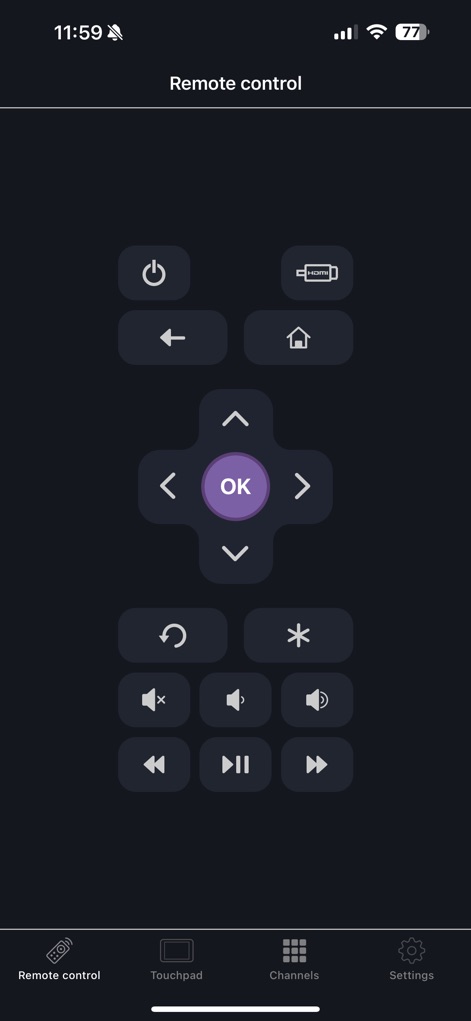
완벽한 리모컨 제어
이 화면은 Roku 기기 제어를 위한 표준 리모컨 인터페이스를 보여줍니다. 사용자는 직관적인 방향 패드와 편리한 볼륨 조절 버튼을 활용하여 미디어를 조작할 수 있습니다.
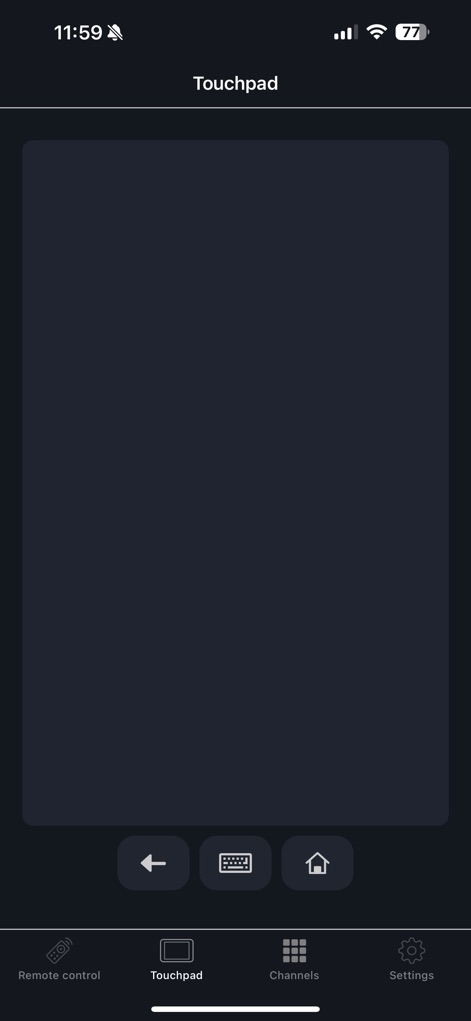
부드러운 터치패드 경험
이 화면은 Roku 기기 탐색을 위한 깨끗하고 넓은 터치패드 영역을 제시합니다. 하단에는 뒤로 가기 버튼과 홈 버튼이 있어 사용자의 빠른 조작을 지원합니다.
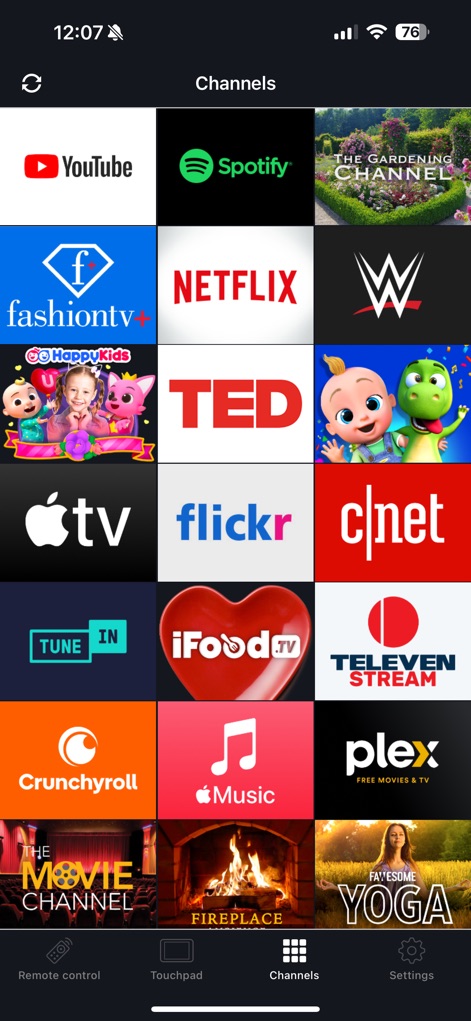
즐겨찾는 채널 한눈에
이 스크린샷은 수많은 스트리밍 채널을 시각적으로 정리된 그리드 형태로 보여줍니다. 사용자는 YouTube 로고와 Netflix 로고를 포함한 다양한 서비스에 즉시 접근할 수 있습니다.
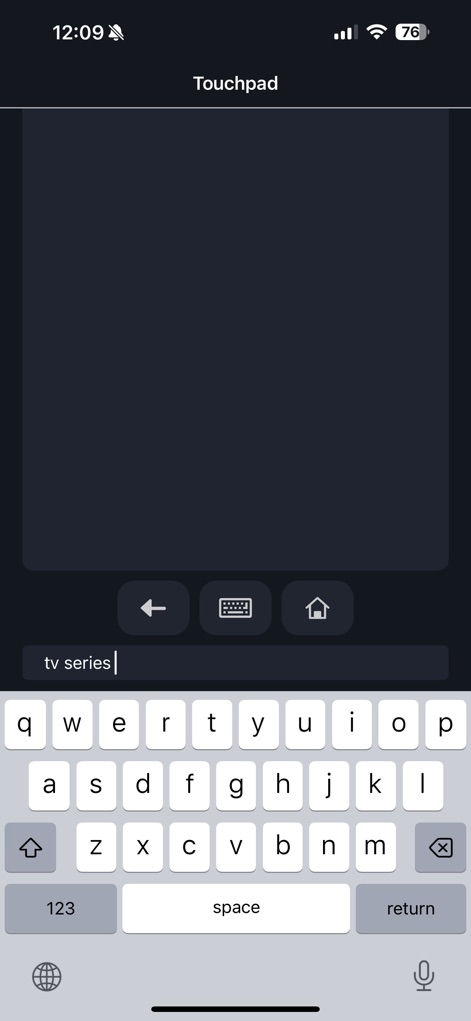
간편한 텍스트 입력
이 화면은 Roku 기기에서 검색 또는 입력에 사용되는 iOS 키보드를 시각화합니다. 사용자는 'tv series'가 입력된 텍스트 필드와 전체 화면 키보드를 통해 쉽게 내용을 입력할 수 있습니다.
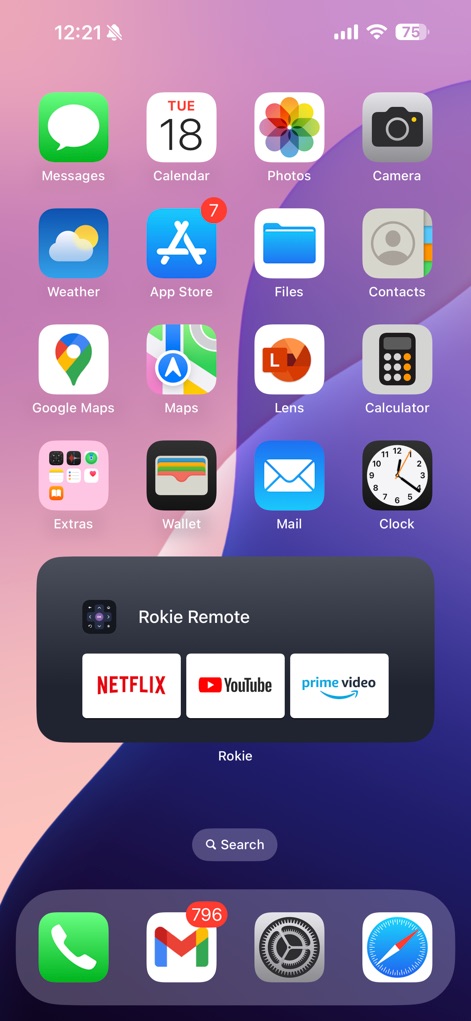
위젯으로 빠른 실행
이 이미지는 iOS 홈 화면에서 Rokie 앱 위젯을 통해 Roku 제어 기능에 빠르게 접근하는 모습을 담고 있습니다. 사용자는 위젯 내의 Netflix 아이콘과 YouTube 아이콘을 통해 즐겨찾는 채널을 바로 실행할 수 있습니다.
설명
Download
비슷한 앱
유사한 기능과 사용자 경험을 가진 앱
이 페이지는 앱이나 개발자의 공식 페이지가 아니며, 정보 제공 및 논평을 목적으로 작성된 독립 편집 간행물입니다. 명시적으로 달리 언급되지 않는 한, 해당 앱이나 개발자는 MWM, Apple, Google Play, 앱 퍼블리셔 또는 앱 개발자와 제휴, 보증, 후원, 승인 또는 공식적으로 연결되어 있지 않으며, 이 페이지의 어떤 내용도 해당 앱이 MWM의 서비스를 사용하여 개발되었음을 의미하지 않습니다. 모든 상표, 로고, 스크린샷 및 기타 콘텐츠는 해당 소유자의 자산입니다.