Route Optimizer - Easy Way
다운로드: App Store

이 페이지는 앱이나 개발자의 공식 페이지가 아니며, 정보 제공 및 논평을 목적으로 작성된 독립 편집 간행물입니다. 명시적으로 달리 언급되지 않는 한, 해당 앱이나 개발자는 MWM, Apple, Google Play, 앱 퍼블리셔 또는 앱 개발자와 제휴, 보증, 후원, 승인 또는 공식적으로 연결되어 있지 않으며, 이 페이지의 어떤 내용도 해당 앱이 MWM의 서비스를 사용하여 개발되었음을 의미하지 않습니다. 모든 상표, 로고, 스크린샷 및 기타 콘텐츠는 해당 소유자의 자산입니다.


로고: Route Optimizer - Easy Way
다운로드: App Store

Route Optimizer - Easy Way

효율성을 요구하는 현장 영업 담당자를 위해 제작된 직관적인 개인 CRM입니다. 일상적인 경로를 최적화하고, 이동 중에 새로운 잠재 고객을 찾고, 복잡한 기업용 소프트웨어에서 시간을 되찾으세요.

주요 수치

다운로드

1K+

사용자 평점

5.0/5

총 평가 수

0

개발사

Starship Coder

카테고리

Navigation

지원 언어

2

최신 버전

4.8.8

크기

117.8 MB

출시일

2024년 5월 22일
기능

영업 성과 극대화, 운전 시간 최소화

시간과 결과를 소중히 여기는 현장 영업 전문가를 위해 제작된 모바일 우선 개인 CRM 및 지능형 경로 플래너입니다.

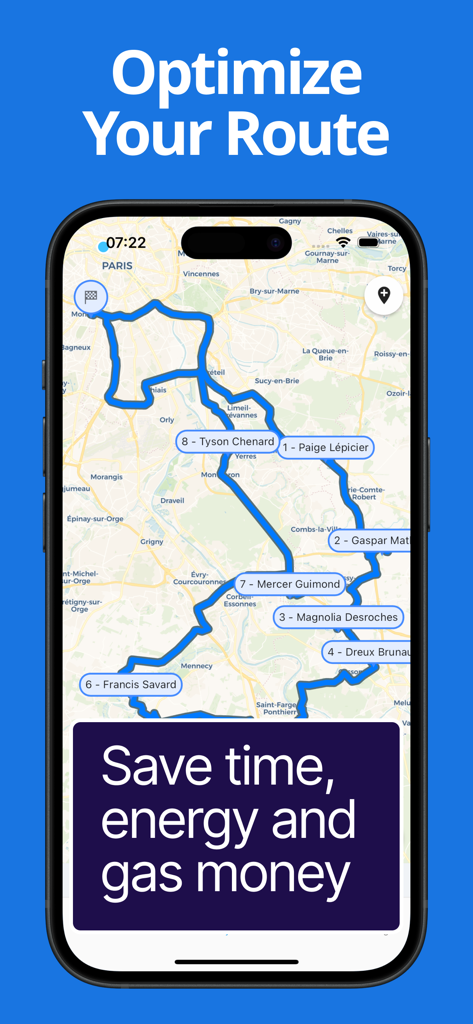
스마트 경로 최적화

수 시간의 수동 계획을 몇 초로 단축하세요. 알고리즘이 가장 빠른 여정을 계산하여 더 많은 약속을 잡고 '차량 이동 시간'을 되찾을 수 있습니다.

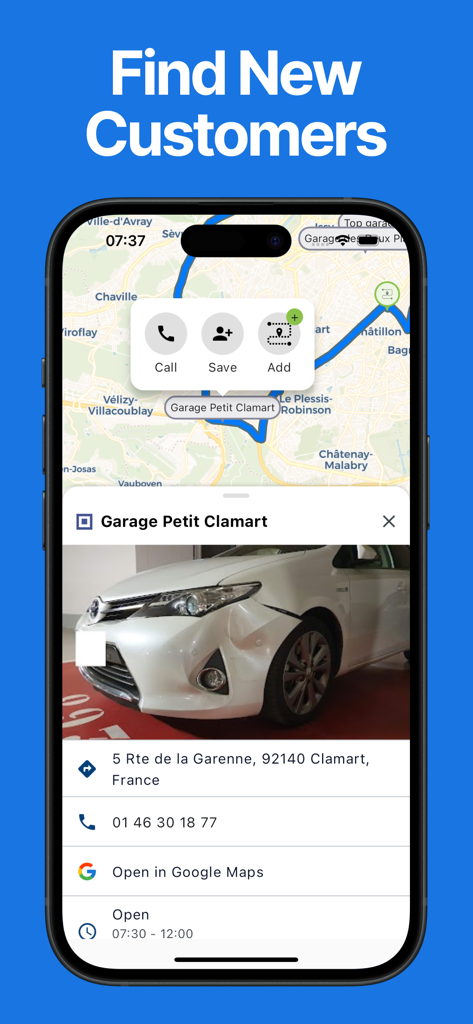
즉각적인 잠재 고객 발굴

회의 사이에 '시간 낭비'가 없도록 하세요. 주변의 새로운 잠재 고객을 즉시 찾아 경로에 추가하여 영업 지역 커버리지를 극대화하세요.

다음 스크린샷과 설명은 앱의 공식 스토어 목록에서 직접 가져온 것이며 앱 개발자의 자산입니다.

앱 스토어

스크린샷

Route Optimizer - Easy Way - 스마트폰으로 최적화된 경로 지도를 보여주는 행복한 현장 영업 담당자
스마트폰으로 최적화된 경로 지도를 보여주는 행복한 현장 영업 담당자

Route Optimizer - Easy Way - 번호가 매겨진 정류장과 고객 이름이 있는 최적화된 영업 경로 지도를 표시하는 iPhone 화면
번호가 매겨진 정류장과 고객 이름이 있는 최적화된 영업 경로 지도를 표시하는 iPhone 화면

Route Optimizer - Easy Way - 전화를 걸거나 경로에 추가하는 옵션과 함께 지도에 비즈니스 프로필을 표시하는 Easy Way 앱의 인터페이스
전화를 걸거나 경로에 추가하는 옵션과 함께 지도에 비즈니스 프로필을 표시하는 Easy Way 앱의 인터페이스

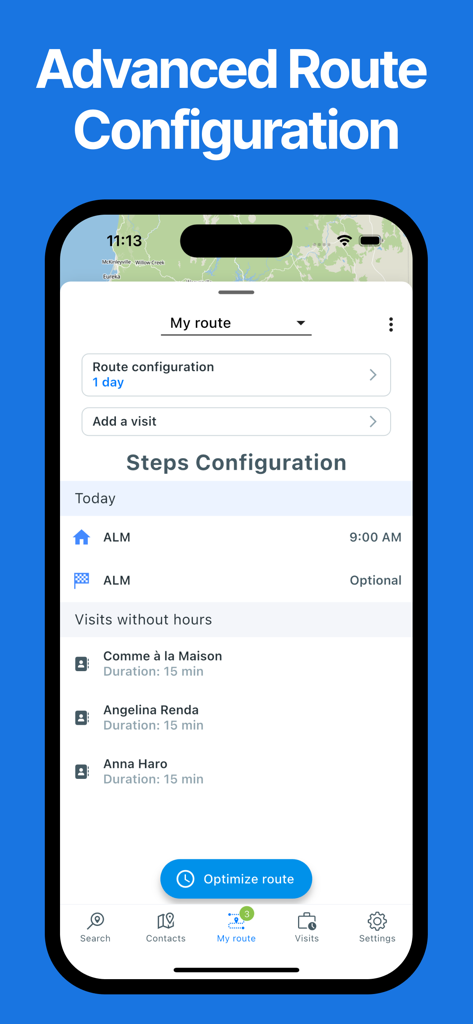
Route Optimizer - Easy Way - 방문 목록과 경로 최적화 버튼을 보여주는 Easy Way 앱의 고급 경로 구성 화면
방문 목록과 경로 최적화 버튼을 보여주는 Easy Way 앱의 고급 경로 구성 화면

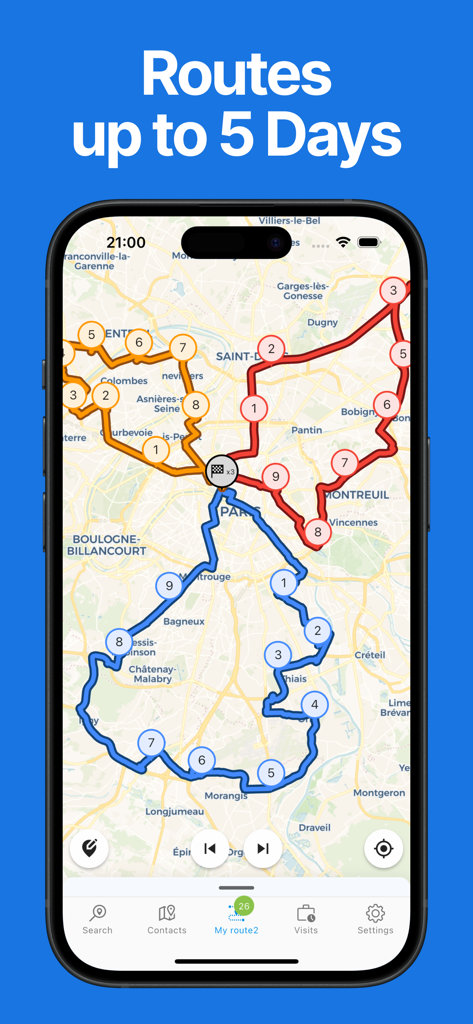
Route Optimizer - Easy Way - 5일 일정의 지도에 여러 색상의 배송 경로와 번호가 매겨진 정류장을 보여주는 Route Optimizer 앱
5일 일정의 지도에 여러 색상의 배송 경로와 번호가 매겨진 정류장을 보여주는 Route Optimizer 앱

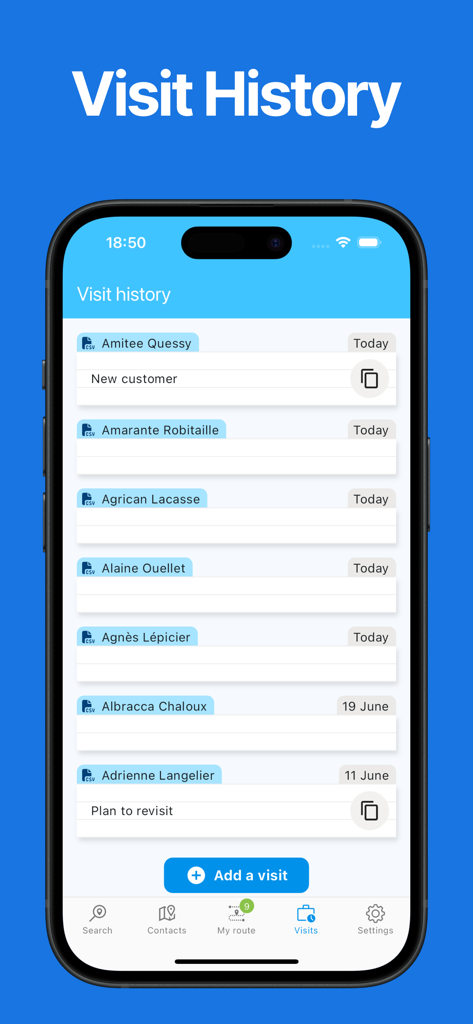
Route Optimizer - Easy Way - 고객 이름과 날짜 로그를 보여주는 Route Optimizer 앱 방문 기록 화면
고객 이름과 날짜 로그를 보여주는 Route Optimizer 앱 방문 기록 화면

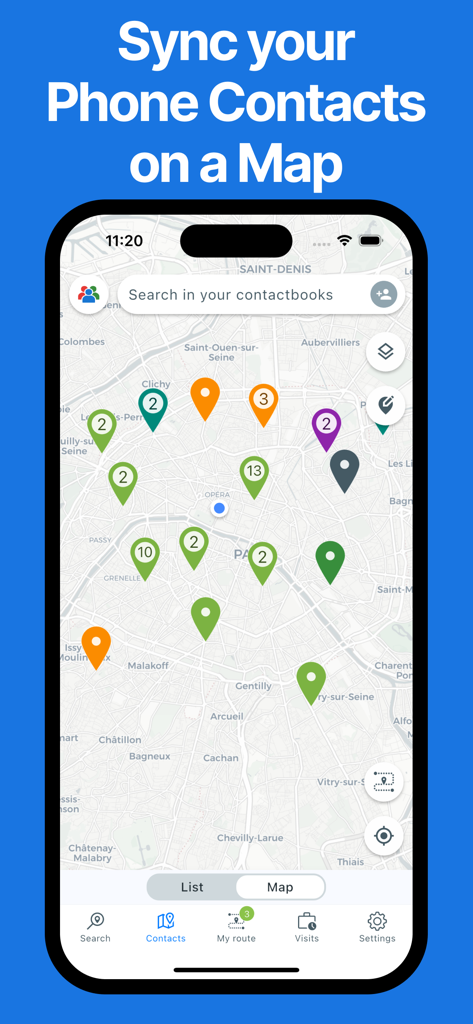
Route Optimizer - Easy Way - 도시 지도에 색깔 핀으로 표시된 전화 연락처를 보여주는 모바일 앱 인터페이스

도시 지도에 색깔 핀으로 표시된 전화 연락처를 보여주는 모바일 앱 인터페이스

설명

EasyWay is the app designed specifically for Field Sales Reps! Natacha V. - Sales Director “This app is a game-changer for preparing my routes. It saves me so much time and allows me to easily keep track of my appointments, including summaries with the date, time spent, and future client needs. As a Sales Director, I’ve recommended it to my team, and they’ve all appreciated the efficiency and time savings it offers.” Ben S. - Business Engineer “Harold has developed an outstanding app that simplifies route planning and provides a clear overview of visit statuses across the sales territory. It’s a real time-saver for my daily activities! The app is intuitive, user-friendly, and easy to get started with. On top of that, Harold is incredibly responsive when it comes to implementing new features to enhance the experience. I strongly recommend this app to all field sales reps—try it, and you’ll adopt it in no time!” Its purpose: to save you time so you can spend more with your clients. It has four main features that make it a tailor-made app for salespeople: • A contact map • A prospect search in Google Maps • A route planner and optimizer • A visit history This makes it a sort of mini-CRM or personal CRM, dedicated to field sales professionals. But why would you need such an app if you already have a CRM? Many CRMs are outdated and often have issues such as: • Only a web app on a PC, forcing you to take out your PC in the car and requiring a network connection • CRMs without a contact map, forcing you to use Google Maps alongside your clients • 2000s-era ergonomics Let’s take a tour of the app and explore its features in more detail! • STARTING POINT: A CONTACT MAP: These are from your phone’s directory or an Excel file. You can also manually add a contact. There’s even a filter system by group or last visit to simplify finding the next client to visit. • LOOKING FOR NEW CLIENTS: Launch a search in a city or around a client. Add the results directly to your route in just a few clicks. • EASY PLANNING: Add clients to a route in two clicks. • VISIT SETUP: Define the time on-site and set a fixed or flexible hour. • SMART OPTIMIZATION: Optimize your route and get the shortest itinerary ⇒ saving time and energy. • THE ROUTE IS READY, LET’S GO: Start the route and check your schedule during the day ⇒ know if you can extend or shorten the visit. • EASY NAVIGATION: Start navigation to your contacts in one click with your favorite navigation app (Waze, Google Maps…). • VISIT HISTORY: Keep track of the visit date (with or without notes). • END OF THE ROUTE: Congratulations, you’ve reached the end, but it’s not over yet… Download Easy Way! You can use it for free indefinitely (with some limitations, but it’s perfectly usable). You can enjoy a one-month free trial to test all the features. Please note that this app requires a paid subscription to access all its features. Your Apple ID account will be charged on the last day of your free trial. Your subscription will automatically renew at the end of each billing period unless canceled 24 hours before the expiration date. You can manage and cancel your subscriptions in your Apple ID account settings after purchase. Enjoy a one-week free trial to test all the features.

Download

다운로드: App Store

이 페이지는 앱이나 개발자의 공식 페이지가 아니며, 정보 제공 및 논평을 목적으로 작성된 독립 편집 간행물입니다. 명시적으로 달리 언급되지 않는 한, 해당 앱이나 개발자는 MWM, Apple, Google Play, 앱 퍼블리셔 또는 앱 개발자와 제휴, 보증, 후원, 승인 또는 공식적으로 연결되어 있지 않으며, 이 페이지의 어떤 내용도 해당 앱이 MWM의 서비스를 사용하여 개발되었음을 의미하지 않습니다. 모든 상표, 로고, 스크린샷 및 기타 콘텐츠는 해당 소유자의 자산입니다.








