Running App for Watch - Fourie
다운로드: App Store

이 페이지는 앱이나 개발자의 공식 페이지가 아니며, 정보 제공 및 논평을 목적으로 작성된 독립 편집 간행물입니다. 명시적으로 달리 언급되지 않는 한, 해당 앱이나 개발자는 MWM, Apple, Google Play, 앱 퍼블리셔 또는 앱 개발자와 제휴, 보증, 후원, 승인 또는 공식적으로 연결되어 있지 않으며, 이 페이지의 어떤 내용도 해당 앱이 MWM의 서비스를 사용하여 개발되었음을 의미하지 않습니다. 모든 상표, 로고, 스크린샷 및 기타 콘텐츠는 해당 소유자의 자산입니다.

로고: Running App for Watch - Fourie
다운로드: App Store

Running App for Watch - Fourie

전문가급 추적, 핸즈프리 제스처, 심층 성능 지표를 사용하여 인터벌과 마라톤을 마스터하세요. 휴대폰이 필요 없는 풍부한 데이터 경험을 요구하는 성능 중심 러너를 위해 설계되었습니다.

주요 수치

다운로드

0

사용자 평점

1.0/5

총 평가 수

0

개발사

Pak Wai CHEUNG

카테고리

Health & Fitness

지원 언어

1

최신 버전

1.0.2

크기

6.5 MB

출시일

2025년 12월 22일
기능

진지한 러너를 위한 정밀 추적

휴대폰을 버리고 속도, 정확성, 전문가 수준의 성능을 위해 설계된 워치 전용 경험으로 훈련 수준을 높이세요.

제로 마찰 컨트롤

한 손으로 하는 손목 제스처와 액션 버튼 지원으로 달리기를 마스터하세요. 땀에 젖은 손이나 장갑을 끼고도 즉시 랩을 표시하고 세트를 시작하세요.

트랙 준비 랩 모드

자동 스플릿 또는 수동 랩 제어 간에 전환하세요. '손목 내리기' 휴식 모드는 달리기 후 분석을 위해 인터벌 번호가 완벽하게 매겨지도록 합니다.

다음 스크린샷과 설명은 앱의 공식 스토어 목록에서 직접 가져온 것이며 앱 개발자의 자산입니다.

앱 스토어

스크린샷
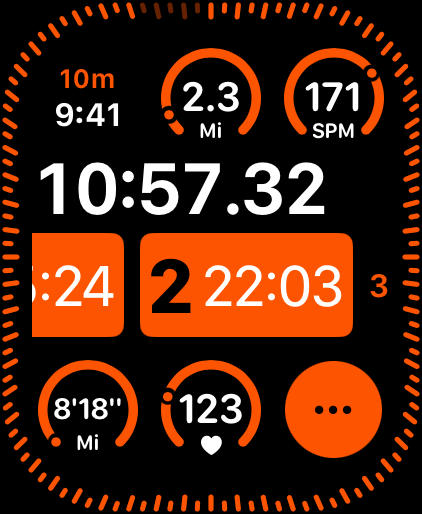
Running App for Watch - Fourie - Fourie 러닝 앱 대시보드가 Apple Watch에서 실시간 운동 지표(시간, 거리, 케이던스, 심박수 포함)를 표시합니다.
Fourie 러닝 앱 대시보드가 Apple Watch에서 실시간 운동 지표(시간, 거리, 케이던스, 심박수 포함)를 표시합니다.

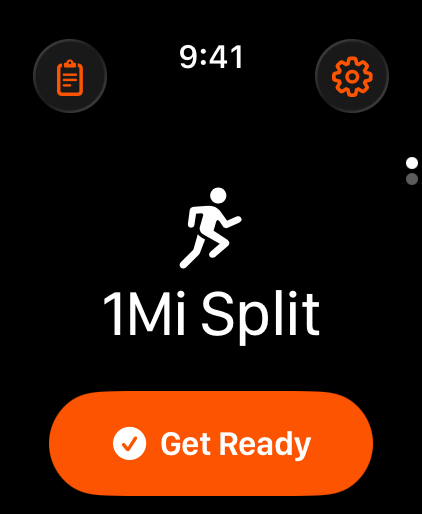
Running App for Watch - Fourie - Fourie 앱의 Apple Watch 화면에 1마일 분할 모드 시작 화면이 표시됩니다.
Fourie 앱의 Apple Watch 화면에 1마일 분할 모드 시작 화면이 표시됩니다.

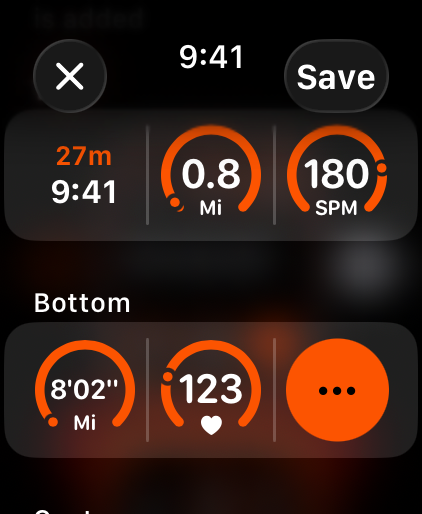
Running App for Watch - Fourie - Apple Watch에서 심박수와 속도를 보여주는 맞춤 설정 가능한 러닝 지표 화면
Apple Watch에서 심박수와 속도를 보여주는 맞춤 설정 가능한 러닝 지표 화면

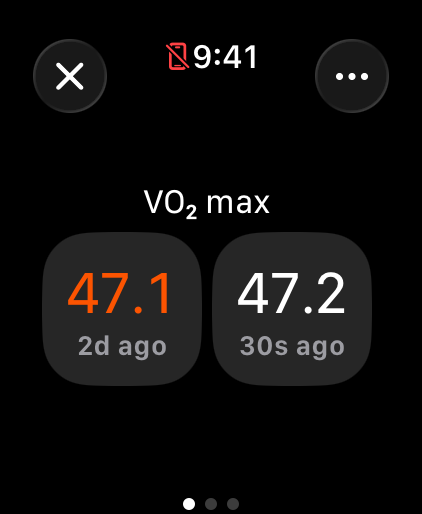
Running App for Watch - Fourie - Fourie 러닝 앱이 Apple Watch에서 VO2 max 데이터를 표시합니다.
Fourie 러닝 앱이 Apple Watch에서 VO2 max 데이터를 표시합니다.

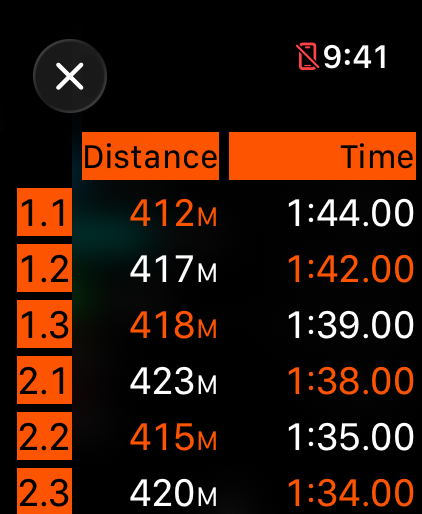
Running App for Watch - Fourie - Fourie 러닝 앱의 랩 및 스플릿 분석으로 인터벌 트레이닝에 대한 거리 및 시간 지표를 보여줍니다.
Fourie 러닝 앱의 랩 및 스플릿 분석으로 인터벌 트레이닝에 대한 거리 및 시간 지표를 보여줍니다.

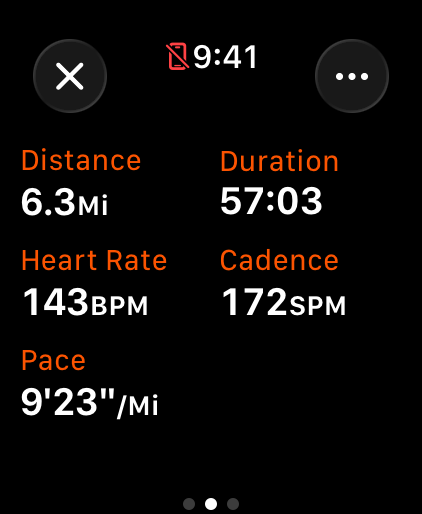
Running App for Watch - Fourie - Fourie 러닝 앱의 스마트워치 인터페이스로 거리, 시간, 심박수, 속도 지표를 표시합니다.
Fourie 러닝 앱의 스마트워치 인터페이스로 거리, 시간, 심박수, 속도 지표를 표시합니다.

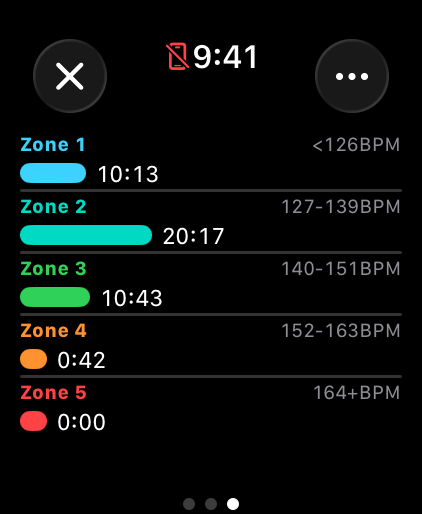
Running App for Watch - Fourie - 각 구간에 소비된 시간을 보여주는 Fourie 러닝 앱의 Apple Watch 심박수 구간 분석
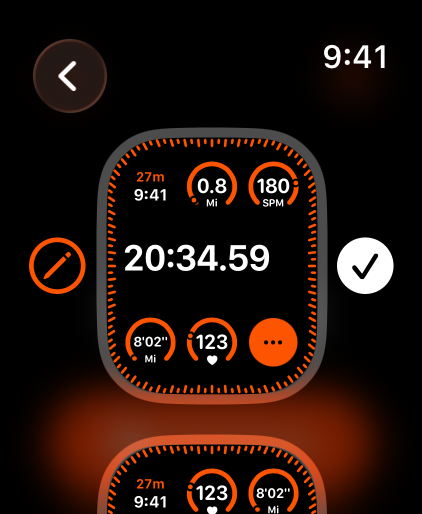
각 구간에 소비된 시간을 보여주는 Fourie 러닝 앱의 Apple Watch 심박수 구간 분석

Running App for Watch - Fourie - Fourie Apple Watch 앱의 맞춤 설정 가능한 러닝 지표 인터페이스
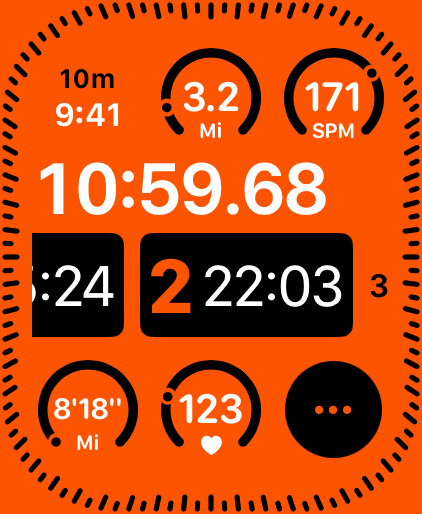
Fourie Apple Watch 앱의 맞춤 설정 가능한 러닝 지표 인터페이스

Running App for Watch - Fourie - Apple Watch의 러닝 앱 인터페이스로 시간, 거리, 심박수, 분당 걸음 수 지표를 표시합니다.

Apple Watch의 러닝 앱 인터페이스로 시간, 거리, 심박수, 분당 걸음 수 지표를 표시합니다.

설명

Fourie is a watch only running app built by a group of running enthusiasts. Elevate your running experience with Fourie, a powerful and intuitive app designed specifically for runners who demand precision and flexibility in tracking all your runs. Whether you're training for a marathon, hitting intervals on the track, or enjoying a casual jog, Fourie delivers accurate GPS tracking, detailed stats, and seamless performance in a clean, runner-focused design. Two Intuitive Modes for Every Run • Split Mode Automatically split your run by distance or time. Set up 1 km, 1 mile, or custom intervals, and Fourie handles the timing and announcements effortlessly. • Lap Mode Take full manual control. Simply start your run and tap to mark laps or sets whenever you're ready. No pre-setup required. Lower your wrist to activate Rest Mode and skip adding lap count when you start your lap, so that your laps will be numbered correctly both during and after your run. Personalized Features to Keep You Motivated • Custom Audio Cues Tailor audio cues for pace, distance, time, splits, and more. You can choose your preferred order and frequency to stay informed without glancing at your screen. • Customizable Views Arrange your run screen exactly how you like it. Customize buttons and metrics that matter most to you for quick actions and gain at-a-glance insights during your workout. • Wrist Flick Gesture njoy seamless one-handed control during your workouts with intuitive wrist flick gestures. Customize them to effortlessly start or end runs, mark laps etc. without even looking at the screen. • Wrist Down Gesture For interval training, simply lower your wrist for a customizable duration to enter Rest Mode. Starting new laps won't advance the overall lap count, letting you track actual intervals without pre-planning. • Action Button Take full advantage of your Apple Watch Ultra's Action Button. Customize it to quickly start or end runs or mark laps right from your wrist. Detailed Insights Right on Your Wrist • VO2 Max Optionally display your estimated VO2 max after every run to track improvements in cardiovascular fitness and endurance. • Lap-by-Lap Breakdown Dive into detailed metrics for each lap, including pace, distance, and time, for precise analysis of your splits. • Heart Rate Zone Analysis Visualize time spent in each heart rate zone to optimize training intensity and recovery.

Download

다운로드: App Store

이 페이지는 앱이나 개발자의 공식 페이지가 아니며, 정보 제공 및 논평을 목적으로 작성된 독립 편집 간행물입니다. 명시적으로 달리 언급되지 않는 한, 해당 앱이나 개발자는 MWM, Apple, Google Play, 앱 퍼블리셔 또는 앱 개발자와 제휴, 보증, 후원, 승인 또는 공식적으로 연결되어 있지 않으며, 이 페이지의 어떤 내용도 해당 앱이 MWM의 서비스를 사용하여 개발되었음을 의미하지 않습니다. 모든 상표, 로고, 스크린샷 및 기타 콘텐츠는 해당 소유자의 자산입니다.








