Say it Mail it Plus
Say it Mail it Plus
다운로드: App Store

이 페이지는 앱이나 개발자의 공식 페이지가 아니며, 정보 제공 및 논평을 목적으로 작성된 독립 편집 간행물입니다. 명시적으로 달리 언급되지 않는 한, 해당 앱이나 개발자는 MWM, Apple, Google Play, 앱 퍼블리셔 또는 앱 개발자와 제휴, 보증, 후원, 승인 또는 공식적으로 연결되어 있지 않으며, 이 페이지의 어떤 내용도 해당 앱이 MWM의 서비스를 사용하여 개발되었음을 의미하지 않습니다. 모든 상표, 로고, 스크린샷 및 기타 콘텐츠는 해당 소유자의 자산입니다.


로고: Say it Mail it Plus
다운로드: App Store

Say it Mail it Plus

타자 치는 것을 멈추고 말하기를 시작하세요. 아이디어, 사진, GPS 위치를 핸즈프리로 캡처한 다음 받은 편지함으로 자동 전송하세요. 이동 중에 생산성을 유지해야 하는 바쁜 전문가에게 완벽합니다.

주요 수치

다운로드

26K+

사용자 평점

1.0/5

총 평가 수

0

개발사

Carnation Software

카테고리

Business

지원 언어

1

최신 버전

1.0.4

크기

2.8 MB

출시일

2021년 10월 16일
기능

생각하는 속도로 아이디어를 포착하세요

Say it & Mail it Plus는 키보드를 전혀 만지지 않고 음성 메모를 실행 항목으로 전환해야 하는 바쁜 전문가를 위한 궁극의 생산성 도구입니다.

마찰 없는 음성 캡처

휴대폰을 귀에 대고 있거나 빠르게 흔드는 것만으로 핸즈프리로 녹음하세요. 운전 중이나 현장에서 키보드를 더듬거릴 필요가 없습니다.

자동 받은 편지함 배달

'보내기' 버튼을 완전히 건너뛰세요. 메모는 보편적인 오디오 파일로 자동 이메일 전송되어 작업이 받은 편지함에서 기다리고 있음을 보장합니다.

다음 스크린샷과 설명은 앱의 공식 스토어 목록에서 직접 가져온 것이며 앱 개발자의 자산입니다.

앱 스토어

스크린샷
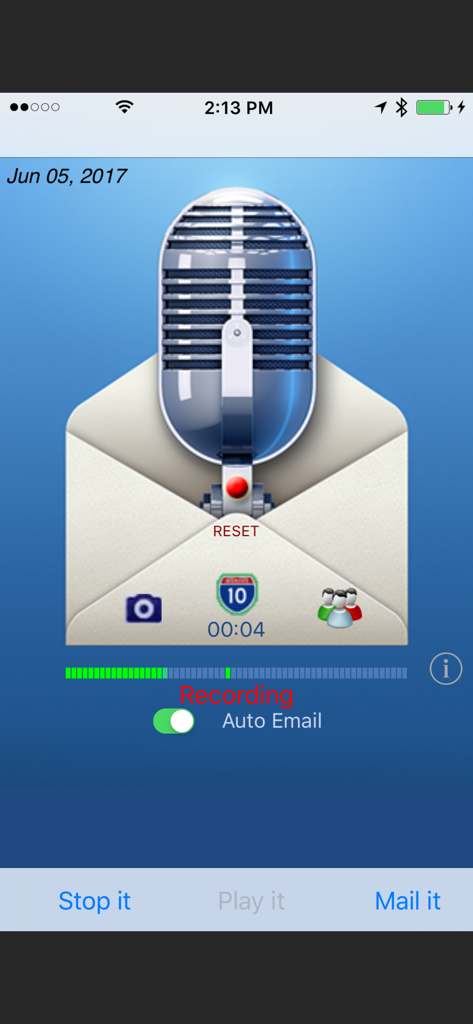
Say it Mail it Plus - Say it Mail it Plus 앱 인터페이스, 자동 이메일 토글과 함께 음성 메모 녹음 표시
Say it Mail it Plus 앱 인터페이스, 자동 이메일 토글과 함께 음성 메모 녹음 표시

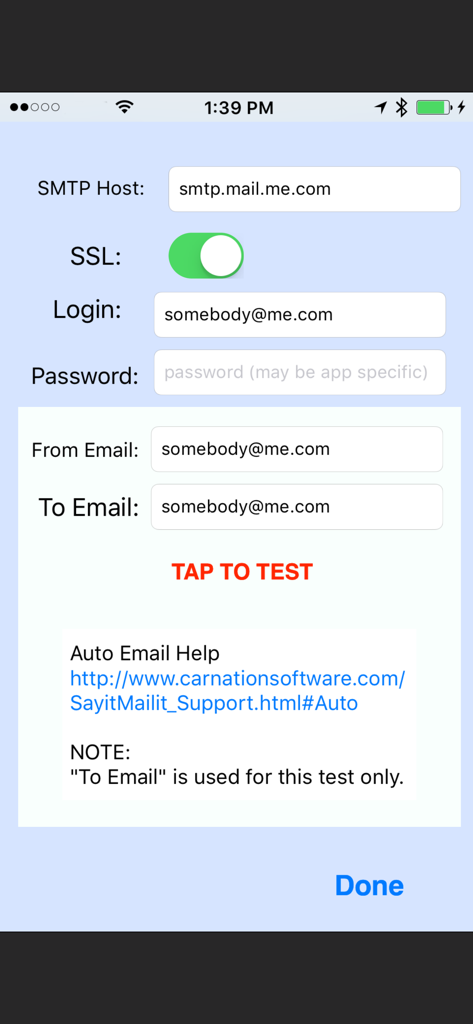
Say it Mail it Plus - 앱의 SMTP 구성 화면, 이메일 호스트 로그인 및 서버 테스트 필드 표시

앱의 SMTP 구성 화면, 이메일 호스트 로그인 및 서버 테스트 필드 표시

설명

Don't type it! Just Say it & Mail it. The fastest way to email a voice memo to yourself or to someone else and optionally include a photo, movie and map location. You can optionally turn on Auto Email. (Then you can Say it and Mail it with no need to tap the Send button) No In-App purchases. "Say it & Mail it" has been designed with simplicity and speed in mind. It remembers your name and an email address, which makes it very fast and easy to send yourself an email memo. Four methods of recording to fit your style: * Method 1: Tap 'Say it' then tap 'Mail it' * Method 2: Hold the iPhone to your ear and speak. When you move the iPhone away, recording stops and the email window opens * Method 3: Shake it to start recording and shake it to stop * Method 4: Tap on the microphone to start recording and tap it again to stop BUT WAIT, THERE'S MORE :-) EMAIL TO GROUPS Uses the groups you already have set up in your Contacts INCLUDE A PICTURE OR MOVIE IN YOUR EMAIL Take a photo or movie or select from the album. Pictures are full resolution compressed jpg format and the picture size can be adjusted. INCLUDE YOUR MAP LOCATION IN YOUR EMAIL When someone receives your email with an iPhone, they will be able to click on the link to launch the map application, see your location and get directions. When someone receives your email with a Mac or PC, they will be able to click on the link to launch their browser to see your location and get directions. So, what else can you do with 'Say it & Mail it'? Lots of things! •Recommend a good restaurant, including location map and photo •Email a reminder to yourself, a friend or preset groups •Document when, why and where you took a great photo •Update your blog via email •Track a real estate tour with info about each home (agent or buyer) •Send a customer the location and details of a house for sale •Record scientific notes with map location and photo of findings •Add content to your podcast •Communicate with elderly relatives who have difficulty typing •Send product information or newsflashes to clients •Email great vacation photos, footage, maps and commentary •Let people know where you are when you need help •Email your messages in any language (no QWERTY keyboard limits) •Document where you park your car so you can easily find it again •And a whole lot more! Emailed voice memos are compatible with Mac, PC and any other computer O/S (uses compressed wave format). No file maintenance on your iPhone/iPod Touch, since audio files are not stored there. NO ADVERTISING in your emails. Just a 'Say it Mail it' signature, which you can optionally remove in the 'Info' setup. Send yourself reminders when you are away from your computer. No typing required. Your email address and subject are autofilled. If you are using an iPhone, your message is sent off immediately, thanks to cell towers. iPod Touch devices store the email and send as soon as they are able to make a Wi-Fi connection. Great way to send anyone a detailed email without using the keyboard. Send an MMS Instant Message So many uses, we can't imagine them all. You will think of many more NOTES: iPod Touch requires headphones with microphone and a Wi-Fi connection. The iPhone has a microphone built-in. Camera may only be available on iPhone. Not all devices can take movies.

Download

다운로드: App Store

이 페이지는 앱이나 개발자의 공식 페이지가 아니며, 정보 제공 및 논평을 목적으로 작성된 독립 편집 간행물입니다. 명시적으로 달리 언급되지 않는 한, 해당 앱이나 개발자는 MWM, Apple, Google Play, 앱 퍼블리셔 또는 앱 개발자와 제휴, 보증, 후원, 승인 또는 공식적으로 연결되어 있지 않으며, 이 페이지의 어떤 내용도 해당 앱이 MWM의 서비스를 사용하여 개발되었음을 의미하지 않습니다. 모든 상표, 로고, 스크린샷 및 기타 콘텐츠는 해당 소유자의 자산입니다.








