
이 페이지는 앱이나 개발자의 공식 페이지가 아니며, 정보 제공 및 논평을 목적으로 작성된 독립 편집 간행물입니다. 명시적으로 달리 언급되지 않는 한, 해당 앱이나 개발자는 MWM, Apple, Google Play, 앱 퍼블리셔 또는 앱 개발자와 제휴, 보증, 후원, 승인 또는 공식적으로 연결되어 있지 않으며, 이 페이지의 어떤 내용도 해당 앱이 MWM의 서비스를 사용하여 개발되었음을 의미하지 않습니다. 모든 상표, 로고, 스크린샷 및 기타 콘텐츠는 해당 소유자의 자산입니다.


Screen Recorder - Record.TV
이 앱은 사용자가 디지털 왕국을 완전히 장악하게 합니다. 화면을 녹화하고, 자신을 투영하며, 손쉽게 세상을 지시하십시오.
다운로드
1M+사용자 평점
총 평가 수
4.1K개발사
카테고리
Photo & Video지원 언어
37최신 버전
3.19크기
150.8 MB출시일
2018년 7월 31일모바일 콘텐츠 제작자를 위한 주요 기능 평가
'Screen Recorder - Record.TV' 앱 분석
비디오 반응 및 오디오 해설 추가
이 도구는 녹화물에 사용자의 얼굴과 음성 반응을 추가하여 게임 세션, 비디오 튜토리얼 또는 데모에 개성을 부여할 수 있는 기능을 제공합니다.
전체 화면 녹화
이 앱은 iOS 11 글로벌 화면 녹화 API를 활용하여 사용자가 기기의 전체 화면을 고품질로 녹화할 수 있게 해줍니다.
다중 내보내기 및 공유
이 앱은 다른 앱, 이메일, AirDrop, WiFi 또는 컴퓨터로의 내보내기를 포함한 다양한 공유 옵션을 제공하여 사용자가 녹화된 콘텐츠를 광범위하게 배포할 수 있게 해줍니다.
인앱 비디오 편집
이 앱은 사용자가 녹화된 비디오를 자르기, 회전 및 필터 적용을 통해 손쉽게 편집할 수 있도록 지원하여 후반 작업의 효율성을 높여줍니다.
자주 묻는 질문
에 대해 알아야 할 모든 것 Screen Recorder - Record.TV
Can I record my screen with Screen Recorder - Record.TV (Recordora)?
Yes, Screen Recorder - Record.TV (Recordora) records full-screen videos using iOS 11 global screen recording APIs. A 2-step guide is available upon app launch.
Does Screen Recorder - Record.TV support video reactions or facecam recording?
Yes, Screen Recorder - Record.TV (Recordora) supports adding video reactions with audio commentary, often called facecam. This feature is ideal for gaming or app demonstrations.
What video editing features does Screen Recorder - Record.TV offer?
Screen Recorder - Record.TV (Recordora) offers video trimming, rotation, and filters. Users can also add touch screen gestures, stickers, and text animations to their recordings.
How can I share or export recordings from Screen Recorder - Record.TV (Recordora)?
Screen Recorder - Record.TV (Recordora) allows sharing and exporting to other apps, email, or AirDrop. You can also export recordings to your computer via WiFi.
How much does Screen Recorder - Record.TV Premium cost?
Screen Recorder - Record.TV (Recordora) Premium offers a 3-day free trial followed by $2.99 per week or $9.99 per month. Subscriptions provide unlimited access to features.
Does Screen Recorder - Record.TV Premium subscription auto-renew?
Yes, the Screen Recorder - Record.TV (Recordora) Premium subscription automatically renews. Users must turn off auto-renewal at least 24 hours before the current period ends.
Does Screen Recorder - Record.TV include chroma key green screen effects?
Yes, Screen Recorder - Record.TV (Recordora) includes green screen effects with chroma key functionality. This feature is available within the video editing interface.
Where can I find the Terms of Use and Privacy Policy for Screen Recorder - Record.TV?
The Terms of Use for Screen Recorder - Record.TV (Recordora) are at https://tos.vidanimate.co. The Privacy Policy is available at https://privacy.vidanimate.co.
다음 스크린샷과 설명은 앱의 공식 스토어 목록에서 직접 가져온 것이며 앱 개발자의 자산입니다.
앱 스토어
스크린샷

이 앱은 iOS 글로벌 화면 녹화 API를 활용하여 사용자가 전체 화면 녹화를 시작할 수 있게 하며, 마이크 활성화/비활성화 옵션(X)과 녹화 전 안내 메시지(Y)를 명확하게 보여줍니다.
간편한 화면 녹화
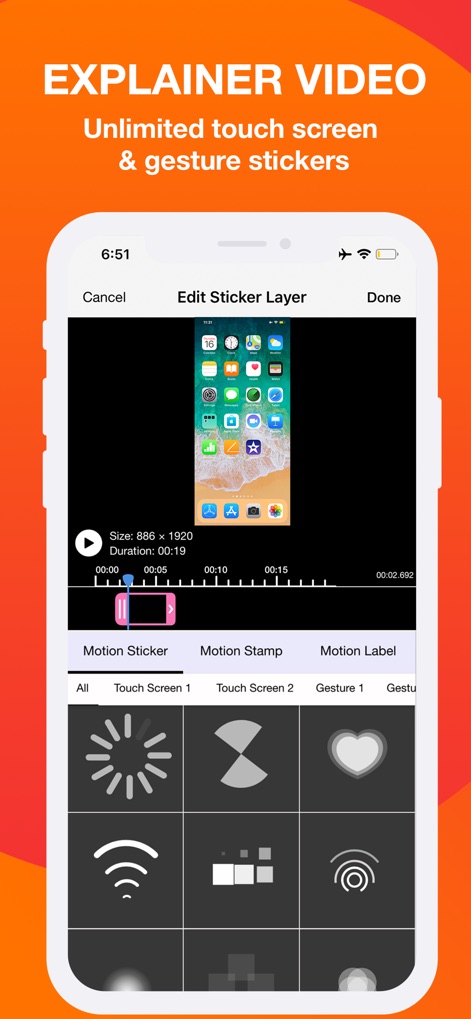
이 화면은 편집자가 터치 스크린 동작을 시각화하는 다양한 모션 스티커(X)를 추가할 수 있는 기능을 보여주며, 타임라인에서 스티커 위치를 정밀하게 조정(Y)할 수 있습니다.
설명 비디오 강화

사용자는 이 기능을 통해 영상에 캡션을 추가하고, 다양한 효과와 스타일(X)로 텍스트를 커스터마이징할 수 있으며, 인트로, 루프, 아웃트로(Y)와 같은 애니메이션 옵션으로 메시지를 더욱 효과적으로 전달할 수 있습니다.
애니메이션 텍스트 추가

이 편집 화면은 메인 화면 녹화 위에 페이스캠 비디오 반응(X)을 오버레이하여 개인적인 터치를 추가할 수 있게 하며, 여러 레이어를 관리하는 타임라인(Y)을 통해 콘텐츠를 정교하게 조합할 수 있습니다.
리액션 비디오 제작

이 도구는 크로마 키 기능(X)을 사용하여 배경을 제거하고, 메인 비디오 위에 인물을 자연스럽게 오버레이하여 전문적인 영상 제작을 가능하게 하며, 오버레이 영상의 크기와 위치를 자유롭게 조절(Y)할 수 있습니다.
크로마 키 효과
설명
Download
비슷한 앱
유사한 기능과 사용자 경험을 가진 앱

Medal - Game Clipping
Medal B.V.

Screen Recorder,Video Recorder
VIDEOSHOW PTE. LTD.

Screen Recorder
App of the Year LLC

Record it! :: Screen Recorder
DIGISET LLC

Screen Recorder Voice & Video
Arthur Eduardo Skaetta Alvarez Desenvolvimento de Software LTDA.

Screen Recorder ®
Poster App LLP

Super Screen Recorder: Full HD
Dream United, Ltd.

Screen Recorder: Go Record
Torqued Studios LLC

Screen Recorder-Video & Voice
Danila Ianushev
이 페이지는 앱이나 개발자의 공식 페이지가 아니며, 정보 제공 및 논평을 목적으로 작성된 독립 편집 간행물입니다. 명시적으로 달리 언급되지 않는 한, 해당 앱이나 개발자는 MWM, Apple, Google Play, 앱 퍼블리셔 또는 앱 개발자와 제휴, 보증, 후원, 승인 또는 공식적으로 연결되어 있지 않으며, 이 페이지의 어떤 내용도 해당 앱이 MWM의 서비스를 사용하여 개발되었음을 의미하지 않습니다. 모든 상표, 로고, 스크린샷 및 기타 콘텐츠는 해당 소유자의 자산입니다.